1. پیژندنه
This manual provides essential information for the proper setup, operation, and maintenance of your Lenovo ThinkPad X220 12.5-inch laptop. Please read these instructions carefully to ensure optimal performance and longevity of your device.
The ThinkPad X220 is a compact and powerful laptop featuring an Intel Core i5 processor, 4GB DDR3 RAM, a 128GB Solid State Drive, and a 12.5-inch display. It comes pre-installed with Windows 7 Home Premium and includes integrated Intel HD Graphics 3000, a webcam, and a fingerprint reader for enhanced security.

شکل ۳: زاویه لرونکی view of the Lenovo ThinkPad X220 laptop, showcasinد هغې کمپیکټ ډیزاین.
2. ترتیب کول
۲.۱ د بسته بندۍ خلاصول او لومړنۍ تفتیش
Carefully remove the laptop and all accessories from the packaging. Inspect the device for any signs of damage. If any components are missing or damaged, contact your vendor immediately.
2.2 د نښلولو بریښنا
- د AC اډاپټر په لپ ټاپ کې د بریښنا نښلونکي سره وصل کړئ.
- د AC اډاپټر په یوه ځمکني بریښنایی پلورنځي کې ولګوئ.
- بیټرۍ به په اتوماتيک ډول چارج شي. سپارښتنه کیږي چې د لومړني کارونې دمخه بیټرۍ په بشپړه توګه چارج کړئ.
۲.۳ د پیل پیل او عملیاتي سیسټم تنظیم کول
Press the power button to turn on the laptop. Follow the on-screen instructions to complete the Windows 7 Home Premium setup process. This typically involves setting up user accounts, language preferences, and network connections.
۲.۳ د بهرنیو وسایلو نښلول
The ThinkPad X220 offers various ports for connecting peripherals:
- د USB 2.0 بندرونه: Three ports are available for connecting USB devices such as mice, keyboards, or external storage.
- VGA پورټ: Connect an external monitor or projector using a VGA cable.
- ایترنیټ (LAN) پورټ: د تار لرونکي شبکې اتصال لپاره.
- آډیو جیک: د هیډفونونو یا بهرني سپیکرو د نښلولو لپاره.
- ExpressCard Slot: For compatible expansion cards.

Figure 2: Left side of the ThinkPad X220, showing the USB, Ethernet, and audio jack ports.
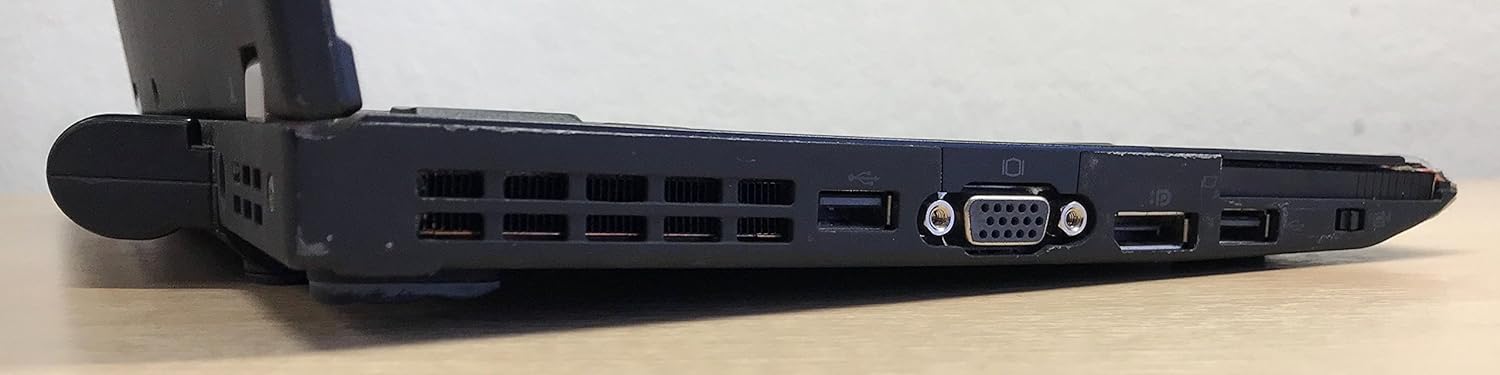
Figure 3: Right side of the ThinkPad X220, featuring the VGA port, additional USB ports, and the ExpressCard slot.
۳. ستاسو د لپ ټاپ چلول
۸ پاور آن/بند
- پاور آن: د کیبورډ ډیک په پورتنۍ ښیې خوا کې د بریښنا تڼۍ فشار ورکړئ.
- بندول: Click the Start button in Windows, then select 'Shut down'. Do not force power off by holding the power button unless the system is unresponsive.
۳.۱ کیبورډ او ان پټ وسایل
The ThinkPad X220 features a full-sized keyboard, a TrackPoint pointing device (red dot in the center of the keyboard), and a multi-touch touchpad.
- کیبورډ: د سیسټم کنټرولونو لپاره د فعالیت کیلي (Fn) سره معیاري QWERTY ترتیب.
- د تعقیب نقطه: Use the TrackPoint to move the cursor and the associated buttons below the spacebar for left, right, and middle-click functions.
- ټچ پیډ: Use gestures for navigation, scrolling, and clicking.
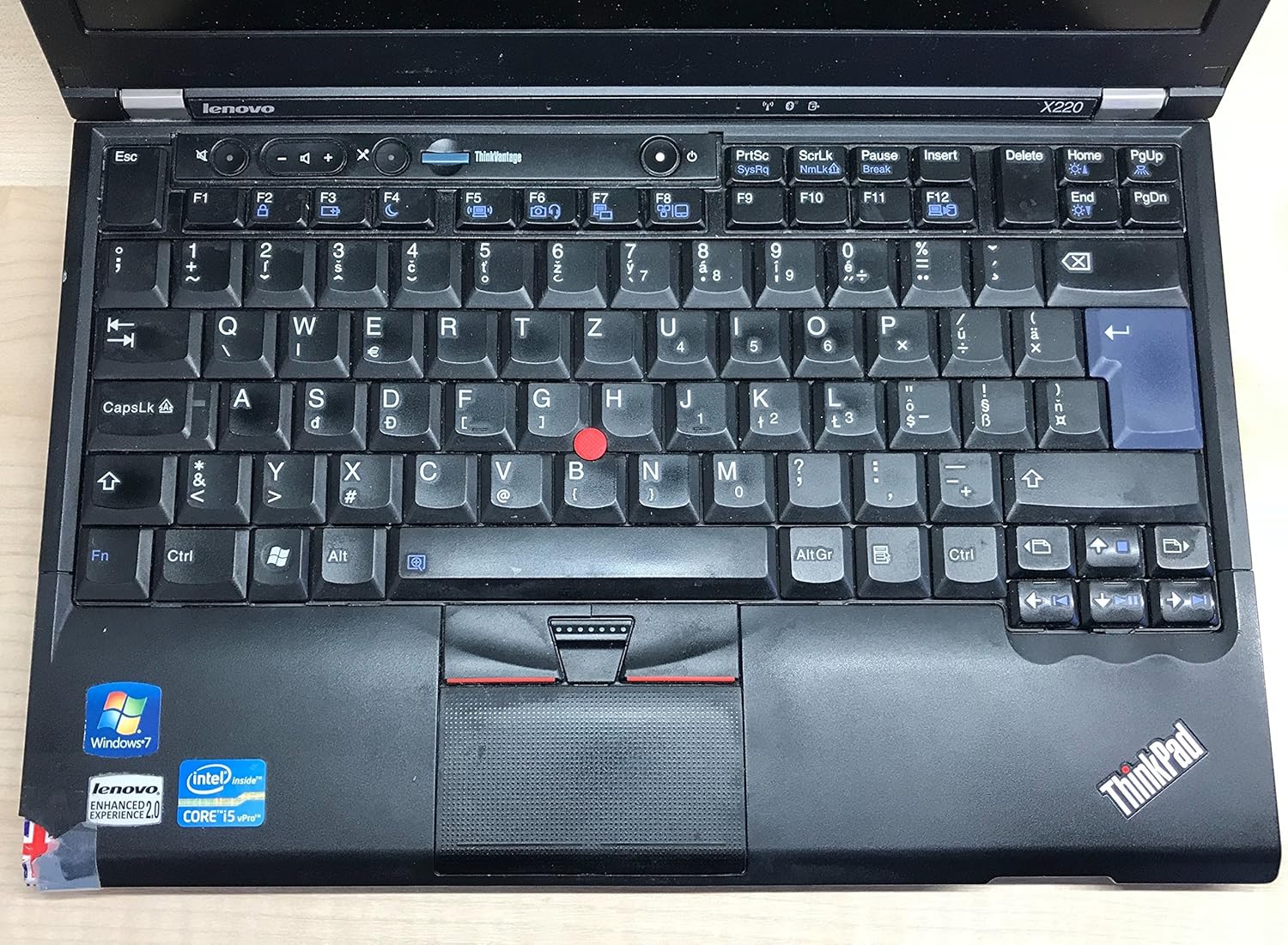
شکل 4: مفصل view of the ThinkPad X220 keyboard, TrackPoint, and touchpad.
3.3 بې سیم اتصال
- Wi-Fi (802.11bgn): To connect to a wireless network, click the network icon in the system tray and select your desired network. Enter the password if prompted.
- بلوتوث: Enable Bluetooth through the Windows settings to connect to compatible devices such as headphones or mice.
3.4 کارول Webcam and Fingerprint Reader
- Webکیم: مدغم شوی webcam can be used for video conferencing and recording. Access it through applications like Skype or the built-in camera software.
- د ګوتو نښان لوستونکی: For enhanced security, configure the fingerprint reader through Windows security settings to log in or authenticate.
4. ساتنه
۴.۱ د خپل لپ ټاپ پاکول
- سکرین: د نرم، لینټ پاک ټوکر څخه په روښانه توګه کار واخلئampپه اوبو یا د سکرین پاکونکي سره مینځل شوی. په مستقیم ډول په سکرین باندې مایع مه سپری کوئ.
- کیبورډ او سيasing: Use a soft cloth and a mild cleaning solution. For dust, use compressed air. Ensure the laptop is powered off before cleaning.
4.2 د بیټرۍ مدیریت
- To maximize battery life, avoid extreme temperatures and fully discharging the battery frequently.
- Calibrate the battery periodically by fully discharging and then fully recharging it.
- د بیټرۍ اوسط ژوند نږدې 2.45 ساعته دی، مګر دا د کارونې پراساس توپیر کولی شي.
4.3 د سافټویر تازه معلومات
په منظم ډول د لینوو ملاتړ څخه د عملیاتي سیسټم تازه معلومات (وینډوز تازه معلومات) او د ډرایور تازه معلومات وګورئ او نصب کړئ. webسایټ د سیسټم ثبات او امنیت ډاډمن کولو لپاره.
5. ستونزه حل کول
This section addresses common issues you might encounter with your ThinkPad X220.
- لیپ ټاپ نه چالانېږي: Ensure the AC adapter is securely connected and the power outlet is functional. If using battery power, ensure the battery is charged.
- د ښودنې ستونزې: If the screen is blank, try pressing Fn + F7 to cycle through display modes (internal, external, both). Ensure external monitors are properly connected.
- Input devices (keyboard/touchpad/TrackPoint) unresponsive: Restart the laptop. Check for driver updates if the issue persists. For the TrackPoint, ensure no debris is obstructing its movement.
- د انټرنیټ اړیکه نشته: Verify Wi-Fi is enabled and connected to a network. For wired connections, ensure the Ethernet cable is properly inserted. Check network adapter drivers.
- System slow or unresponsive: Close unnecessary applications. Check Task Manager for processes consuming high CPU or memory. Consider running a virus scan.
د نورو پیچلو مسلو لپاره، د لینوو ملاتړ ته مراجعه وکړئ webسایټ یا د تخنیکي ملاتړ سره اړیکه ونیسئ.
6. مشخصات
| فیچر | مشخصات |
|---|---|
| برانډ | Lenovo |
| لړۍ | ThinkPad |
| د ماډل شمیره | 428743U |
| د سکرین اندازه | ۷۸۷ انچه |
| د سکرین ریزولوشن | 1366 x 768 پکسله |
| پروسیسر | انټل کور i5-2430M (2.4 GHz) |
| RAM | ۳۲ جي بي ډي ډي آر ۵ (۸۴۰۰ ميګاهيرتزه) |
| هارډ ډرایو | ۲۵۶ جي بي ايس ايس ډي (سيريال اې ټي اې) |
| د ګرافیک کاپروسیسر | Intel HD ګرافیک 3000 |
| بې سیم ډول | 802.11bgn |
| د USB 2.0 بندرونه | 3 |
| عملیاتي سیسټم | د وینډوز 7 کور پریمیم |
| د اوسط بیټرۍ ژوند | 2.45 ساعته |
| د توکي وزن | 0.01 ounces (Note: This weight is likely incorrect and refers to packaging or a component, actual laptop weight is typically around 3 lbs) |
| د محصول ابعاد (LxWxH) | 15 x 13 x 5 انچه |
| رنګ | تور |
| ځانګړی ځانګړنه | د ګوتو نښې لوستونکی |
7. تضمین او ملاتړ
7.1 د تضمین معلومات
Your Lenovo ThinkPad X220 laptop is covered by a limited warranty. The specific terms and duration of the warranty may vary based on your region and point of purchase. Please refer to the warranty documentation included with your product or visit the official Lenovo support webد تفصيلي معلوماتو لپاره سایټ.
7.2 تخنیکي ملاتړ
د تخنیکي مرستې، د ډرایور ډاونلوډونو، یا نورو ستونزو حل کولو لپاره، مهرباني وکړئ د لینوو رسمي ملاتړ ته مراجعه وکړئ. website. You can typically find support resources by searching for your specific model (ThinkPad X220) on their site. Have your product's serial number ready when contacting support.
د لینوو ملاتړ Webسایټ: https://support.lenovo.com


