پیژندنه
This manual provides detailed instructions for the setup, operation, and maintenance of your Casio DQ-541D-8RDF Digital Alarm Clock. Please read these instructions carefully to ensure proper use and to maximize the lifespan of your device. Keep this manual for future reference.
محصول پای ته ورسیدview
The Casio DQ-541D-8RDF is a compact digital alarm clock designed for reliability and ease of use. It features a clear digital display, a beeper alarm, a snooze function, and a backlight for visibility in low light conditions.
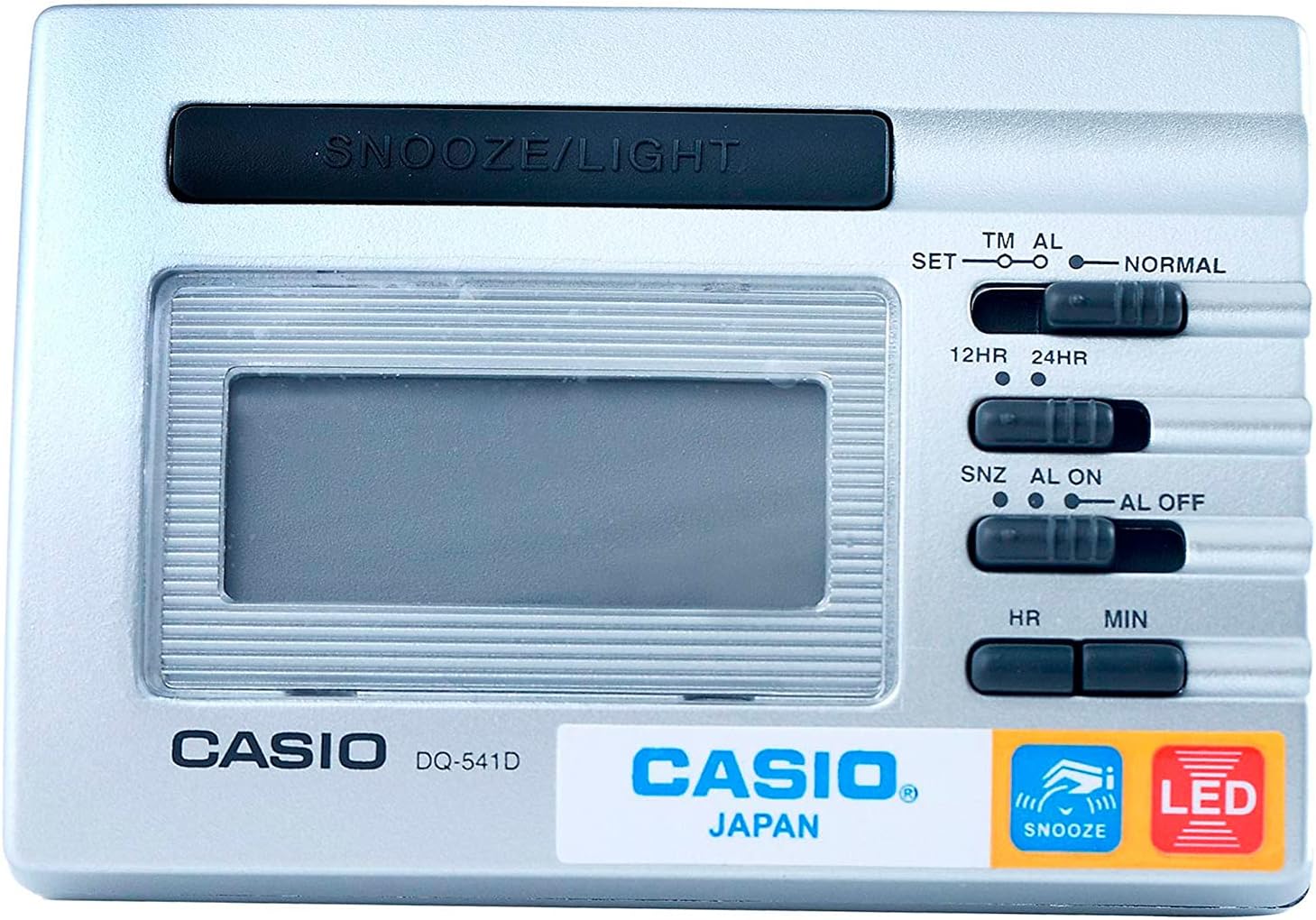
انځور 1: مخکی View. This image displays the front of the Casio DQ-541D-8RDF digital alarm clock, showing the digital display, the large SNOOZE/LIGHT button at the top, and the control switches on the right side for time setting, alarm setting, and 12/24-hour format selection. The Casio logo and model number are visible below the display.

انځور ۵.۱: اړخ View د کنټرولونو سره. This image provides a closer look at the right side of the alarm clock, highlighting the various slide switches and buttons used for configuration. These include switches for setting time (SET, TM AL, NORMAL), selecting 12-hour or 24-hour format (12HR, 24HR), and controlling the alarm (SNZ AL ON, AL ON, AL OFF). Hour (HR) and Minute (MIN) buttons are also visible for adjustments.

انځور ۲.۱: ښکته View. This image shows the bottom of the Casio DQ-541D-8RDF alarm clock, featuring the battery compartment cover. An arrow indicates the direction to slide the cover for battery installation or replacement. The "MADE IN CHINA" text is also visible.
چمتو کول
د بیټرۍ نصب کول
- Locate the battery compartment on the bottom of the clock (refer to Image 3).
- Slide the battery compartment cover in the direction indicated by the arrow to open it.
- Insert one (1) AAA battery, ensuring the positive (+) and negative (-) terminals are aligned correctly according to the diagram inside the compartment. A fresh AAA battery is included with your purchase.
- Replace the battery compartment cover by sliding it back until it clicks securely into place.
- The display should now show a default time or begin flashing, indicating the clock is powered on and ready for time setting.
عملیاتي لارښوونې
د اوسني وخت ټاکل
- Locate the slide switch labeled SET TM AL NORMAL on the right side of the clock (refer to Image 2).
- Slide this switch to the SET position. The hour digits on the display will begin to flash.
- فشار ورکړئ HR button repeatedly to adjust the hour. Hold the button down for faster adjustment.
- فشار ورکړئ MIN button repeatedly to adjust the minute. Hold the button down for faster adjustment.
- کله چې سم وخت وټاکل شي، نو سلائډ کړئ SET TM AL NORMAL بېرته ته وګرځوئ نورمال position to save the time.
د الارم وخت تنظیم کول
- Locate the slide switch labeled SET TM AL NORMAL.
- Slide this switch to the AL position. The alarm time will be displayed, and the hour digits will begin to flash.
- فشار ورکړئ HR د الارم ساعت تنظیمولو لپاره په مکرر ډول تڼۍ.
- فشار ورکړئ MIN د الارم دقیقې تنظیمولو لپاره په مکرر ډول تڼۍ.
- کله چې د مطلوب الارم وخت تنظیم شي، نو سلایډ کړئ SET TM AL NORMAL بېرته ته وګرځوئ نورمال position to save the alarm time.
Activating/Deactivating the Alarm and Snooze Function
- Locate the slide switch labeled SNZ AL ON AL OFF (refer to Image 2).
- To activate the alarm with snooze: Slide the switch to the SNZ AL ON position. An alarm icon will appear on the display, indicating the alarm is active and the snooze function is enabled.
- To activate the alarm without snooze: Slide the switch to the ټول فعال position. An alarm icon will appear on the display.
- To deactivate the alarm: Slide the switch to the AL بند position. The alarm icon will disappear from the display.
Using the Snooze and Light Function
- کله چې الارم غږ شي، لوی فشار ورکړئ ننوتل / روښانه کول button located at the top of the clock.
- Pressing this button will temporarily stop the alarm, and it will sound again after a few minutes (typically 5-8 minutes, depending on the model's pre-set interval).
- په تیاره شرایطو کې د نندارې روښانه کولو لپاره، فشار ورکړئ ننوتل / روښانه کول button. The LED backlight will activate for a few seconds.
12-Hour / 24-Hour Timekeeping
- Locate the slide switch labeled 12HR 24HR (refer to Image 2).
- سویچ ته سلایډ کړئ 12HR position for 12-hour format (with AM/PM indicator).
- سویچ ته سلایډ کړئ 24HR position for 24-hour format.
ساتنه
- پاکول: Wipe the clock with a soft, dry cloth. Do not use abrasive cleaners or chemical solvents, as these may damage the casing یا ښودنه.
- د بیټرۍ بدلول: When the display becomes dim or the alarm sound weakens, it is time to replace the battery. Follow the "Battery Installation" steps in the Setup section. Always use a fresh AAA battery.
- ذخیره کول: If you do not plan to use the clock for an extended period, remove the battery to prevent leakage and potential damage to the device.
- چاپیریال: ساعت د سختې تودوخې، مستقیم لمر وړانګو، لوړې رطوبت، یا قوي مقناطیسي ساحو سره د مخ کیدو څخه ډډه وکړئ.
د ستونزو حل کول
| ستونزه | د حل لاره |
|---|---|
| ښودنه خالي یا تیاره ده. | Check battery installation. Replace with a fresh AAA battery. |
| الارم نه غږېږي. | ډاډ ترلاسه کړئ SNZ AL ON AL OFF سویچ ټاکل شوی دی ټول فعال or SNZ AL ON. Verify the alarm time is set correctly. Replace battery if weak. |
| وخت غلط دی. | Re-set the current time following the "Setting the Current Time" instructions. Check the 12HR/24HR setting. |
| د سنوز فعالیت کار نه کوي. | ډاډ ترلاسه کړئ SNZ AL ON AL OFF سویچ ټاکل شوی دی SNZ AL ON. |
مشخصات
- د ماډل شمیره: DQ-541D-8RDF
- نښه: کاسیو
- ابعاد: ۱ x ۱ x ۱ سانتي متره (تقریبا)
- د توکي وزن: 140.61 ګرامه
- د بریښنا سرچینه: 1 x AAA بیټرۍ (شامل)
- ځانګړتیاوې: LED backlight, Beeper alarm, Snooze function, 12/24-hour timekeeping
تضمین او ملاتړ
د تضمین معلوماتو او پیرودونکو ملاتړ لپاره، مهرباني وکړئ د تضمین کارت ته مراجعه وکړئ چې ستاسو محصول سره شامل دی یا رسمي کاسیو ته مراجعه وکړئ. website. Casio provides reliable products, and their support resources can assist with any further inquiries or service needs.
You can often find additional support and product information on the official Casio webسایټ: www.casio.com


