پیژندنه
This manual provides detailed instructions for the proper use and maintenance of your Casio Digital Traveler's Alarm Clock, model PQ-11D-8RDF. Please read this manual thoroughly before using the clock to ensure optimal performance and longevity.
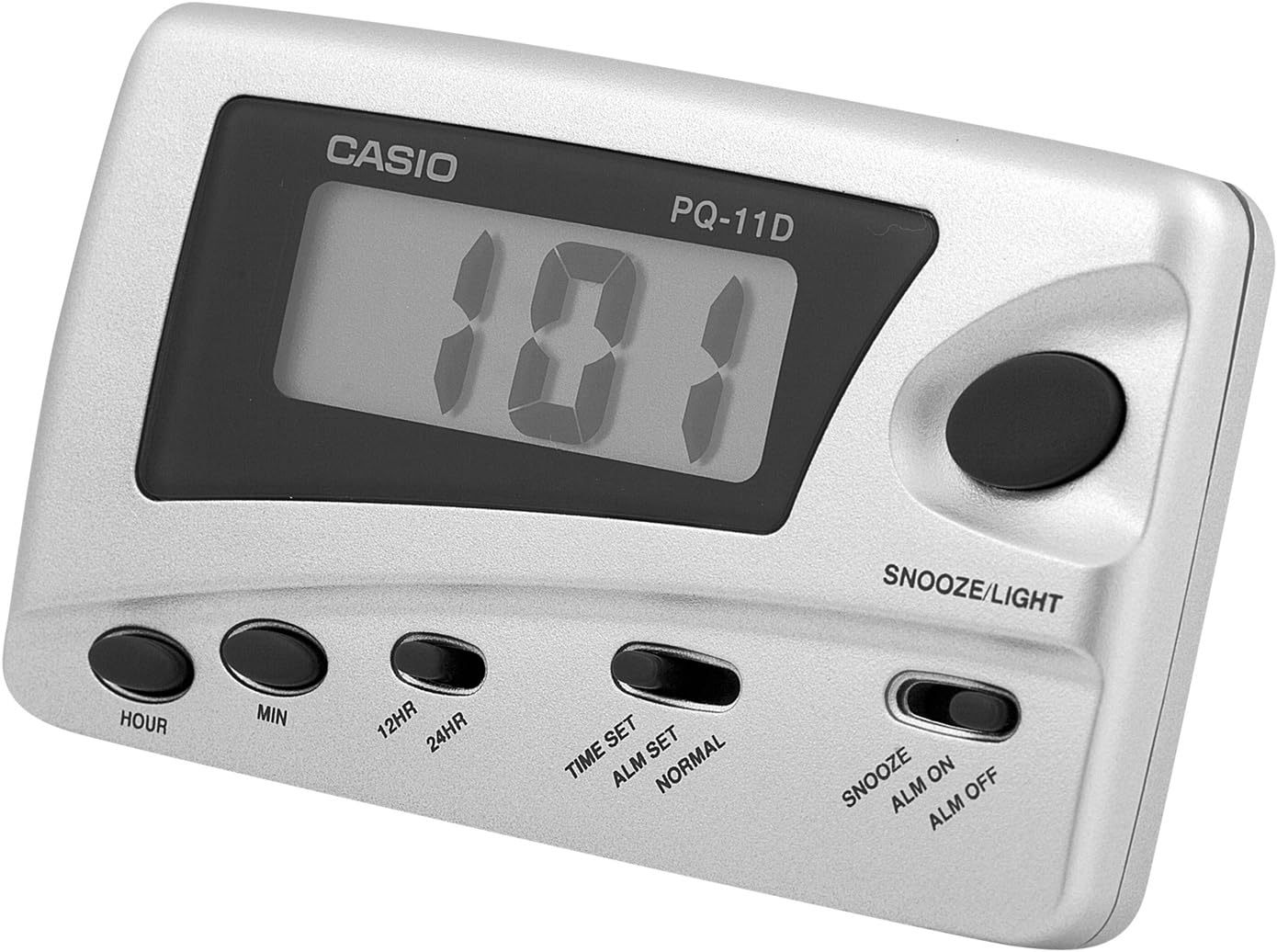
انځور: مخکی view of the Casio Digital Traveler's Alarm Clock. The clock features a digital display, a large snooze/light button on the top right, and smaller buttons for Hour, Min, 12HR/24HR, Time Set/Alarm Set/Normal switch, and Snooze/Alarm On/Alarm Off switch along the bottom.
چمتو کول
1. د بیټرۍ نصب کول
The clock operates on batteries. While a battery is typically included, you may need to remove a protective tab or replace it. The battery compartment is located on the back of the unit.
- د ساعت په شا کې د بیټرۍ د خونې پوښ خلاص کړئ.
- Insert the required batteries (e.g., AAA, specific button cell) ensuring correct polarity (+/-). Refer to the markings inside the compartment.
- د بیټرۍ کمپارټ پوښ په خوندي ډول وتړئ.

انځور: شاته view of the Casio Digital Traveler's Alarm Clock. The image shows the battery compartment cover on the right side and a foldable kickstand in the center, allowing the clock to stand upright.
۳. د لومړني وخت تنظیم
- موندل TIME SET / ALM SET / NORMAL slide switch on the front of the clock.
- سویچ ته سلایډ کړئ د وخت وخت position. The hour digits will begin to flash.
- فشار ورکړئ ساعت button repeatedly to set the correct hour. Pay attention to AM/PM indicators if present.
- فشار ورکړئ MIN د سمې دقیقې د ټاکلو لپاره په مکرر ډول تڼۍ فشار ورکړئ.
- Once the time is set, slide the switch back to the نورمال موقعیت
۳. د ۱۲/۲۴ ساعتونو د بڼې انتخاب
To switch between 12-hour and 24-hour (military) time format:
- In نورمال time display mode, press the 12HR/24HR تڼۍ
- The display will toggle between the 12-hour format (with AM/PM indicator) and the 24-hour format.
عملیاتي لارښوونې
۱. د الارم وخت ټاکل
- موندل TIME SET / ALM SET / NORMAL سلایډ سویچ
- سویچ ته سلایډ کړئ ALM SET position. The alarm time will be displayed, and the hour digits will flash.
- فشار ورکړئ ساعت button repeatedly to set the desired alarm hour.
- فشار ورکړئ MIN د مطلوب الارم دقیقې تنظیم کولو لپاره په مکرر ډول تڼۍ.
- Once the alarm time is set, slide the switch back to the نورمال موقعیت
۳. د الارم فعالول/غیر فعالول
The alarm can be turned on or off using the dedicated switch.

انځور: تړل view of the control panel, highlighting the Snooze/Light button and the slide switch for Snooze, Alarm On, and Alarm Off functions. This switch controls the alarm's activation and the snooze feature.
- موندل SNOOZE / ALM ON / ALM OFF سلایډ سویچ
- د الارم فعالولو لپاره، سویچ ته سلائډ کړئ ټول فعال position. An alarm indicator (e.g., bell icon) will appear on the display.
- د الارم غیر فعالولو لپاره، سویچ ته سلائډ کړئ ALM بند position. The alarm indicator will disappear.
۴. د سنوز فعالیت
When the alarm sounds, you can temporarily stop it using the snooze function.
- When the alarm is sounding, press the large ننوتل / روښانه کول تڼۍ
- The alarm will stop and sound again after approximately 5 minutes.
- To fully stop the alarm, slide the SNOOZE / ALM ON / ALM OFF ته واړوئ ALM بند موقعیت
4. د LED Backlight
The clock features an LED backlight for viewپه ټیټ رڼا شرایطو کې د نندارې ملاتړ کول.
- لوی فشار ورکړئ ننوتل / روښانه کول د نندارې روښانه کولو لپاره تڼۍ.
- The backlight will remain on for a few seconds and then automatically turn off.
ساتنه
1. د بیټرۍ بدلول
When the display becomes dim or the alarm sound weakens, it is time to replace the batteries. Follow the battery installation steps in the Setup section.
- Always use the specified battery type.
- زاړه او نوي بیټرۍ، یا د بیټرۍ مختلف ډولونه مه ګډوئ.
- که چیرې ساعت د اوږدې مودې لپاره ونه کارول شي ترڅو د لیکیدو مخه ونیسي، بیټرۍ لرې کړئ.
- د ځایی مقرراتو سره سم په مسؤلیت سره کارول شوي بیټرۍ تصفیه کړئ.
2. پاکول
To clean the clock, wipe it with a soft, dry cloth. Do not use abrasive cleaners, solvents, or chemical sprays, as these can damage the casing یا ښودنه.
3. ذخیره کول
Store the clock in a cool, dry place away from direct sunlight and extreme temperatures when not in use.
د ستونزو حل کول
| ستونزه | احتمالي لامل | د حل لاره |
|---|---|---|
| ښودنه تیاره یا خالي ده. | ټیټ یا مړه بیټرۍ. | بیټرۍ په نویو سره بدل کړئ. سمه قطبي والی ډاډمن کړئ. |
| الارم نه غږېږي. | Alarm is not activated (ALM OFF). د الارم وخت په غلط ډول ټاکل شوی دی. | سلایډ کړئ SNOOZE / ALM ON / ALM OFF ته واړوئ ټول فعال. ډاډ ترلاسه کړئ چې د الارم وخت په سمه توګه تنظیم شوی دی. |
| Display flickers or buttons are unresponsive during setting. | Slide switch (TIME SET/ALM SET/NORMAL) not fully engaged. Internal connection issue. | Ensure the slide switch is firmly in the desired position. Try removing and reinserting batteries. If problem persists, contact support. |
| Snooze function does not work. | Alarm is not active or switch is in ALM OFF position. | Ensure the alarm is set and active (ALM ON). Press the SNOOZE/LIGHT button only when the alarm is sounding. |
مشخصات
- نښه: کاسیو
- د ماډل شمیره: PQ-11D-8RDF
- د محصول ابعاد: 2.17 x 0.59 x 3.54 انچه
- د توکي وزن: 1.94 اونس
- ځانګړتیاوې: LED Back Light, 12/24 Hour Format, Snooze Function (Beep Sound)
- د بریښنا سرچینه: Battery (type not specified in input, but implied by "BATTERY INCLUDED")
تضمین او ملاتړ
د تضمین معلوماتو یا تخنیکي ملاتړ لپاره، مهرباني وکړئ د تضمین کارت ته مراجعه وکړئ چې ستاسو محصول سره شامل دی یا رسمي کاسیو ته مراجعه وکړئ. website. You may also contact Casio customer service directly for assistance with product inquiries or troubleshooting beyond this manual.
د کاسیو رسمي Webسایټ: www.casio.com


