1. پیژندنه
This manual provides comprehensive instructions for the setup, operation, maintenance, and troubleshooting of your DNP DS-RX1HS Dye Sublimation Photo Printer. The DS-RX1HS is designed for high-volume photo printing, offering enhanced efficiency and print speed for various applications, including photo booths and event photography. It supports multiple print sizes and features USB iSerial connectivity for seamless integration with Mac and PC systems.

Figure 1: DNP DS-RX1HS Photo Printer, angled front view. This image shows the compact design of the printer with its front media tray and the DNP logo.
2. ترتیب کول
Follow these steps to set up your DNP DS-RX1HS printer.
2.1 پیک کول
- پرنټر په احتیاط سره له بسته بندۍ څخه لرې کړئ.
- Verify that all included components are present: Printer CD, Drivers for Windows OS7 and 8.1, Printhead Cushion, Power Cord. (Print media is not included and must be purchased separately).
- Remove any protective tapes or packing materials from the printer.
2.2 د پرنټر سره نښلول
The DS-RX1HS connects to your computer via a USB 2.0 Type B port.
- Locate the USB 2.0 Type B port on the rear of the printer.
- Connect one end of a USB 2.0 cable (not included) to the printer and the other end to an available USB port on your computer.
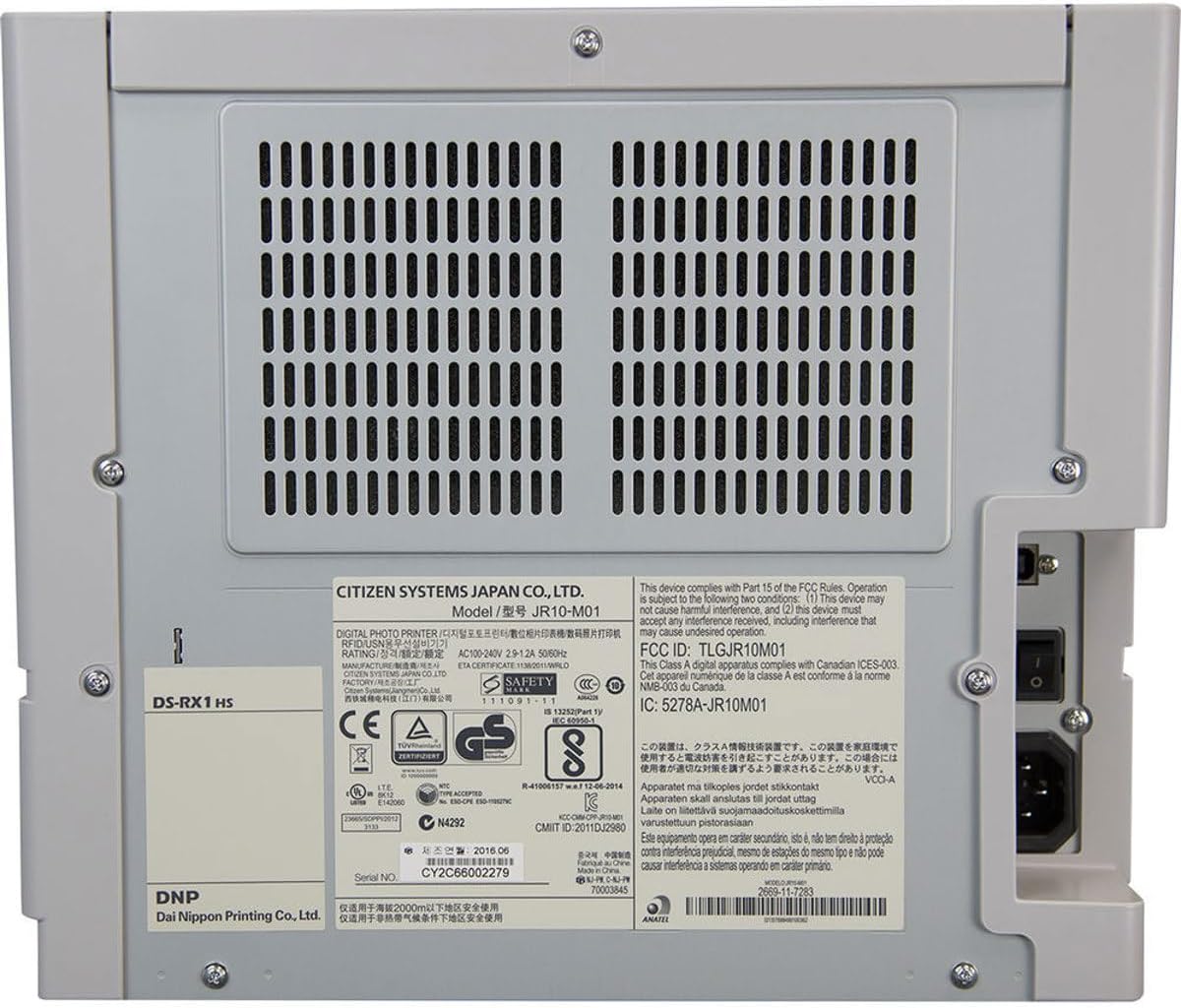
شکل 2: شاته view of the DNP DS-RX1HS Photo Printer. This image highlights the power input and USB connectivity port on the back panel.
2.3 د ډرایور نصب کول
Install the necessary drivers before operating the printer.
- د وینډوز لپاره: Insert the included Printer CD and follow the on-screen instructions to install drivers for Windows OS7 and 8.1. Drivers for newer Windows versions and a printer Status App for RX1HS are available for download from the DNP webسایټ
- د ماک لپاره: A Mac OS-X Print Center Driver is available for download from the DNP webسایټ
۴.۳ د چاپي رسنیو بارول
The DS-RX1HS uses dye-sublimation media, consisting of a ribbon and glossy photo paper.
- د پرنټر مخکینۍ پوښ خلاص کړئ.
- Carefully insert the paper roll into the designated slot.
- Load the ribbon cartridge according to the instructions provided with your media kit. Ensure it is securely seated.
- مخکینۍ پوښ وتړئ.

شکل 3: داخلي view of the DNP DS-RX1HS Photo Printer with media loaded. This image shows the paper roll and ribbon cartridge installed inside the printer.
2.5 د بریښنا نښلول
- Connect the power cord to the power input on the rear of the printer.
- د بریښنا د تار بله پای په مناسب بریښنایی پلورنځي کې ولګوئ.
- Press the power button, usually located on the front or side, to turn on the printer. The POWER indicator light should illuminate.
۳. د پرنټر چلول
Once the printer is set up and drivers are installed, you can begin printing.
3.1 Basic Printing Process
- ډاډ ترلاسه کړئ چې پرنټر فعال دی او ستاسو کمپیوټر سره وصل دی.
- Open the image you wish to print using your preferred photo editing or printing software.
- Select the DNP DS-RX1HS as your printer.
- In the print settings, choose your desired print size (e.g., 4x6", 6x8") and quality (300x300dpi or 300x600dpi).
- Initiate the print command. The printer will process and output the photo.
3.2 Print Speed and Sizes
- د چاپ سرعت: Approximately 12.4 seconds for a 4x6" print and 22 seconds for a 6x8" print.
- ملاتړ شوي اندازه: The printer supports 2x6", 4x6", and 6x8" print formats.
3.3 USB iSerial Functionality
The USB iSerial feature allows for simplified management when connecting multiple DS-RX1HS units to a single computer, enhancing productivity for large-scale events. Refer to the DNP website for specific software and setup instructions for this feature.
4. ساتنه
منظم ساتنه غوره فعالیت تضمینوي او ستاسو د چاپګر ژوند اوږدوي.
۳.۳ د رسنیو ځای پر ځای کول
The printer can produce up to 700 4x6" sheets per roll. Replace the ribbon and paper roll when the media runs out or when prompted by the printer status.
- د مخ پوښ خلاص کړئ.
- Remove the used paper roll and ribbon cartridge.
- Install new media as described in Section 2.4.
- مخکینۍ پوښ وتړئ.
۳.۲ د چاپ سر پاکول
A printhead cushion is included with the printer. Refer to the DNP official documentation for detailed instructions on printhead cleaning procedures to maintain print quality.
4.3 عمومي پاکول
- د پرنټر بهرنۍ برخه د نرم او وچ ټوکر سره پاک کړئ.
- د سختو کیمیاوي موادو یا خړوبولو پاکونکو کارولو څخه ډډه وکړئ.
- Ensure no dust or debris accumulates in the media loading area.
5. ستونزه حل کول
This section addresses common issues you might encounter with your DS-RX1HS printer.
5.1 د شاخص څراغونه
The front panel of the printer features several indicator lights to communicate its status.

شکل 4: مخکی view of the DNP DS-RX1HS Photo Printer. This image shows the indicator lights for Power, Ribbon, Paper, and Error on the left side of the front panel.
- ځواک: دا په ګوته کوي چې پرنټر فعال دی.
- RIBBON: Illuminates when the ribbon needs replacement or is incorrectly installed.
- پاه: Illuminates when the paper roll needs replacement or is incorrectly installed.
- تېروتنه: Indicates a general error. Refer to the printer's Status App or driver software for specific error codes.
5.2 عام مسایل او حلونه
| مسله | احتمالي لامل | د حل لاره |
|---|---|---|
| پرنټر نه چالانېږي. | د برېښنا تار نه دی وصل شوی، د برېښنا د رسولو ستونزه ده. | ډاډ ترلاسه کړئ چې د بریښنا تار په خوندي ډول د پرنټر او آوټ لیټ دواړو سره وصل دی. آوټ لیټ د بل وسیلې سره ازموینه وکړئ. |
| "RIBBON" light is on. | Ribbon is empty or incorrectly installed. | Replace the ribbon cartridge or re-install it correctly. |
| "PAPER" light is on. | Paper roll is empty or incorrectly installed. | Replace the paper roll or re-install it correctly. |
| Poor print quality (streaks, incorrect colors). | Dirty printhead, old media, incorrect driver settings. | Clean the printhead (refer to Section 4.2). Replace media. Verify print settings in your software. |
| چاپګر د کمپیوټر لخوا نه پیژندل کیږي. | Incorrect or missing drivers, loose USB connection. | Reinstall drivers (Section 2.3). Check USB cable connection. Try a different USB port or cable. |
For more detailed troubleshooting, consult the DNP Status App for Windows or the official DNP support webسایټ
6. مشخصات
Key technical specifications for the DNP DS-RX1HS Photo Printer:
| فیچر | تفصیل |
|---|---|
| د ماډل نوم | DS-RX1HS |
| د چاپ ټیکنالوژي | رنګ Sublimation |
| د چاپګر محصول | رنګ |
| د ارتباط ټیکنالوژي | USB 2.0 |
| د ملاتړ شوي میډیا اندازه | 2x6", 4x6", 6x8" |
| د چاپي رسنیو ډول | ځلیدونکی عکس کاغذ |
| د اعظمي داخل شیټ ظرفیت | 350 sheets (for 4x6" media) |
| Maximum Print Speed (4x6") | نږدې 12.4 ثانیې |
| Maximum Print Speed (6x8") | نږدې 22 ثانیې |
| قرارداد | 300x300dpi (high speed), 300x600dpi |
| د محصول ابعاد | ۱۶"د x ۲۶"وچ x ۴۷"ح (Note: The width '290"W' appears to be a data entry anomaly; actual printer width is significantly less.) |
| د توکي وزن | ۷.۹۶ پونډه (۳.۶۲ کیلوګرامه) |
| د حافظې د ذخیره کولو ظرفیت | 64 MB |
| شاملې برخې | Printer CD, Drivers for Windows OS7 and 8.1, Printhead Cushion, Power Cord (Print Media Not Included) |
7. تضمین او ملاتړ
For information regarding product warranty, technical support, and additional resources, please contact DNP directly or visit their official webسایټ
- جوړونکی: DNP
- رسمي Webسایټ: Refer to your product packaging or the DNP website for the most current support information and driver downloads.