پیژندنه
This manual provides detailed instructions for the safe and efficient operation of your Utilitech Mechanical Residential Plug-In Timer. Please read this manual thoroughly before use and retain it for future reference.
The Utilitech Mechanical Residential Plug-In Timer is designed to automate the on/off cycles of electrical devices, helping to conserve energy and enhance convenience. It features up to 48 on/off settings per day and includes 4 outlets for connecting multiple devices.
محصول پای ته ورسیدview
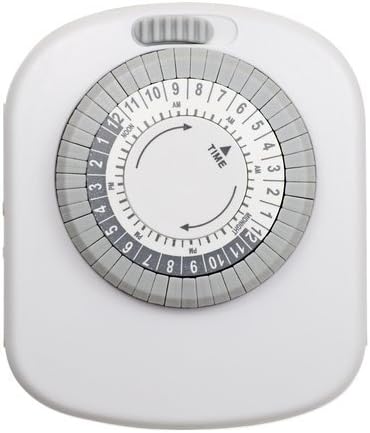
شکل 1: مخکی view of the Utilitech Mechanical Residential Plug-In Timer, showing the central dial with time markings and surrounding pins.
The timer features a circular dial with hour markings (AM/PM) and a series of push-down pins around its circumference. These pins control the on/off cycles. A manual override switch is typically located on the top or side of the unit.
کلیدي ځانګړتیاوې:
- Up to 48 on/off settings per 24-hour period.
- Non-removable pins for easy programming.
- Designed for energy saving.
- Equipped with 4 outlets for multiple device connections.
- Simple plug-in installation.
چمتو کول
ابتدايي ترتیب:
ټایمر خلاص کړئ: Carefully remove the timer from its packaging. Inspect for any damage.
نښلول: Plug the timer into a standard 120V AC wall outlet. Ensure the outlet is easily accessible.
Charge Battery (if applicable): Although this model does not require batteries for operation, some timers may have an internal battery for timekeeping during power outages. If so, allow it to charge for at least 30 minutes before programming.
اوسنی وخت ټاکل: Rotate the entire dial clockwise until the current time aligns with the "TIME" arrow indicator on the timer's face. The dial is marked with AM and PM hours (e.g., 12 PM for Noon, 12 AM for Midnight).
Figure 2: Detail of the timer dial, highlighting the "TIME" arrow and the 24-hour markings for setting the current time.
عملیاتي لارښوونې
د پروګرام کولو او بندولو وختونه:
The timer uses push-down pins around the dial to set the on/off intervals. Each pin represents a 30-minute segment.
د پنونو پیژندنه: Locate the small, grey pins around the outer edge of the dial. Each pin corresponds to a 30-minute interval.
Set "ON" Times: Push down the pins corresponding to the time periods you want the connected device to be ON. When a pin is pushed down, it activates the power during that 30-minute segment as the dial rotates.
Set "OFF" Times: Leave the pins in the "up" position for the time periods you want the connected device to be بند. When a pin is in the up position, it deactivates the power during that 30-minute segment.
شکل 3: مفصل view of the timer's outer ring with individual pins, illustrating how to push them down for "ON" periods.
د لاسي اوورایډ سویچ: The timer typically has a manual override switch (often a slider or button) located on the top or side. This switch allows you to bypass the programmed settings and keep the device either continuously ON or OFF. Ensure this switch is in the "Timer" or "Auto" position for programmed operation.
وسیله وصل کړئ: Plug the device you wish to control into one of the 4 outlets on the timer. Ensure the device's own power switch is set to the "ON" position.
Example Programming:
To turn a lamp on from 6:00 PM to 10:00 PM:
- Locate the 6 PM mark on the dial.
- Push down all pins from 6 PM to 10 PM.
- Ensure all other pins are in the "up" position.
- Set the current time on the dial.
- l پلګ کړئamp into the timer.
ساتنه
The Utilitech Mechanical Residential Plug-In Timer requires minimal maintenance.
پاکول: Disconnect the timer from the power outlet before cleaning. Wipe the exterior with a soft, dry cloth. Do not use liquid cleaners or abrasive materials.
ذخیره کول: If storing the timer for an extended period, ensure it is clean and dry. Store in a cool, dry place away from direct sunlight and extreme temperatures.
معاینه: Periodically inspect the timer and its cord for any signs of damage, such as frayed wires or cracked casing. If damage is found, discontinue use immediately and replace the unit.
د ستونزو حل کول
| ستونزه | احتمالي لامل | د حل لاره |
|---|---|---|
| Device does not turn ON/OFF as programmed. |
|
|
| د ټایمر ډایل نه ګرځي. |
|
|
| Timer makes a rattling or loud noise. |
|
|
مشخصات
| صفت | تفصیل |
|---|---|
| د ماډل شمیره | 358707 |
| برخه شمیره | TM20DHBL |
| برانډ | یوټیلیټیک |
| ډول | Mechanical Residential Plug-In Timer |
| د دکانونو شمیر | 4 |
| Daily Settings | Up to 48 on/off settings (30-minute intervals) |
| د نصب کولو ډول | پلګ ان ماونټ |
| رنګ | سپین |
| د توکي وزن | 6.4 اونس |
| د کڅوړې ابعاد | 6.7 x 4.1 x 2.1 انچه |
| بیټرۍ ته اړتیا ده | نه |
| UPC | 070686507131 |
د خوندیتوب معلومات
Please read and follow all safety instructions to prevent injury or damage.
یوازې د کور دننه کارول: This timer is designed for indoor use in dry locations only. Do not expose to water or moisture.
بریښنایی درجه بندي: Do not exceed the electrical rating of the timer. Overloading can cause overheating and fire.
ځمکني کول: Ensure the timer is plugged into a properly grounded outlet if applicable. This model is a 2-prong device.
ماشومان او څاروي: د ماشومانو او څارویو د لاسرسي څخه لرې وساتئ.
قطع کول: تل د پاکولو دمخه یا کله چې د اوږدې مودې لپاره نه کارول کیږي، د دیوال له ساکټ څخه ټایمر خلاص کړئ.
ترمیم: Do not attempt to open or repair the timer yourself. Refer all servicing to qualified personnel.
تضمین او ملاتړ
For warranty information or technical support, please refer to the product packaging or contact Utilitech customer service. Keep your purchase receipt for warranty claims.
Note: Specific warranty terms and contact information may vary. Please consult the documentation included with your product.


