پیژندنه
This manual provides detailed instructions for the operation and maintenance of your Casio DBC-611-1DF Men's Silver Tone 25 Memory Calculator Databank Watch. Please read this manual thoroughly to ensure proper use and to fully utilize all features of your watch.

مخکی view of the Casio DBC-611-1DF Databank Watch, displaying the digital time and calculator keypad.
چمتو کول
د وخت او نیټې ترتیب کول
- د وخت ساتلو حالت کې، فشار ورکړئ سمون button (top left) until the seconds start to flash. This indicates the setting mode.
- فشار ورکړئ موډ button (bottom left) to cycle through the settings: seconds, hour, minutes, year, month, day.
- Use the numeric keypad (calculator buttons) to input the correct values for each setting. For example, to set the hour, press the corresponding number on the keypad.
- د ۱۲ ساعته او ۲۴ ساعته بڼې ترمنځ د بدلولو لپاره، فشار ورکړئ PM button (bottom left of keypad) while the hour setting is flashing.
- کله چې ټول ترتیبات تنظیم شي، فشار ورکړئ سمون د تنظیم کولو حالت څخه وتلو لپاره بیا تڼۍ.
د بند تنظیم کول
The watch features an adjustable metal band. To adjust the length, locate the clasp and use a small flathead tool to lift the locking tab. Slide the clasp along the band to the desired position, then press the tab down firmly to secure it. Ensure the clasp is securely fastened before wearing.
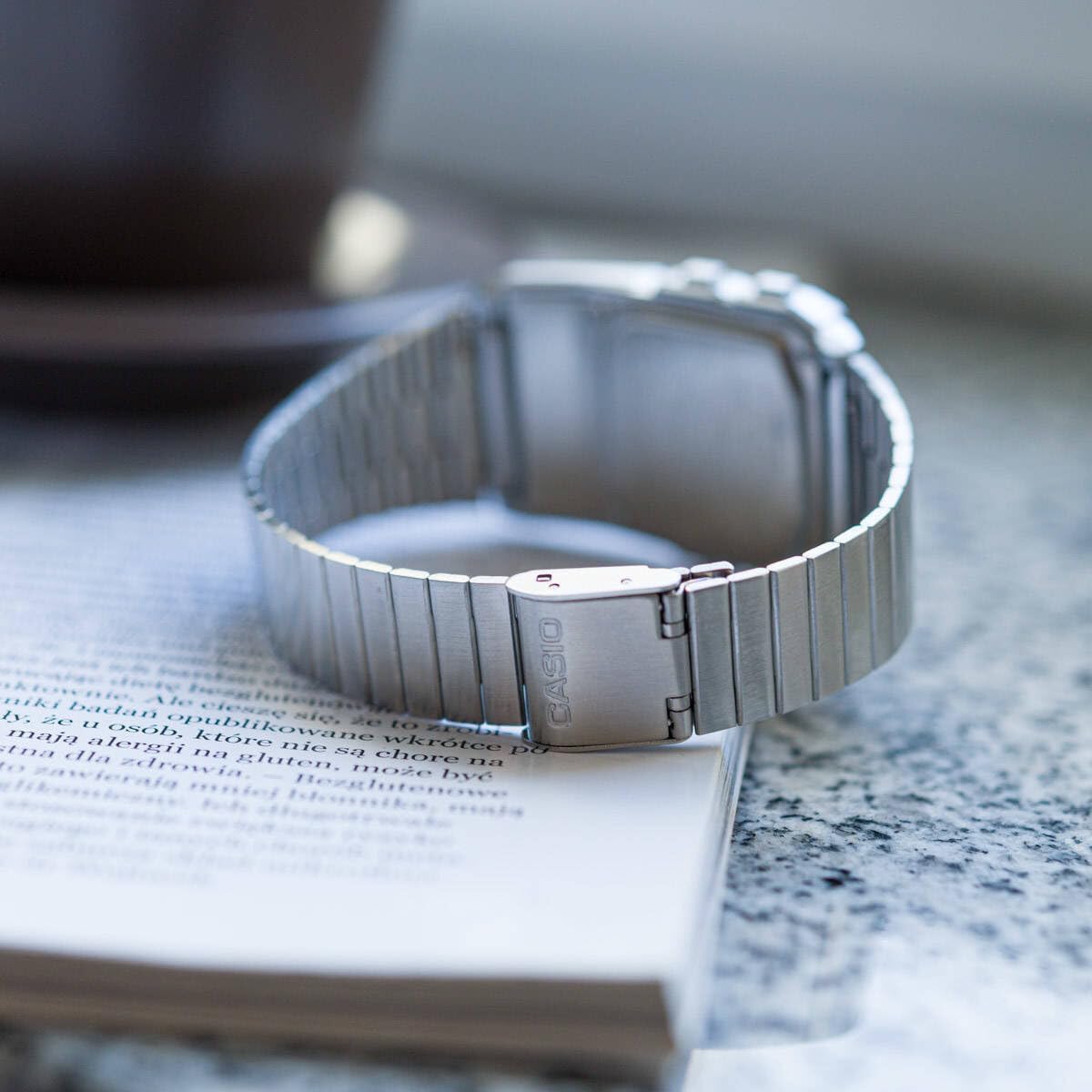
شاته view of the watch, showing the adjustable metal clasp for band sizing.
عملیاتي لارښوونې
د نیویګیشن حالت
فشار ورکړئ موډ تڼۍ (لاندې کیڼ اړخ ته) د مختلفو حالتونو له لارې د ګرځیدو لپاره:
- د وخت ساتلو حالت: د اونۍ اوسنی وخت، نیټه او ورځ ښیې.
- Telememo Mode: Stores up to 25 sets of name and telephone number data.
- Calculator Mode: Performs basic arithmetic calculations.
- د تمځای حالت: Measures elapsed time, split times, and 1st-2nd place times.
- د دوه ګوني وخت حالت: Displays the current time in a different time zone.
- د الارم حالت: Sets up to 5 daily alarms and an hourlد وخت سیګنال.
د کیلکولیټر په کارولو سره
In Calculator Mode, use the numeric keypad to input numbers and perform operations. The display supports 8 digits. Press the AC button (top right of keypad) to clear the current entry.
Telememo Function
To enter or recall data in Telememo Mode:
- Navigate to Telememo Mode.
- فشار ورکړئ سمون button to enter data input mode.
- Use the numeric keypad to enter numbers. Use the SPACE button for spaces.
- مطبوعاتي سمون د ننوتلو خوندي کول.
- د کارولو ټیلیفون/FWD او د وخت کتنه/وخت buttons to scroll through stored entries.
د سټاپ واچ فعالیت
په سټاپ واچ حالت کې:
- مطبوعاتي پیل / ودرول (bottom right of keypad) to start and stop the stopwatch.
- مطبوعاتي LAP/RESET (bottom left of keypad) to record lap times or reset the stopwatch when stopped.
الارم او Hourlد وخت سیګنال
د الارم حالت کې:
- د کارولو موډ button to select one of the 5 alarms or the hourlد وخت سیګنال.
- مطبوعاتي سمون to set the alarm time. Use the numeric keypad to input the hour and minutes.
- مطبوعاتي ALM چالان/بند (top left of keypad) to toggle the selected alarm on or off.
- مطبوعاتي SIG ON/OFF (middle right of keypad) to toggle the hourlد وخت سیګنال آن یا بند.
Auto LED Light
The watch features an Auto LED light. This function automatically illuminates the display when the watch is tilted towards your face in a dark environment. To activate or deactivate this feature, refer to the detailed instructions in the full module manual (Module No. 437, 438, 3208).

زاویه view of the Casio Databank Watch, highlighting the display and keypad.
ساتنه
عمومي پاملرنه
- ساعت په منظم ډول د نرم او وچ ټوکر سره پاک کړئ.
- ساعت د سختې تودوخې، د اوږدې مودې لپاره د مستقیم لمر وړانګو، یا قوي مقناطیسي ساحو سره د مخ کیدو څخه ډډه وکړئ.
- While the watch is water-resistant, avoid direct contact with water to prolong its lifespan, especially for the calculator buttons.
د بیټرۍ بدلول
The watch uses 1 CR123A battery. Battery life is approximately 5 years. When the display becomes dim or functions become erratic, it is time to replace the battery. Battery replacement should ideally be performed by a qualified technician to ensure water resistance is maintained.
د ستونزو حل کول
- ښودنه خالي یا تیاره ده: Check the battery. If recently replaced, ensure it is installed correctly.
- تڼۍ بې ځوابه دي: Ensure the watch is not in a locked mode (if applicable, refer to full manual). If the issue persists, a reset may be required (consult a technician).
- وخت ناسم دی: Re-set the time and date as per the "Setting the Time and Date" section.
مشخصات
| برانډ | کاسیو |
| د ماډل شمیره | DBC-611-1DF |
| د محصول ابعاد | 2.44 x 4.09 x 3.62 انچه |
| د توکي وزن | 1.69 اونس |
| د بیټرۍ ډول | ۱ CR123A (شامل دی) |
| ځانګړي ځانګړتیاوې | 25 pages of Telememo, 1/100-second stopwatch, Dual time, 5 alarms, Auto LED light |
| د اوبو مقاومت | Water Resistant (general daily use, not for swimming or diving) |
| نیټه لومړی شتون لري | د مارچ 22، 2012 |
د محصول رسمي ویډیو
د محصول رسمي ویډیو نندارهasing the features and design of the Casio Databank Watch.
تضمین او ملاتړ
د تضمین معلوماتو او پیرودونکو ملاتړ لپاره، مهرباني وکړئ د تضمین کارت ته مراجعه وکړئ چې ستاسو محصول سره شامل دی یا رسمي کاسیو ته مراجعه وکړئ. website. The module number for this watch is 437, 438, or 3208, which can be used to find specific support documents online.
For additional assistance, you may contact Casio customer service directly.