1. پیژندنه
This manual provides detailed instructions for the installation, operation, and maintenance of your Gewiss GW10701 Programmable Thermostat. This device is designed to control heating and air conditioning systems, allowing you to manage room temperature efficiently and comfortably. Please read this manual thoroughly before installation and use to ensure proper functionality and safety.
2. د خوندیتوب معلومات
Always observe the following safety precautions to prevent personal injury or damage to the device:
- نصب کول باید یوازې د وړ پرسونل لخوا د ځایی بریښنایی کوډونو او مقرراتو سره سم ترسره شي.
- Disconnect power to the heating/cooling system at the main circuit breaker before installing or servicing the thermostat.
- ترموسټاټ د اوبو یا ډیر رطوبت سره مه مخ کوئ.
- یوازې د ټاکل شوي بیټرۍ ډول وکاروئ او د نصبولو پرمهال سم قطبي والی ډاډمن کړئ.
- Keep batteries out of reach of children. Do not dispose of batteries in fire.
- Do not attempt to open or repair the thermostat yourself. Contact qualified service personnel.
3. محصول ختم شوview
The Gewiss GW10701 is a wall-mounted programmable thermostat featuring an LCD display and intuitive controls for temperature management.
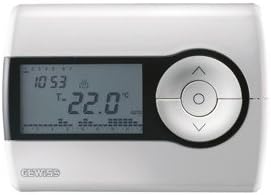
شکل 1: مخکی view of the Gewiss GW10701 Thermostat. It features a clear LCD screen displaying time and temperature, alongside a circular control panel with directional buttons and a central confirmation button for easy navigation and setting adjustments.
3.1. اجزاء
- د LCD نندارې: Shows current time, temperature, operating mode, and programming settings.
- د کنټرول تڼۍ: Typically include UP/DOWN arrows for temperature adjustment, MODE button for selecting operating modes (e.g., Heat, Cool, Auto, Off), and a SET/PROG button for accessing programming menus. (Note: Specific button functions may vary slightly; refer to on-screen prompts.)
- د بیټرۍ کڅوړه: Located on the rear or side, houses the power supply batteries.
- چوکۍ پلیټ: د خوندي دیوال نصبولو لپاره.
4. نصب کول
۴.۱. د ځای غوره کول
Select a central location on an interior wall, approximately 1.5 meters (5 feet) above the floor. Avoid locations near heat sources (lamps, direct sunlight, fireplaces), drafts (windows, doors), or areas with poor air circulation.
۲.۲. د ترموسټاټ نصبول
- د بریښنا قطع کول: Turn off the power to your heating/cooling system at the main circuit breaker.
- جلا بیس پلیټ: Carefully detach the front cover of the thermostat from its base plate.
- نښه کول او ډرل کول: Hold the base plate against the wall at your chosen location. Mark the drilling points. Drill holes and insert wall anchors if necessary.
- خوندي اساس پلیټ: Fasten the base plate to the wall using the provided screws.
- تارونه (که چیرې تطبیق شي): Connect the system wires to the appropriate terminals on the base plate. Refer to the wiring diagram provided with your heating/cooling system or consult a qualified electrician. Note: While the thermostat is battery-powered, it controls a 230V system. Ensure correct wiring.
- بیټرۍ نصب کړئ: Insert the required batteries into the battery compartment, observing correct polarity (+/-).
- ترموسټاټ ضمیمه کړئ: Carefully reattach the thermostat front cover to the base plate, ensuring it clicks securely into place.
- د بریښنا بیرته راګرځول: Turn on the power to your heating/cooling system at the main circuit breaker.
5. عملیات
5.1. ابتدايي ترتیب
Upon first power-up or after battery replacement, you may need to set the current time and date. Follow the on-screen prompts or refer to the programming section.
5.2. د حرارت درجه تنظیم کول
د کارولو UP او ښکته arrow buttons to adjust the desired temperature. The display will show the set temperature temporarily, then revert to the current room temperature.
5.3. عملیاتي طریقې
فشار ورکړئ موډ button (or similar) to cycle through available operating modes:
- تودوخه: ترموسټاټ به د تودوخې سیسټم فعال کړي کله چې د خونې تودوخه د ټاکل شوي تودوخې څخه ښکته شي.
- ارام: The thermostat will activate the air conditioning system when the room temperature rises above the set temperature.
- اتو: ترموسټاټ په اتوماتيک ډول د تودوخې او یخولو ترمنځ بدلیږي ترڅو د تودوخې ټاکل شوی حد وساتي.
- بند: The heating and cooling systems are turned off.
6 برنامه کول
The Gewiss GW10701 allows you to create custom heating/cooling schedules for different times of the day and days of the week. This feature helps optimize energy consumption and comfort.
۲. د وخت او نیټې ټاکل
- فشار ورکړئ SET or پروګ د ترتیباتو مینو ته د ننوتلو لپاره تڼۍ.
- Navigate using the arrow buttons to find "Time" or "Date" settings.
- Use the arrow buttons to adjust the values (hour, minute, day, month, year).
- د هر ترتیب سره تایید کړئ SET or central button.
6.2. Creating a Program Schedule
The thermostat typically offers daily or weekly programming options. You can set different temperatures for various periods (e.g., Wake, Day, Evening, Sleep).
- فشار ورکړئ پروګ د پروګرام کولو حالت ته د ننوتلو لپاره تڼۍ.
- Select the day or group of days you wish to program (e.g., Mon-Fri, Sat-Sun, or individual days).
- For each period (e.g., "Wake"), set the desired start time and temperature using the arrow buttons.
- Advance to the next period and repeat the process.
- Save your program and exit programming mode.
Consult the on-screen menu and specific button labels on your device for precise programming steps, as interfaces can vary.
7. ساتنه
7.1. د بیټرۍ بدلول
The thermostat is powered by batteries. When the battery indicator appears on the display, replace the batteries promptly to ensure continuous operation. Typically, 2x AA or AAA alkaline batteries are required.
- د ترموسټاټ مخکینۍ پوښ په احتیاط سره لرې کړئ.
- زاړه بیټرۍ لرې کړئ او په مسؤلیت سره یې تصفیه کړئ.
- نوې بیټرۍ دننه کړئ، د سم قطبیت ډاډ ترلاسه کړئ.
- د مخ پوښ بیا وصل کړئ.
7.2. پاکول
Clean the thermostat's exterior with a soft, dry cloth. Do not use abrasive cleaners, solvents, or spray cleaners directly onto the device, as this can damage the display or internal components.
8. ستونزه حل کول
| ستونزه | احتمالي لامل | د حل لاره |
|---|---|---|
| ښودنه خالي یا تیاره ده. | ټیټ یا مړه بیټرۍ. | بیټرۍ د نویو سره بدل کړئ. |
| د تودوخې / یخولو سیسټم ځواب نه ورکوي. |
|
|
| د تودوخې لوستل ناسم ښکاري. | د ترموسټاټ موقعیت چې د مسودو یا تودوخې سرچینو لخوا اغیزمن شوی. | ډاډ ترلاسه کړئ چې ترموسټاټ د مستقیم لمر وړانګو، مسودو، یا تودوخې خپروونکو وسایلو سره مخ نه وي. |
9. مشخصات
- جوړونکی: ګویس
- د ماډل شمیره: GW10701 (Chorus)
- ابعاد (L x W x H): 13 x 2.3 x 9.2 سانتي متره
- وزن: 9.07 ګرامه
- رنګ: سپین
- مواد: پلاستیک
- د بریښنا رسول: د بیټرۍ چلول
- د بدلولو حجمtage: 230 Volt (for controlled system)
- د ښودلو ډول: LCD یا LED
- د نصب کولو ډول: په دیوال کی ایښودل شوی
- د کنټرول ځانګړتیاوې: Programmable, Button control
- کارول: Heating systems, Air conditioning systems
10. تضمین او ملاتړ
For warranty information, technical support, or service inquiries regarding your Gewiss GW10701 Thermostat, please refer to the warranty card included with your product or visit the official Gewiss website. You may also contact your local Gewiss distributor or retailer for assistance.
Gewiss Official Webسایټ: www.gewiss.com


