1. محصول ختم شوview
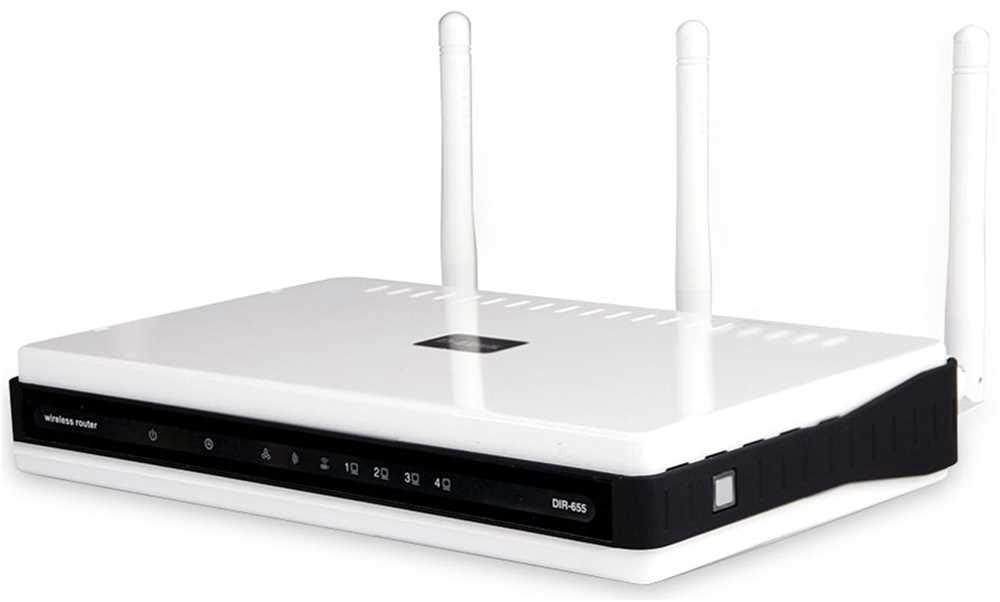
The D-Link DIR-655 Xtreme N Gigabit Router is an IEEE 802.11n (draft) compliant device designed to deliver faster speeds and extended range compared to IEEE 802.11g, while maintaining backward compatibility with IEEE 802.11g and IEEE 802.11b devices. This router enables high-speed internet access for multiple computers, game consoles, and media players when connected to a cable or DSL modem. It facilitates the creation of a secure wireless network for sharing photos, files, music, videos, printers, and network storage.
2. د تنظیم کولو لارښود
Follow these steps to set up your D-Link DIR-655 Xtreme N Wireless Router:
۱. خلاصول او ځای پر ځای کول
- ټول توکي په احتیاط سره له بسته بندۍ څخه لرې کړئ.
- Place the router in a central location in your home or office for optimal wireless coverage. Avoid placing it near large metal objects, concrete walls, or devices that emit radio frequency interference (e.g., microwave ovens, cordless phones).
- Ensure proper ventilation around the router.
2.2. د هارډویر اتصال
- انتن سره وصل کړئ: Attach the three external antennas to the connectors on the back of the router. Ensure they are securely tightened.
- موډیم سره وصل شئ:
- Power off your cable or DSL modem.
- Connect one end of an Ethernet cable to the Internet (WAN) port on the back of the DIR-655 router.
- Connect the other end of this Ethernet cable to the Ethernet port on your cable or DSL modem.
- Power on your modem and wait for its indicator lights to stabilize (usually indicating an active internet connection).
- بریښنا وصل کړئ: Plug the power adapter into the power port (12V===2A) on the back of the router, then plug the other end into a wall outlet or power strip. The power LED on the front of the router should illuminate.
- وسایل وصل کړئ (اختیاري تار): For wired connections, connect Ethernet cables from your computers or other network devices to any of the four LAN ports (1-4) on the back of the router.
شکل 1: شاته view of the D-Link DIR-655 router, highlighting the LAN, Internet, USB, Reset, and Power ports, along with the three external antennas.

شکل 2: مخکی view of the D-Link DIR-655 router, displaying the D-Link logo and various status indicator lights.
۳. ابتدايي ترتیب (بې سیم)
To connect wirelessly and configure your router:
- د شبکې نوم (SSID) ومومئ: Look for the Wi-Fi network name (SSID) printed on a label on the bottom or back of your router.
- وائی فای سره وصل کړئ: On your computer or mobile device, search for available Wi-Fi networks and select the SSID of your D-Link DIR-655.
- پاسورډ دننه کړئ: Enter the Wi-Fi password (also known as the network key or passphrase) found on the same label as the SSID.
- د روټر انٹرفیس ته لاسرسی: خلاص a web براوزر او ډول
http://dlinkrouter.localor192.168.0.1(default IP address) into the address bar. - ننوتل: د کارونکي نوم (معمولا) دننه کړئ
admin) او پټنوم (ډیری وخت خالي یاadmin). Refer to your router's label for default login credentials. - د تنظیم وزرډ چلول: Follow the on-screen instructions of the D-Link setup wizard to configure your internet connection and personalize your Wi-Fi network name and password.
3. عملیاتي لارښوونې
The D-Link DIR-655 is designed for high-performance wireless networking:
- Wireless N Technology: Utilizes IEEE 802.11n (draft) for enhanced speed and range, ideal for streaming HD video, online gaming, and large file لیږدونه
- ګیګابایټ ایترنیټ بندرونه: Four LAN ports provide 10x faster wired connections than standard Ethernet, ensuring high-speed data transfer for connected devices.
- دوه اړخیزه ملاتړ: The router supports dual-band operation, allowing for flexible network configurations and reduced interference.
- Multiple Antennas: Three external antennas help to optimize wireless signal strength and coverage throughout your home or office.
- USB SharePort: The USB port allows you to connect a USB storage device or printer and share it across your network.
4. ساتنه
د خپل روټر د غوره فعالیت او اوږد عمر ډاډمن کولو لپاره:
- د فرم ویئر تازه معلومات: په منظم ډول د D-Link ملاتړ وګورئ webد فرم ویئر تازه معلوماتو لپاره سایټ. د فرم ویئر تازه کول کولی شي فعالیت ښه کړي، نوي ځانګړتیاوې اضافه کړي، او امنیتي زیانونه حل کړي.
- فزیکي پاکوالی: روټر پاک او له دوړو څخه پاک وساتئ. د بهرنۍ برخې د پاکولو لپاره نرم، وچ ټوکر وکاروئ. ډاډ ترلاسه کړئ چې د هوا د جریان سوري بند شوي نه وي.
- په دوره یي ډول بیا پیل کول: Restarting your router every few weeks can help clear its memory and resolve minor network issues, improving overall performance.
- خوندي ځای پرځای کول: Ensure the router is placed in a secure location where it won't be easily knocked over or exposed to extreme temperatures or moisture.
5. ستونزه حل کول
If you encounter issues with your D-Link DIR-655 router, try these common troubleshooting steps:
- د انټرنیټ اتصال نشته:
- Check all cable connections (power, Ethernet to modem, Ethernet to devices).
- Restart your modem, then your router, and then your connected devices.
- تایید کړئ چې ستاسو د انټرنیټ خدماتو چمتو کونکي (ISP) اتصال فعال دی.
- د بېسیم ورو سرعت:
- ډاډ ترلاسه کړئ چې ستاسو وسایل د روټر په غوره حد کې دي.
- د نورو برېښنايي وسایلو مداخله کمه کړئ.
- Consider changing your Wi-Fi channel in the router settings to avoid congestion.
- د خپل وسیلې بې سیم چلوونکي تازه کړئ.
- د روټر ترتیباتو ته لاسرسی نشئ کولی:
- ډاډ ترلاسه کړئ چې ستاسو وسیله د روټر شبکې سره وصل ده (تار یا بېسیم).
- د ډیفالټ IP پتې کارولو هڅه وکړئ
192.168.0.1orhttp://dlinkrouter.local. - د خپل براوزر زیرمه او کوکیز پاک کړئ، یا یو بل براوزر هڅه وکړئ.
- If you forgot your password, perform a factory reset (see below).
- د فابریکې رییس: To restore the router to its factory default settings, locate the "Reset" button on the back of the router. With the router powered on, use a paperclip or similar pointed object to press and hold the reset button for about 10 seconds. Release the button and wait for the router to restart. یادونه: This will erase all custom settings, including your Wi-Fi name and password.
6. مشخصات
| فیچر | تفصیل |
|---|---|
| د ماډل نوم | DIR-655 |
| بې سیم ډول | 802.11n |
| برانډ | د لینک |
| د توکي ماډل شمیره | DIR-655/E |
| عملیاتي سیسټم | زاین او ایس |
| د توکي وزن | ۰.۹۸۶ اونس (۲۷.۹۴ ګرامه) |
| د محصول ابعاد | 47.44 x 77.95 x 12.6 انچه |
| والیtage | 110 ولټه |
| ځانګړی ځانګړنه | WPS |
| د فریکونسی بانډ ټولګی | دوه ګونی بند |
| د بې سیمه مواصلاتو معیار | 802.11n |
| مطابقت لرونکې وسیلې | Gaming Console, Printer |
| وړاندیز شوي استعمالونه | سوداګري، لوبیدل، کور |
| د ارتباط ټیکنالوژي | ایترنیټ |
| د انتن ډول | ثابت شوی |
7. تضمین او ملاتړ
For detailed warranty information and technical support, please refer to the official D-Link website or the documentation included with your product. You can also visit the D-Link support portal for FAQs, firmware downloads, and contact options.
آنلاین ملاتړ: www.dlink.com/support


