1. پیژندنه
Thank you for choosing the Hama 95236 8-inch LCD Digital Photo Frame. This manual provides important information regarding the safe operation, setup, and maintenance of your device. Please read it thoroughly before using the product and keep it for future reference.
2. د خوندیتوب لارښوونې
- Do not open the device. Incorrect assembly or repair can lead to electric shock.
- محصول مه چلوئ که چیرې دا په ښکاره ډول زیانمن شوی وي.
- Protect the product from dirt, moisture, and overheating. Use it only in dry environments.
- محصول مه پریږدئ یا یې قوي وایبریشنونو ته ښکاره کړئ.
- یوازې د خپل ټاکل شوي هدف لپاره محصول وکاروئ.
- دا محصول، د ټولو بریښنایی محصولاتو په څیر، د ماشومانو له لاسرسۍ څخه لرې وساتئ.
- د بسته بندۍ مواد سمدلاسه د ځایی پلي کیدو مقرراتو سره سم تخریب کړئ.
3. د بسته محتويات
Please check that the package contains the following items:
- Hama 95236 8-inch LCD Digital Photo Frame
- د بریښنا اډاپټر
- د کارونکي لارښود (دا لاسوند)
4. محصول ختم شوview
Familiarize yourself with the components and controls of your digital photo frame.
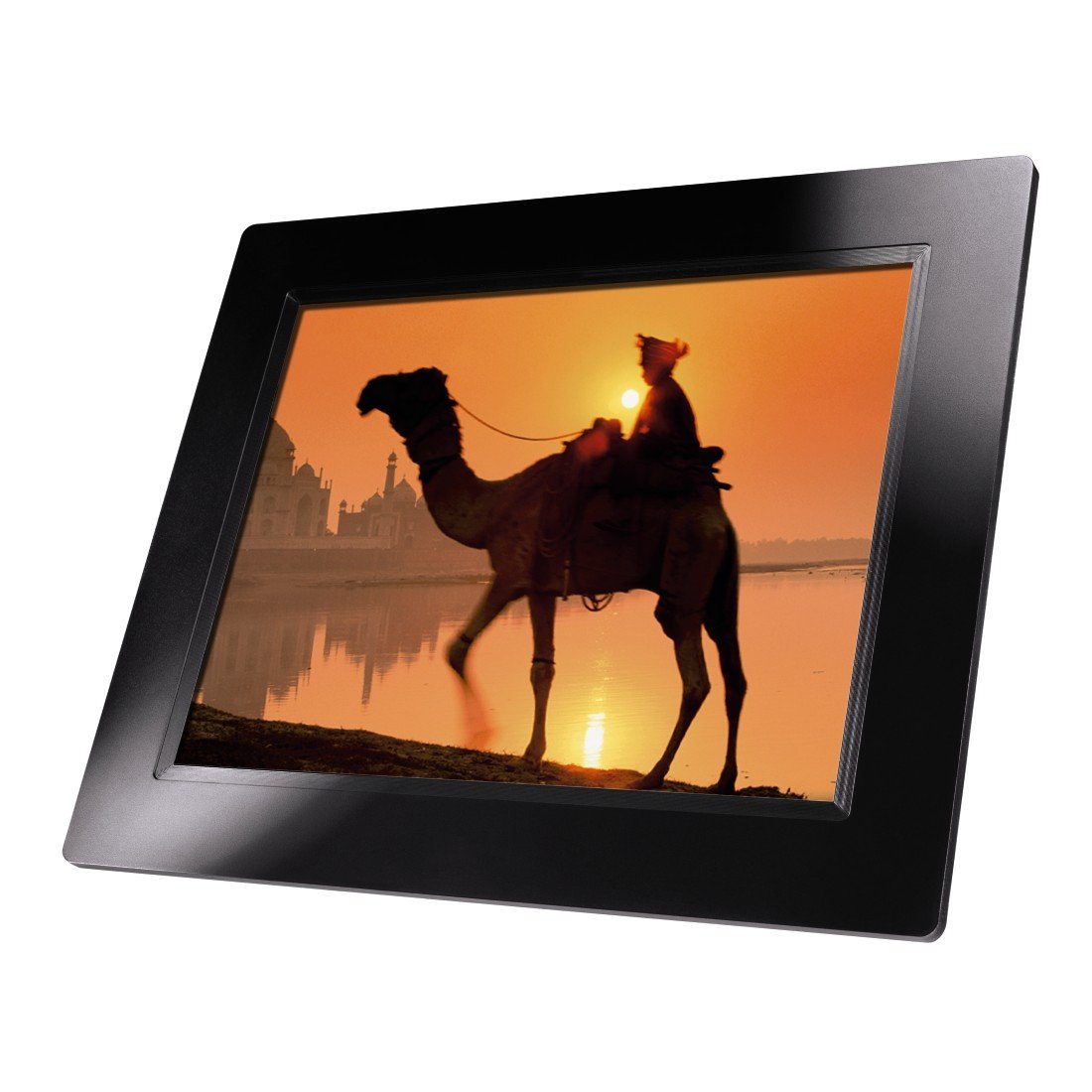
شکل 4.1: مخکی view of the Hama 95236 Digital Photo Frame, showing the 8-inch LCD screen.

شکل 4.2: اړخ view of the digital photo frame, highlighting the various input ports including the SD/MMC/MS card slot, USB port, and DC IN power port.

شکل 4.3: شاته view of the digital photo frame, showing the stand attachment point, ventilation grilles, and the control panel with power, navigation, and menu buttons.
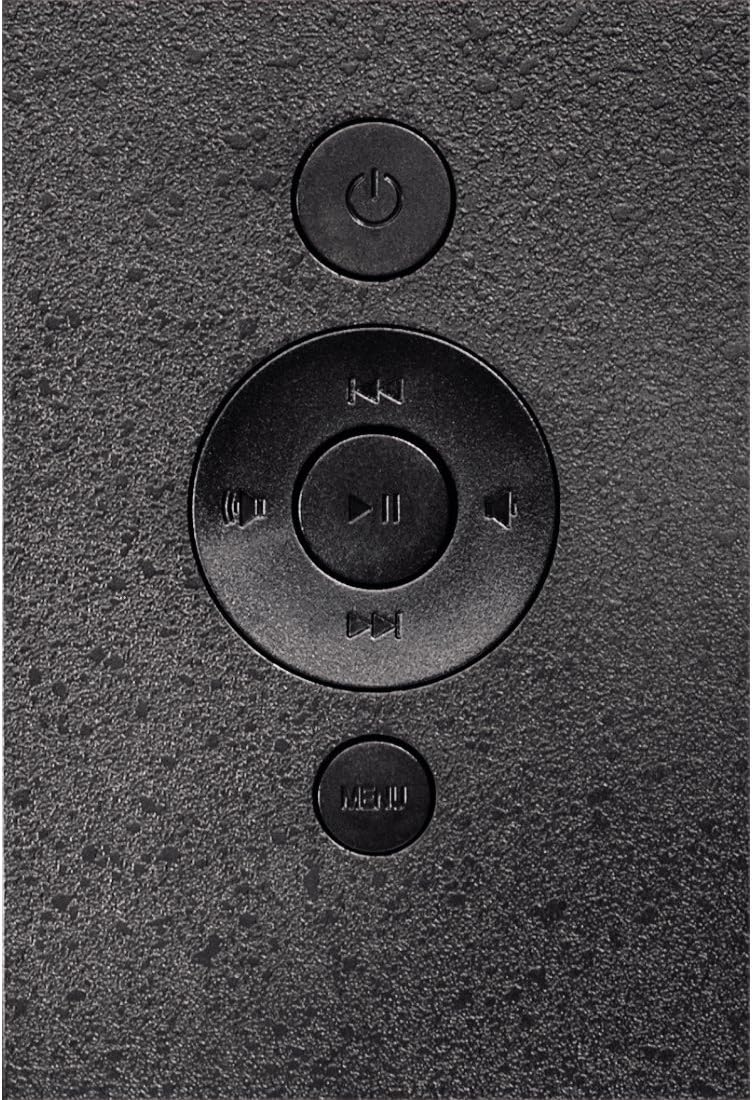
شکل 4.4: Close-up of the control buttons located on the back of the frame. These include the power button, directional navigation buttons (up, down, left, right), play/pause/enter button, and the menu button.
۴.۲. بندرونه او کنټرولونه
- SD/MMC/MS Card Slot: For inserting memory cards to display photos and videos.
- USB پورټ: For connecting USB flash drives or other compatible USB storage devices.
- په DC کې: Power input for connecting the provided power adapter.
- د بریښنا تڼۍ: وسیله آن یا بندوي.
- د نیویګیشن تڼۍ (پورته/ښکته/کیڼ/ښي): Used to navigate through menus and select options.
- Play/Pause/Enter Button: Confirms selections or controls media playback.
- د مینو تڼۍ: د ترتیباتو او اختیارونو لپاره اصلي مینو ته لاسرسی لري.
5. ترتیب کول
۱. د سټینډ نښلول
Insert the metal stand into the designated slot on the back of the digital photo frame. Ensure it is securely fastened to provide stable support for the frame.
5.2. د بریښنا پیوستون
- Connect the power adapter to the DC IN port on the back of the photo frame.
- د بریښنا اډاپټر په مناسب بریښنایی پلورنځي کې ولګوئ.
- The frame will typically power on automatically or can be turned on using the power button.
5.3. Inserting a Memory Card or USB Drive
The Hama 95236 supports SD/MMC/MS memory cards and USB flash drives.
- Locate the SD/MMC/MS card slot or the USB port on the side of the frame (refer to Figure 4.2).
- Carefully insert your memory card or USB drive into the corresponding slot/port. Ensure it is inserted correctly to avoid damage.
- The frame should automatically detect the storage device and prompt you to view its contents or start a slideshow.
6. عملیاتي لارښوونې
6.1. بنسټیز نیویګیشن
Use the navigation buttons on the back of the frame to move through menus and options. The Play/Pause/Enter button confirms your selection.
6.2. اصلي مینو
فشار ورکړئ مینو button to access the main menu. From here, you can select different modes and settings:
- عکس: View photos in a slideshow or individually.
- موسيقي: غږ غږول files.
- ویډیو: ویډیو پلی کړئ files.
- Calendar/Clock: Display the calendar and time.
- ترتیبات: Adjust various device parameters.
6.3. Photo Playback
- د اصلي مینو څخه، غوره کړئ انځور.
- Navigate to your desired folder or select all photos.
- فشار ورکړئ پلی/پاز/انټر button to start the slideshow.
- During a slideshow, you can use the navigation buttons to skip photos or pause playback.
6.4. د سیسټم تنظیمات
ته لاسرسی ترتیبات menu to customize your photo frame:
- د ښودلو ترتیبات: Adjust brightness, contrast, and display mode.
- د سلایډ شو ترتیبات: Configure transition effects, display time per photo, and repeat mode.
- نېټه او وخت: اوسنی نیټه او وخت تنظیم کړئ. Note: Some users have reported that date and time settings may reset after power loss.
- ژبه: Select your preferred language for the menu interface.
- د ذخیره کولو معلومات: View details about connected storage devices.
7. ساتنه
7.1. د آلې پاکول
- تل د پاکولو دمخه وسیله د بریښنا رسولو څخه جلا کړئ.
- Clean the screen and exterior surfaces with a soft, dry, lint-free cloth.
- Do not use aggressive cleaning agents, solvents, or abrasive materials.
7.2. ذخیره کول
که چیرې وسیله د اوږدې مودې لپاره ذخیره کوئ، نو له بریښنا څخه یې جلا کړئ او په یخ او وچ ځای کې یې د مستقیم لمر وړانګو او سختې تودوخې څخه لرې وساتئ.
8. ستونزه حل کول
| ستونزه | احتمالي لامل | د حل لاره |
|---|---|---|
| وسیله نه ورځي. | د بریښنا اډاپټر نه دی وصل شوی یا خراب شوی دی. | Ensure the power adapter is securely connected to both the frame and the power outlet. Test the outlet with another device. |
| هیڅ انځورونه نه دي ښودل شوي. | No memory card/USB drive inserted or fileملاتړ نه کیږي. | Insert a compatible memory card or USB drive with supported image formats (e.g., JPEG). Check if the storage device is properly inserted. |
| Date and time reset after power off. | No internal battery backup for clock. | This model may not retain date/time settings without continuous power. Re-enter settings if necessary after power interruption. |
| Video playback is choppy or distorted. | Unsupported video format or high bitrate. | ویډیو ډاډمنه کړئ files are in a supported format and resolution. Convert videos to a lower resolution or bitrate if issues persist. |
| تڼۍ بې ځوابه دي. | د سافټویر لنډمهاله ستونزه. | Disconnect the power adapter, wait a few seconds, then reconnect it to restart the device. |
9. مشخصات
| فیچر | تفصیل |
|---|---|
| د ماډل شمیره | 00095236 |
| د سکرین اندازه | ۷۸۷ انچه |
| د ښودلو ریزولوشن | 800 x 600 پکسله |
| د اړخ نسبت | 4:3 |
| داخلي ذخیره | ۰.۵ جي بي (۵۱۲ ايم بي) |
| ارتباط | USB, SD/MMC/MS Card Slot |
| ابعاد (L x W x H) | 2.6 x 22.2 x 17.8 سانتي متره |
| وزن | 550 ګرامه |
| جوړونکی | حما |
10. د تضمین معلومات
Hama GmbH & Co KG provides a manufacturer's warranty for this product. The specific terms and conditions of the warranty period and coverage are subject to the purchase date and the region of purchase. Please retain your proof of purchase (receipt) for any warranty claims.
For detailed warranty information, please refer to the official Hama webسایټ ته مراجعه وکړئ یا مستقیم د دوی د پیرودونکو ملاتړ سره اړیکه ونیسئ.
11. د پیرودونکي ملاتړ
Should you have any questions regarding this product, please contact Hama Customer Support:
- Webسایټ: Visit the official Hama website for FAQs, drivers, and further product information. www.hama.com
- اړیکه: Refer to the contact section on the Hama webستاسو په سیمه کې د تلیفون شمیرو یا بریښنالیک ملاتړ لپاره سایټ.
مهرباني وکړئ د ملاتړ سره د تماس په وخت کې خپل د ماډل شمیره (00095236) او د پیرود ثبوت چمتو ولرئ.


