1. پیژندنه
Thank you for choosing the Antec HCG-850M 850W Power Supply. This manual provides essential information for the safe and efficient installation, operation, and maintenance of your power supply unit. Please read this manual thoroughly before installation and retain it for future reference.
2. د خوندیتوب معلومات
تل د خپل سیسټم د ټپي کیدو یا زیان څخه د مخنیوي لپاره لاندې خوندیتوب احتیاطي تدابیر په پام کې ونیسئ:
- مه کوه open the power supply casinج. لوړ حجمtages دننه شتون لري، حتی کله چې یونټ خلاص شوی وي.
- مه کوه insert any objects into the power supply's ventilation openings.
- Ensure the power supply is installed in a well-ventilated area.
- Use only the modular cables provided with this power supply. Using incompatible cables can cause damage.
- Disconnect the AC power cord from the wall outlet before installing or removing the power supply.
- This product is designed for use in personal computers only.
3. د بسته محتويات
ډاډ ترلاسه کړئ چې ټول توکي ستاسو په کڅوړه کې شتون لري:
- Antec HCG-850M 850W Power Supply
- Modular Cable Set (PCI-E, SATA, Peripheral, CPU)
- د AC بریښنا تار
- د سکرو نصب کول
- د کارونکي لارښود (دا لاسوند)
4. محصول ختم شوview
The Antec HCG-850M is an 850-watt, 80 PLUS Bronze certified, semi-modular power supply designed for high-performance personal computers. It features a quiet 135mm fan for efficient cooling and robust protection circuits to ensure stable power delivery.
4.1 کلیدي ځانګړتیاوې
- 850 Watts Continuous Power
- 80 PLUS Bronze Certified Efficiency
- Semi-Modular Cable Management
- 135mm خاموش فین
- د ATX فارم فکتور
- Multiple Protection Circuits (OCP, OVP, UVP, SCP, OPP, OTP)
4.2 د بریښنا رسولو واحد
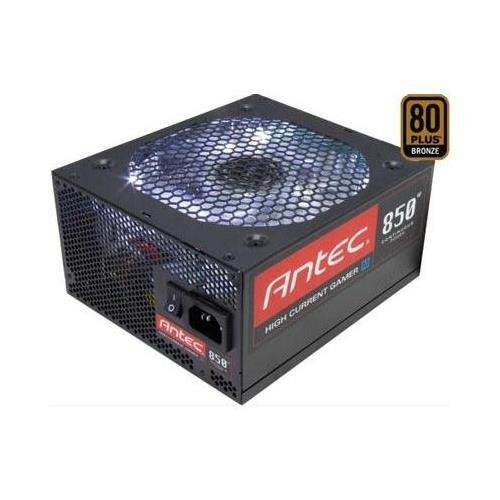
انځور 1: مخکی view of the Antec HCG-850M 850W Power Supply, showing the fan grille and modular cable connectors. This unit provides stable power to your computer components.
5. ترتیب او نصب کول
Follow these steps to install your Antec HCG-850M power supply:
- خپل سیسټم چمتو کړئ: ډاډ ترلاسه کړئ چې ستاسو کمپیوټر په بشپړ ډول بند دی او د دیوال له ساکټ څخه خلاص شوی دی. د خپل کمپیوټر کیس پرانیزئ.
- زوړ PSU لرې کړئ (که چیرې تطبیق شي): ټول کیبلونه له خپل زاړه بریښنا رسولو څخه جلا کړئ. زاړه PSU خلاص کړئ او له قضیې څخه یې لرې کړئ.
- نوی PSU نصب کړئ: Carefully place the Antec HCG-850M into the power supply bay of your computer case. Secure it with the provided mounting screws. Ensure the fan is oriented correctly for optimal airflow (typically facing down if there's a bottom vent, or up if not).
- اړین کیبلونه وصل کړئ:
- د 24 پن ATX مدر بورډ بریښنا کیبل سره وصل کړئ.
- Connect the 4+4-pin or 8-pin EPS/CPU power cable to your motherboard.
- ماډلر کیبلونه وصل کړئ: Attach the necessary modular cables for your components (e.g., PCI-E for graphics cards, SATA for hard drives/SSDs, Peripheral for fans/accessories). Connect them securely to both the power supply and the respective components.
- د کیبل مدیریت: د هوا جریان او جمالیات ښه کولو لپاره کیبلونه په ښه توګه وګرځوئ.
- قضیه وتړئ او بریښنا فعاله کړئ: Close your computer case. Connect the AC power cord to the power supply and then to a wall outlet. Flip the power switch on the PSU to the 'ON' position. Power on your computer.
6. عملیاتي لارښوونې
Once installed, the Antec HCG-850M operates automatically. Here are some general operating guidelines:
- پاور آن/بند: Use your computer's power button to turn the system on or off. The switch on the power supply itself should generally remain in the 'ON' position during normal operation.
- د سیسټم ثبات: Ensure your system is stable. If you experience unexpected shutdowns or reboots, refer to the troubleshooting section.
- وینټیلیشن: Maintain good airflow around your computer case to prevent overheating of components, including the power supply.
7. ساتنه
Proper maintenance can extend the lifespan of your power supply:
- د دوړو پاکول: Periodically clean dust from the power supply's fan grille and the interior of your computer case using compressed air. Always disconnect the AC power cord before cleaning.
- د کیبل چک: Occasionally check that all power cables are securely connected to the power supply and components.
- چاپیریال: Operate the power supply in a clean, dry environment with stable temperatures.
8. ستونزه حل کول
If you encounter issues with your power supply, try the following steps:
8.1 No Power to System
- Ensure the AC power cord is securely plugged into both the wall outlet and the power supply.
- Check that the power supply's ON/OFF switch is in the 'ON' position.
- Verify all internal power cables (24-pin ATX, CPU, PCI-E) are correctly and firmly connected.
- د دیوال ساکټ د بل وسیلې سره ازموینه وکړئ ترڅو ډاډ ترلاسه کړئ چې دا بریښنا لري.
- که امکان ولري، د بریښنا رسولو په بل پیژندل شوي کاري سیسټم کې یا د PSU ټیسټر سره ازموینه وکړئ.
8.2 System Instability or Random Shutdowns
- Ensure your system's power requirements do not exceed the 850W capacity of the PSU.
- Check for overheating components. Ensure proper case ventilation and clean any dust buildup.
- Verify all power connections are secure. Loose connections can cause intermittent power delivery.
- If the issue persists, it may indicate a fault with the power supply or another component. Consider professional diagnosis.
9. مشخصات
| فیچر | تفصیل |
|---|---|
| د ماډل شمیره | HCG-850M |
| د واټ محصولtage | 850 واټ |
| د موثریت تصدیق | 80PLUS د برونزو |
| د فارم فکتور | ATX |
| د یخولو طریقه | هوا (۱۲۰ ملي متره فین) |
| د ماډل ډول | نیمه ماډلر |
| مطابقت لرونکې وسیلې | شخصي کمپیوټر |
| د توکي وزن | ۰.۴۵ پونډه (تقریبا ۰.۴ کیلوګرامه) |
| ASIN | B00ESAI3M0 |
10. تضمین او ملاتړ
د انټیک محصولات د تولید کونکي تضمین لخوا ملاتړ کیږي. د ځانګړي تضمین شرایطو او مقرراتو لپاره، مهرباني وکړئ د تضمین کارت ته مراجعه وکړئ چې ستاسو محصول سره شامل دی یا رسمي انټیک ته مراجعه وکړئ. website. For technical support or customer service, please contact Antec directly through their official support channels.
رسمي انټیک Webسایټ: www.antec.com


