1. پیژندنه
This manual provides essential information for the safe and efficient installation, operation, and maintenance of your Delta DPS-750EB A D20850-006 750 Watt Power Supply. This power supply unit (PSU) is designed for server applications, offering reliable power delivery with a 750-watt output capacity.
2. د خوندیتوب معلومات
WARNING: Improper installation or use can result in electric shock, fire, or damage to the equipment. Always follow these safety guidelines.
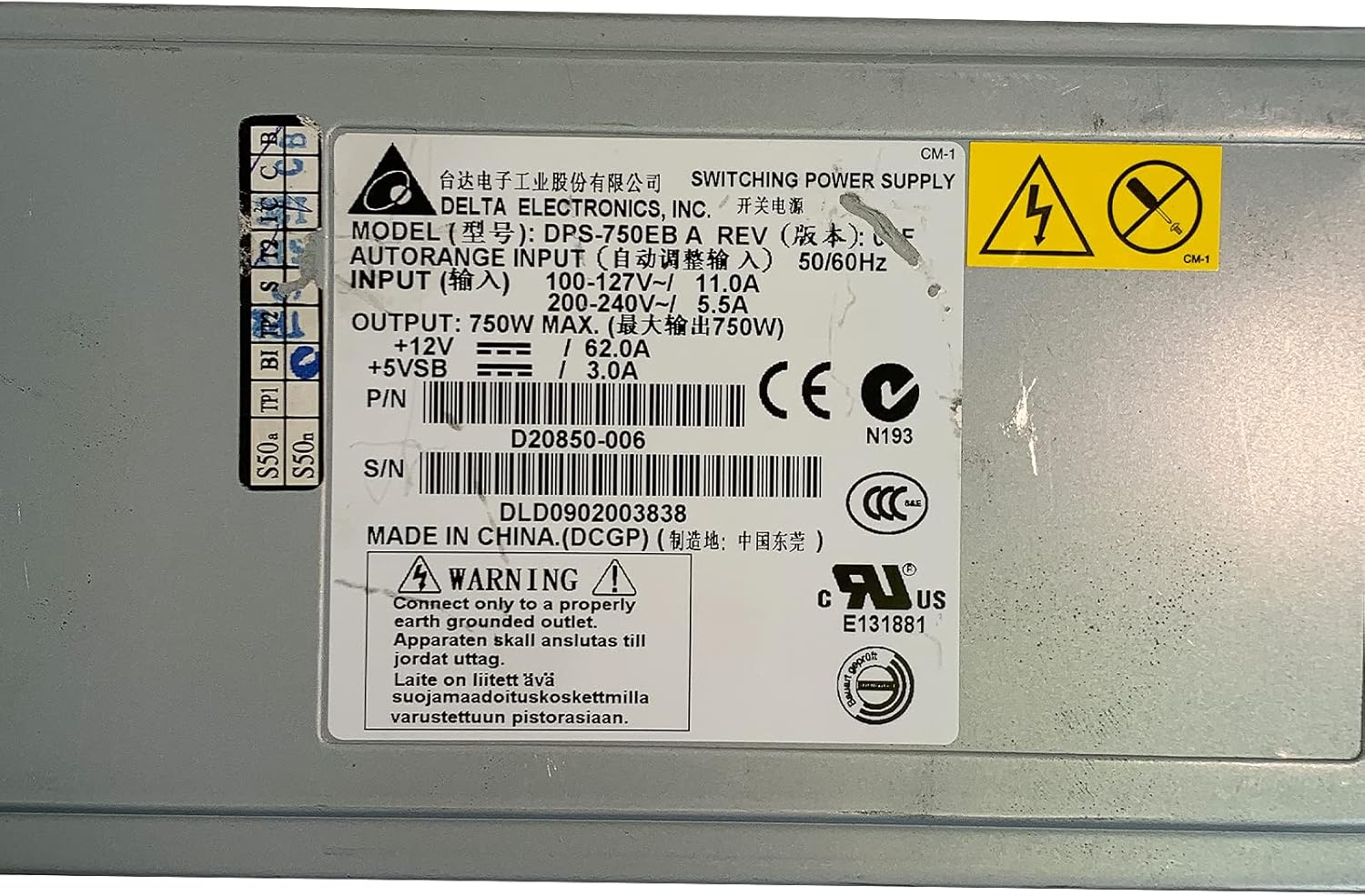
- ځمکني کول: Connect only to a properly earth grounded outlet. The apparatus must be connected to a mains socket outlet with a protective earthing connection.
- والیtage: د ننوتلو حجم ډاډمن کړئtage matches the specifications on the power supply label (100-127V~ or 200-240V~).
- مسلکي نصب کول: نصب کول باید د وړ پرسونل لخوا ترسره شي.
- وینټیلیشن: د هوا د بهېدو لارې مه بندوئ. د یونټ شاوخوا کافي هوا جریان ډاډمن کړئ ترڅو د ډیر تودوخې مخه ونیول شي.
- رطوبت: Do not expose the power supply to moisture or liquids.
- خدمت کول: د برېښنا رسونه مه خلاصوئ casinج. دننه د کارونکي لپاره د خدمت وړ برخې نشته. ټولې خدمتونه وړ خدماتو پرسونل ته راجع کړئ.

انځور 2.1: Product label showing input voltage، د محصول واټtage, and safety warnings. Note the grounding requirement: "Connect only to a properly earth grounded outlet."
3. محصول ختم شوview
The Delta DPS-750EB A is a robust 750-watt power supply designed for server environments. It features a semi-modular design, allowing for flexible cable management. The unit includes active cooling with integrated fans to maintain optimal operating temperatures.
انځور 3.1: مخکی view of the Delta DPS-750EB A power supply, showcasing د هغې کمپیکټ فارم فاکتور.

انځور 3.2: شاته view of the power supply, showing the dual cooling fans and the AC power input connector.
4. ترتیب او نصب کول
- بسته بندي کول: د برېښنا رسونه په احتیاط سره د هغې له بسته بندۍ څخه لرې کړئ. د هر ډول لیدل شوي زیان لپاره معاینه کړئ.
- چمتووالی: Ensure the server system is powered off and disconnected from the main power outlet.
- پورته کول: Install the power supply into the designated bay within your server chassis. Secure it using the appropriate screws.
- د کیبل پیوستون: Connect the necessary power cables (e.g., motherboard, CPU, peripherals) from the power supply to the corresponding components. The semi-modular design allows you to connect only the cables you need.
- د AC بریښنا پیوستون: Connect the AC power cord to the power supply's input port and then to a properly grounded wall outlet.
5. عملیاتي لارښوونې
- لومړنی بریښنا فعالول: After all connections are secure, power on your server system.
- د سیسټم معاینه: Verify that all components are receiving power and functioning correctly. Listen for normal fan operation from the power supply.
- نورمال عملیات: The power supply will operate continuously as long as the server system is powered on. The internal fans will adjust speed based on temperature and load to maintain optimal cooling.
6. ساتنه
- د دوړو لرې کول: Periodically inspect the power supply's fan vents for dust accumulation. Use compressed air to gently clean the vents and fan blades to ensure unrestricted airflow. Perform this with the system powered off and unplugged.
- د کیبل معاینه: Regularly check all power cables for signs of wear, fraying, or loose connections. Replace any damaged cables immediately.
- چاپیریال: Ensure the server operates in a clean, dry, and well-ventilated environment to prevent dust buildup and overheating.
7. ستونزه حل کول
| ستونزه | احتمالي لامل | د حل لاره |
|---|---|---|
| سیسټم فعال نه دی. | Loose power cable, faulty outlet, power supply failure. | Check all power connections. Test the outlet with another device. If issues persist, consult a technician. |
| System powers on but is unstable/shuts down. | Overheating, insufficient power, component failure. | Ensure proper ventilation. Verify power supply wattage meets system requirements. Check for component errors. |
| د PSU څخه د فین لوړ غږ. | Dust accumulation, high load, fan malfunction. | Clean fan vents. Ensure system is not under excessive load. If noise is abnormal, consider professional inspection. |
8. مشخصات
| فیچر | مشخصات |
|---|---|
| د ماډل نوم | DPS-750EB A |
| برانډ | ډیلټا |
| مطابقت لرونکې وسیلې | سرور |
| د واټ محصولtage | 750 واټ |
| د فارم فکتور | ATX |
| د یخولو طریقه | Air (1 Fan) |
| د بریښنا رسولو ډیزاین | نیمه ماډلر |
| د لږ تر لږه داخلولو حجمtage | 100 وولټ (AC) |
| د اعظمي داخل مقدارtage | 230 وولټ (AC) |
| د لوړ حرارت درجه درجه | 50 درجې سیلسیس |
| د توکي وزن | 5 پونډه |
| P/N | D20850-006 |
| S/N | DLD0902003838 |
9. تضمین او ملاتړ
For warranty information and technical support, please refer to the documentation provided with your purchase or contact Delta Electronics directly. Keep your purchase receipt and product serial number (DLD0902003838) readily available when contacting support.