1. پیژندنه
The CyberPower Smart App LCD OR2200LCDRT2U is a rack/tower convertible Uninterruptible Power Supply (UPS) system designed to provide reliable battery backup and surge protection. It features line interactive topology and Automatic Voltage Regulation (AVR) to safeguard office servers, networking hardware, workgroup servers, workstations, and telecom installations. This manual provides essential information for the proper setup, operation, and maintenance of your UPS system.

شکل 1: مخکی view of the CyberPower OR2200LCDRT2U UPS System, showcasing the LCD panel and ventilation.
2. کلیدي ځانګړتیاوې
- 2200VA/1320W Battery Backup: Provides guaranteed power protection for critical equipment.
- ۶ د NEMA ۵-۱۵R آوټ لیټونه: Offers both battery backup and surge protection.
- Multifunction LCD Screen: Displays real-time information including runtime in minutes, battery status, and power conditions.
- اتومات Voltagای مقررات (AVR): د بیټرۍ بریښنا ته د بدلولو پرته د بریښنا کوچني بدلونونه سموي، د بیټرۍ ژوند اوږدوي.
- 2U Rack/Tower Convertible Design: Flexible installation options for various environments.
- PowerPanel Business Edition Management Software: Free downloadable software for comprehensive UPS management.

Figure 2: Rear panel of the UPS, highlighting the NEMA 5-20R outlets, communication ports, and expansion slot.
۴. د تنظیم لارښوونې
3.1 پیک کول او تفتیش کول
Carefully unpack the UPS system and inspect it for any shipping damage. Ensure all components listed in the packing list are present. If any damage or missing items are found, contact your dealer or CyberPower immediately.
3.2 ځای پرځای کول
The OR2200LCDRT2U can be installed in a 2U rackmount configuration or as a tower. Ensure adequate ventilation around the unit. Avoid placing the UPS near heat sources or in direct sunlight.

Figure 3: Multiple CyberPower UPS units rack-mounted in a data center environment, demonstrating typical installation.
3.3 د بریښنا سره وصل کول
- Connect the UPS power cord (NEMA 5-20P right angle plug) to a properly grounded 20A wall outlet.
- Plug your equipment into the 8 NEMA 5-20R outlets on the rear panel. Prioritize critical equipment for battery backup outlets.
۳.۶ د بیټرۍ لومړنی چارج
For optimal performance, charge the UPS batteries for at least 8 hours before initial use. The unit will charge automatically when connected to AC power.
4. عملیاتي لارښوونې
4.1 بریښنا کول / بندول
Press the power button on the front panel to turn the UPS on or off. The LCD will illuminate and display status information.
۳.۳.۱ د LCD ښودنه او کنټرولونه
The multifunction LCD provides real-time status updates. Use the navigation buttons (Tab, Enter, Up/Down, Esc) to view various parameters such as input/output voltage، د بیټرۍ ظرفیت، د بار اندازهtage, and estimated runtime.
Video 1: An official CyberPower video demonstrating the features and operation of the Smart App Sinewave UPS Systems, including the multifunction LCD and power management capabilities.
4.3 اتومات Voltagد مقرراتو (AVR)
The UPS automatically corrects minor voltage fluctuations (sags and surges) without switching to battery power. This ensures stable power delivery to connected devices and prolongs battery life.
5. ساتنه
5.1 د بیټرۍ بدلول
The OR2200LCDRT2U uses four 12V sealed lead-acid batteries. Batteries are user-replaceable. Refer to the detailed battery replacement guide for your specific model. Always use genuine CyberPower replacement batteries to ensure compatibility and safety.
Video 2: A user-generated video demonstrating the process of replacing ExpertPower batteries in a CyberPower UPS. While not an official CyberPower video, it illustrates the general procedure for battery replacement.
5.2 پاکول
Regularly clean the exterior of the UPS with a dry cloth. Ensure ventilation openings are free from dust and debris to prevent overheating.
6. ستونزه حل کول
If the UPS is not functioning correctly, consult the following common issues:
- ځواک نشته: Check the power cord connection to the wall outlet and the UPS. Ensure the power button is pressed.
- د بیټرۍ لنډ وخت: Batteries may be old or not fully charged. Allow 8 hours for charging or consider battery replacement.
- د اوورلوډ الارم: Disconnect non-essential equipment from the UPS to reduce the load.
- UPS Not Providing Backup: Ensure the UPS is connected to a live AC outlet and the batteries are charged.
For further assistance, refer to the full user manual or contact CyberPower support.
7. مشخصات
| صفت | ارزښت |
|---|---|
| د ماډل شمیره | OR2200LCDRT2U |
| ظرفیت (VA/W) | 2200VA/1320W |
| د وتلو ځایونه | 8 NEMA 5-20R |
| ننوتۍ فلګ | NEMA 5-20P (right angle, 10 ft cord) |
| توپولوژي | لاین متقابل عمل |
| اتومات Voltagد مقرراتو (AVR) | هو |
| د بیټرۍ ډول | Sealed Lead Acid (4 x 12V included) |
| د محصول ابعاد | 17.25 x 15.75 x 3.5 انچه |
| د توکي وزن | ۲.۴۵ پونډه |
| والیtage | 120 ولټه |
| رنګ | تور |
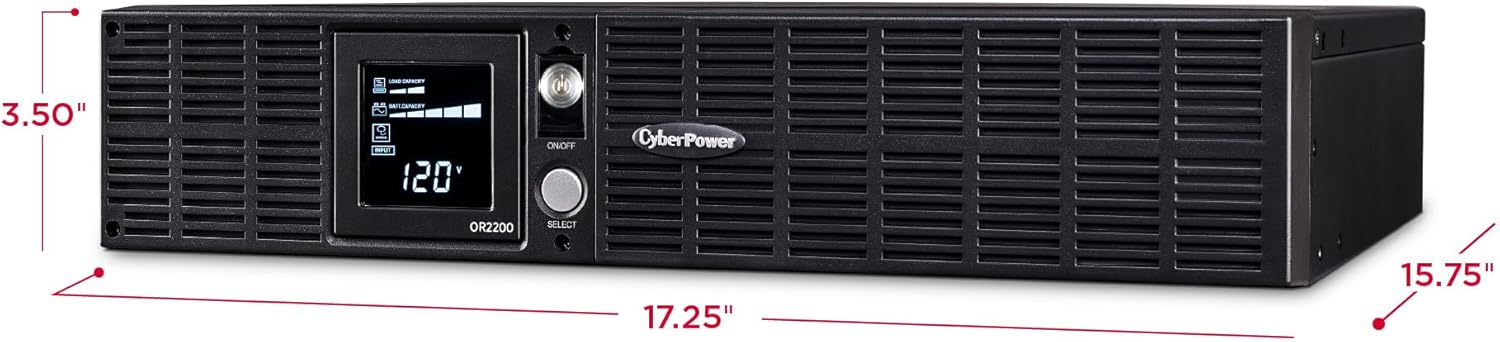
Figure 4: Dimensions of the CyberPower OR2200LCDRT2U UPS, showing its compact 2U form factor.
8. تضمین او ملاتړ
8.1 د تضمین معلومات
The CyberPower OR2200LCDRT2U comes with a 3-year warranty, which includes the batteries. It also includes a $300,000 Connected Equipment Guarantee, providing peace of mind for your connected devices.
8.2 د پیرودونکي ملاتړ
For technical assistance, troubleshooting, or warranty claims, please visit the official CyberPower website or contact their customer support. Free PowerPanel Business Edition Management Software is available for download to enhance monitoring and control capabilities.


