1. پیژندنه
The Aiphone GT-BCX Expanded Audio Bus Control Unit is designed to enhance the functionality of the GT Series Multi-Tenant Intercom system. This unit provides expanded audio bus control, facilitating communication within complex multi-tenant environments. It operates on a 24V DC power source and is engineered for DIN rail mounting, ensuring seamless integration into existing setups. This manual provides essential information for the proper installation, operation, and maintenance of your GT-BCX unit.
2. د خوندیتوب معلومات
Please read and understand all safety instructions before installing or operating the GT-BCX unit. Failure to follow these instructions may result in injury, damage to the product, or voiding of the warranty.
- د بریښنا سرچینه: Only use the specified 24V DC power source. Connecting to an incorrect voltage کولی شي واحد ته زیان ورسوي.
- لګول: نصب کول باید د وړ پرسونل لخوا د ټولو محلي بریښنایی کوډونو او مقرراتو سره سم ترسره شي.
- چاپیریال: Do not expose the unit to moisture, extreme temperatures, or direct sunlight. Ensure adequate ventilation.
- تارونه: Ensure all wiring is correctly connected and secured to prevent short circuits or loose connections.
- ساتنه: د هر ډول ساتنې یا پاکولو دمخه بریښنا قطع کړئ.
3. د بسته محتويات
د نصبولو دمخه ډاډ ترلاسه کړئ چې ټول توکي په بسته کې شتون لري.
- Aiphone GT-BCX Expanded Audio Bus Control Unit
- د نصبولو لارښود (دا سند)
- Necessary mounting hardware for DIN rail installation
4. ترتیب او نصب کول
Follow these steps for proper installation of the GT-BCX unit.
4.1 پورته کول
The GT-BCX unit is designed for DIN rail mounting. Ensure the DIN rail is securely installed in a suitable enclosure or panel.
- Align the GT-BCX unit with the DIN rail.
- Press the unit firmly onto the rail until it clicks into place, ensuring it is securely fastened.
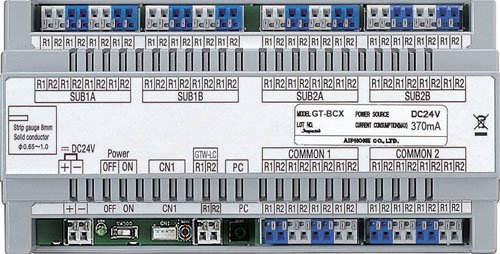
Image 1: The Aiphone GT-BCX Expanded Audio Bus Control Unit, typically shown mounted on a DIN rail. This image illustrates the compact design and connection terminals of the unit.
4.2 تارونه
The GT-BCX unit requires specific wiring for connection to the GT Series intercom system and power supply.
- د تار ډول: Use 2-conductor, solid, non-shielded wire with PE insulation for bus connections.
- د بریښنا پیوستون: Connect the 24V DC power source to the designated power terminals on the GT-BCX unit. Observe correct polarity.
- د بسونو اړیکې: Connect the GT Series intercom bus lines to the appropriate terminals on the GT-BCX unit. Refer to the GT Series system manual for specific bus wiring diagrams.
- ځمکني کول: د ځایی بریښنایی کوډونو سره سم مناسب ځمکنی کول ډاډمن کړئ.
۵.۱ لومړنی پاور اپ
Once all connections are secure, apply power to the unit. Observe any indicator lights for proper operation. Refer to the GT Series system manual for system-wide configuration and testing procedures.
5. Operating the GT-BCX Unit
The GT-BCX unit functions as an integral part of the Aiphone GT Series Multi-Tenant Intercom system. It expands the audio bus capabilities, allowing for more extensive and complex intercom configurations. Its operation is largely automatic once properly installed and configured within the GT Series system. It manages and routes audio signals across the expanded bus, ensuring clear communication between various intercom stations.
Specific operational details, such as call routing, tenant station programming, and system-wide audio adjustments, are managed through the main GT Series control unit and associated software. The GT-BCX unit provides the necessary hardware infrastructure for these expanded audio functions.
6. ساتنه
The Aiphone GT-BCX unit is designed for reliable, long-term operation with minimal maintenance. However, periodic checks can help ensure optimal performance.
- پاکول: Gently wipe the exterior of the unit with a soft, dry cloth. Do not use harsh chemicals or abrasive cleaners.
- اړیکې: په دوره یي ډول د ټولو تارونو اتصالونه معاینه کړئ ترڅو ډاډ ترلاسه شي چې دوی خوندي او له زنګ څخه پاک دي.
- چاپیریال: Ensure the installation environment remains free from excessive dust, moisture, and extreme temperatures.
- فرم ویئر: Consult Aiphone's official website or your system integrator for information on potential firmware updates for the GT Series system, which may affect the GT-BCX unit's performance.
7. ستونزه حل کول
If you encounter issues with your GT-BCX unit or the GT Series intercom system, refer to the following table for common problems and solutions.
| ستونزه | احتمالي لامل | د حل لاره |
|---|---|---|
| د بریښنا شاخص رڼا نشته | Incorrect 24V DC power connection or no power supply. | Verify 24V DC power supply is connected and active. Check polarity of power connections. |
| No audio through expanded bus | Incorrect bus wiring or configuration issue in the main GT Series control unit. | Check bus wiring for correct connections and continuity. Consult the GT Series system manual for configuration settings. |
| موقتي غږ | Loose wiring connections or interference. | Secure all wiring connections. Ensure proper wire type (2-cond, solid, non-shielded) is used. Check for sources of electrical interference. |
| Unit not recognized by GT Series system | Improper bus connection or system configuration. | Verify bus connections are correct. Ensure the GT Series main control unit is properly configured to recognize expanded bus units. |
If the problem persists after attempting these solutions, contact Aiphone technical support or your system integrator for further assistance.
8. مشخصات
Key technical specifications for the Aiphone GT-BCX Expanded Audio Bus Control Unit:
| فیچر | مشخصات |
|---|---|
| د ماډل شمیره | GT-BCXB-N |
| د بریښنا سرچینه | 24V DC |
| پورته کول | د DIN ریل |
| Wire Type (Bus) | 2-conductor, solid, non-shielded, PE insulation |
| ابعاد (L x W x H) | 8.9 x 5.3 x 3.3 انچه (22.6 x 13.5 x 8.4 سانتي متره) |
| د توکي وزن | ۶ پونډه (۳ کیلو ګرامه) |
| ساختماني مواد | ABS پلاستيک |
| مطابقت لرونکې وسیلې | GT Series Multi-Tenant Intercom Systems |
| د ارتباط ټیکنالوژي | تارونه |
9. تضمین او ملاتړ
Aiphone Corporation products are manufactured to high-quality standards. For specific warranty information, please refer to the warranty card included with your product or visit the official Aiphone website. Technical support is available to assist with installation, troubleshooting, and general inquiries.
Aiphone Corporation Contact Information:
Please visit the official Aiphone website for the most current contact details, support resources, and service center locations.


