Boxlight ACTG042

د بکس لایټ بدلول Lamp د ماډل کارن لارښود

Models: LC-XG110, LC-XG210, LX32 (Part Number: ACTG042)

پیژندنه

This manual provides essential information for the safe and effective installation, operation, and maintenance of your Boxlight replacement lamp module. This module is designed for use with Boxlight LC-XG110, LC-XG210, and LX32 projector models. Please read these instructions carefully before proceeding with installation.
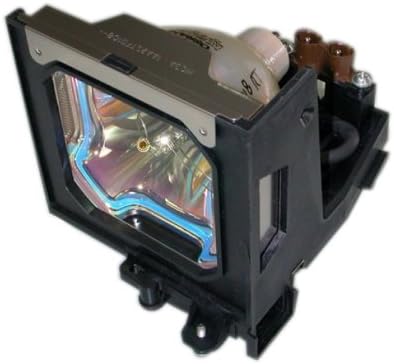
د بکس لایټ بدلول Lamp ماډل

Image: Boxlight replacement lamp module, showing the bulb encased in its housing with electrical connectors.

The Boxlight replacement lamp module (Part Number: ACTG042) includes an original bulb and housing, ensuring compatibility and optimal performance with your projector. It features a 250-watt bulb with an average lamp life of 2000 hours under normal operating conditions.

د خوندیتوب مهم معلومات

بلب په دې lamp contains Mercury (Hg). Please dispose of in accordance with local, state, or federal laws. Do not dispose of with regular household waste.

د نصبولو لارښوونې

  1. د بریښنا بند او قطع کول: Ensure your Boxlight projector is turned off and completely unplugged from the power source.
  2. سړه کول: پروجیکټر ته اجازه ورکړئ چې لږ تر لږه د 30 دقیقو لپاره سړه شي.amp operates at high temperatures and can cause burns if handled while hot.
  3. L ومومئamp پوښ: Refer to your projector's user manual to locate the lamp compartment cover. This is typically secured by one or more screws.
  4. L لرې کړئamp پوښ: Using a suitable screwdriver, carefully remove the screw(s) securing the lamp cover and then remove the cover.
  5. Unscrew Old Lamp: زوړ ایلamp module will be secured by one or more screws. Unscrew these fasteners.
  6. زوړ L لرې کړئamp: Gently pull the handle on the old lamp module to slide it out of the projector. Be careful not to drop it.
  7. نوی L داخل کړئamp: Carefully insert the new Boxlight replacement lamp module into the projector, ensuring it slides smoothly into place. Do not force it.
  8. Secure New Lamp: Fasten the new lamp module with the screw(s) you removed earlier. Ensure it is securely seated.
  9. L بدل کړئamp پوښ: بیا سره نښلول lamp compartment cover and secure it with its screw(s).
  10. بریښنا بیا وصل کړئ: Plug the projector back into the power outlet.
  11. ایل بیا تنظیم کړئamp ټایمر: Consult your projector's user manual for instructions on how to reset the lamp timer. This is crucial for accurate lamp life tracking.

عملیاتي لارښوونې

ساتنه

د ستونزو حل کول

If you encounter issues after installing the new lamp، لاندې په پام کې ونیسئ:

For further assistance, refer to your projector's original user manual or contact Boxlight customer support.

د محصول مشخصات

برانډد بکس څراغ
د ماډل شمیرهACTG042
Compatible Projector ModelsLC-XG110, LC-XG210, LX32
Lamp د برخې شمیرې03-000712-01P; 610 305 5602; MP56T-930; POA-LMP59
واټtage۴۵ واټه
Lamp Life (Normal)۸ ساعته
د رڼا ډولزینون
Lamp ټیکنالوژيLCD
د توکي وزن۱.۶۲ اونس (۰.۱ پونډه)
د محصول ابعاد5.32 x 4.53 x 4.13 انچه
UPC840398106805

د تضمین معلومات

This Boxlight replacement lamp module is covered by a د 180 ورځو تضمین د پیرود نیټې څخه. دا تضمین د عادي استعمال لاندې موادو او کاریګرۍ نیمګړتیاوې پوښي. مهرباني وکړئ د تضمین ادعاوو لپاره د پیرود ثبوت وساتئ.

For warranty service or inquiries, please contact the seller or manufacturer directly.

د پیرودونکي ملاتړ

If you require further assistance, have questions about installation, or need to report an issue, please contact the retailer where you purchased this product or the manufacturer, Arclyte Tech. (Boxlight's manufacturer).

When contacting support, please have your product model number (ACTG042) and proof of purchase readily available.

اړوند اسناد - ACTG042

مخکېview Boxlight 3650 User's Guide: Setup, Operation, and Specifications
This user's guide provides comprehensive instructions for the Boxlight 3650 multimedia projector, covering setup, operation, safety precautions, troubleshooting, and technical specifications for enhanced presentations.
مخکېview د مایکرو پورټ ایبل LCD پروجیکټر کارونکي لارښود
د مایکرو پورټ ایبل LCD پروجیکټر لپاره جامع کارونکي لارښود، چې ځانګړتیاوې، تنظیم، اړیکې، د OSD مینو عملیات، ساتنه، او د ستونزو حل کول پوښي.
مخکېview د بکس لایټ بوسټن لړۍ پروجیکټر کارونکي لارښود - تنظیم، ځانګړتیاوې، او عملیاتي لارښود
د BOXLIGHT بوسټن لړۍ پروجیکټر لپاره جامع کارونکي لارښود. د ځانګړتیاوو، خوندیتوب لارښوونو، تنظیم کولو پروسیجرونو، عملیاتو، ساتنې، او ستونزو حل کولو په اړه زده کړه وکړئ. د ملاتړ لپاره BOXLIGHT.com ته مراجعه وکړئ.
مخکېview د بکس لایټ میمیو پرو جی متقابل فلیټ پینل ښودنه: د بکس خلاصولو او نصبولو لارښود
د بکس لایټ میمیو پرو جی انټرایکټیو فلیټ پینل ډیسپلی د ان باکس کولو او نصبولو لپاره جامع لارښود. د هارډویر تنظیم، وای فای ماډل، فرم ویئر تازه معلومات، او د ګوګل لومړني ترتیب پوښي.
مخکېview د بکس لایټ پروجیکټو رائټ 5|6 کارن لارښود
د BOXLIGHT ProjectoWrite5 او ProjectoWrite6 پروجیکټرونو لپاره جامع کارونکي لارښود، د پرمختللي پریزنټیشنونو لپاره د تنظیم، ځانګړتیاو، عملیاتو، ساتنې، او ستونزو حل کولو توضیحات.
مخکېview د میمیو پرو جی متقابل ښودنې کارونکي لارښود | بکس لایټ
د بکس لایټ میمیو پرو جي انټرایکټیو ډیسپلې لپاره جامع کارونکي لارښود، چې خوندیتوب، تنظیم، عملیات، ساتنه، او ستونزې حل کول پوښي. زده کړئ چې څنګه وسایل وصل کړئ، ریموټ کنټرول وکاروئ، او عامې ستونزې حل کړئ.