1. پیژندنه
The DKM-401 is a low-cost precision instrument designed to display various AC parameters in a 3-phase distribution panel. The standard unit is designed for 230/400V networks. A different version is available for 120/208V systems. The unit fits into a standard 92x92mm panel opening.

انځور: مخکینۍ برخه view of the DKM-401 Digital Multimeter, showing the display for L1, L2, L3 currents and frequency/voltage, along with menu buttons.
2. ځانګړتیاوې
- ریښتیني RMS اندازه کول
- Class 0.5 accuracy
- د فلش ماونټ نصب کول
- د فرنټ پینل برنامه کول
- د پینل ژوروالی کم شوی
- د عملیاتي تودوخې پراخه لړۍ
- مهر شوی مخکینۍ پینل (IP54)
- د پلگ ان اتصال سیسټم
- کم لګښت
3. اندازه شوي پیرامیټونه
- له مرحلې څخه مرحله voltages: U12-U23-U31
- مرحله تر بې طرفه حجمtages: V1-V2-V3
- Phase currents: I1-I2-I3
- Frequency: F
4. نصب کول
4.1. Electrical Installation Guidelines
خبرداری: Do not install the unit close to high electromagnetic noise emitting devices like contactors, high current busbars, switchmode power supplies, and the like.
Although the unit is protected against electromagnetic disturbance, excessive disturbance can affect its operation, measurement precision, and data communication quality.
- د مناسب حرارت درجه کیبلونه وکاروئ.
- Use adequate cable section, at least 0.75mm² (AWG18).
- For current transformer inputs, use at least 1.5mm² section (AWG15) cable.
- د اوسني ټرانسفارمر کیبل اوږدوالی باید د 1.5 مترو څخه زیات نه وي. که اوږد کیبل کارول کیږي، د کیبل برخه په متناسب ډول زیاته کړئ.
- اوسني ټرانسفارمر باید د 5A محصول ولري.
احتیاط: Current Transformers must be used for current measurement. No direct connection allowed.
4.2. Panel Cutout and Mounting
The DKM-401 is designed for flush mounting into a standard 92x92mm panel opening. Ensure sufficient depth for installation.

Image: Panel cutout dimensions, indicating a 92x92mm square opening.

انځور: اړخ view illustrating mounting tolerances and the required panel depth of minimum 30mm and 49mm for the unit's body.
The unit is secured using rear retaining brackets. Ensure the panel thickness is within acceptable tolerances for a secure fit.
5. د پیوستون ډیاګرام
Refer to the diagram below for proper electrical connections of the DKM-401 Digital Multimeter. Ensure all connections are made securely and according to local electrical codes.

Image: Detailed connection diagram for the DKM-401, illustrating input terminals for voltage (L1, L2, L3, N) and current transformers (1, 2, 3, 4, 11, 12, 13, 14).
- Connect L1, L2, L3, and Neutral (N) to the corresponding terminals.
- Connect current transformers (CTs) to terminals 1-4, 11-14 as indicated. Ensure correct polarity.
- Fuses (6A) are recommended for protection on the voltage input lines.
6. عملیات
6.1. Pushbutton Functions
The DKM-401 features three buttons on the front panel for configuration and measurement screen navigation.
| تڼۍ | فعالیت |
|---|---|
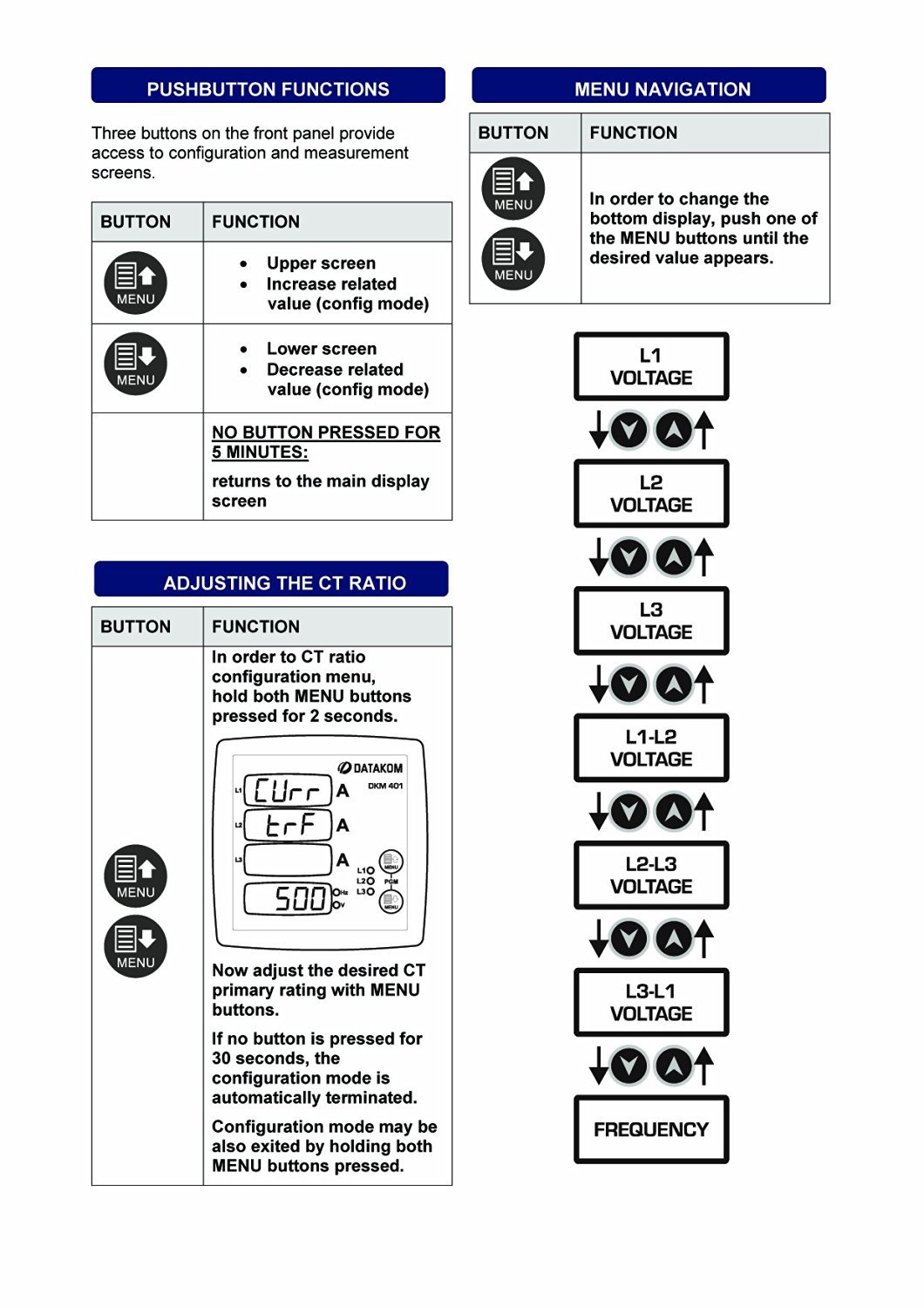 | Upper screen, Increase related value (config mode) |
| Lower screen, Decrease related value (config mode) |
| NO BUTTON PRESSED FOR 5 MINUTES: | Returns to the main display screen |
Image: Table illustrating the functions of the DKM-401's front panel buttons.
6.2. مینو نیویگیشن
To change the bottom display, press one of the MENU buttons until the desired value appears. The sequence of displayed values is as follows:
- L-1 VOLTAGE
- L-2 VOLTAGE
- L-3 VOLTAGE
- L1-L2 VOLTAGE
- L2-L3 VOLTAGE
- L3-L1 VOLTAGE
- فریکونسی
Image: Diagram showing the menu navigation flow and the order of parameters displayed on the DKM-401.
6.3. Adjusting the CT Ratio
To enter the CT ratio configuration menu, hold both MENU buttons pressed for 2 seconds. The display will show "Curr" and "ErrA" followed by the current CT ratio (e.g., "500").
Image: DKM-401 display in CT ratio adjustment mode, showing "Curr", "ErrA", and a numerical value.
Use the MENU buttons to adjust the desired CT primary rating. If no button is pressed for 30 seconds, the configuration mode automatically terminates. The configuration mode can also be exited by holding both MENU buttons pressed again.
7. تخنیکي مشخصات
د بریښنا رسولو داخلول:
- 170 - 275VAC, 45 - 66 Hz
- د مختلف AC عرضه کولو حجمtagشتون لري.
د اندازه کولو ان پټ سلسله:
- والیtage: 10 - 300 V AC (L-N), 20 - 520 V AC (L-L)
- اوسني معلومات: 0.2 - 5.5 A AC
- فریکونسی: ۲۰ - ۲۰۰۰۰ هرټز
دقت:
- والیtage: 0.5% + 1 عدد
- اوسنۍ: 0.5% + 1 عدد
- فریکونسی: 0.5% + 1 عدد
د اندازه کولو لړۍ:
- CT ratio: 5/5A to 5000/5A
د بریښنا مصرف:
- < 4 W
والیtagای بار:
- < 0.1VA په هر پړاو کې
اوسنی بار:
- < 1VA په هر پړاو کې
د حرارت درجه:
- -20°C ته +80°C (-4 تر +176°F)
اعظمي رطوبت:
- 95٪ غیر کنډیشن.
د ساتنې کچه:
- IP 54 (مخکې پینل)
- IP 30 (Back Panel)
احاطه:
- Non-flammable, RoHS compliant, ABS/PC (UL94-V0)
لګول:
- د شا د ساتلو قوسونو سره د فلش نصب کول
ابعاد:
- 102x102x53mm (WxHxD)
د پینل کټ آوټ:
- 92x92mm
وزن:
- 200 ګرامه
د EU لارښوونې:
- 2006/95/EC (LVD)
- 2004/108 / EC (EMC)
د حوالې معیارونه:
- EN 61010 (خوندیتوب)
- EN 61326 (EMC)
Image: Compilation of technical specifications for the DKM-401 Digital Multimeter.
8. ساتنه
The Datakom DKM-401 Digital Multimeter is designed for long-term, reliable operation with minimal maintenance. Follow these general guidelines:
- پاکول: Periodically clean the front panel with a soft, dry cloth. Avoid using abrasive cleaners or solvents that could damage the display or casing.
- معاینه: Regularly inspect all wiring connections for tightness and signs of wear or damage. Ensure the unit is free from dust and debris, especially around ventilation areas if any.
- د چاپیریال شرایط: ډاډ ترلاسه کړئ چې عملیاتي چاپیریال د ټاکل شوي تودوخې او رطوبت حدودو کې پاتې کیږي ترڅو د وخت دمخه ناکامۍ مخه ونیول شي.
- د کارونکي د خدمت وړ برخې نشته: The DKM-401 contains no user-serviceable parts. Do not attempt to open the enclosure, as this may void the warranty and expose you to electrical hazards.
9. ستونزه حل کول
This section provides solutions to common issues encountered with the DKM-401 Digital Multimeter. If the problem persists, contact technical support.
| ستونزه | احتمالي لامل | د حل لاره |
|---|---|---|
| No Display / Unit Off | د برېښنا نشتوالی، ناسم تارونه، فیوز چاودېدلی. | Check power connections (170-275VAC). Verify fuses are intact. Ensure wiring matches the connection diagram. |
| ناسم لوستل | Incorrect CT ratio setting, faulty wiring, external electromagnetic interference. | Verify the CT ratio setting (Section 6.3). Check all wiring for secure connections and correct polarity. Relocate the unit away from strong electromagnetic fields if possible. |
| تڼۍ بې ځوابه | Temporary software glitch, physical button damage. | Power cycle the unit (turn off and on). If buttons remain unresponsive, contact support. |
| منجمد ښکاره کول | Software error, power instability. | Power cycle the unit. Ensure stable power supply. |
10. د بسته بندۍ معلومات
- د هرې بستې ټوټې: 12 ټوټې
- د بسته اندازه: 280 x 170 x 215mm
- د بسته وزن: 2.6 کیلو ګرامه
11. تضمین او ملاتړ
Datakom products are manufactured under strict quality control standards. For warranty information, please refer to the documentation included with your purchase or visit the official Datakom webسایټ
For technical assistance, troubleshooting, or service inquiries, please contact your authorized Datakom dealer or distributor. When contacting support, please have your product model (DKM-401) and serial number available.
قانوني اعلان: Please note that this Datakom item is not sold to USA and Canada. This manual is for informational purposes only and does not constitute a warranty or guarantee.


