پیژندنه
This manual provides detailed instructions for the safe and efficient operation of your Icom ID-5100A DELUXE 144/440 Amateur Radio Mobile Transceiver. Please read this manual thoroughly before using the device to ensure proper functionality and to prevent damage.
محصول پای ته ورسیدview
The Icom ID-5100A is a VHF/UHF dual-band mobile transceiver featuring a responsive touch screen, D-STAR digital voice capabilities, and an integrated GPS receiver. It is designed for amateur radio enthusiasts seeking advanced communication features.
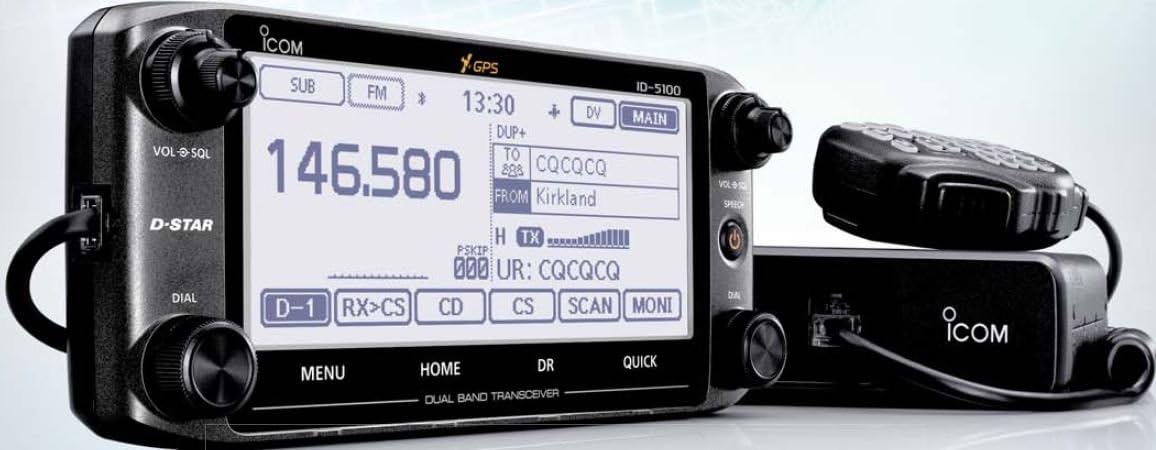
شکل 1: Icom ID-5100A DELUXE Mobile Transceiver. This image displays the main unit with its detachable control head, featuring a large touch screen display, various control knobs, and a connected microphone.
کلیدي ځانګړتیاوې:
- VHF/UHF Dual Band Operation
- د زړه راښکونکي ټچ سکرین ښودنه
- D-STAR Digital Voice and Data Modes
- Integrated GPS Receiver
- Optional Bluetooth Connectivity (requires optional module)
- Detachable Control Head for flexible installation
چمتو کول
1. خلاصول او معاینه کول
Carefully remove all components from the packaging. Verify that all items listed in the packing list are present and undamaged. If any items are missing or damaged, contact your dealer immediately.
۵.۱. د ټرانسسیور نصبول
The ID-5100A features a detachable control head for flexible installation. The main unit should be mounted in a secure, well-ventilated location, away from direct sunlight and excessive heat. The control head can be mounted separately using the optional MBA-2 Remote Head Mounting Bracket (if included or purchased separately).
- اصلي واحد: Secure the main unit using the supplied mounting bracket and screws. Ensure adequate airflow around the unit.
- د کنټرول مشر: Attach the control head to the main unit or to the MBA-2 bracket using the supplied cable. Position the control head for optimal visibility and accessibility.
3. د بریښنا پیوستون
Connect the supplied DC power cable directly to a 12V DC power source capable of supplying sufficient current (typically 13.8V DC ±15%). Ensure correct polarity: red wire to positive (+), black wire to negative (-). Avoid connecting to the vehicle's cigarette lighter socket for high-power operation.
4. د انتن پیوستون
Connect a suitable 144/440 MHz dual-band antenna to the antenna connector on the rear of the main unit. Use a high-quality coaxial cable with appropriate connectors. Ensure the antenna is properly tuned for the operating frequencies to prevent damage to the transceiver.
۱. د مایکروفون اتصال
Connect the supplied HM-207 microphone to the microphone jack on the control head. Ensure the connector is fully inserted and secured.
عملیاتي لارښوونې
1. بریښنا فعال/بند
Press and hold the power button (usually located on the control head) for approximately one second to turn the transceiver on or off.
2. Basic Frequency Selection
- Direct Entry: Use the touch screen keypad to directly enter the desired frequency.
- د ډونل ډایل: Rotate the main tuning dial to adjust the frequency in steps.
- د حافظې چینلونه: Access stored frequencies by navigating through memory channels.
3. Volume and Squelch Adjustment
- Volume (VOL): Rotate the VOL knob to adjust the audio output level.
- سکوییلچ (SQL): Rotate the SQL knob to set the squelch level, which mutes background noise when no signal is present. Adjust until the noise disappears but weak signals can still be heard.
4. D-STAR Operation
The ID-5100A supports D-STAR digital voice and data communication. To operate in D-STAR mode:
- Select the D-STAR mode from the touch screen menu.
- Configure your call sign and other D-STAR parameters in the settings.
- Use the DR (D-STAR Repeater) function to easily select and connect to D-STAR repeaters.
۶.۴. د جي پي ایس دندې
The integrated GPS receiver provides location data for D-STAR operations (e.g., sending position data) and other features. Ensure the GPS antenna has a clear view د غوره استقبال لپاره د آسمان څخه.
6. مینو نیویگیشن
Access various settings and functions through the touch screen menu. Tap the "MENU" button to enter the main menu, then navigate using the on-screen icons and buttons.
ساتنه
1. پاکول
Wipe the transceiver and control head with a soft, dry cloth. For stubborn dirt, use a cloth lightly dampened with water. Avoid using harsh chemicals, solvents, or abrasive cleaners, as these can damage the finish and display.
2. د فرم ویئر تازه معلومات
Periodically check the ICOM website for available firmware updates. Firmware updates can improve performance, add new features, or fix bugs. Follow the instructions provided by ICOM carefully when performing updates.
3. ذخیره کول
When not in use for extended periods, store the transceiver in a cool, dry place, away from direct sunlight and extreme temperatures. Disconnect the power cable and antenna.
د ستونزو حل کول
| ستونزه | احتمالي لامل | د حل لاره |
|---|---|---|
| هیڅ ځواک نشته | Power cable disconnected; Blown fuse; Incorrect polarity. | Check power cable connections; Replace fuse; Verify correct polarity. |
| غږ نشته | Volume too low; Squelch set too high; Speaker disconnected. | Increase volume; Decrease squelch level; Check speaker connection. |
| نشي لیږدولی | Antenna not connected; Incorrect frequency/mode; Microphone not connected. | Connect antenna; Verify frequency and mode settings; Connect microphone. |
| جي پي ایس سیګنال نه ترلاسه کوي | GPS antenna obstructed; Poor satellite visibility. | Ensure GPS antenna has clear view of sky; Move to an open area. |
مشخصات
| فیچر | تفصیل |
|---|---|
| د ماډل نوم | ID-5100A Deluxe |
| د فریکونسی رینج | 144/440 MHz (VHF/UHF Dual Band) |
| ښودل | Touchscreen, 5.5 Inches |
| ځانګړي ځانګړتیاوې | D-STAR, Internal GPS, Detachable Control Head |
| ارتباط | USB (for data/programming), Optional Bluetooth |
| د بریښنا اړتیا | ۲۴ ولټه ډي سي (نوم) |
| ابعاد (اصلي واحد) | نږدې ۹.۶۵ x ۸.۵۸ x ۳.۳۱ انچه (د بستې ابعاد) |
| وزن | تقریبا ۸.۸ اونس (د توکو وزن) |
| شاملې برخې | GPS Receiver, Antenna |
تضمین او ملاتړ
For warranty information, please refer to the warranty card included with your product or visit the official ICOM website. Technical support is available through authorized ICOM dealers or directly from ICOM customer service. Please have your model number and serial number ready when contacting support.
یادونه: مشخصات د محصول د ښه والي لپاره پرته له خبرتیا بدلون مومي.


