1. پیژندنه
The Mastech MS6612 is a digital luxmeter designed for measuring illuminance. It features a large LCD display with backlight and a bar graph for easy reading. This device offers automatic and manual range switching, data hold, peak value measurement, relative value measurement, and zero calibration functions. It is capable of measuring up to 200,000 Lux or 20,000 Foot-Candles (Fc).
2. د خوندیتوب معلومات
Please read and understand all safety instructions before operating the device. Failure to follow these instructions may result in injury or damage to the meter.
- Do not operate the meter in environments with explosive gas, vapor, or dust.
- د میټر د سختې تودوخې یا لوړې رطوبت سره د مخ کیدو څخه ډډه وکړئ.
- که چیرې میټر د اوږدې مودې لپاره نه کارول کیږي نو بیټرۍ لرې کړئ ترڅو د لیکیدو مخه ونیسي.
- د میټر د ترمیم یا تعدیل هڅه مه کوئ. ټولې خدمات وړ پرسونل ته راجع کړئ.
- میټر پاک او وچ وساتئ.
3. محصول ختم شوview
The Mastech MS6612 Digital Luxmeter consists of a main unit with an LCD display and control buttons, and a silicon photoelectric diode sensor for light detection.
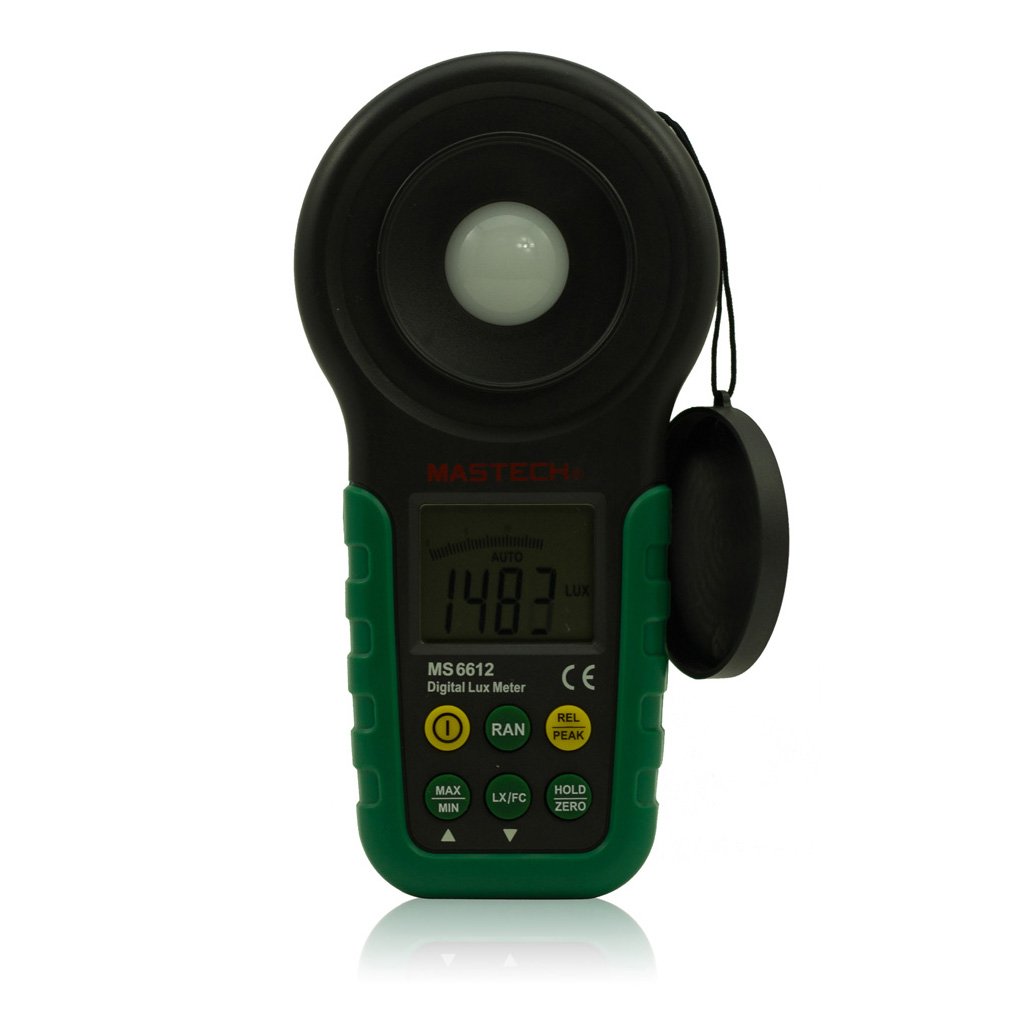
شکل 1: مخکی view of the Mastech MS6612 Digital Luxmeter. This image shows the main body of the device, including the large LCD screen, control buttons, and the light sensor located at the top.
مهمې برخې:
- د LCD نندارې: 3½ digits with analog bar display for clear readings.
- د کنټرول تڼۍ: For various functions such as power, range, hold, peak, relative, zero, unit conversion, and mute.
- د رڼا سینسر: Silicon photoelectric diode for accurate light measurement.
- د بیټرۍ کڅوړه: د 9V بیټرۍ لپاره په شا کې موقعیت لري.
4. ترتیب کول
4.1 د بیټرۍ نصب کول
- د میټر په شا کې د بیټرۍ د برخې پوښ ومومئ.
- د بیټرۍ د خونې د خلاصولو لپاره د سکریو ډرایور (که اړتیا وي) وکاروئ.
- Insert one 9V (IEC 6LR61) battery, observing the correct polarity (+/-).
- د بیټرۍ کمپارټ پوښ بدل کړئ او خوندي یې کړئ.
Note: A low battery indicator will appear on the display when the battery needs replacement.
5. عملیاتي لارښوونې
۸ پاور آن/بند
- فشار ورکړئ پاور د میټر چالانولو لپاره ت buttonۍ.
- فشار ورکړئ پاور button again to turn the meter off.
- The meter features an automatic power-off function, which will turn off the device if no keys are operated for more than 10 minutes.
۷.۱ اساسي اندازه ګیري
- میټر چالان کړئ.
- Point the light sensor towards the light source to be measured.
- The illuminance value will be displayed on the LCD. The meter automatically selects the appropriate range.
5.3 Range Switching (Auto/Manual)
The MS6612 supports both automatic and manual range switching.
- In auto-ranging mode, the meter automatically selects the best measurement range.
- فشار ورکړئ بدل کړئ button to switch between auto and manual ranging modes. In manual mode, you can cycle through available ranges.
- If the measured value exceeds the current range in manual mode, the LCD will display "OL" (Overload).
5.4 د ډیټا هولډ فعالیت
په ښودنه کې د اوسني لوستلو د کنګل کولو لپاره:
- فشار ورکړئ هوډ button. The "HOLD" indicator will appear on the display.
- فشار ورکړئ هوډ button again to release the data hold and resume live measurement.
5.5 Maximum/Minimum Value Measurement
ته view the maximum or minimum illuminance recorded during a measurement session:
- فشار ورکړئ MAX/MIN button. The display will show the maximum recorded value.
- مطبوعاتي MAX/MIN again to cycle to the minimum recorded value.
- مطبوعاتي MAX/MIN a third time to exit this mode and return to live measurement.
5.6 Peak Value Measurement
This function captures the highest instantaneous illuminance value.
- فشار ورکړئ PEAK button to activate peak measurement. The "PEAK" indicator will appear.
- The display will show the highest illuminance detected since activating the function.
- مطبوعاتي PEAK بیا د دې حالت څخه وتلو لپاره.
5.7 Relative Value Measurement
This function allows you to set a reference point and measure the difference from that point.
- In a stable light environment, press the REL button. The current reading becomes the reference, and the display will show "0".
- Subsequent measurements will show the difference (positive or negative) from this reference value.
- مطبوعاتي REL again to exit relative measurement mode.
5.8 Zero Calibration Function
To ensure accuracy, especially in low light conditions, perform a zero calibration.
- Place the light sensor in a completely dark environment (e.g., cover it with an opaque cap).
- فشار ورکړئ صفر button. The display should read "0.00".
- This calibrates the meter to account for any residual sensor output in darkness.
5.9 Unit Conversion (Fc/Lux)
The meter can display measurements in Lux or Foot-Candles (Fc).
- فشار ورکړئ UNIT button to toggle between Lux and Fc units.
- The selected unit will be indicated on the LCD.
- تبادله: 1 Fc = 10.764 Lux; 1 Lux = 0.09290 Fc.
5.10 Touch Tone and Mute Function
The meter may emit a touch tone when buttons are pressed. This can be muted.
- Refer to the specific button on your device for muting the touch tone.
6. ساتنه
6.1 پاکول
- د میټر سی پاک کړئasing د نرم سره، damp ټوکر د کثافاتو پاکوونکي یا محلول مه کاروئ.
- Keep the light sensor clean and free from dust or smudges to ensure accurate readings. Use a soft, lint-free cloth.
6.2 د بیټرۍ بدلول
Replace the 9V battery when the low battery indicator appears on the display. Follow the steps in Section 4.1 for battery installation.
6.3 ذخیره کول
- If storing the meter for an extended period, remove the battery to prevent leakage and potential damage.
- میټر په یخ او وچ ځای کې وساتئ، د مستقیم لمر وړانګو او سختې تودوخې څخه لرې.
7. ستونزه حل کول
| ستونزه | احتمالي لامل | د حل لاره |
|---|---|---|
| میټر نه چالانېږي. | مړ یا په غلط ډول نصب شوی بیټرۍ. | د بیټرۍ قطبیت وګورئ، بیټرۍ بدله کړئ. |
| "OL" په سکرین کې ښودل شوی. | Measurement value exceeds current range (manual mode). | Switch to a higher range or enable auto-ranging. |
| ناسم لوستل. | Dirty sensor, uncalibrated zero, or incorrect range. | Clean sensor, perform zero calibration, ensure correct range. |
| د ټیټ بیټرۍ شاخص. | د بیټرۍ ځواک ټیټ دی. | د 9V بیټرۍ ځای په ځای کړئ. |
8. مشخصات
| پیرامیټر | ارزښت |
|---|---|
| د اندازه کولو لړۍ | 20, 200, 2000, 20000, 200000 Lux 20, 200, 2000, 20000 Fc |
| ښودل | 3½ digits, max reading of 1999, with analog bar display |
| سینسر | Silicon photoelectric diode |
| Measured Spectral Range | 320~730nm |
| Sampد نرخ کچه | ≥2 times/s |
| د عملیاتي حرارت درجه | -10~50 °C, max 80% RH (Non-Condensed) |
| د ذخیرې د حرارت درجه | -10~50 °C, max 80% RH (Non-Condensed, removing batteries) |
| عملیاتي چاپیریال | د کور دننه کارول |
| لوړوالی | 2000m highest |
| د بریښنا رسول | 1 x 9V, IEC 6LR61 battery |
| د بیټرۍ ژوند | نږدې 200 ساعته |
| ابعاد (HxWxD) | 190 mm x 89 mm x 42.5 mm ( 7.48 x 3.50 x 1.67 انچه) |
| وزن (د بیټرۍ پرته) | نږدې 360 g (12.7 اوز) |
| وزن (د بیټرۍ سره) | نږدې 420 g (14.8 اوز) |
Illuminance Unit Conversion:
- 1 Foot-Candle (Fc) = 10.764 Lux
- 1 Lux = 0.09290 Foot-Candle (Fc)
9. تضمین او ملاتړ
Mastech products are designed for reliability and performance. For specific warranty information, please refer to the warranty card included with your purchase or visit the official Mastech website. For technical support or service inquiries, please contact Mastech customer service through their official channels.
مهرباني وکړئ د تضمین ادعاوو لپاره د پیرود ثبوت په توګه خپل د پیرود رسید وساتئ.