پیژندنه
د پیرودلو لپاره مننهasing the Marantz CD5005 CD Player. This manual provides detailed instructions for the proper setup, operation, and maintenance of your new audio component. The CD5005 is designed to deliver high-quality audio playback from various disc formats, including CD, CD-R, CD-RW, MP3, and WMA files. It features high-quality audio components such as the CS4398 DAC and Marantz HDAM SA2, ensuring exceptional sound reproduction. Please read this manual thoroughly before using the unit to ensure optimal performance and longevity.
د خوندیتوب لارښوونې
Always follow these basic safety precautions when operating the CD5005 CD Player:
- د بریښنا سرچینه: واحد یوازې د حجم د AC آوټ لیټ سره وصل کړئtage په شا پینل کې مشخص شوی.
- وینټیلیشن: Ensure adequate ventilation. Do not block ventilation openings. Avoid installing in confined spaces.
- اوبه او رطوبت: واحد د باران، رطوبت یا ډیر رطوبت سره مه مخ کوئ. په واحد کې د مایعاتو ډک شوي شیان مه ځای پر ځای کوئ.
- تودوخه: واحد د تودوخې سرچینو لکه ریډیټرونو، د تودوخې راجسترونو، بخاریو، یا نورو وسایلو څخه لرې وساتئ چې تودوخه تولیدوي.
- پاکول: د پاکولو دمخه د دیوال له ساکټ څخه واحد خلاص کړئ. یوازې وچ ټوکر وکاروئ.
- خدمت کول: د واحد د خدمت کولو هڅه مه کوئ. ټول خدمتونه وړ خدماتو پرسونل ته راجع کړئ.
- د ډیسک اداره کول: Handle discs by their edges. Avoid touching the shiny surface. Keep discs clean and free from scratches.
د بسته محتويات
ډاډ ترلاسه کړئ چې ستاسو کڅوړه لاندې توکي لري:
- Marantz CD5005 CD Player
- د جلا کیدو وړ بریښنا تار
- Audio Cables (L/R Analog)
- Digital Audio Cable (Coaxial)
- د ریموټ کنټرول واحد
- AA Batteries for Remote Control (x2)
- Quick Setup Guide (Printed)
- Interactive CD-ROM Manual (except Japan)
محصول پای ته ورسیدview
مخکینۍ پینل

شکل 1: مخکی view of the Marantz CD5005 CD Player. This image shows the disc tray, display, control buttons, and headphone jack on the front panel.
The front panel of the CD5005 features the disc tray, a clear dual-line display, essential playback control buttons (Play, Pause, Stop, Skip), and a headphone output with a dedicated volume control. The power button is located on the left side.
شاته پینل

شکل 2: شاته view of the Marantz CD5005 CD Player. This image displays the various input and output terminals, including analog audio outputs, digital coaxial and optical outputs, and the AC power inlet.
The rear panel provides connectivity options including gold-plated analog audio outputs, digital coaxial output, and digital optical output for connecting to an amplifier or receiver. A remote control input/output terminal is also present for system integration, along with the detachable AC power inlet.
ریموټ کنټرول
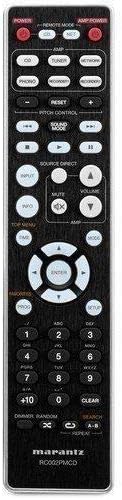
Figure 3: The remote control unit for the Marantz CD5005 CD Player. This remote allows for comprehensive control of the CD player's functions, including playback, track selection, pitch control, and display dimmer.
The included remote control unit provides full functionality for the CD5005, including features not available on the front panel such as pitch control, display dimmer, track randomization, and various repeat functions. It also allows for control of other compatible Marantz components.
چمتو کول
1. ځای پرځای کول
Place the CD5005 on a stable, level surface away from direct sunlight, heat sources, and excessive vibration. Ensure there is adequate space around the unit for proper ventilation.
۳. د آډیو کیبلونو نښلول
Choose one of the following methods to connect the CD5005 to your ampلایفیر یا رسیور:
- انلاګ پیوستون: Use the supplied L/R analog audio cables to connect the AUDIO OUT jacks on the CD5005 to the corresponding CD input jacks on your amplifier. Ensure red plugs connect to red jacks (right channel) and white plugs to white jacks (left channel).
- Digital Coaxial Connection: Use the supplied digital coaxial cable to connect the COAXIAL DIGITAL AUDIO OUT jack on the CD5005 to a digital coaxial input on your ampژغورونکی یا اخیستونکی.
- ډیجیټل آپټیکل اتصال: Use an optical digital audio cable (not supplied) to connect the OPTICAL DIGITAL AUDIO OUT jack on the CD5005 to a digital optical input on your ampژغورونکی یا اخیستونکی.
یادونه: Do not connect both analog and digital outputs to the same input on your amplifier simultaneously, as this may cause interference or unexpected behavior. Select the appropriate input on your amplifier after connecting.
۱. د بریښنا تار نښلول
Connect the detachable power cord to the AC inlet on the rear panel of the CD5005, then plug the other end into a suitable AC wall outlet.
4. د ریموټ کنټرول بیټرۍ نصب کول
Open the battery compartment on the back of the remote control unit. Insert two AA batteries, ensuring correct polarity (+/-) as indicated inside the compartment. Close the cover securely.
عملیاتي لارښوونې
Basic CD Playback
- فشار ورکړئ پاور د واحد د فعالولو لپاره په مخکینۍ پینل یا ریموټ کنټرول کې تڼۍ.
- فشار ورکړئ خلاص/بند د ډیسک ټری خلاصولو لپاره ت buttonۍ.
- Place a CD, CD-R, CD-RW, MP3, or WMA disc onto the disc tray with the label side facing up.
- فشار ورکړئ خلاص/بند د ډیسک ټری د بندولو لپاره بیا تڼۍ. واحد به ډیسک ولولي.
- فشار ورکړئ لوبه وکړئ د بيا غږولو پيلولو لپاره ت buttonۍ.
- د پلې بیک د بندولو لپاره، فشار ورکړئ وقفه تڼۍ. د بیا پیلولو لپاره بیا فشار ورکړئ.
- د بیاځلې ودریدو لپاره ودروئ تڼۍ
- د کارولو SKIP د ټریکونو ترمنځ د تګ راتګ لپاره تڼۍ.
Advanced Features (Remote Control)
- د پیچ کنټرول: د کارولو د پیچ کنټرول buttons on the remote to adjust the playback speed and pitch.
- CD Text Display: If a disc supports CD Text, the display will show track and artist information. Use the ښودل button on the remote to cycle through display modes.
- پلے بیک تکرار کړئ: فشار ورکړئ تکرار کړئ button on the remote to select repeat modes (e.g., repeat one track, repeat all tracks, repeat A-B segment).
- ناڅاپي غږول: فشار ورکړئ بې ترتیبه button on the remote to play tracks in a random order.
- د هیډفون محصول: Connect headphones to the front panel headphone jack. Adjust the لیول knob next to the jack to control headphone volume independently. Note that plugging in headphones does not mute the main analog or digital outputs.
- د اپلیکیشن کنټرول: The CD5005 supports app control via RC-5 with a compatible Marantz network player. Refer to the network player's manual for details on this integration.
ساتنه
د واحد پاکول
Wipe the exterior surfaces of the CD5005 with a soft, dry cloth. Do not use abrasive cleaners, waxes, or solvents, as these can damage the finish. Avoid spraying liquids directly onto the unit.
Disc Handling and Care
- Always hold discs by their edges to prevent fingerprints and scratches on the playing surface.
- If a disc is dirty, wipe it gently from the center outwards with a soft, lint-free cloth. Do not use circular motions.
- Do not use solvents such as benzene, thinner, or commercially available record cleaners, as they may damage the disc.
- کله چې ډیسکونه نه کارول کیږي نو په خپلو بکسونو کې یې وساتئ ترڅو د دوړو او سکریچونو څخه یې خوندي کړئ.
- Avoid exposing discs to direct sunlight or high temperatures for extended periods.
د ستونزو حل کول
If you experience issues with your Marantz CD5005, refer to the following common problems and solutions:
| ستونزه | احتمالي لامل | د حل لاره |
|---|---|---|
| هیڅ ځواک نشته | د برېښنا تار په خوندي ډول نه دی تړل شوی. | د واحد او دیوال آوټ لیټ سره د بریښنا تار اتصال وګورئ. |
| د غږ تولید نشته | د آډیو کیبل ناسم اتصال؛ غلط ان پټ غوره شوی دی ampژوندی؛ ampد لایفیر حجم ډیر ټیټ دی. | Verify audio cable connections. Select the correct input on your amplifier. Increase ampد لوړولو حجم. |
| Disc does not play / "No Disc" error | Disc inserted incorrectly; disc is dirty or scratched; disc format not supported. | Insert disc with label side up. Clean the disc. Try a different disc. Ensure disc format (CD, CD-R/RW, MP3, WMA) is supported. |
| Skipping or intermittent playback | Disc is dirty or scratched; unit is subject to vibration. | Clean the disc. Place the unit on a stable surface away from vibrations. |
| ریموټ کنټرول کار نه کوي | Batteries are depleted or inserted incorrectly; obstacle between remote and unit; remote sensor blocked. | Replace batteries, ensuring correct polarity. Remove any obstacles. Ensure the remote sensor on the unit is clear. |
که چیرې د دې حلونو هڅه کولو وروسته هم ستونزه دوام ومومي، مهرباني وکړئ د مارانټز پیرودونکي ملاتړ سره اړیکه ونیسئ.
مشخصات
| فیچر | تفصیل |
|---|---|
| د ماډل شمیره | CD5005 |
| د ډیسک مطابقت | سي ډي، سي ډي-آر/آر ډبليو، ايم پي ۳، ډبليو اېم اې |
| ډیجیټل څخه انلاګ کنورټر (DAC) | CS4398 |
| Analog Output Circuit | Marantz HDAM SA2 |
| محصولات | Analog L/R (Gold-plated), Digital Coaxial, Digital Optical, Headphone |
| ځانګړي ځانګړتیاوې | Pitch Control, CD Text Display, App Control (via RC-5 with Marantz network player), Auto Standby |
| د بریښنا مصرف (ستونزه) | ټیټ |
| د محصول ابعاد (W x D x H) | 17.3 x 14.6 x 4.1 انچه (43.9 x 37.1 x 10.4 سانتي متره) |
| د توکي وزن | ۶ پونډه (۳ کیلو ګرامه) |
| جوړونکی | مارانتز |
| رنګ | تور |
تضمین او ملاتړ
For warranty information and customer support, please refer to the warranty card included with your product or visit the official Marantz webسایټ. د تضمین ادعاوو لپاره د پیرود ثبوت وساتئ.
د مارانټز رسمي Webسایټ: www.marantz.com


