1. پیژندنه
Thank you for choosing the Mastech MS2115B True RMS Digital Clamp Meter. This instrument is designed for safe and accurate measurement of various electrical parameters. This manual provides essential information for the proper and safe operation, maintenance, and troubleshooting of your device. Please read this manual thoroughly before use and retain it for future reference.
2. د خوندیتوب معلومات
To ensure safe operation and service of the meter, follow these safety precautions:
- تل د محلي او ملي خوندیتوب کوډونو ته غاړه کیږدئ.
- که چیرې میټر خراب ښکاري یا د ازموینې لیډونو موصلیت خراب شوی وي نو مه یې کاروئ.
- هیڅکله د ټاکل شوي حجم څخه ډیر مه پلي کوئtage، لکه څنګه چې په میټر باندې نښه شوی، د ټرمینلونو ترمنځ یا د هر ټرمینل او ځمکې ترمنځ.
- د حجم سره کار کولو پرمهال خورا احتیاط وکاروئtagد 60V DC یا 30V AC RMS څخه پورته. دا حجمونهtagد شاک خطر رامنځته کوي.
- Keep your fingers behind the probe barriers when making measurements.
- د دندو بدلولو دمخه د ازموینې لیډونه له سرکټ څخه جلا کړئ.
- د بیټرۍ پوښ خلاصولو دمخه د میټر څخه د ازموینې لیډونه لرې کړئ.
- کله چې د ټیټ بیټرۍ شاخص څرګند شي نو بیټرۍ ژر تر ژره بدله کړئ ترڅو د غلط لوستلو څخه مخنیوی وشي.
- میټر په چاودیدونکو ګازو، بخاراتو یا دوړو چاپیریال کې مه چلوئ.
- ډاډ ترلاسه کړئ چې clamp jaw is fully closed when taking current measurements.
3. محصول ختم شوview
The Mastech MS2115B is a True RMS digital clamp meter designed for professional and home use. It offers a wide range of measurement capabilities and features for electrical testing.
3.1 کلیدي ځانګړتیاوې
- Dual Display with 6000 counts for clear readings.
- Jaw size up to Ø40mm (1.6 inch) for various conductor sizes.
- Auto Ranging and Manual Ranging capabilities.
- DC/AC current measurement up to 1000A.
- Tests AC/DC voltage and current, resistance, capacitance, frequency, and duty cycle.
- True RMS (Root Mean Square) measurement for accurate readings on non-sinusoidal waveforms.
- NCV (غیر تماس والی جلدtage Detector) for identifying live wires without direct contact.
- Inrush current measurement for motor startup analysis.
- Data Hold, MAX/MIN Value Measurement, and Relative Measurement functions.
- Diode test and Continuity Buzzer (<50 ohm).
- Display Backlight and Work Light for use in dimly lit areas.
- Low Battery Display and Auto Power Off for extended battery life.
- USB interface for data communication with Windows OS.
3.2 اجزا
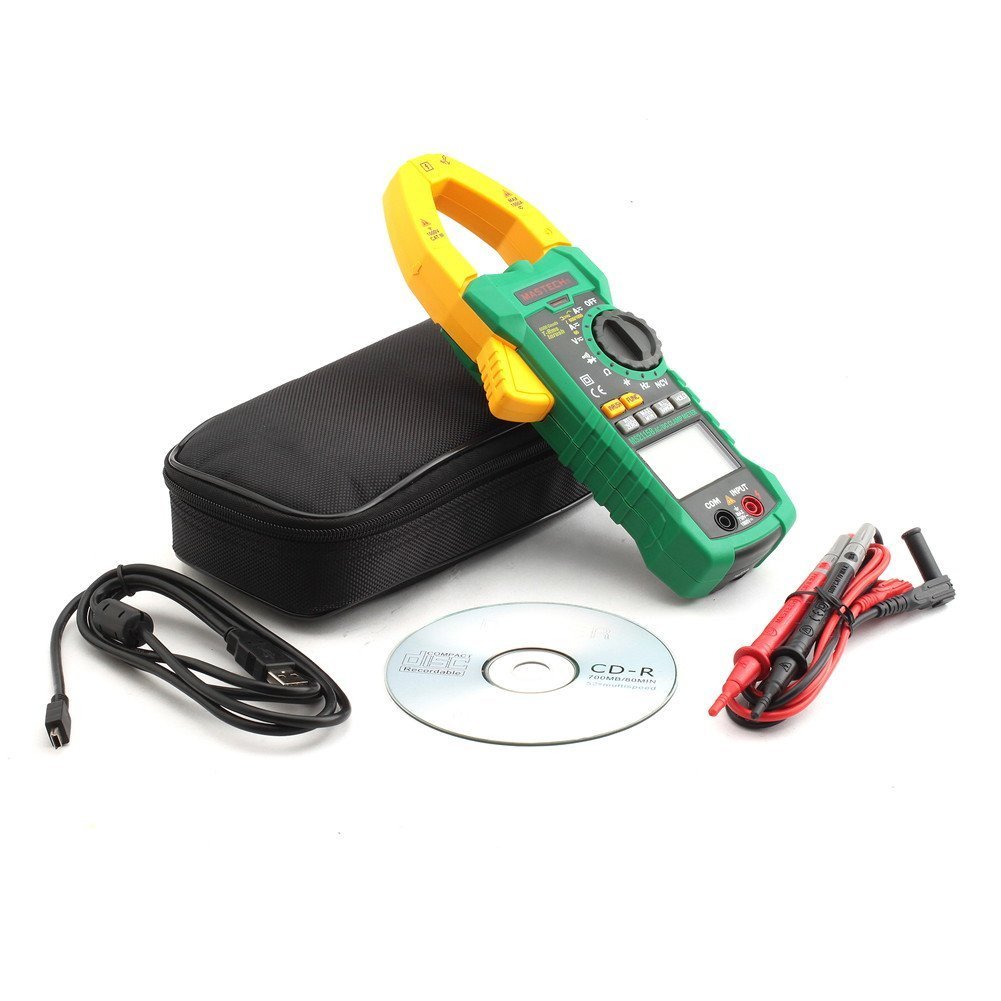
Familiarize yourself with the main components of the MS2115B clamp متره:


4. ترتیب کول
4.1 د بیټرۍ نصب کول
The Mastech MS2115B requires batteries for operation. Please note that batteries are not included in the package.
- ډاډ ترلاسه کړئ چې میټر بند دی او د ازموینې ټولې لیډونه منقطع کړئ.
- د میټر په شا کې د بیټرۍ د برخې پوښ ومومئ.
- د بیټرۍ پوښ خوندي کولو لپاره د سکرو ډرایور څخه کار واخلئ.
- په احتیاط سره د بیټرۍ پوښ لرې کړئ.
- Insert the required batteries, observing correct polarity (+ and -).
- د بیټرۍ پوښ بدل کړئ او د سکرو سره یې خوندي کړئ.

۶.۲ د ټیسټ لیډونو نښلول
د voltage, resistance, capacitance, frequency, diode, and continuity measurements, connect the test leads:
- Insert the red test lead into the "INPUT" terminal.
- Insert the black test lead into the "COM" (common) terminal.
4.3 USB Interface Setup (for Windows OS)
The MS2115B features a USB interface for data logging and analysis on a computer running Windows OS.
- Install the provided communication software from the included CD onto your Windows computer.
- Connect the USB communication cable to the meter's USB port and to an available USB port on your computer.
- Follow the software instructions to establish communication and begin data transfer.
5. عملیاتي لارښوونې
5.1 Power On/Off and Auto Power Off
- To power on, rotate the rotary switch from "OFF" to any desired measurement function.
- To power off, rotate the rotary switch back to "OFF".
- The meter features an Auto Power Off function to conserve battery life. It will automatically turn off after approximately 15 minutes of inactivity. To disable this feature temporarily, refer to the full user manual for specific button combinations during power-on.
د دندې تonsۍ
- FUNC: Selects between different measurement modes within a single rotary switch position (e.g., AC/DC voltage, Diode/Continuity).
- رینج: Toggles between auto-ranging and manual ranging. In manual ranging, press repeatedly to cycle through ranges.
- هولډ: د اوسني ښودنې لوستل کنګل کوي. د خوشې کولو لپاره بیا فشار ورکړئ.
- MAX/MIN: Displays the maximum or minimum reading recorded since activation. Press repeatedly to cycle through MAX, MIN, and current readings.
- REL/صفر: Activates relative measurement mode, displaying the difference between the current reading and a stored reference value. Also used for zeroing DC current readings.
- INRUSH: Measures the inrush current (startup current) of motors or other inductive loads.
- Backlight/Work Light: Activates the display backlight and work light for improved visibility.
۴.۳ د اندازه کولو طرزالعملونه
5.3.1 DC/AC حجمtage اندازه کول
- Connect the red test lead to the "INPUT" terminal and the black test lead to the "COM" terminal.
- Rotate the rotary switch to the V (والtage) position. Press FUNC to select between DC V= یا AC V~.
- Touch the test probes to the desired test points in the circuit.
- ټوک ولولئtage ارزښت په نندارتون کې.
5.3.2 DC/AC Current Measurement (Clamp)
- Rotate the rotary switch to the A (Current) position. Press FUNC to select between DC A= یا AC A~.
- cl خلاص کړئamp jaw and enclose only one conductor of the circuit. Ensure the jaw is fully closed.
- For DC current, press REL/ZERO to zero the display before measurement if needed.
- په ښودنه کې اوسنی ارزښت ولولئ.
5.3.3 د مقاومت اندازه کول
- Connect test leads as for voltage.
- Rotate the rotary switch to the Ω (مقاومت) موقعیت.
- ډاډ ترلاسه کړئ چې د ازموینې لاندې سرکټ غیر انرژي شوی دی.
- Touch the test probes across the component or circuit to measure resistance.
- په ښودنه کې د مقاومت ارزښت ولولئ.
5.3.4 د ظرفیت اندازه کول
- Connect test leads as for voltage.
- Rotate the rotary switch to the CAP (ظرفیت) موقعیت.
- د اندازه کولو دمخه ډاډ ترلاسه کړئ چې کپیسیټر په بشپړ ډول خارج شوی دی.
- د کپیسیټر ټرمینلونو په اوږدو کې د ازموینې پروبونو ته لمس کړئ.
- په ښودنه کې د ظرفیت ارزښت ولولئ.
۵.۶ د فریکونسۍ او دندې دورې اندازه کول
- Connect test leads as for voltage.
- Rotate the rotary switch to the هرز /٪ (Frequency/Duty Cycle) position.
- مطبوعاتي FUNC to toggle between Frequency (Hz) and Duty Cycle (%).
- Touch the test probes to the signal source.
- په نندارتون کې د فریکونسۍ یا دندې دورې ارزښت ولولئ.
۵.۵ ډایډ ازموینه او دوام
- Connect test leads as for voltage.
- Rotate the rotary switch to the ډایډ/دوام موقعیت
- مطبوعاتي FUNC to select between Diode test or Continuity test.
- For Diode Test: Touch the red probe to the anode and the black probe to the cathode. The display shows the forward voltage غورځول. د خلاص سرکټ د چک کولو لپاره پروبونه برعکس کړئ.
- For Continuity Test: Touch the probes to the circuit. A continuous beep indicates continuity (resistance less than 50 ohms).
۵.۴ NCV (غیر اړیکې والیومtage) کشف
- Rotate the rotary switch to the NCV موقعیت
- د cl پورته برخه حرکت وکړئamp meter near a conductor or outlet.
- The meter will emit an audible beep and the NCV indicator will light up if AC voltage کشف شوی دی.
۶.۱.۲ د ننوتلو اوسني اندازه کول
- Rotate the rotary switch to the A~ (AC Current) position.
- فشار ورکړئ INRUSH تڼۍ
- cl خلاص کړئamp jaw and enclose only one conductor of the circuit where the inrush current is to be measured.
- Turn on the device or motor. The meter will capture and display the peak inrush current.
6. ساتنه
6.1 پاکول
- په وخت سره قضیه د اعلان سره پاک کړئamp ټوکر او نرم صابون. د کثافاتو او محلولونو څخه کار مه اخلئ.
- د ننوتلو ټرمینلونه له خاورې او رطوبت څخه پاک وساتئ.
6.2 د بیټرۍ بدلول
کله چې د ټیټ بیټرۍ شاخص په ډسپلې کې څرګند شي، نو سمدلاسه بیټرۍ بدل کړئ ترڅو دقیق لوستل ډاډمن شي. د بیټرۍ نصبولو لارښوونو لپاره 4.1 برخې ته مراجعه وکړئ.
6.3 ذخیره کول
- If the meter is not used for an extended period, remove the batteries to prevent leakage and damage.
- میټر په یخ او وچ ځای کې وساتئ، د مستقیم لمر وړانګو او سختې تودوخې څخه لرې.
7. ستونزه حل کول
If you encounter issues with your Mastech MS2115B, refer to the following common troubleshooting steps:
| ستونزه | احتمالي لامل | د حل لاره |
|---|---|---|
| میټر نه چالانېږي. | مړه یا په غلط ډول نصب شوي بیټرۍ. | د بیټرۍ قطبیت وګورئ؛ بیټرۍ بدل کړئ. |
| هیڅ لوستل یا "OL" نه ښودل کیږي. | Open circuit, out of range, or incorrect function selected. | Check circuit connections, select appropriate range/function, ensure continuity. |
| ناسم لوستل. | Low battery, dirty test leads/terminals, external interference. | Replace batteries, clean leads/terminals, move away from strong electromagnetic fields. |
| Auto Power Off activates too quickly. | Normal operation (15 min inactivity). | Press any button or rotate the switch to reset the timer. Refer to the full manual to disable this feature if needed. |
| Clamp current reading is zero or incorrect. | Multiple conductors in jaw, jaw not fully closed, DC current not zeroed. | Ensure only one conductor is in the jaw, close jaw completely, press REL/ZERO for DC current. |
If the problem persists after trying these steps, please contact Mastech customer support or your local distributor for assistance.
8. تخنیکي مشخصات
The following table outlines the technical specifications for the Mastech MS2115B Digital Clamp متره:
| د اندازه کولو دنده | رینج | دقت |
|---|---|---|
| DC Voltage | ۲۰۰ ملی وولټ / ۲ ولټ / ۲۰ ولټ / ۲۰۰ ولټ / ۶۰۰ ولټ | ±(0.5% + 3) for 600mV-600V, ±(0.8% + 2) for 1000V |
| AC Voltage | ۲۰۰ ملی وولټ / ۲ ولټ / ۲۰ ولټ / ۲۰۰ ولټ / ۶۰۰ ولټ | ±(0.8% + 3) for 600mV-600V, ±(1% + 4) for 750V |
| DC اوسنی | 60A/600A/1000A | ± (3.0٪ + 3) |
| AC اوسنی | 60A/600A/1000A | ± (2.5٪ + 3) |
| مقاومت | 600Ω / 6kΩ / 60kΩ / 600kΩ / 6MΩ / 60MΩ | ±(1.0% + 3) for 600Ω-6MΩ, ±(1.5% + 3) for 60MΩ |
| ظرفیت | 6nF / 60nF / 600nF / 6uF / 60uF / 600uF / 6mF / 60mF | ± (4.0٪ + 3) |
| Frequency (from Clamp) | 0 ~ 10kHz | ± (1.5٪ + 5) |
| Frequency (AC Voltage) | 0 ~ 10kHz | ± (1.5٪ + 5) |
| د منطق فریکونسی | 0،60 ~ XNUMX،XNUMXMHz | ± (0.5٪ + 3) |
| د دندې سایکل | 10% ~ 90% | ±3.0% |
| د ډایډ ټیسټ | 2.7V | مخکینی ټوکtage غورځول |
| دوامدار بجر | <50 ohm | د اوریدو وړ غږ |
عمومي مشخصات:
- ښکاره کول: Dual Display, 6000 counts
- د ژامې خلاصول: Ø40mm (1.6 انچه)
- ریښتینی RMS: هو
- NCV: هو
- داخلېدل: هو
- د معلوماتو ساتل: هو
- MAX/MIN: هو
- نسبي اندازه کول: هو
- Backlight/Work Light: هو
- د ټیټ بیټرۍ نښې: هو
- اتومات بریښنا بند: هو
- USB انٹرفیس: Yes (Windows OS compatible)
- د بریښنا سرچینه: د بیټرۍ چلول (بیټرۍ پکې شاملې نه دي)
- ابعاد: نږدې 26 x 14 x 6.6 سانتي متره
- وزن: تقریبا 720 ګرامه
- جوړونکی: ماسټر
- د ماډل شمیره: د MS2115B
- ASIN: B00LD8IIJS
- UPC: 702382755386, 702382755881, 706551142168
9. تضمین او ملاتړ
For warranty information, please refer to the documentation provided with your purchase or contact the seller directly. Mastech products typically come with a manufacturer's warranty against defects in materials and workmanship.
For technical support, troubleshooting assistance beyond this manual, or inquiries about replacement parts, please contact Mastech customer service or your authorized Mastech distributor. Contact details can usually be found on the manufacturer's official webپه سایټ یا ستاسو د پیرود رسید کې.


