1. پیژندنه
This manual provides essential instructions for the safe operation and maintenance of your QFX PBX-410204BTD PA Speaker. Please read this manual thoroughly before using the device and retain it for future reference.
1.1. محصول ختم شوview
The QFX PBX-410204BTD is a versatile battery-powered PA speaker system featuring dual 10-inch woofers and dual 1-inch tweeters. It includes multiple audio input options such as Bluetooth, USB, SD card, FM radio, and DVD playback. Additional features include a disco light and karaoke functionality, making it suitable for various entertainment and public address applications. The unit operates on a 12V 12AH rechargeable battery and supports AC 100-240V input.
1.2. د خوندیتوب لارښوونې
- د بریښنا سرچینه: ډاډ ترلاسه کړئ چې د بریښنا رسولو حجم سره سمون لريtage requirements (AC 100-240V or DC 12V).
- وینټیلیشن: د هوا د جریان لپاره د واحد شاوخوا کافي ځای وساتئ.
- اوبه او رطوبت: واحد د باران، رطوبت یا مایعاتو سره مه مخ کوئ.
- د تودوخې سرچینې: واحد د تودوخې سرچینو لکه ریډیټرونو، د تودوخې راجسترونو، بخاریو، یا نورو تودوخې تولیدونکو وسایلو څخه لرې وساتئ.
- پاکول: Disconnect the power before cleaning. Use a dry cloth.
- خدمت کول: د دې محصول پخپله خدمت کولو هڅه مه کوئ. ټول خدمتونه وړ خدماتي پرسونل ته راجع کړئ.
- بیټرۍ: The unit contains a rechargeable battery. Follow proper disposal guidelines for batteries. Do not expose to excessive heat.
2. د بسته محتويات
مهرباني وکړئ د لاندې توکو لپاره په بسته کې وګورئ:
- QFX PBX-410204BTD PA Speaker Unit
- د بریښنا اډاپټر/کیبل
- ریموټ کنټرول (که شامل وي)
- مایکروفون (که شامل وي)
- د کارونکي لارښود (دا لاسوند)
3. کنټرولونه او ځانګړتیاوې
Familiarize yourself with the various controls and connection ports on your PA speaker.
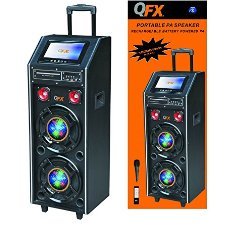
شکل 1: مخکی view of the QFX PBX-410204BTD PA Speaker. This image displays the speaker's front panel, including the dual 10-inch woofers, the central control panel with various buttons and knobs, and the integrated disco light.
3.1. د کنټرول پینلview
- د بریښنا سویچ: واحد فعال/بندوي.
- د حجم کنټرول: د ماسټر حجم تنظیموي.
- د مایکروفون داخلول: Connects a wired microphone.
- د ایکو/مایک حجم: Adjusts microphone volume and echo effect.
- USB پورټ: د USB فلش ډرایو پلې بیک لپاره.
- د SD کارت سلاټ: د SD کارت پلې بیک لپاره.
- د حالت تڼۍ: Switches between input modes (Bluetooth, USB, SD, FM, DVD).
- د پلی کولو/پاز بټن: د میډیا پلے بیک کنټرولوي.
- مخکینی/راتلونکی ټریک بټن: Navigates media tracks or FM stations.
- FM انتن: د ایف ایم راډیو د ښه استقبال لپاره.
- Disco Light Switch: Turns the disco light ON/OFF.
- ډي وي ډي غږوونکی: Integrated DVD disc slot and controls.
- د AC داخلول: Connects the power adapter for charging and AC operation.
- DC 12V Input/Output: For external 12V power source or output.
4. ترتیب کول
۱. ابتدايي چارج کول
Before first use, fully charge the internal battery. Connect the power adapter to the AC input on the speaker and plug it into a standard wall outlet. The charging indicator will illuminate. Charging typically takes several hours. The indicator will change or turn off once fully charged.
4.2. ځای پرځای کول
Place the speaker on a stable, flat surface. Ensure there is adequate space around the unit for ventilation. Avoid placing it near direct sunlight, heat sources, or areas with high humidity.
5. عملیاتي لارښوونې
5.1. بریښنا فعال/بند
To power on the unit, toggle the Power Switch to the "ON" position. To power off, toggle it to "OFF".
5.2. د بلوتوث پیوستون
- Turn on the speaker and press the "Mode" button until "Bluetooth" mode is selected.
- Enable Bluetooth on your mobile device or audio player.
- لټون "QFX PBX-410204BTD" (or similar name) in your device's Bluetooth settings.
- Select the speaker to pair. A confirmation tone will sound upon successful connection.
- تاسو اوس کولی شئ د سپیکر له لارې له خپل وسیله څخه آډیو غږ کړئ.
۵. د USB/SD کارت پلے بیک
- Insert a USB flash drive or SD card into the respective slot.
- Press the "Mode" button to select "USB" or "SD" mode. The unit will automatically begin playing compatible audio files.
- د پلې بیک کنټرولولو لپاره د پلې/پاز، مخکیني او بل تڼۍ وکاروئ.
5.4. ایف ایم راډیو
- Press the "Mode" button to select "FM" mode.
- د ښه استقبال لپاره د FM انتن غځول.
- د شته ایف ایم سټیشنونو د اتوماتیک سکین کولو او خوندي کولو لپاره د پلی/پاز تڼۍ کېکاږئ او ونیسئ.
- Use the Previous/Next buttons to navigate through saved stations.
5.5. DVD پلے بیک
- Insert a DVD disc into the DVD slot.
- Press the "Mode" button to select "DVD" mode.
- Use the integrated DVD controls or the remote control to manage playback.
۵. د کاراوکی فعالیت
- Connect a microphone to the Microphone Input jack.
- Adjust the Microphone Volume and Echo controls to your preference.
- Play music from any source (Bluetooth, USB, SD, DVD) and sing along.
5.7. Disco Light
Toggle the Disco Light Switch to activate or deactivate the integrated disco light feature.
6. ساتنه
6.1. پاکول
Wipe the exterior of the unit with a soft, dry cloth. Do not use abrasive cleaners, waxes, or solvents. Ensure the unit is powered off and unplugged before cleaning.
6.2. د بیټرۍ پاملرنه
To prolong battery life, fully charge the unit before storing it for extended periods. Recharge the battery at least once every 3 months if not in regular use. Avoid completely draining the battery frequently.
6.3. ذخیره کول
سپیکر په یخ او وچ ځای کې وساتئ، د مستقیم لمر وړانګو او سختې تودوخې څخه لرې.
7. ستونزه حل کول
| ستونزه | احتمالي لامل | د حل لاره |
|---|---|---|
| هیڅ ځواک نشته | Unit not plugged in; Power switch off; Battery drained. | Check power connection; Turn power switch ON; Charge the battery. |
| غږ نشته | حجم ډېر ټیټ دی؛ د ننوتلو ناسم حالت؛ وسیله جوړه شوې نه ده (بلوتوث). | حجم زیات کړئ؛ د ان پټ سمه حالت غوره کړئ؛ د بلوتوث وسیله بیا جوړه کړئ. |
| بلوتوث نه نښلي | Speaker not in Bluetooth mode; Device too far; Interference. | Ensure speaker is in Bluetooth mode; Move device closer; Avoid obstacles. |
| USB/SD نه غږېږي | غلط file بڼه؛ USB/SD کارت فاسد شوی؛ ناسم حالت. | ډاډ ترلاسه کړئ files are compatible (e.g., MP3); Try another USB/SD card; Select correct mode. |
| د ایف ایم راډیو کمزوری استقبال | انتن نه دی غځول شوی؛ کمزوری سیګنال. | Fully extend the FM antenna; Try repositioning the unit. |
8. مشخصات
- ماډل: PBX-410204BTD
- د سپیکر ډول: د بیټرۍ چلولو وړ PA سپیکر
- د ووفر اندازه: 2 x 10 انچه
- د ټویټر اندازه: 2 x 1 انچه
- ارتباط: Bluetooth, USB, SD, FM Radio, DVD
- ځانګړي ځانګړتیاوې: Disco Light, Karaoke
- بیټرۍ: د ۱۲V ۷AH چارج وړ
- د AC داخلول: 100-240V
- DC Input/Output: 12V
- د واټ محصولtage: 346 واټ
- د پارسل ابعاد: 100.33 x 43.18 x 43.18 سانتي متره (39.5 x 17 x 17 انچه)
- د توکي وزن: ۵.۴۴ کیلوګرامه (۱۲ پونډه)
9. تضمین او ملاتړ
For warranty information and technical support, please refer to the warranty card included with your product or contact QFX customer service directly. Keep your purchase receipt as proof of purchase.
یادونه: د تضمین ځانګړي شرایط ممکن د سیمې او پرچون پلورونکي له مخې توپیر ولري.


