محصول پای ته ورسیدview
The Performance Tool W2977 CAN OBD II Scanner Tool is an essential diagnostic device for vehicle owners and professionals. It provides a straightforward way to interact with your vehicle's On-Board Diagnostics (OBD-II) system, allowing you to quickly identify and resolve issues indicated by the Check Engine Light.
کلیدي ځانګړتیاوې:
- د وسایطو پراخه پوښښ: Compatible with most 1996 and newer American, European, and Asian vehicles.
- Powerful Scan Tool: Reads and erases Diagnostic Trouble Codes (DTCs) to pinpoint engine and emissions system problems.
- د کاروونکي دوستانه انٹرفیس: Simple operation with clear display and intuitive buttons.
- د اخراج د چمتووالي چک: Verifies your vehicle's emissions system status for compliance.
- Full OBD2 Protocol Support: Includes support for the Controller Area Network (CAN) protocol.
- Note: Does not work with 2007 Chevy Silverado models.
د تنظیم کولو لارښود
Follow these steps to set up and begin using your W2977 CAN OBD II Scanner Tool:
- د OBD-II پورټ ومومئ: د OBD-II پورټ معمولا د موټر د چلوونکي په اړخ کې د ډشبورډ لاندې موقعیت لري. که تاسو یې ونه موندئ نو د خپل موټر د مالک لارښود ته مراجعه وکړئ.
- سکینر وصل کړئ: Plug the scanner's cable connector firmly into the vehicle's OBD-II port. Ensure a secure connection.

Image: Connecting the scanner to the vehicle's OBD-II port.

Image: The W2977 scanner held in hand, connected and ready for use.
Once connected, the scanner will power on automatically. Ensure your vehicle's ignition is in the 'ON' position or the engine is running, as required for proper communication.
عملیاتي لارښوونې
د تشخیصي ستونزو کوډونه (DTCs) لوستل
- With the scanner connected and powered on, the display will show 'C.A.N. OBD2'.
- فشار ورکړئ ننوتل button to initiate the scan. The display will show 'SCAN...' as it communicates with the vehicle.
- Once the scan is complete, the scanner will display 'Menu: 1. DTC'. Press ننوتل ته view the Diagnostic Trouble Codes.
- If codes are present, they will be displayed. Use the سکرول button to navigate through multiple codes if applicable.
- If 'NO CODES' is displayed, it means no active Diagnostic Trouble Codes are currently stored in the vehicle's computer.

Image: Initial display screen of the scanner.

Image: Menu option to view DTCs.

Image: Display indicating no trouble codes found.
Erasinد تشخیصي ستونزو کوډونه (DTCs)
یادونه: ایرasing DTCs will turn off the Check Engine Light, but it will not fix the underlying problem. Ensure the issue has been resolved before clearing codes.
- From the main menu, use the سکرول button to navigate to 'Menu: 2. ERASE'.
- فشار ورکړئ ننوتل button. The scanner will ask 'ERASE? YES NO'.
- مطبوعاتي ننوتل again to confirm 'YES'. The display will show 'ERASE DONE!' indicating the codes have been cleared.
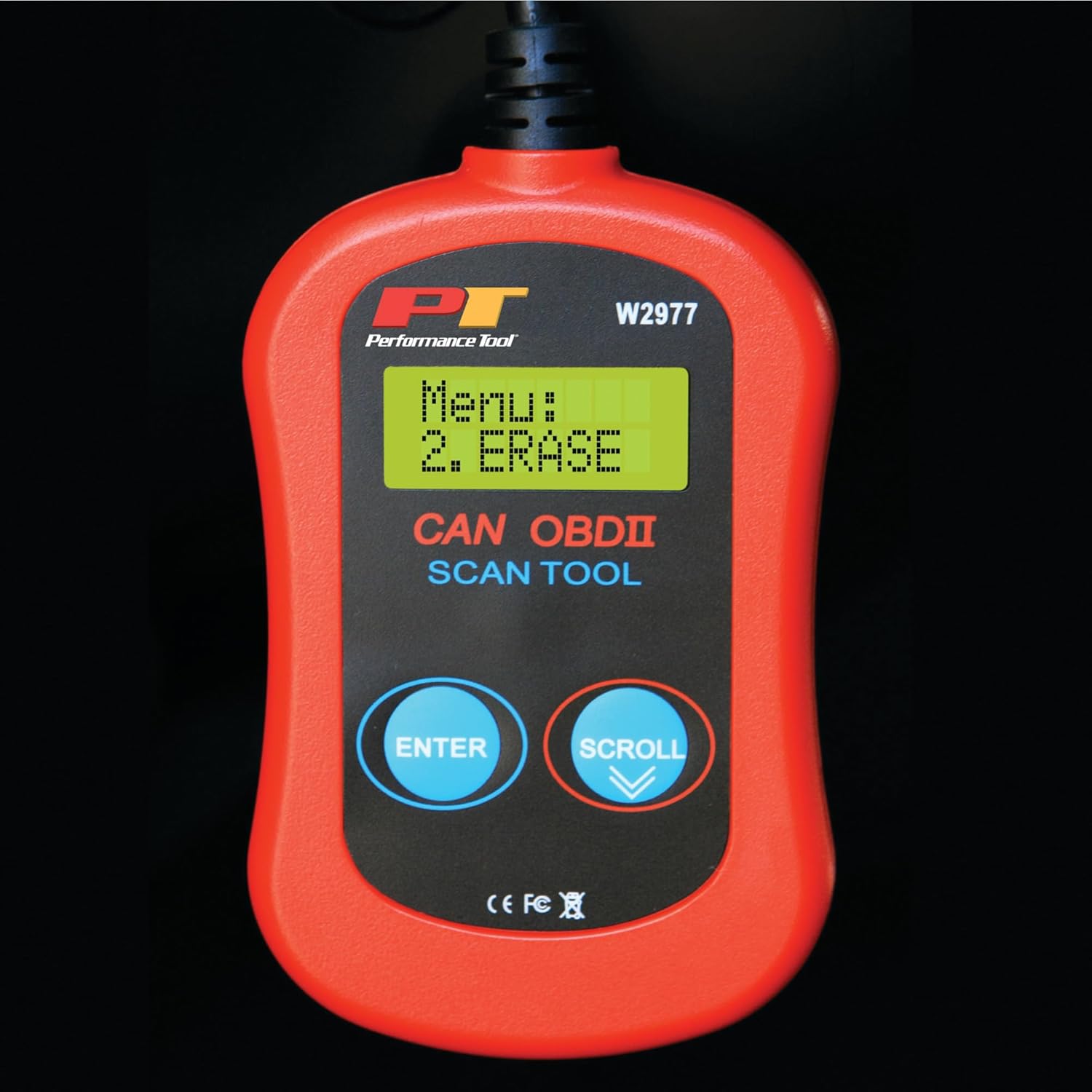
Image: Menu option to erase DTCs.
ساتنه
To ensure the longevity and proper functioning of your Performance Tool W2977 scanner, follow these maintenance guidelines:
- پاکول: وسیله په نرم، وچ ټوکر سره پاک کړئ. د کثافاتو پاکوونکي یا محلولونه مه کاروئ.
- ذخیره کول: سکینر په پاک او وچ چاپیریال کې د سختې تودوخې او مستقیم لمر وړانګو څخه لرې وساتئ.
- د کیبل پاملرنه: Avoid kinking or sharply bending the cable. Store it neatly coiled to prevent damage.
د ستونزو حل کول
عام مسایل:
- 'LINK ERROR!' Displayed:
This indicates a communication issue between the scanner and the vehicle. - Ensure the scanner cable is securely connected to the OBD-II port.
- Verify the vehicle's ignition is in the 'ON' position or the engine is running.
- Check if your vehicle is compatible with OBD-II (most vehicles 1996 and newer).
- Try connecting the scanner to a different compatible vehicle to rule out a scanner issue.
- سکینر نه چالانېږي:
- The scanner draws power from the vehicle's OBD-II port. Ensure the connection is secure.
- Check the vehicle's fuse for the OBD-II port (often labeled 'CIGAR' or 'AUX POWER').
- No Codes Found, But Check Engine Light is On:
- Some intermittent issues may not store a permanent code immediately. Drive the vehicle for a short period and re-scan.
- Ensure the vehicle's ignition is on or engine is running during the scan.

Image: Display indicating a communication error.
تخنیکي مشخصات
| مشخصات | تفصیل |
|---|---|
| برانډ | د فعالیت وسیله |
| ماډل | W2977 |
| د توکي وزن | 5.6 اونس |
| د محصول ابعاد | 1.75 x 6.09 x 9.5 انچه |
| د موټرو فټ ډول | Universal Fit (1996 and later OBD-II compliant vehicles) |
| UPC | 039564106811 |
| جوړونکی | د فعالیت وسیله |
تضمین او ملاتړ
The Performance Tool W2977 CAN OBD II Scanner Tool comes with a 1-year limited warranty. For detailed warranty information and terms, please refer to the official documentation.
For further assistance, troubleshooting, or to access the complete user manual, please refer to the official PDF document:
د کارونکي لارښود (PDF) ډاونلوډ کړئ
تاسو هم کولی شئ لیدنه وکړئ Performance Tool Store on Amazon د نورو محصولاتو معلوماتو او ملاتړ سرچینو لپاره.


