1. پیژندنه
This manual provides comprehensive instructions for the Monoprice MS-WN513N2 Wireless N300 4-Port Broadband Router. This device is designed to provide a high-speed wireless network connection for your home or small office, offering reliable internet access and advanced security features. Please read this manual thoroughly before operating the device.
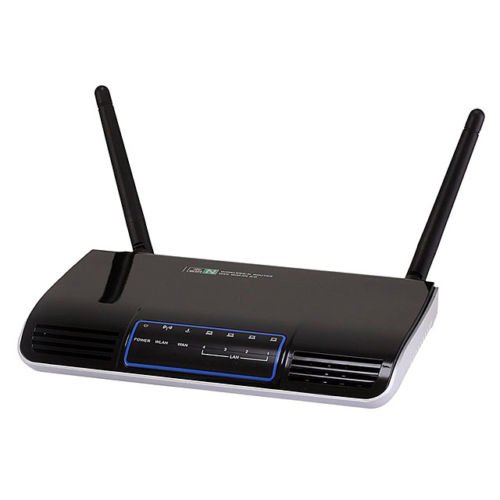
انځور 1.1: مخکی view of the Monoprice MS-WN513N2 Wireless N300 Router. The router is black with indicator lights on the front panel.
2. ځانګړتیاوې
The Monoprice MS-WN513N2 router offers a range of features to enhance your network experience:
- Wireless N300 Performance: Complies with 802.11b/g/n standards, offering wireless transmission speeds up to 300 Mbps.
- 4-Port Broadband Router: Includes four (4) LAN ports for wired connections.
- پرمختللي امنیت: Supports 64-bit/128-bit WEP, WPA/WPA2, and WPA-PSK/WPA2-PSK authentication.
- د IPv6 ملاتړ: Compatible with Internet Protocol Version 6.
- د خدماتو کیفیت (QoS): Bandwidth control for prioritizing network traffic.
- WPS (Wi-Fi محافظت شوی ترتیب): Simplifies wireless security configuration.
- ډیری عملیاتي طریقې: Can be configured as a Gateway, Wireless Bridge, or Wireless ISP (WISP).
- Dynamic DNS (DDNS): Supports dynamic domain name system configuration.
- UPnP Support: Universal Plug and Play for easy device discovery.
- فایروال: Integrated firewall for network protection.
- Automatic MDI/MDIX: Automatic cable detection for Ethernet ports.
3. د بسته محتويات
مهرباني وکړئ تصدیق کړئ چې ټول توکي ستاسو په کڅوړه کې شتون لري:
- Monoprice MS-WN513N2 Wireless N300 Router
- د بریښنا اډاپټر (DC 5V)
- ایترنیټ کیبل
- د چټک نصبولو لارښود (که شامل وي)
۳. فزیکي اوورview
4.1 د مخکینۍ پینل شاخصونه
مخکینۍ پینل د LED شاخصونه لري چې د وضعیت معلومات چمتو کوي:
- د بریښنا LED: دا په ګوته کوي چې آیا روټر فعال دی.
- WAN LED: د انټرنیټ سره د پیوستون حالت په ګوته کوي.
- د LAN LEDs (۱-۴): Indicate activity on the respective wired LAN ports.
- WLAN LED: د بېسیم شبکې فعالیت په ګوته کوي.
۱.۲.۲ د شا پینل پورټونه او تڼۍ
The rear panel contains all physical connection points:
- DC 5V بریښنا پورټ: د شامل شوي بریښنا اډاپټر سره وصل کیږي.
- د وان بندر: ستاسو د موډیم یا انټرنیټ خدمت چمتو کونکي شبکې سره وصل کیږي.
- د LAN بندرونه (1-4): Connect to wired devices such as computers, gaming consoles, or switches.
- د WPS تڼۍ: د اسانه بېسیم اتصال لپاره د وای فای محافظت شوی تنظیم پیل کوي.
- سوري بیا تنظیم کړئ: Used to restore the router to factory default settings. Insert a paperclip and hold for 5-10 seconds.
- د انتن بندرونه: Two (2) ports for connecting the external antennas.
5. ترتیب کول
5.1 د هارډویر اتصال
- انتنونه وصل کړئ: Screw the two external antennas onto the antenna ports on the rear panel.
- موډیم وصل کړئ: د ایترنیټ کیبل یوه پای د خپل موډیم LAN پورټ سره وصل کړئ او بله پای یې د WAN د روټر بندر.
- بریښنا وصل کړئ: د بریښنا اډاپټر د روټر سره وصل کړئ د DC 5V ځواک پورټ and plug the adapter into a power outlet.
- پاور آن: Wait for the router to power on. The Power LED should illuminate. Allow a few minutes for the router to boot up and establish a connection.
- کمپیوټر وصل کړئ (اختیاري): For initial configuration, it is recommended to connect a computer directly to one of the router's LAN د ایترنیټ کیبل په کارولو سره بندرونه.
۲.۳ ابتدايي ترتیب (Web انٹرفیس)
- د لاسرسي روټر: خلاص a web browser on a connected computer. In the address bar, type the router's default IP address (commonly
192.168.1.1or192.168.0.1) and press Enter. Refer to the label on the bottom of your router for the exact IP address and default login credentials. - ننوتل: د کارونکي نوم او پټنوم اصلي بڼه دننه کړئ (د مثال په توګه،
adminد دواړو لپاره). - د تنظیم وزرډ چلول: د روټر web interface will typically present a Quick Setup Wizard. Follow the on-screen prompts to configure your internet connection type (e.g., PPPoE, Dynamic IP, Static IP) and basic wireless settings (SSID, password).
- د ډیفالټ اسناد بدل کړئ: For security, it is highly recommended to change the default login username and password for the router's web انٹرفیس
6. چلول
۴.۲ د بېسیم شبکې ترتیب
To configure your wireless network:
- ته لاړشئ د بېسیم ترتیبات برخه کې web انٹرفیس
- SSID: Change the default Wireless Network Name (SSID) to a unique name.
- د امنیت حالت: وټاکئ WPA2-PSK as the recommended security mode.
- رمز: Set a strong, unique password (at least 8 characters, including letters, numbers, and symbols).
- چینل: The router can automatically select the best 2.4 GHz channel. You can also manually select a fixed channel (e.g., 1, 6, or 11) to avoid interference.
- خپل بدلونونه خوندي کړئ.
۸.۵ امنیتي ترتیبات
The router provides various security features:
- فایروال: The built-in firewall helps protect your network from external threats. Ensure it is enabled.
- د MAC فلټر کول: You can restrict network access to specific devices based on their MAC addresses.
- د والدینو کنټرول: Some routers offer features to block specific websites or limit internet access times for certain devices.
- WPS: Use the WPS button for quick, secure connections with WPS-compatible devices.
6.3 پرمختللی ځانګړتیاوې
Explore the advanced settings in the web interface for more control:
- د خدماتو کیفیت (QoS): Prioritize bandwidth for applications like gaming or video streaming.
- د پور لیږدول: Configure specific ports to allow external access to devices on your local network (e.g., for gaming servers).
- Dynamic DNS (DDNS): If you have a dynamic public IP address, DDNS allows you to access your network using a consistent domain name.
- IPv6: Configure IPv6 settings if your ISP supports it.
- د عملیاتو حالت: Change the router's mode to Wireless Bridge or WISP if needed for specific network setups.
7. ساتنه
7.1 د فرم ویئر تازه معلومات
Periodically check the Monoprice website for firmware updates. Firmware updates can improve performance, add new features, and fix security vulnerabilities. Follow the instructions provided with the firmware update carefully to avoid damaging the device.
۷.۳ د روټر بیا تنظیم کول
If you forget your login password or experience persistent issues, you can restore the router to its factory default settings:
- د روټر په فعالولو سره، ومومئ هول بیا تنظیم کړئ په شا پینل کې.
- Use a paperclip or a thin, pointed object to press and hold the reset button inside the hole for approximately 5-10 seconds.
- Release the button when the router's LEDs flash or restart.
- The router will reboot with factory default settings. You will need to reconfigure it using the web انٹرفیس
8. ستونزه حل کول
Here are solutions to common issues:
- انټرنیټ ته لاسرسی نشته:
- Check if the WAN LED is lit. If not, ensure the Ethernet cable from the modem is securely connected to the router's WAN port.
- خپل موډیم او روټر بیا پیل کړئ.
- د روټر په کمپیوټر کې د خپل انټرنیټ اتصال ترتیبات تایید کړئ web انٹرفیس
- لاسرسی نشم کولی Web انٹرفیس:
- ډاډ ترلاسه کړئ چې ستاسو کمپیوټر د ایترنیټ یا وای فای له لارې له روټر سره وصل دی.
- Verify the router's IP address. Try
192.168.1.1or192.168.0.1. - د خپل براوزر کیش پاک کړئ یا بل براوزر هڅه وکړئ.
- If you forgot the password, perform a factory reset.
- د بېسیم ورو سرعت:
- Ensure your devices support 802.11n for optimal speeds.
- Check for interference from other 2.4 GHz devices (cordless phones, microwaves). Try changing the wireless channel.
- ډاډ ترلاسه کړئ چې روټر په مرکزي ځای کې موقعیت لري او خنډ نه وي.
- د خپل وسیله د بېسیم اډاپټر چلوونکي تازه کړئ.
- د بېسیم اتصال څاڅکي:
- Check for signal strength and interference.
- ډاډ ترلاسه کړئ چې د روټر فرم ویئر تازه دی.
- Verify that the wireless security settings are correctly configured.
9. مشخصات
| فیچر | مشخصات |
|---|---|
| ماډل | MS-WN513N2 |
| بې سیم معیارونه | IEEE 802.11n (Draft 2.0), IEEE 802.11g, IEEE 802.11b |
| Wireless Signal Rates (802.11n) | Up to 300 Mbps (270, 243, 216, 162, 135, 130, 108, 81, 65, 54, 40.5, 27, 13.5 Mbps) |
| Wireless Signal Rates (802.11g) | 54، 48، 36، 24، 18، 12، 9، 6 Mbps |
| Wireless Signal Rates (802.11b) | 11 ، 5.5 ، 2 ، 1 MBS |
| د فریکونسی رینج | ۲.۴ - ۲.۴۸۳۵ GHz |
| د بې سیم لیږد بریښنا | تر 20 dBm پورې |
| د انډول کولو ټیکنالوژي | DBPSK ، DQPSK ، CCK ، OFDM ، 16-QAM ، 64-QAM |
| بندرونه | 4x LAN Ports, 1x WAN Port, 2x Antenna Ports, 1x DC 5V Power Port |
| تڼۍ | WPS Button, Reset Hole |
| امنیت | 64/128-bit WEP, WPA/WPA2, WPA-PSK/WPA2-PSK |
| د بریښنا رسول | DC 5V |
| ملاتړ شوي پروتوکولونه | IPv6, PPPoE |
10. تضمین او ملاتړ
For warranty information and technical support, please refer to the official Monoprice webد مونوپریس پیرودونکي خدماتو سایټ یا مستقیم اړیکه ونیسئ. د تضمین ادعاوو لپاره خپل د پیرود رسید وساتئ.
مونوپریس Webسایټ: www.monoprice.com


