پیژندنه
This manual provides essential information for the proper installation, operation, and maintenance of your Kenwood DPX501BT 2-DIN CD Receiver. Please read these instructions thoroughly before using the unit to ensure optimal performance and safety. Keep this manual for future reference.
محصول پای ته ورسیدview
The Kenwood DPX501BT is a 2-DIN (double DIN) CD receiver designed for in-car audio systems. It features built-in Bluetooth for hands-free calling and audio streaming, a CD player, USB input, and AM/FM radio. The unit offers various audio adjustments, including an equalizer, to customize your listening experience.

شکل 1: مخکی view of the Kenwood DPX501BT CD Receiver. This image displays the main unit with its central volume knob, display screen, and various control buttons.

شکل 2: Kenwood DPX501BT CD Receiver shown alongside its remote control unit. The remote allows for convenient operation from a distance.
تنظیم او نصب کول
Proper installation is crucial for the performance and longevity of your receiver. It is recommended that installation be performed by a qualified professional.
د واحد نصب کول
The DPX501BT is a 2-DIN unit. Ensure your vehicle's dashboard opening is compatible. Some vehicles may require a dash kit or trimming of the factory radio support bracket for a flush fit.

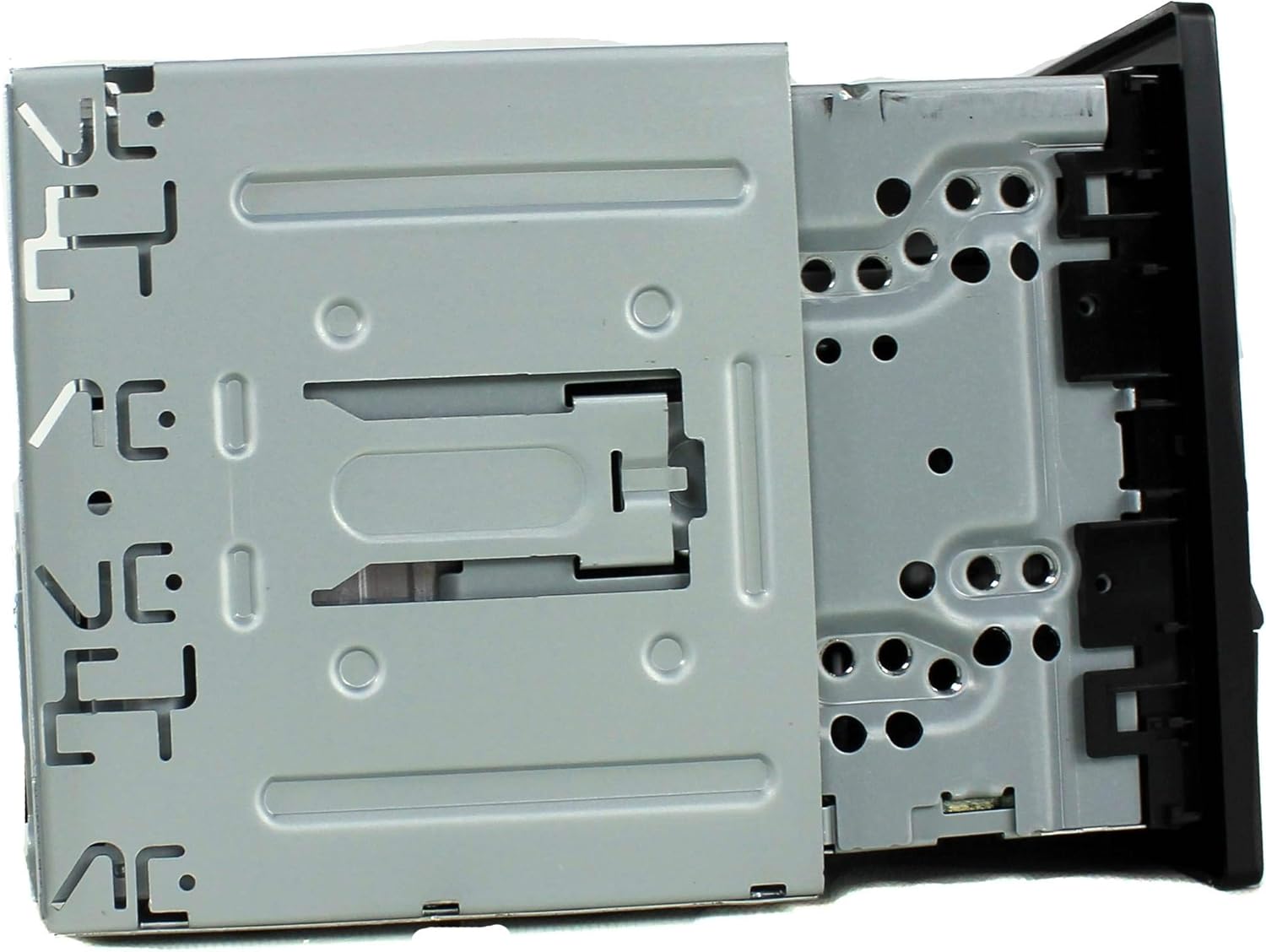
شکل 3: اړخ view of the Kenwood DPX501BT receiver, illustrating the mounting bracket and screw points for secure installation into a vehicle's dashboard.
د تارونو نښلول
Connect the wiring harness according to your vehicle's specifications and the provided wiring diagram (typically found in a separate installation guide or on the unit's harness itself). Ensure all connections are secure to prevent shorts or intermittent operation.
- ځواک: Connect the yellow wire to constant 12V, red wire to switched 12V (ignition), and black wire to ground.
- ويناوال: Connect speaker wires to the corresponding vehicle speaker wires, ensuring correct polarity.
- انتن: د موټر د انتن کیبل سره وصل کړئ.
- ریموټ چالان: که چیرې یو بهرنی کاروئ amplifier, connect the blue/white wire to the ampد لایفیر ریموټ ان پټ.
- د پارکینګ بریک: For safety features, connect the parking brake wire as instructed.
شکل 4: شاته view of the Kenwood DPX501BT, displaying the multi-pin wiring harness connector, RCA pre-outs, and antenna input. This is where all external connections are made.
عملیاتي لارښوونې
بنسټیز کنټرولونه
- پاور آن/بند: Press the SRC (Source) button briefly to turn the unit on. Press and hold the SRC button to turn it off.
- د حجم کنټرول: د حجم کچه تنظیمولو لپاره لوی مرکزي غوټۍ وګرځوئ.
- د سرچینې انتخاب: Press the SRC button repeatedly to cycle through available sources (CD, USB, Bluetooth Audio, Tuner, AUX).
- مینو/ترتیبات: Press the AUDIO button to access audio settings or the FNC (Function) button for other system settings.

شکل 5: Close-up of the Kenwood DPX501BT front panel with the display illuminated in blue, showing the layout of buttons and the central control knob for operation.
د بلوتوټ عملیات
The DPX501BT features built-in Bluetooth for wireless connectivity.
- د وسیلې جوړه کول:
- ډاډ ترلاسه کړئ چې ستاسو په ګرځنده وسیله کې بلوتوټ فعال دی.
- په ریسیور کې، د بلوتوټ سرچینه غوره کړئ.
- لټون available devices on your phone. The receiver will appear as "DPX501BT" or similar.
- Select the receiver on your phone and confirm the pairing code if prompted.
- د لاسونو څخه وړیا تلیفون کول: Once paired, you can make and receive calls through the receiver. Use the phone button on the unit to answer/end calls.
- د بلوتوث آډیو سټریمینګ: Select Bluetooth Audio as the source to stream music from your paired device. Use the track skip buttons on the receiver to control playback.
CD/USB Playback
- سي ډي: Insert a CD into the disc slot. The unit will automatically switch to the CD source and begin playback.
- USB: Connect a USB storage device (e.g., flash drive) to the USB port. Select the USB source. The unit will read compatible audio files (MP3, WMA, AAC, WAV). Use the FNC button to navigate folders and files.
د راډیو عملیات
- د بندونو انتخاب: Press the SRC button until "Tuner" is selected, then press the BAND button to switch between FM1, FM2, FM3, and AM bands.
- ه هماهن: Use the seek buttons (◀◀ / ▶▶) to automatically search for stations. Press and hold for manual tuning.
- مخکې ټاکل شوي سټیشنونه: د اوسني سټیشن د پری سیټ په توګه د ذخیره کولو لپاره د شمیرې تڼۍ (1-6) فشار ورکړئ او ونیسئ. د پری سیټ یادولو لپاره په لنډه توګه فشار ورکړئ.
د آډیو ترتیبات
Press the AUDIO button to access various sound adjustments, including:
- برابرونکی: Adjust bass, mid, and treble levels, or select from preset EQ curves.
- بیلانس/فدر: Adjust sound distribution between left/right and front/rear speakers.
- د Subwoofer کنټرول: If connected, adjust subwoofer output levels.
د ښودلو ترتیبات
The display illumination color can be customized. Refer to the full owner's manual for detailed instructions on changing display colors and adjusting brightness. Note that display readability can vary based on ambient light conditions and viewزاویه.
ساتنه
د واحد پاکول
- مخکینۍ تخته د نرم، وچ ټوکر سره پاک کړئ.
- د کثافاتو پاکوونکي، موم، یا محلول مه کاروئ.
- د سختې خاورې لپاره، دampen the cloth lightly with water.
د سي ډي پلیر پاملرنه
- سي ډي ګانې د هغوی له څنډو سره ونیسئ ترڅو د ګوتو نښې او سکریچونه ونه شي.
- سي ډي ګانې د نرم، لینټ نه پاک ټوکر سره پاکې کړئ، او له مرکز څخه بهر ته یې پاک کړئ.
- Do not use irregularly shaped CDs or those with adhesive labels, as they can damage the mechanism.
د ستونزو حل کول
If you encounter issues with your DPX501BT, refer to the following common problems and solutions:
| ستونزه | احتمالي لامل | د حل لاره |
|---|---|---|
| هیڅ ځواک نشته | فیوز وچ شوی؛ ناسم تارونه؛ د موټر د بیټرۍ ستونزه. | د موټر فیوزونه او د واحد فیوز وګورئ. د بریښنا او ځمکې اړیکې تایید کړئ. د موټر بیټرۍ وګورئ. |
| غږ نشته | غږ ډېر ټیټ دی؛ خاموش فعال شوی دی؛ د سپیکر ناسم تارونه؛ ampد ژوند کولو مسله. | غږ زیات کړئ. خاموشي غیر فعاله کړئ. د سپیکر اتصالونه او قطبي والی وګورئ. بهرنۍ تایید کړئ ampد ژوند کولو عملیات. |
| بلوتوث نه نښلي | Device not in pairing mode; receiver not in Bluetooth source; interference. | Ensure both devices are in pairing mode. Select Bluetooth source on receiver. Try re-pairing. Move away from other wireless devices. |
| سي ډي/يو ايس بي نه غږېږي | Disc/USB corrupted or incompatible format; dirty disc; incorrect source selected. | Ensure media is clean and compatible. Select correct source. Try different media. |
| ښودل یې د لوستلو لپاره ستونزمن دي | High ambient light; display brightness setting. | Adjust display brightness and dimmer settings. Consider viewing angle relative to sunlight. |
If the problem persists after attempting these solutions, consult a Kenwood authorized service center or contact Kenwood customer support.
مشخصات
| فیچر | مشخصات |
|---|---|
| د ماډل شمیره | DPX501BT |
| د محصول ابعاد | 6.69 x 5.91 x 3.15 انچه |
| د توکي وزن | ۲.۴۵ پونډه |
| د ارتباط ټیکنالوژي | بلوتوث، USB |
| بې سیم مخابرات | Bluetooth, IR |
| ځانګړي ځانګړتیاوې | برابرونکی |
| د کنټرولر ډول | اندروید (مطابق) |
| مطابقت لرونکې وسیلې | سمارټ فون، سپیکر |
| د آډیو وتلې حالت | سټیریو، شاوخوا |
| شاوخوا د غږ چینل ترتیب کول | 4 چینل |
| د بریښنا اړتیا | 12V battery (1 required) |
تضمین او ملاتړ
د تضمین معلوماتو، تخنیکي ملاتړ، یا خدماتو پوښتنو لپاره، مهرباني وکړئ د خپل محصول سره شامل شوي تضمین کارت ته مراجعه وکړئ یا رسمي کین ووډ ته مراجعه وکړئ. webسایټ. تاسو کولی شئ د مرستې لپاره مستقیم د کین ووډ پیرودونکي خدماتو سره اړیکه ونیسئ.


