1. پیژندنه
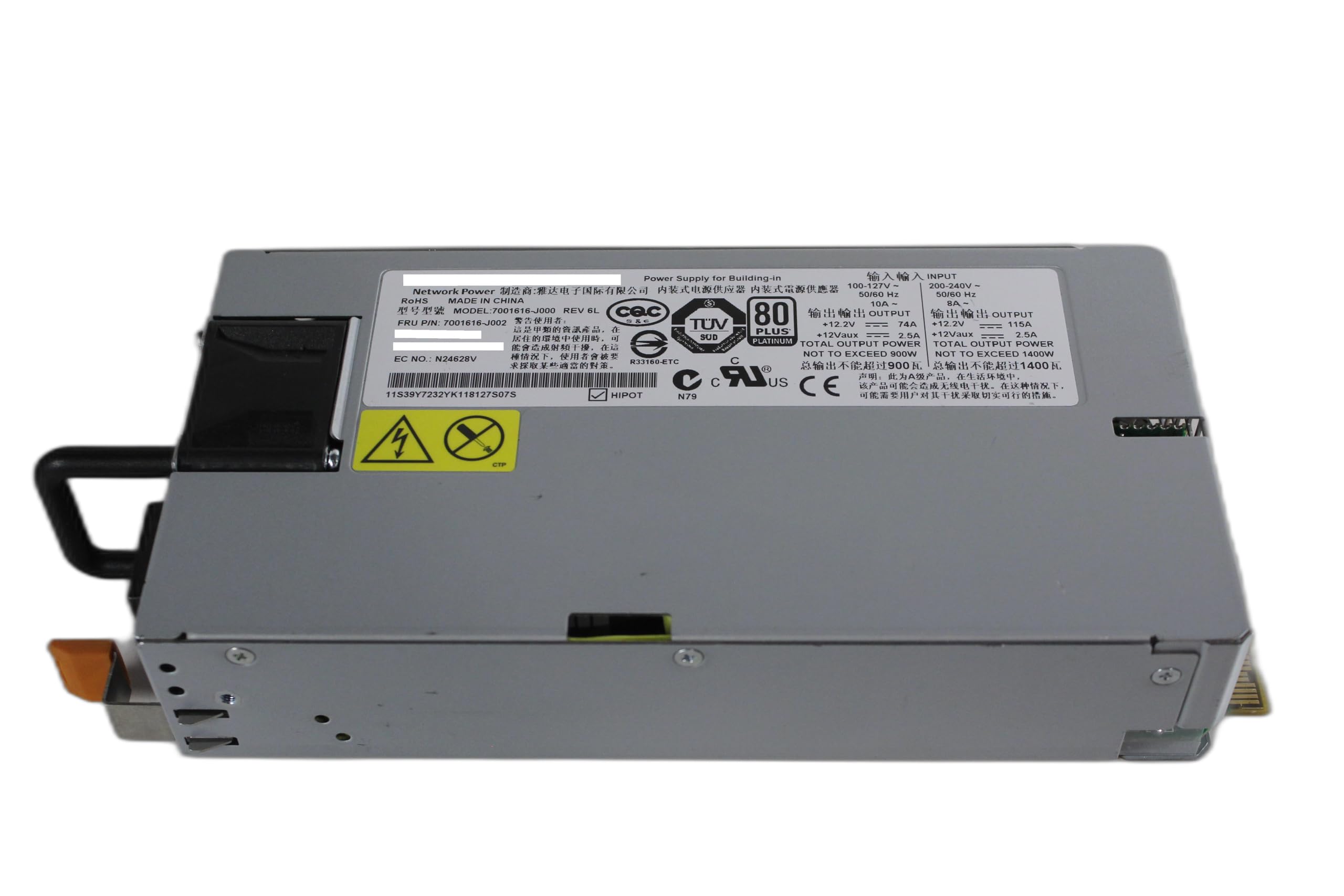
This manual provides essential instructions for the safe and efficient installation, operation, and maintenance of the Emerson 7001616-J000 1400W Server Power Supply. This power supply unit (PSU) is designed for integration into server systems, providing stable and reliable power to critical components. Please read this manual thoroughly before proceeding with any installation or operation.
2. د خوندیتوب معلومات
د ټپي کیدو او تجهیزاتو د زیان مخنیوي لپاره تل لاندې خوندیتوب احتیاطي تدابیر په پام کې ونیسئ:
- Ensure the server system is completely powered off and disconnected from the main power source before installing or removing the power supply.
- د برېښنا رسونه مه خلاصوئ casing. There are no user-serviceable parts inside, and dangerous voltages شتون لري.
- Handle the power supply with care to avoid dropping or physical damage.
- د ډیر تودوخې مخنیوي لپاره د بریښنا رسولو په ښه هوا لرونکي ځای کې نصب کړئ.
- Use only compatible power cables and connectors.
- If any smoke, unusual odors, or abnormal noises are detected, immediately disconnect power and contact qualified service personnel.
3. ترتیب او نصب کول
Follow these steps for proper installation of the Emerson 7001616-J000 Server Power Supply:
- چمتووالی: Power down the server completely and unplug all power cords from the wall outlet. Open the server chassis according to the server manufacturer's instructions.
- Locate PSU Bay: Identify the designated power supply bay within your server chassis. If replacing an existing PSU, carefully remove the old unit.
- PSU داخل کړئ: Gently slide the Emerson 7001616-J000 power supply into the bay. Ensure it is fully seated and aligned with the mounting points.
- خوندي PSU: Secure the power supply using the screws or latching mechanisms provided by your server chassis.
- کیبلونه وصل کړئ: Connect the necessary power cables from the PSU to the server's motherboard, hard drives, and other components. Refer to your server's manual for specific cable routing and connection points.
- تړل شوی چیسس: Once all connections are secure, close the server chassis.
- د AC بریښنا سره وصل کړئ: Plug the AC power cord into the power supply's input receptacle and then into a grounded electrical outlet.

4. عملیاتي لارښوونې
Once installed, the Emerson 7001616-J000 power supply operates automatically when the server is powered on. It provides continuous and stable power to the server components.
- پاور آن: After connecting the AC power cord, press the power button on your server to initiate startup.
- د وضعیت شاخصونه: Some server systems or power supplies may feature LED indicators to show operational status (e.g., green for normal operation, amber for fault). Consult your server's documentation for specific indicator meanings.
- بندول: To power off the server, follow the operating system's shutdown procedure, then press and hold the server's power button if necessary. For complete power disconnection, unplug the AC power cord from the wall outlet.
5. ساتنه
منظم ساتنه ستاسو د بریښنا رسولو اوږد عمر او غوره فعالیت ډاډمن کولو کې مرسته کوي:
- د دوړو لرې کول: Periodically inspect the power supply's fan and ventilation grilles for dust accumulation. Use compressed air to gently clear dust from these areas. Ensure the server is powered off and unplugged before cleaning.
- د کیبل معاینه: Check all power cables connected to the PSU for any signs of wear, fraying, or loose connections. Replace damaged cables immediately.
- د چاپیریال شرایط: Ensure the server operates within recommended temperature and humidity ranges. Excessive heat or moisture can degrade power supply performance and lifespan.
- د فرم ویئر تازه معلومات: While the PSU itself typically does not have user-updatable firmware, ensure your server's system firmware (BIOS/UEFI) is up to date, as it can affect power management.
6. ستونزه حل کول
که تاسو د خپل بریښنا رسولو سره ستونزې سره مخ شئ، نو لاندې اساسي ستونزې حل کولو ګامونه په پام کې ونیسئ:
| ستونزه | احتمالي لامل | د حل لاره |
|---|---|---|
| Server does not power on. | No AC power, loose connections, faulty PSU. | Verify AC power cord is securely plugged into both the PSU and a working wall outlet. Check all internal power connections. If problem persists, the PSU may be faulty. |
| Server powers on but shuts down unexpectedly. | Overheating, unstable power, faulty PSU. | Ensure adequate ventilation. Check for dust buildup. Verify stable AC power source. If issues continue, the PSU may be failing. |
| Unusual noises or smells from PSU. | د داخلي برخې ناکامي. | Immediately power off the server and disconnect AC power. Do not attempt to repair. Contact qualified service personnel. |
If these steps do not resolve the issue, contact your server manufacturer or a qualified technician for further assistance.
7. مشخصات
The following table details the technical specifications for the Emerson 7001616-J000 1400W Server Power Supply:
| فیچر | تفصیل |
|---|---|
| د ماډل شمیره | 7001616-ج000 |
| FRU P/N | 7001616-ج002 |
| د برخې شمیرې | 39Y7232, 39Y7233 |
| برانډ | ایمرسن |
| ننوتۍ جلدtage رینج 1 | 100-127V~, 50/60 Hz, 10A |
| ننوتۍ جلدtage رینج 2 | 200-240V~, 50/60 Hz, 8A |
| Output Power (Total) | Up to 1400W (at 200-240V input) |
| د محصول Voltage +12.2V | 74A (at 100-127V input), 115A (at 200-240V input) |
| د محصول Voltage +12Vaux | 2.5A |
| د موثریت درجه | 80 پلس پلاتین |
| د توکي وزن | نږدې 1 پونډه |
| جوړونکی | IBM (as listed) |
| UPC | 791398644166 |
8. تضمین او ملاتړ
For warranty information and technical support, please refer to the documentation provided with your server system or contact the original seller or manufacturer. Keep your purchase receipt as proof of purchase.


