پیژندنه
Thank you for choosing Hongfa Replacement HEPA Filters. These filters are designed to maintain the peak cleaning performance of your iRobot Roomba 800 and 900 series robotic vacuum cleaner. Regular replacement of your vacuum's filters is crucial for trapping fine dust, allergens, and debris, ensuring cleaner air and efficient operation of your device.
مطابقت
These Hongfa replacement HEPA filters are compatible with the following iRobot Roomba 800 and 900 series models:
- iRobot Roomba 805
- iRobot Roomba 860
- iRobot Roomba 870
- iRobot Roomba 871
- iRobot Roomba 877
- iRobot Roomba 880
- iRobot Roomba 890
- iRobot Roomba 891
- iRobot Roomba 960
- iRobot Roomba 980
- iRobot Roomba 981

This diagram provides the physical dimensions of the filter and lists compatible Roomba 800 and 900 series models.
د بسته محتويات
Your Hongfa replacement filter package includes:
- 15 x Hongfa HEPA Filters for Roomba 800/900 Series
- 1 x د پاکولو برش
- 4 x پیچ
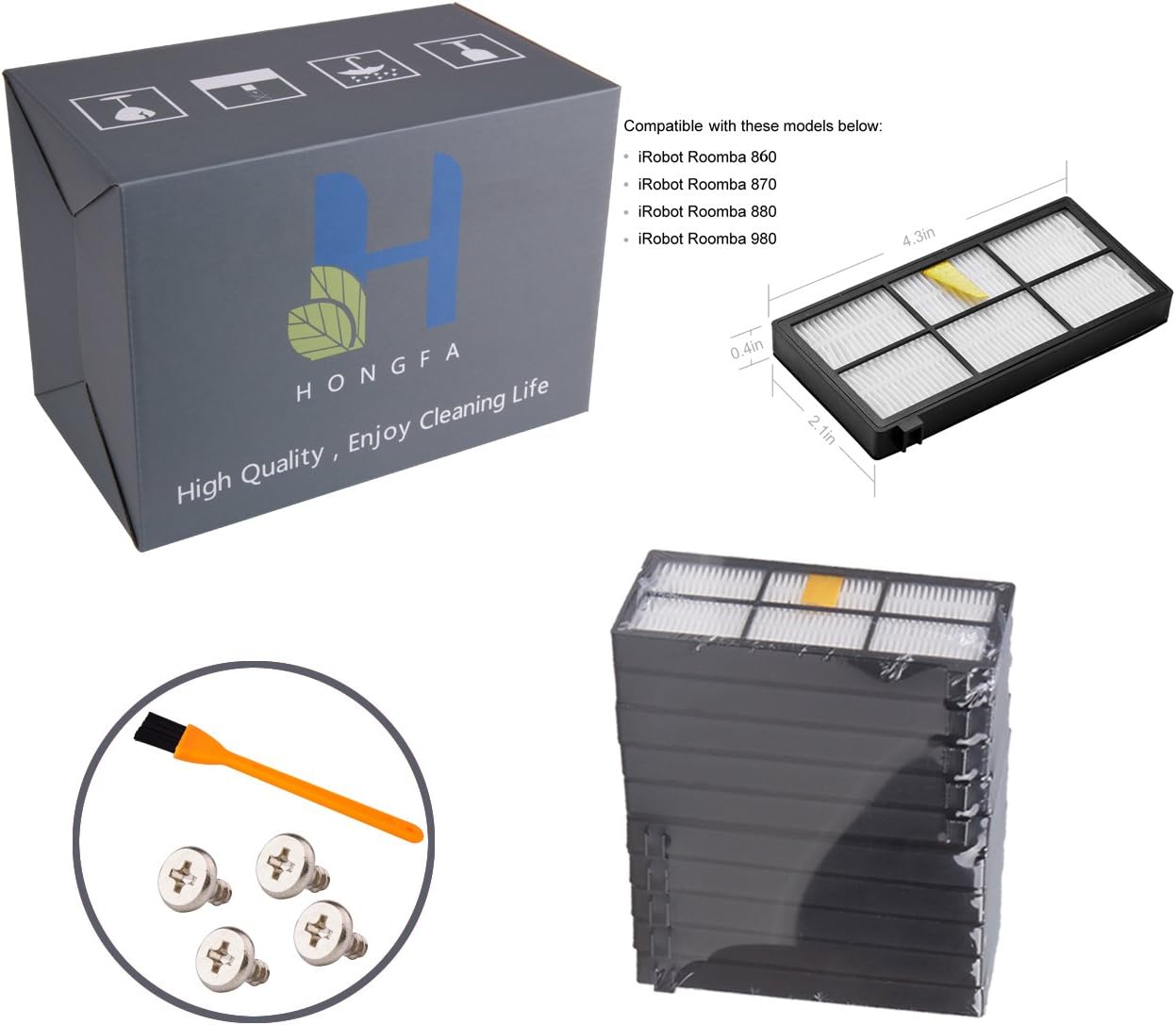
This image displays the complete package contents: the box, multiple filters, a cleaning brush, and four screws.
د نصبولو لارښود
Follow these steps to replace the HEPA filter in your iRobot Roomba:
- Remove the Vacuum Bin: Gently press the bin release button and slide the dust bin out from your iRobot Roomba.
- Open the Filter Door: Locate the filter compartment on the dust bin. Press the filter door release tab and lift the door open.
- زوړ فلټر لرې کړئ: Grasp the yellow tab on the old HEPA filter and pull it out to remove it from the bin. Dispose of the old filter properly.
- نوی فلټر داخل کړئ: Place a new Hongfa replacement filter into the filter compartment. Ensure the yellow tab is facing outwards and the filter is seated securely, clicking into place.
- Close and Reinstall: Close the filter door firmly. Slide the dust bin back into your iRobot Roomba until it locks into position.

This image illustrates the process of inserting a new filter into the vacuum's dust bin.

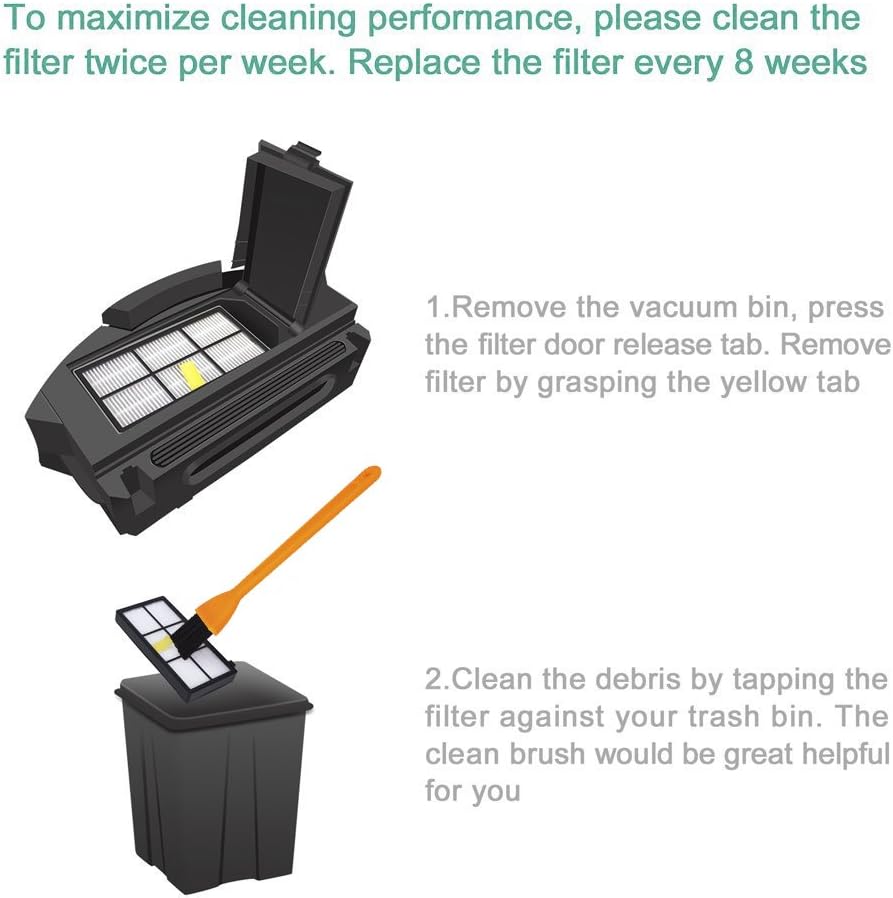
This visual guide details the process of removing the filter from the vacuum bin and cleaning it by tapping and brushing.
Operating with New Filters
Once the new Hongfa HEPA filters are installed, your iRobot Roomba is ready for operation. The new filters will contribute to maintaining optimal suction power and air filtration, ensuring your home environment remains clean and free of airborne particles. Operate your Roomba according to its manufacturer's instructions.
ساتنه
Regular cleaning and timely replacement of your HEPA filters are essential for extending the life of your Roomba and ensuring consistent cleaning performance.
د فلټر پاکول
To clean your filter:
- Remove the vacuum bin and filter as described in the installation steps.
- Gently tap the filter against the inside of a trash container to dislodge accumulated debris.
- Use the provided cleaning brush to carefully brush away any remaining dust and hair from the filter pleats.

A Hongfa replacement filter shown alongside the included cleaning brush, used for maintenance.
This image demonstrates how to use the provided brush to clean dust and debris from the filter pleats.
د ځای پرځای کولو مهال ویش
For optimal performance and air quality, it is recommended to clean your HEPA filter twice per week and replace it every 2 months (approximately 8 weeks), depending on usage and household environment.
د ستونزو حل کول
If you encounter issues after installing your new filters, consider the following:
- د سکشن ځواک کم شوی: If your Roomba's suction seems weaker, the filter might be clogged. Remove and clean the filter thoroughly. If the issue persists, replace the filter with a new one.
- فلټر په سمه توګه نه فټ کیږي: Ensure you have the correct filter series for your specific Roomba model (800/900 series). Double-check that the filter is inserted fully into the compartment and the yellow tab is properly engaged, allowing the filter door to close securely.
- غیر معمولي غږونه: If you hear unusual noises, ensure the filter is correctly seated and not obstructing any moving parts within the dust bin.
مشخصات
| برانډ | هانګفا |
| مواد | High-quality PC (Polycarbonate), EVA Sponge |
| مطابقت لرونکې وسیلې | iRobot Roomba 800 and 900 Series Robotic Vacuums |
| د بسته بندي مقدار | 15 Filters, 1 Cleaning Brush, 4 Screws |
| د توکي ماډل شمیره | 713458758118 |
| د کڅوړې ابعاد | 7.87 x 5.2 x 2.91 انچه |
| د توکي وزن | 14.4 اونس |
تضمین او ملاتړ
For any questions regarding product performance, installation, or potential warranty claims, please contact Hongfa customer support directly. Refer to the packaging or the seller's information for specific contact details.


