1. پیژندنه
This manual provides detailed instructions for the VTech VTONE300P cordless phone. It covers setup, operation, maintenance, and troubleshooting to ensure optimal performance of your device. Please read this manual thoroughly before using your new phone.
2. کلیدي ځانګړتیاوې
- DECT 6.0 Wireless Technology for clear communication.
- Caller ID for identifying incoming calls.
- Reminder Alarm function.
- 20-Contact Phonebook for storing frequently called numbers.
- Adjustable Flash for call waiting or transferring calls.
3. محصول ختم شوview
The VTech VTONE300P is a stylish and functional cordless phone designed for ease of use. Below is an image of the product:
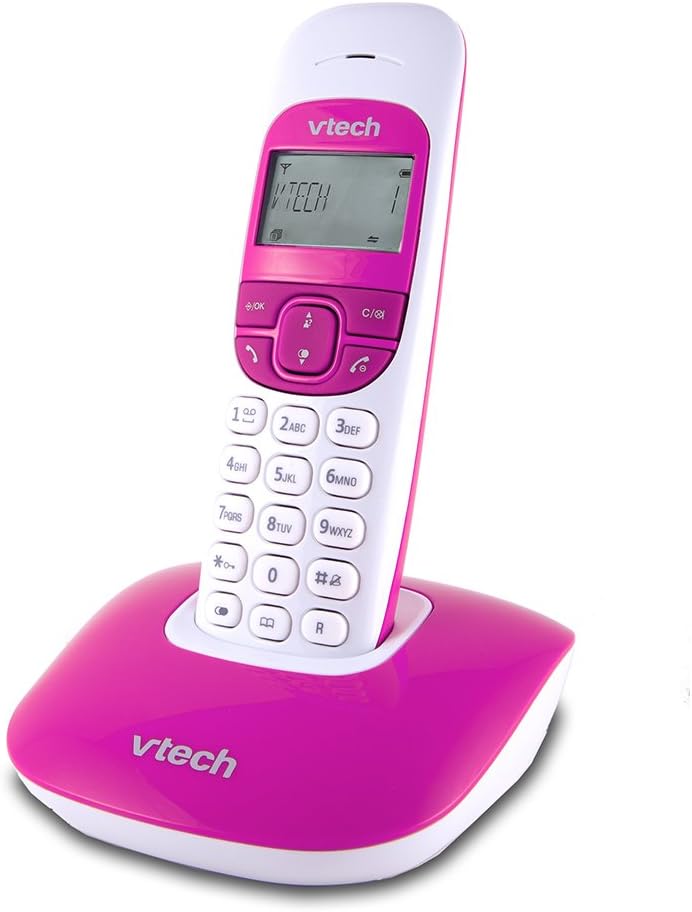
This image displays the VTech VTONE300P cordless phone. The handset is white with a pink keypad and screen surround, featuring a digital display showing 'VTECH 1'. It is securely placed in its matching pink base station, which also bears the 'VTech' logo.
4. ترتیب کول
4.1 پیک کول
ډاډ ترلاسه کړئ چې ټولې برخې شتون لري:
- بې تاره دستګاه
- د بنسټ واحد
- د بیس یونټ لپاره د بریښنا اډاپټر
- د ټیلیفون کرښه
- د چارج وړ بیټرۍ (مخکې نصب شوي یا جلا)
۲.۲ د بنسټ واحد اتصال
- د بریښنا اډاپټر کوچنۍ پای د بیس واحد په شا کې د بریښنا جیک سره ولګوئ.
- د بریښنا اډاپټر لویه پای په معیاري بریښنایی آوټ لیټ کې ولګوئ.
- د ټیلیفون لاین تار یوه پای د بیس یونټ په شا کې د ټیل لاین جیک سره وصل کړئ.
- د ټیلیفون لاین تار بل پای د ټیلیفون دیوال جیک سره وصل کړئ.
۲.۳ د هینډسیټ بیټرۍ نصب او چارج کول
- If batteries are separate, open the battery compartment cover on the back of the handset.
- چمتو شوي د چارج وړ بیټرۍ دننه کړئ، د سم قطبي حالت (+ او -) مشاهده کړئ.
- د بیټرۍ کمپارټ پوښ وتړئ.
- Place the handset on the base unit to charge. The handset will beep, indicating it is charging. Allow at least 12 hours for the initial charge.
4.4 ابتدايي ترتیب
After the handset is charged, follow the on-screen prompts to set the date, time, and language.
5. عملیاتي لارښوونې
۴.۲ زنګ وهل
- د ډایل کولو لپاره: فشار ورکړئ خبرې تڼۍ، بیا د تلیفون شمیره دننه کړئ.
- د تلیفون کتاب څخه: فشار ورکړئ تلیفون button, navigate to the desired contact, then press خبرې.
- سرخیل: فشار ورکړئ سرخیل تڼۍ ته view وروستي ډایل شوي شمیرې، بیا فشار ورکړئ خبرې زنګ وهل
۵.۲ د زنګونو ترلاسه کول
کله چې تلیفون زنګ ووهي، فشار ورکړئ خبرې د زنګ ځواب لپاره تڼۍ.
5.3 د زنګ وهونکي ID
When you receive a call, the caller's information (if available) will appear on the handset display. You can review د فشارولو سره تیر زنګونه زنګ ووهه تڼۍ
5.4 د تلیفون کتاب
- اړیکه اضافه کړئ: مطبوعاتي مینو, select 'Phonebook', then 'Add New Entry'. Enter the name and number, then save.
- Edit Contact: Navigate to the contact in the phonebook, press مینو, select 'Edit', make changes, then save.
- اړیکه ړنګ کړئ: Navigate to the contact, press مینو, select 'Delete'.
5.5 د الارم فعالیت
To set a reminder alarm:
- مطبوعاتي مینو.
- Navigate to 'Alarm' or 'Reminders'.
- Set the desired time and activate the alarm.
5.6 Adjustable Flash
The flash function is typically used during a call to activate services like call waiting or to transfer a call if connected to a PBX system. Press the فلش button (often labeled 'R' or a specific icon) during an active call.
6. ساتنه
6.1 پاکول
د هینډسیټ او بیس واحد د نرم، d سره پاک کړئamp ټوکر. د سختو پاکولو اجنټانو یا خړوبونکو موادو څخه کار مه اخلئ. په هر ډول سوریو کې د لندبل له ننوتلو څخه ډډه وکړئ.
6.2 د بیټرۍ پاملرنه
The rechargeable batteries typically last for several years. If you notice a significant decrease in talk time or standby time, it may be time to replace the batteries. Use only VTech approved replacement batteries.
7. ستونزه حل کول
| ستونزه | د حل لاره |
|---|---|
| د ډایل ټون نشته | Ensure the base unit's power adapter and telephone line cord are securely connected. Check if other phones on the same line are working. |
| زنګونه نشي وهلی یا ترلاسه کولی نشي | Verify the telephone line is active. Ensure the handset is charged and within range of the base unit. |
| د زنګ وهونکي ID کار نه کوي | Confirm you have subscribed to Caller ID service from your telephone provider. Check the phone's settings to ensure Caller ID is enabled. |
| هینډسیټ چارج نه کوي | Ensure the handset is correctly seated in the base unit. Clean the charging contacts on both the handset and base with a dry cloth. Check the power adapter connection. |
| ضعیف غږ کیفیت | هینډسیټ د بیس یونټ ته نږدې کړئ. د نورو بریښنایی وسیلو سره نږدې د بیس یونټ له ځای پرځای کولو څخه ډډه وکړئ چې ممکن د مداخلې لامل شي. |
8. مشخصات
| فیچر | تفصیل |
|---|---|
| برانډ | VTech |
| ماډل | VTONE300P |
| بې سیم ټیکنالوژي | DECT 6.0 |
| د ښودلو اندازه | ۷۸۷ انچه |
| د بریښنا سرچینه | د بیټرۍ چلول |
| مواد | پلاستیک |
| ابعاد (L x W x H) | 11 x 11.7 x 15.5 سانتي متره |
| وزن | 430 ګرامه |
| UPC | 183420002271 |
9. تضمین او ملاتړ
For warranty information and technical support, please refer to the documentation included with your purchase or visit the official VTech webسایټ. د تضمین ادعاوو لپاره د پیرود ثبوت په توګه د پیرود رسید وساتئ.