پیژندنه
This manual provides detailed instructions for the proper use and maintenance of your Casio STL-S110H-1ACF Tough Solar Runner Digital Watch. This timepiece is designed for active individuals, featuring solar power, multiple digital functions, and a durable resin construction.
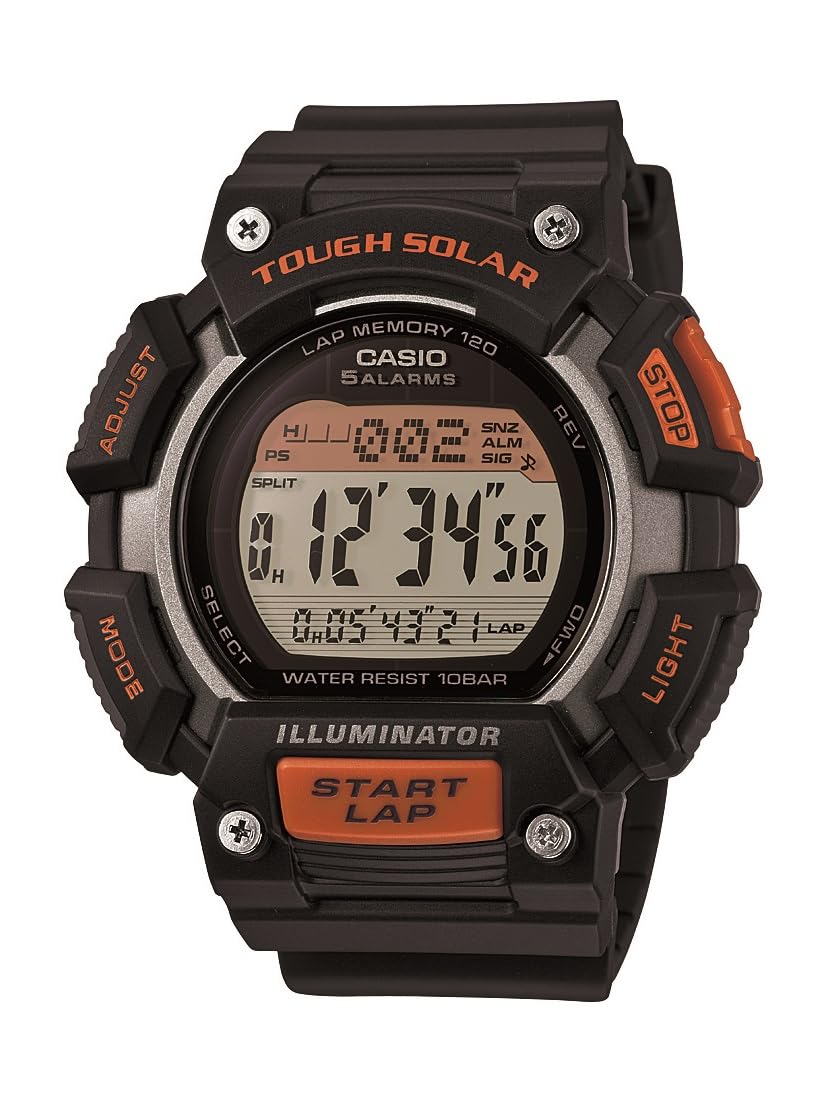
شکل 1: Casio STL-S110H-1ACF Tough Solar Runner Digital Watch. This image displays the watch's digital face, resin case, and band, highlighting its robust design.
چمتو کول
۱. ابتدايي چارج کول
Your watch is equipped with Tough Solar technology, which converts light into electrical energy. Before initial use, or if the display is blank, expose the watch to bright light for several hours. Ensure the watch face is directly exposed to light for efficient charging.
- د چارج کولو چاپیریال: Place the watch near a window or under a strong artificial light source. Avoid extreme heat.
- د بیټرۍ کچه شاخص: The watch features a battery level indicator. Ensure it shows a sufficient charge before setting the time and using functions.
2. د وخت او نیټې ټاکل
- د وخت ساتلو حالت کې، فشار ورکړئ او ونیسئ سمون button (usually top-left) until the city code starts to flash. This indicates the setting mode.
- د کارولو موډ button (usually bottom-left) to cycle through the settings: City Code → DST (Daylight Saving Time) → 12/24-hour format → Seconds → Hour → Minute → Year → Month → Day.
- د کارولو لټون or مخکی / شاته buttons (usually top-right and bottom-right) to change the flashing value.
- کله چې ټول ترتیبات سم شي، فشار ورکړئ سمون د تنظیم کولو حالت څخه وتلو لپاره بیا تڼۍ.
عملیاتي لارښوونې
Your Casio STL-S110H-1ACF watch offers various modes and functions. Use the موډ button to navigate between them.
۱. د وخت ساتلو حالت
This is the default mode, displaying the current time, day, and date. From this mode, you can activate the LED light.
- LED څراغ: فشار ورکړئ رڼا button (usually top-right) to illuminate the display. The light features an after-glow function.
2. د سټاپ واچ حالت
The stopwatch measures elapsed time, split times, and two finishes. It has a capacity of 1/100-second for 100 hours.
- د سټاپ واچ حالت ته د ننوتلو لپاره موډ تڼۍ
- فشار ورکړئ پیل / ودرول button (usually bottom-right) to start timing.
- مطبوعاتي پیل / ودرول بیا ځنډول.
- فشار ورکړئ RESET button (usually top-right) to reset to zero.
- For split times, press وېشل شوى (usually top-right) while timing, then پیل / ودرول to stop, and RESET پاکول
۴. د شمېرنې ټایمر حالت
The watch includes two independent countdown timers, useful for interval training or specific tasks.
- د شمېرنې ټایمر حالت دننه کړئ د موډ تڼۍ
- فشار ورکړئ او ونیسئ سمون د تنظیم کولو حالت ته د ننوتلو لپاره تڼۍ.
- د کارولو موډ button to select which timer (T1 or T2) to set, and then to cycle through hours, minutes, and seconds.
- د کارولو لټون or مخکی / شاته د ارزښتونو د بدلولو لپاره تڼۍ.
- مطبوعاتي سمون د ترتیب حالت څخه د وتلو لپاره.
- مطبوعاتي پیل / ودرول د شمېرنې پیل یا بندولو لپاره.
۶. د نړۍ د وخت حالت
View په ټوله نړۍ کې د ۴۸ ښارونو (۲۹ وخت زونونو) اوسنی وخت.
- Enter World Time Mode using the موډ تڼۍ
- د کارولو لټون or مخکی / شاته buttons to scroll through city codes.
- To swap your Home City time with the World Time City, press the سمون او لټون په ورته وخت کې تڼۍ.
5. د الارم حالت
Set up to five daily alarms and an hourlد وخت سیګنال.
- د الارم حالت ته د ننوتلو لپاره موډ تڼۍ
- د کارولو لټون or مخکی / شاته buttons to select an alarm (AL1 to AL5) or the Hourlد وخت سیګنال (SIG).
- فشار ورکړئ او ونیسئ سمون د الارم ترتیب حالت ته د ننوتلو لپاره تڼۍ.
- د کارولو موډ button to select hour or minute.
- د کارولو لټون or مخکی / شاته د ارزښتونو د بدلولو لپاره تڼۍ.
- مطبوعاتي سمون د ترتیب حالت څخه د وتلو لپاره.
- د الارم یا هو بدلولو لپارهurly time signal on/off, select it and press the پیل / ودرول تڼۍ
ساتنه
1. پاکول
- Wipe the watch with a soft, dry cloth to remove dirt and moisture.
- د سختې خاورې لپاره، نرم ټوکر وکاروئampened with water and a mild neutral detergent. Avoid harsh chemicals.
- Clean the resin band regularly to prevent skin irritation and maintain its appearance.
2. Solar Charging Care
- Ensure the watch face is regularly exposed to light to maintain optimal battery charge.
- Avoid prolonged storage in dark places, as this can lead to battery depletion.
- Do not expose the watch to extremely high temperatures during charging (e.g., on a car dashboard in direct sunlight).
۳. د اوبو مقاومت
This watch is designed for daily use and can withstand splashes or brief immersion in water. However, it is not suitable for diving or prolonged underwater use. Do not operate buttons while the watch is wet.
د ستونزو حل کول
- ښودنه خالي یا تیاره ده: The watch battery may be low. Expose the watch to bright light for several hours to recharge.
- وخت غلط دی: Re-adjust the time and date settings as described in the "Setting the Time and Date" section. Ensure the correct home city and DST settings are selected.
- تڼۍ بې ځوابه دي: This could indicate a very low battery level. Charge the watch fully. If the issue persists, contact customer support.
- Watch stops functioning after exposure to water: Ensure buttons were not pressed underwater. Allow the watch to dry completely. If issues persist, seek professional service.
مشخصات
| د ماډل شمیره | STLS110H-1A |
| د بریښنا سرچینه | Tough Solar (Solar rechargeable battery) |
| د بیټرۍ ژوند (بشپړ چارج) | Approx. 11 months (without further exposure to light) |
| د قضیې مواد | رال |
| بانډ مواد | رال |
| د کړکۍ مواد ډایل کړئ | منرال |
| د قضیې ابعاد | 49 ملي متره (قطر) |
| د محصول ابعاد | 5.26 x 5.46 x 1.4 سانتي متره |
| وزن | 54.43 ګرامه |
| د اوبو مقاومت | General daily use (splash resistant) |
| افعال | LED light with after-glow, 5 daily alarms, hourly time signal, world time (48 cities), stopwatch (1/100-second, 100-hour capacity), 2 countdown timers, auto-calendar. |
تضمین او ملاتړ
Your Casio watch is covered by a manufacturer's warranty. Please refer to the warranty card included with your purchase for specific terms and conditions, including warranty period and coverage details. For technical support, service, or inquiries regarding your watch, please contact Casio customer service through their official webسایټ یا ستاسو د تضمین اسنادو کې چمتو شوي د اړیکو معلومات.
For further assistance, visit the official Casio support webسایټ: www.casio.com/support


