پیژندنه
The Marathon 100 Hour Dual Digital Timer is a versatile and essential tool designed for precise time management in various settings, including kitchens, offices, labs, and schools. Featuring a large, easy-to-read LCD display and a loud alarm, this timer ensures you never miss an important moment. It offers dual functionality, allowing you to track two separate events simultaneously, with both countdown and count-up capabilities.

مخکی view of the Marathon 100 Hour Dual Digital Timer, highlighting its clear dual LCD display and intuitive button layout for T1, T2, M, HR, MIN, SEC, and START/STOP.
کلیدي ځانګړتیاوې
- Dual Digital Timer: Simultaneously track two separate events with individual timers (T1 and T2).
- Large, Easy-to-Read LCD Display: High-contrast display ensures clear visibility of time from a distance.
- Loud Ring Alarm: Audible alarm can be heard across a room, ensuring timely alerts.
- دوه ګونی فعالیت: Each timer can operate as a countdown timer (up to 99 hours, 59 minutes, 59 seconds) or a count-up stopwatch.
- Built-in Memory Function: Easily recall previous timer settings for repetitive tasks.
- څو اړخیز ځای پرځای کول: Features a magnetic back for attachment to metal surfaces (like refrigerators) and a fold-out stand for tabletop use.
- بیټرۍ شاملې دي: د سمدستي کارونې لپاره د 2 AAA بیټرۍ سره راځي.

Image illustrating the timer's dual function (count down or up), inclusion of 2x AAA batteries, and versatile placement options (tabletop stand, wall mount, wall magnet).
چمتو کول
1. د بیټرۍ نصب کول
- د ټایمر په شا کې د بیټرۍ کڅوړه ومومئ.
- د بیټرۍ پوښ خلاص کړئ.
- درې AAA بیټرۍ دننه کړئ، د سم قطبیت (+/-) ډاډ ترلاسه کړئ لکه څنګه چې د خونې دننه ښودل شوي.
- د بیټرۍ پوښ په خوندي ډول وتړئ.
۳. لومړنی بریښنا فعالول
Upon battery installation, the timer's LCD display will activate, showing "00:00:00" for both T1 and T2. The timer is now ready for use.
عملیاتي لارښوونې
Setting a Countdown Timer (T1 or T2)
- فشار ورکړئ T1 or T2 button to select the desired timer. The selected timer's display will flash.
- فشار ورکړئ HR button to set the hours.
- فشار ورکړئ MIN د دقیقو تنظیم کولو لپاره ت buttonۍ.
- فشار ورکړئ SEC د ثانیو د تنظیم کولو لپاره تڼۍ.
- کله چې مطلوب وخت تنظیم شي، فشار ورکړئ پیل / ودرول د شمېرنې پیل کولو لپاره تڼۍ.
- During countdown, a green light will flash. When the timer reaches zero, the alarm will sound, and a red light will flash. The timer will then automatically begin counting up to show elapsed time since the alarm.
- To stop the alarm and the count-up, press the پیل / ودرول تڼۍ
Using as a Count-Up Timer (Stopwatch)
- Ensure the selected timer (T1 or T2) is set to "00:00:00". If not, press the M (Memory) button to clear any previous setting, or press HR او MIN simultaneously to reset.
- فشار ورکړئ پیل / ودرول د شمېرنې پیل کولو لپاره تڼۍ.
- فشار ورکړئ پیل / ودرول د شمېرنې د بندولو لپاره بیا تڼۍ کېکاږئ.
- فشار ورکړئ پیل / ودرول button once more to resume.
- To reset the count-up timer to "00:00:00", press the HR او MIN buttons simultaneously while the timer is paused or running.
د حافظې فعالیت
The timer features a built-in memory function. If you stop a countdown timer within one minute after it reaches zero, it will automatically remember the previous setting. To recall a stored memory, press the M تڼۍ
د الارم حجم تنظیم کول
On the side of the timer, there is a switch to adjust the alarm volume. Options include: Mute, Low, and High. Select the appropriate volume level for your environment.

The timer displaying active green and red indicator lights for T1 and T2, signifying active or completed timers.
د ځای پرځای کولو اختیارونه
- مقناطیسي شاته: The timer has strong magnets on its back, allowing it to be securely attached to metal surfaces such as refrigerators, ovens, or whiteboards.
- Fold-Out Stand: A convenient fold-out stand is integrated into the back of the timer, enabling it to stand upright on any flat surface like a countertop or desk.
- کلیپ: The fold-out stand can also function as a clip, allowing you to attach the timer to a belt, pocket, or apron for portability.

A user demonstrating the magnetic attachment feature of the timer on a refrigerator, showcasing its convenience in a kitchen environment.
ساتنه
- پاکول: ټایمر په نرم سره پاک کړئ، دamp ټوکر. د کثافاتو پاکوونکي مه کاروئ او نه هم واحد په اوبو کې ډوب کړئ.
- د بیټرۍ بدلول: Replace batteries when the display dims or the timer functions become erratic. Always use 2 new AAA alkaline batteries. Dispose of old batteries responsibly.
- ذخیره کول: If storing the timer for an extended period, remove the batteries to prevent leakage and damage.
د ستونزو حل کول
| ستونزه | احتمالي لامل / حل |
|---|---|
| ښودنه خالي یا تیاره ده. | Batteries are low or incorrectly installed. Replace with new AAA batteries, ensuring correct polarity. |
| Alarm is too quiet or not sounding. | Check the volume switch on the side of the timer and set it to "Low" or "High". Ensure the speaker on the back is not obstructed. |
| ټایمر د تڼۍ فشارونو ته ځواب نه ورکوي. | Try removing and reinserting the batteries to perform a soft reset. If the issue persists, replace the batteries. |
| Timer does not reset to zero. | To reset a timer, ensure it is paused (if counting up) or has completed its countdown. Then, press the HR and MIN buttons simultaneously. |
| Magnetic attachment is not strong enough. | Ensure the surface is clean and flat. For heavier items or less magnetic surfaces, consider using additional magnets or the fold-out stand. |
مشخصات
- د ماډل شمیره: TI030017WH
- رنګ: Double Timer White
- مواد: پلاستیک
- د محصول ابعاد: 5 x 4.2 x 1.4 انچه
- د توکي وزن: ۱.۶۲ اونس (۰.۱ پونډه)
- د بریښنا سرچینه: 2 AAA بیټرۍ (شامل دي)
- د اعظمي وخت ترتیب: ۹ ساعته، ۵۹ دقیقې، ۵۹ ثانیې
- د ترتیباتو شمیر: 2 (Dual Timers)
- UPC: 063442000229
- جوړونکی: ماراتن
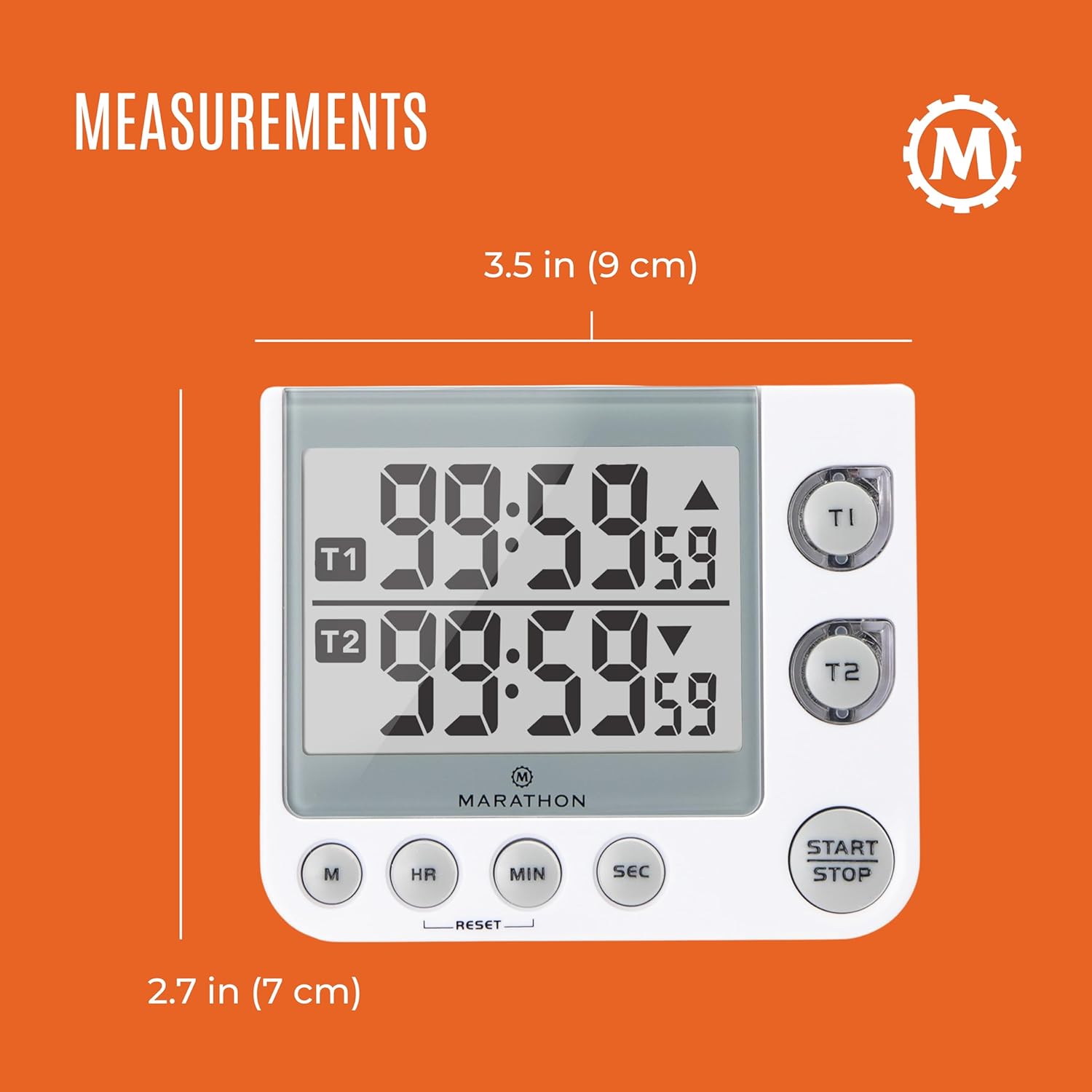
Image displaying the physical measurements of the timer, indicating its compact size for easy placement.
تضمین او ملاتړ
Marathon has been manufacturing precision timing instruments since 1941, combining modern design sensibility with Swiss engineering and craftsmanship to ensure the highest quality products. For specific warranty information or technical support, please refer to the contact details provided with your product packaging or visit the official MARATHON webسایټ
Note: This manual provides general instructions. Specific features and operations may vary slightly. Always refer to the latest information from the manufacturer.


