1. پیژندنه
The Alpine IVA-W520E is a full-featured 2DIN DVD player solution designed for in-car entertainment and media. It integrates advanced video and audio technologies, including a 7-inch LED touchscreen and a Burr-Brown 24-bit DAC, to deliver high-quality sound and clear images. This manual provides essential information for the proper installation, operation, and maintenance of your IVA-W520E unit.
2. د خوندیتوب معلومات
مهرباني وکړئ د واحد نصبولو یا چلولو دمخه د خوندیتوب ټولې لارښوونې په دقت سره ولولئ. د دې لارښوونو په تعقیب کې پاتې راتلل ممکن واحد یا موټر ته زیان یا زیان ورسوي.
- د مسلکي نصب کولو وړاندیز شوی: Due to the complexity of car audio-visual systems, professional installation is highly recommended to ensure proper wiring and functionality.
- د بریښنا سرچینه: واحد یوازې د 12V DC منفي ځمکې بریښنا رسولو سره وصل کړئ.
- له ګډوډۍ ډډه وکړئ: د واحد کنټرولونه مه کاروئ یا view video content while driving, as this can lead to accidents. Always pull over to a safe location before making adjustments.
- وینټیلیشن: د یونټ شاوخوا کافي هوا ورکول ډاډمن کړئ ترڅو د ډیر تودوخې مخه ونیول شي. د هوا د توییدو لارې مه بندوئ.
- رطوبت او مایعات: Keep the unit away from moisture and liquids. Do not expose it to rain or water.
- پاکول: د پاکولو لپاره نرم، وچ ټوکر وکاروئ. د کثافاتو پاکوونکو یا محلولونو څخه ډډه وکړئ.
3. د بسته محتويات
د نصبولو دمخه ډاډ ترلاسه کړئ چې ټول توکي په بسته کې شتون لري:
- Alpine IVA-W520E Head Unit
- پاور/سپیکر هارنس
- د نصبولو هارډویر (پیچونه، بریکٹونه)
- ټرم حلقه
- د کارونکي لارښود (دا لاسوند)
- د تضمین معلومات
4. ترتیب او نصب کول
4.1. د نصبولو لارښوونې
Proper installation is crucial for optimal performance and safety. It is highly recommended to have the unit installed by a qualified professional.
- د بیټرۍ قطع کول: د هر ډول بریښنایی کار پیل کولو دمخه، د موټر د منفي بیټرۍ ټرمینل جلا کړئ ترڅو د لنډ سرکټ مخه ونیول شي.
- پورته کول: Securely mount the unit in the vehicle's double-DIN opening using the provided mounting brackets and screws. Ensure it is stable and does not obstruct any vehicle controls.
- تارونه: Connect the power harness, speaker wires, and other input/output cables according to the wiring diagram provided in the separate installation guide. Pay close attention to ground connections.
- Antenna and External Devices: Connect the radio antenna and any external devices such as a reverse camera or external ampژغورونکي
4.2. ابتدايي ترتیب
After installation, reconnect the battery and power on the unit for the first time.
- د ژبې انتخاب: د خپلې خوښې ژبه غوره کولو لپاره په سکرین کې لارښوونې تعقیب کړئ.
- وخت او نېټه: Set the correct time and date for accurate display.
- د آډیو ترتیبات: Adjust basic audio settings such as volume, balance, and fader.
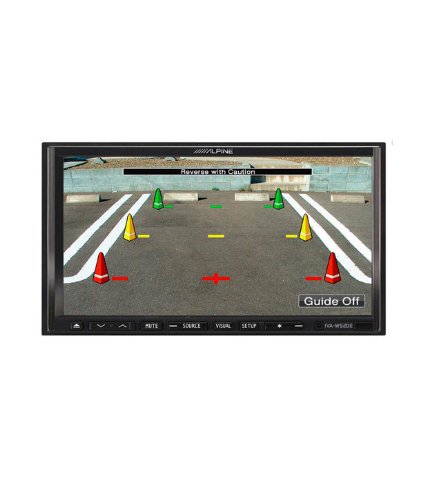
شکل 4.1: مثالample of the IVA-W520E displaying a reverse camera feed, showing parking guidelines. This feature aids in safe vehicle maneuvering.
5. د واحد چلول
5.1. Touchscreen and Button Controls
The IVA-W520E features a responsive 7-inch LED touchscreen for primary control, supplemented by physical buttons for quick access to common functions.
- ټچ سکرین: Navigate menus, select sources, and control playback by touching the screen.
- د حجم کنټرول: Use the dedicated volume buttons or on-screen controls to adjust audio levels.
- سرچینه تtonۍ: Press to cycle through available audio/video sources (Radio, DVD, USB, iPod, AUX, Bluetooth).
- تteۍ غږول: په لنډمهاله توګه د آډیو محصول خاموشوي.
- د تنظیم تڼۍ: د سیسټم تنظیماتو مینو ته لاسرسی ومومئ.
.5.2 آډیو غږول
The unit supports various audio formats and sources, enhanced by its Burr-Brown 24-bit DAC for superior sound quality.
- د USB غږ: Connect a USB device containing audio files. The unit will display track information and allow navigation through folders.
- iPod/iPhone Connectivity: Connect your iPod or iPhone for direct audio playback and control.
- DVD/CD پلې بیک: Insert a DVD or CD into the disc slot for audio or video playback.
- د راډیو ټونر: Access AM/FM radio stations.
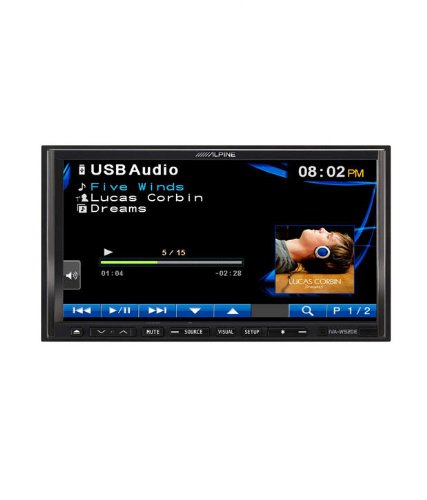
Figure 5.1: The IVA-W520E displaying the USB Audio interface, showing current track, artist, and playback controls. This allows for easy navigation of digital music files.
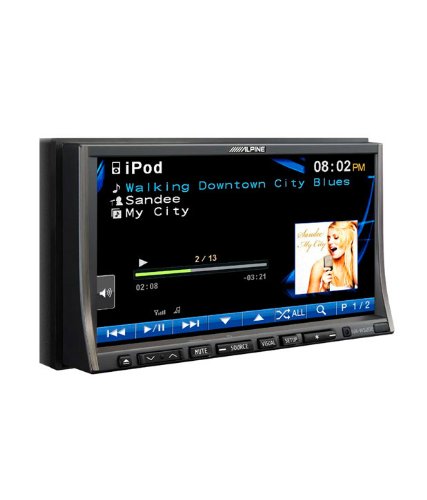
Figure 5.2: The IVA-W520E displaying the iPod interface, showing a list of songs and album art. This demonstrates seamless integration with Apple devices for music playback.
5.3. ویډیو پلې بیک
The 7-inch LED screen provides enhanced image quality with higher resolution, better contrast, and improved color reproduction compared to standard LCD screens.
- DVD Video: Insert a video DVD for playback. Ensure the parking brake safety wire is correctly connected for video to display while the vehicle is stationary.
- External Video Input: The unit supports external video sources, such as a reverse camera or other video devices.
5.4. د بلوتوټ ارتباط
The IVA-W520E is upgradable for Bluetooth hands-free system functionality, allowing for safe and convenient communication while driving.
- جوړه کول: Refer to the separate Bluetooth module manual (if applicable) for pairing instructions with your mobile phone.
- د لاسونو څخه وړیا تلیفون کول: Make and receive calls directly through the unit.
- غږیزې خپرونې: د خپل بلوتوث فعال شوي وسیلې څخه آډیو سټریم کړئ.
5.5. Navigation System (Upgradable)
The unit is designed to be upgradable with a navigation system. Consult your Alpine dealer for compatible navigation modules and installation.
6. ساتنه
Regular maintenance helps ensure the longevity and optimal performance of your Alpine IVA-W520E.
- د سکرین پاکول: Gently wipe the touchscreen with a soft, lint-free cloth. For stubborn smudges, slightly dampen the cloth with water or a screen-specific cleaner. Do not spray cleaner directly onto the screen.
- ډیسک سلاټ: Keep the disc slot free of dust and debris. Avoid inserting bent, scratched, or irregular discs.
- عمومي پاکول: Use a soft, dry cloth to wipe the unit's exterior. Avoid harsh chemicals or abrasive materials.
7. ستونزه حل کول
If you encounter issues with your IVA-W520E, refer to the following common problems and solutions:
| ستونزه | احتمالي لامل | د حل لاره |
|---|---|---|
| هیڅ ځواک نشته | فیوز چاودېدلی، غلط تارونه، تړل شوی اړیکه. | Check vehicle fuses and unit's fuse. Verify power and ground wiring connections. Ensure battery is connected. |
| نه غږ | Volume too low, mute activated, speaker wiring issue, incorrect source selected. | Increase volume. Deactivate mute. Check speaker connections. Select correct audio source. |
| د ډیسک تېروتنه | چټل، سکریچ شوی، یا نامناسب ډیسک. | ډیسک پاک کړئ. یو بل، ښه پیژندل شوی ډیسک هڅه وکړئ. ډاډ ترلاسه کړئ چې د ډیسک بڼه ملاتړ شوې ده. |
| Video Not Displaying (while driving) | Parking brake safety wire not connected or incorrectly connected. | This is a safety feature. Video playback is disabled while the vehicle is in motion. Ensure the parking brake wire is correctly connected to the vehicle's parking brake circuit. |
| د بلوتوټ جوړه کولو مسلې | Bluetooth module not connected, phone not in pairing mode, interference. | Ensure optional Bluetooth module is correctly installed. Put phone in pairing mode. Move closer to the unit. |
If the problem persists after trying these solutions, please contact your authorized Alpine dealer or customer support.
8. مشخصات
Key technical specifications for the Alpine IVA-W520E:
- ماډل: IVA-W520E
- د ښودلو اندازه: 7 انچونه (18 سانتي متره)
- د ښودلو ډول: LED LCD Touchscreen
- قرارداد: 480 x 272 پکسله
- آډیو DAC: Burr-Brown 24-bit
- مطابقت لرونکي وسایل: Smartphone (via USB/iPod, Bluetooth upgradable)
- ځانګړي ځانګړتیاوې: Touchscreen, Bluetooth (upgradable)
- د آډیو محصول حالت: سپیکر
- جوړونکی: الپین
- لومړی شتون لري: ۹ اګست ۲۰۲۲
9. تضمین او ملاتړ
For detailed warranty information, please refer to the warranty card included with your product package or visit the official Alpine webسایټ. د پیرود ثبوت په توګه د پیرود رسید وساتئ.
For technical support, service, or inquiries about compatible accessories and upgrades (such as navigation modules or Bluetooth kits), please contact your authorized Alpine dealer or visit the Alpine customer support portal online.
د الپین رسمي Webسایټ: www.alpine.com


