1. پیژندنه
د پیرودلو لپاره مننهasing the eKids Li-B17 Millennium Falcon Bluetooth Speaker. This portable wireless speaker allows you to stream audio from your Bluetooth-enabled devices and enjoy hands-free calling. Its unique design, inspired by the iconic Millennium Falcon, includes light effects and plays the Star Wars theme. Please read this manual carefully to ensure proper use and maintenance of your speaker.
2. د خوندیتوب معلومات
- د عمر سپارښتنه: د ۶ کلونو او پورته عمر لرونکو لپاره مناسب.
- Do not expose the unit to extreme temperatures, direct sunlight, or moisture.
- د واحد د جلا کولو یا بدلولو هڅه مه کوئ. دا به تضمین باطل کړي.
- یوازې چمتو شوی چارجینګ کیبل یا تصدیق شوی معادل وکاروئ.
- واحد د قوي مقناطیسي ساحو څخه لرې وساتئ.
3. د بسته محتويات
ډاډ ترلاسه کړئ چې ټول توکي په کڅوړه کې شتون لري:
- eKids Li-B17 Millennium Falcon Bluetooth Speaker
- د USB چارج کیبل

شکل 1: eKids Li-B17 Millennium Falcon Bluetooth Speaker on its clear stand, showcasing its detailed design and illuminated blue engine lights.
4. د محصول ب Featuresې
- Bluetooth Wireless Audio: Stream music wirelessly from compatible devices.
- د لاسونو څخه پاک فعالیت: Answer and end calls directly from the speaker.
- د رڼا اغیزې: Integrated lights illuminate during operation.
- د چارج وړ بیټرۍ: Built-in lithium battery provides up to 6 hours of playback.
- Star Wars Theme: Plays the iconic Star Wars main theme.
- AUX داخلول: Connect non-Bluetooth devices via the auxiliary port.

شکل 2: The eKids Li-B17 Millennium Falcon Bluetooth Speaker with text indicating powerful sound performance and illuminated engine lights, alongside a smartphone displaying music playback.
5. ترتیب کول
۳.۱ د سپیکر چارج کول
- Connect the small end of the included USB charging cable to the USB charging port on the speaker.
- Connect the larger end of the USB charging cable to a powered USB port (e.g., computer, USB wall adapter).
- د چارج کولو شاخص څراغ به روښانه شي. کله چې په بشپړ ډول چارج شي، رڼا ممکن رنګ بدل کړي یا بند شي.
- بشپړ چارج شاوخوا ۵۰ ساعته د پلې بیک وخت چمتو کوي.
5.2 بریښنا کول / بندول
Locate the 3-position switch on the side of the speaker (refer to Figure 3).
- واک ته ON in Bluetooth mode, slide the switch to the بلوتوث سمبول موقعیت
- واک ته ON in AUX mode, slide the switch to the AUX موقعیت
- واک ته بند, slide the switch to the بند (منځنی) موقعیت.
5.3 د بلوتوټ جوړه کول
- Ensure the speaker is charged and powered ON in Bluetooth mode. The speaker will automatically enter pairing mode if no previously paired device is found.
- په خپل بلوتوث فعال شوي وسیله (سمارټ فون، ټابلیټ، او نور) کې، بلوتوث فعال کړئ او د شته وسایلو لټون وکړئ.
- غوره کړئ "eKids Li-B17" (یا ورته نوم) د وسیلو له لیست څخه.
- Once paired, the speaker will indicate a successful connection (e.g., a tone or voice prompt).
- To pair a new device or re-enter pairing mode, press and hold the Bluetooth button on the top of the speaker.
5.4 د ایکس رابطه
For devices without Bluetooth, you can use the AUX input:
- Slide the 3-position switch to the AUX موقعیت
- Connect one end of a 3.5mm audio cable (not included) to your audio device's headphone jack.
- Connect the other end of the 3.5mm audio cable to the AUX port on the speaker (refer to Figure 3).
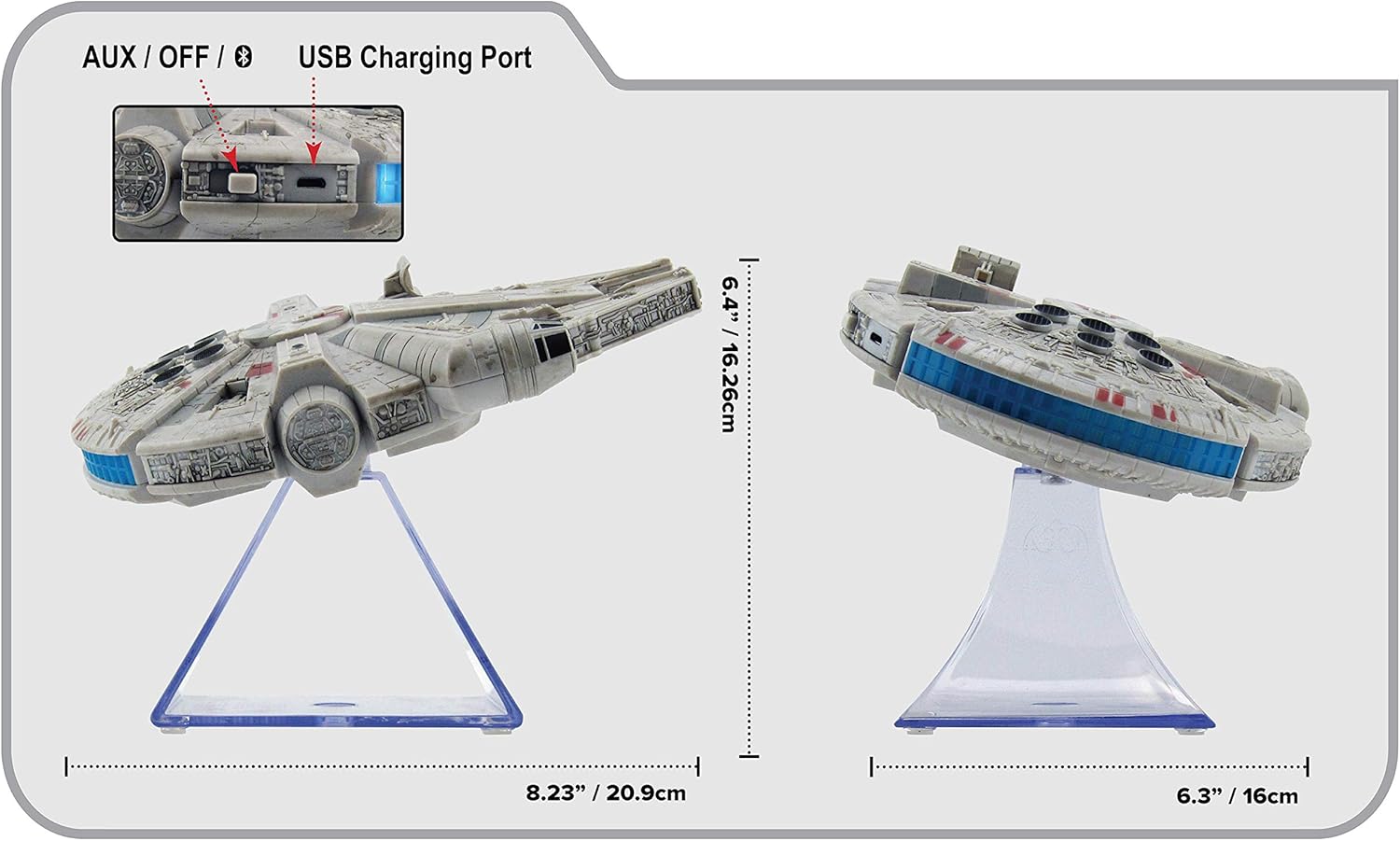
شکل 3: اړخ view of the eKids Li-B17 Millennium Falcon Bluetooth Speaker, highlighting the AUX/OFF/Bluetooth switch, USB charging port, and product dimensions.

شکل 4: Image illustrating the eKids Li-B17 Millennium Falcon Bluetooth Speaker's compatibility with multiple devices including mobile phones, tablets, notebooks, smartwatches, game devices, and PCs.
6. عملیاتي لارښوونې
6.1 آډیو غږول
- Once connected via Bluetooth or AUX, start playing audio from your source device.
- Adjust the volume using the controls on your connected device. The speaker itself does not have volume controls.
۶.۳ د لاسونو څخه پاک زنګ وهل
کله چې د بلوتوث له لارې سمارټ فون سره وصل شئ:
- د زنګ په ځواب کې: Press the designated call button on the speaker (often integrated with the Bluetooth button or a separate small button near the main blaster area).
- د زنګ وهلو پای: Press the call button again.
- تلیفون کول: Initiate the call from your smartphone; audio will route through the speaker.
6.3 د رڼا اغیزې
The speaker features integrated blue engine lights that illuminate when the speaker is powered on and in use, enhancing the visual experience.
6.4 Star Wars Theme Playback
Press the large button located on the top of the speaker (the top blaster area) to play the Star Wars main theme.
7. ساتنه
- Clean the speaker with a soft, dry cloth. Do not use liquid cleaners or abrasive materials.
- سپیکر په یخ او وچ ځای کې وساتئ کله چې نه کارول کیږي.
- د سپیکر له غورځولو یا د قوي ټکانونو سره مخ کیدو څخه ډډه وکړئ.
8. ستونزه حل کول
| ستونزه | احتمالي لامل | د حل لاره |
|---|---|---|
| سپیکر نه خلاصیږي. | بیټرۍ ختمه شوې. | د ورکړل شوي USB کیبل په کارولو سره سپیکر چارج کړئ. |
| د بلوتوث له لارې جوړه نشي کیدی. | Speaker is not in pairing mode or device's Bluetooth is off. | Ensure speaker is in Bluetooth mode and press the Bluetooth button to enter pairing. Turn Bluetooth on your device and search again. |
| له سپیکر څخه غږ نه راځي. | Volume too low, incorrect input mode, or device not playing. | Increase volume on your device. Ensure speaker is in correct mode (Bluetooth/AUX). Check if your device is playing audio. |
| ضعیف غږ کیفیت. | Device too far from speaker, interference, or low battery. | Move device closer to speaker (within 30 feet). Avoid obstacles. Charge the speaker. |
9. مشخصات
| فیچر | مشخصات |
|---|---|
| د ماډل شمیره | Li-B17 |
| د ارتباط ټیکنالوژي | بلوتوث |
| د بیسیم رینج | تر 30 فوټو پورې (نږدې 9 متره) |
| د بریښنا سرچینه | Lithium-Polymer Battery (rechargeable) |
| د بیټرۍ ژوند | تر 6 ساعتونو پورې |
| د سپیکر اعظمي تولید ځواک | 25 واټ |
| د آډیو وتلې حالت | سټیریو |
| مواد | پلاستیک |
| د نصب کولو ډول | ټابلیټ |
| ابعاد (L x W x H) | 18.29 x 26.42 x 24.13 سانتي متره (7.2 x 10.4 x 9.5 انچه) |
| شاملې برخې | Millennium Falcon Bluetooth Speaker, USB Charging Cable |
10. تضمین او ملاتړ
دا محصول د الف سره راځي محدود تضمین. For specific details regarding warranty coverage, duration, and how to obtain service, please refer to the warranty card included with your purchase or contact eKids customer support.
For technical support or further inquiries, please visit the official eKids webسایټ یا د دوی د پیرودونکي خدماتو څانګې سره اړیکه ونیسئ.


