پیژندنه
This manual provides instructions for the HAVIT HV-KB366L RGB Backlit Mechanical Gaming Keyboard. This keyboard features blue mechanical switches, full anti-ghosting, and customizable RGB backlighting, designed for reliable performance.
د تنظیم کولو لارښوونې
د کیبورډ سره نښلول
- په خپل کمپیوټر کې موجود USB پورټ ومومئ.
- Connect the USB cable from the HAVIT HV-KB366L keyboard to the USB port on your computer.
- کیبورډ پلګ او پلی دی او باید ستاسو د عملیاتي سیسټم لخوا په اتوماتيک ډول وپیژندل شي.
د سیسټم مطابقت
- Compatible with Windows 10 and other Windows operating systems.
- Mac OS supports 6-key rollover only.
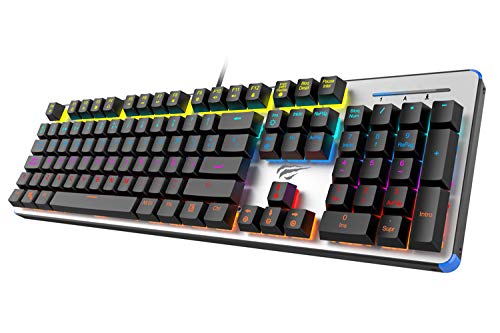
Figure 1: HAVIT HV-KB366L RGB Backlit Mechanical Gaming Keyboard. An overhead view د کیبورډ، شوکasing its full layout with RGB lighting on the keys and a white frame.
عملیاتي لارښوونې
میخانیکي کیلي سویچونه
The keyboard is equipped with blue mechanical switches, providing tactile feedback and an audible click with each keystroke. This design is intended for precise input during typing and gaming.
د غوسټینګ ضد ځانګړتیا
The full key anti-ghosting mechanism ensures that all key presses are registered accurately, even when multiple keys are pressed simultaneously. This feature is beneficial for fast-paced gaming.
د شاتنۍ رڼا تنظیم کول
- To change the backlight color or mode, press the Fn کیلي په ورته وخت کې د بیکلیټ key. Repeated presses will cycle through available modes and colors.
- Marquee Mode: In 7-color backlit mode (non-breathing), press the بیکلیټ key once to activate marquee mode. Press the بیکلیټ key again to deactivate marquee mode and return to 7-color backlit mode.
- د روښانتیا کچه: The backlight offers 4 levels of brightness adjustment.
- د تنفس کچه: The breathing effect has 10 adjustable levels.
ساتنه
د کیبورډ پاکول
- د پاکولو دمخه کیبورډ له خپل کمپیوټر څخه جلا کړئ.
- د کیبورډ سطحې د پاکولو لپاره نرم، وچ ټوکر وکاروئ.
- د کیلي ګانو ترمنځ د دوړو او کثافاتو لپاره، فشار شوي هوا وکاروئ.
- Avoid using harsh chemicals or abrasive materials, as these can damage the finish or keycaps.
پایښت
The keyboard features an aluminum top housing with a sanded finish and a metal base, contributing to its overall durability and stable performance.
د ستونزو حل کول
کیبورډ ځواب نه ورکوي
- ډاډ ترلاسه کړئ چې USB کیبل په خوندي ډول د کیبورډ او کمپیوټر دواړو سره وصل دی.
- هڅه وکړئ چې کیبورډ په خپل کمپیوټر کې بل USB پورټ سره وصل کړئ.
- په بل کمپیوټر کې کیبورډ ازموینه وکړئ ترڅو معلومه کړئ چې ستونزه د کیبورډ سره ده یا د کمپیوټر USB پورټ سره.
د شا څراغ کار نه کوي یا غلط دی
- ډاډ ترلاسه کړئ چې کیبورډ په سمه توګه وصل دی او بریښنا ترلاسه کوي.
- مطبوعاتي Fn + Backlit key to cycle through backlight modes and ensure it is not turned off or set to a very low brightness.
- Refer to the "Backlight Adjustment" section for detailed instructions on changing modes and brightness.
مشخصات
| برانډ | HAVIT |
| د ماډل شمیره | HV-KB366L |
| جوړونکی | HAVIT |
| د محصول ابعاد | 50.5 x 17.6 x 6 سانتي متره |
| د توکي وزن | 1.33 کیلو ګرامه |
| د ارتباط ټیکنالوژي | برښنایی (USB) |
| د کیبورډ توضیحات | د لوبو میخانیکي کی بورډ |
| ځانګړی ځانګړنه | RGB Backlit, Anti-Ghosting |
| د هارډویر پلیټ فارم | لپ ټاپ، کمپیوټر |
| عملیاتي سیسټم | Windows 10 (and compatible), Mac OS (6-key rollover) |
| والیtage | 5 ولټه |
| شاملې برخې | USB کیبل |
تضمین او ملاتړ
د تضمین معلومات
Specific warranty details for the HAVIT HV-KB366L keyboard are not provided in the product data. Please refer to the product packaging or contact HAVIT directly for warranty terms and conditions.
د پیرودونکي ملاتړ
For technical assistance, troubleshooting, or further inquiries, please contact HAVIT customer support through their official webسایټ یا د اړیکې معلومات ستاسو د پیرود سره چمتو شوي.


