1. پیژندنه
This manual provides comprehensive instructions for the setup, installation, operation, maintenance, and troubleshooting of your Antec VSK2000-U3 Micro-ATX Desktop Case. Please read this manual thoroughly before beginning installation to ensure proper assembly and optimal performance.
Video 1: Computer Case Display. This video provides a visual overview of a computer case, demonstrating its external features and design.
2. کلیدي ځانګړتیاوې
The Antec VSK2000-U3 Micro-ATX Desktop Case is designed for efficient and compact PC builds. Key features include:
- د مور بورډ ملاتړ: تر مایکرو-ATX پورې
- Cooling: 1 x 92 mm temperature-controlled fan included
- Power Supply Unit (PSU) Support: TFX form factor
- Drive Bays: Supports up to 1 x 5.25” ODD, 1 x 3.5" HDD & 1 x 2.5" SSD
- د پراخولو سلاټونه: 4

شکل 1: مخکی view of the Antec VSK2000-U3 case, highlighting the front panel I/O and optical drive bay.
3. ترتیب او نصب کول
Follow these steps to install your components into the Antec VSK2000-U3 case. Ensure all power is disconnected before handling internal components.
۱. د قضیې چمتو کول
- د غاړې تختې لرې کړئ: Carefully remove the side panels of the case to access the interior.
- د I/O شیلډ نصب کړئ: د خپل مور بورډ سره چمتو شوی I/O شیلډ د کیس په شا خلاصیدو کې نصب کړئ.

شکل 2: اړخ view of the Antec VSK2000-U3 case with the side panel removed, showing the internal layout.
3.2. د مور بورډ نصب کول
- Align Motherboard: Carefully align your Micro-ATX motherboard with the standoffs inside the case.
- خوندي مور بورډ: Use the provided screws to secure the motherboard to the standoffs.
3.3. د بریښنا رسولو نصب کول
- د PSU موقعیت: Install your TFX form factor power supply into its designated bay.
- خوندي PSU: د قضیې له شا څخه د پیچونو سره د بریښنا رسولو خوندي کړئ.
- د بریښنا کیبلونه وصل کړئ: Route and connect the necessary power cables to your motherboard and other components.

شکل 3: شاته view of the Antec VSK2000-U3 case, showing the I/O shield area, expansion slots, and PSU mounting.
3.4. Drive Installation (ODD, HDD, SSD)
- Optical Drive (ODD): Install your 5.25" optical drive into the front bay. The case features a tool-less ODD housing system.
- هارډ ډیسک ډرایو (HDD): Install your 3.5" HDD into the designated bay. The case features a tool-less HDD housing system.
- Solid State Drive (SSD): Install your 2.5" SSD into the designated bay.
- Connect Drives: Connect SATA data and power cables to all installed drives.
۲.۵. د توسعې کارت نصبول
- د سلاټ پوښونه لرې کړئ: د قضیې له شا څخه د اړتیا وړ پراخولو سلاټ پوښونه لرې کړئ.
- د کارت نصب کول: Insert your expansion card (e.g., graphics card) into the appropriate PCI-E slot on the motherboard.
- خوندي کارت: Secure the expansion card with a screw.
۵.۸. د مخکینۍ تختې اړیکې
Connect the front panel cables (USB 3.0, audio, power switch, reset switch, LED indicators) to the corresponding headers on your motherboard. Refer to your motherboard manual for specific header locations.
3.7. د کیبل مدیریت
Route cables neatly to improve airflow and aesthetics. Use cable ties or the case's cable management features to secure cables away from moving parts and airflow paths.
3.8. Video Tutorials for Installation
Video 2: Detailed Installation Tutorial. This video demonstrates the step-by-step process of installing components into a computer case, including the motherboard, power supply, and drives.
Video 3: Micro ATX PC Case Installation. This video illustrates the assembly process for a Micro ATX PC case, covering component placement and cable routing.
4. عملیاتي لارښوونې
Once all components are securely installed and connected, replace the side panels. Connect your monitor, keyboard, mouse, and other peripherals to the appropriate ports on the rear I/O panel and front panel. Connect the power cable to the power supply and a wall outlet, then press the power button on the front of the case to start your system.
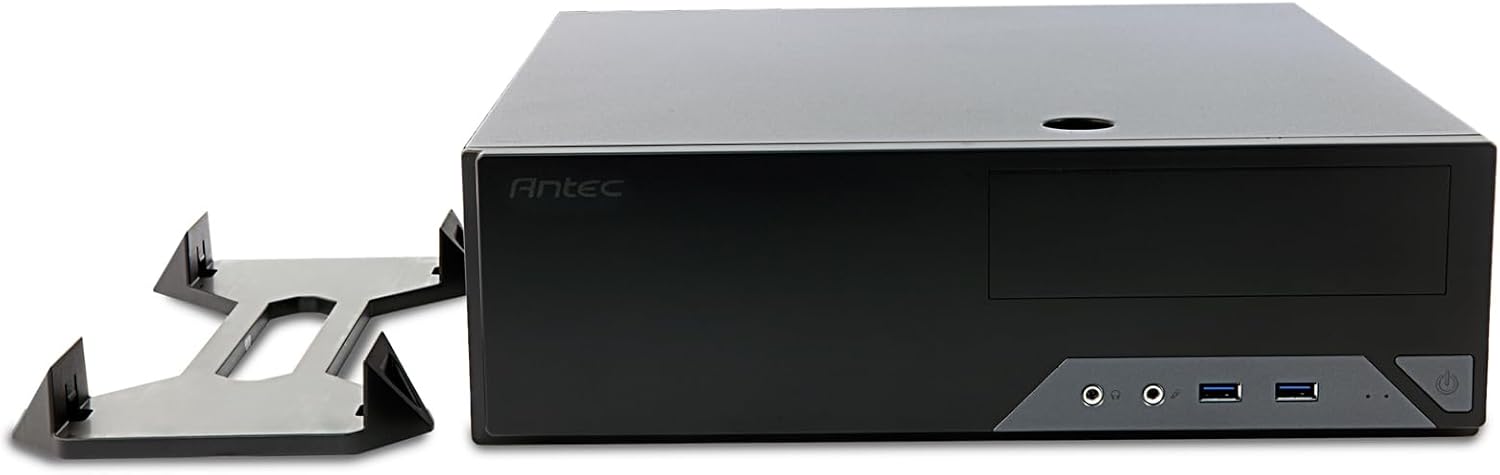
Figure 4: The Antec VSK2000-U3 case shown in a horizontal orientation with its included stand, demonstrating versatile placement options.
5. ساتنه
منظم ساتنه ستاسو د کمپیوټر د اوږد عمر او غوره فعالیت ډاډمن کولو کې مرسته کوي.
- د دوړو پاکول: Periodically clean dust from the case interior, fans, and air vents using compressed air or a soft brush. Ensure the system is powered off and unplugged before cleaning.
- د کیبل مدیریت: Check cable routing periodically to ensure no cables are obstructing airflow or fan operation.
- د فین چیک: Ensure the included 92mm temperature-controlled fan and any other installed fans are operating correctly and free from obstructions.
6. ستونزه حل کول
که تاسو د خپل کمپیوټر په جوړولو کې ستونزې سره مخ شئ، نو لاندې عام ستونزې حل کولو ګامونه په پام کې ونیسئ:
- ځواک نشته:
- Verify the power cable is securely connected to the PSU and wall outlet.
- ډاډ ترلاسه کړئ چې د PSU سویچ په 'آن' حالت کې دی.
- Check all internal power connections (24-pin ATX, 8-pin CPU, GPU power, drive power).
- Confirm front panel power switch cable is correctly connected to the motherboard.
- نه ښودنه:
- Ensure the monitor is connected to the correct graphics output (dedicated GPU or motherboard integrated graphics).
- د ګرافیک کارت او RAM ماډلونه بیا تنظیم کړئ.
- ډیر شور:
- Identify the source of the noise (fan, HDD).
- Clean dust from fans.
- Ensure no cables are touching fan blades.
7. مشخصات
| فیچر | تفصیل |
|---|---|
| برانډ | انټیک |
| لړۍ | VSK2000-U3 |
| د ماډل نوم | VSK2000-U3 |
| د مور بورډ مطابقت | مایکرو ATX |
| د قضیې ډول | Mid Tower (Slim Desktop) |
| ابعاد (LxWxH) | 18.6 x 15.9 x 7 انچه |
| د توکي وزن | ۲.۴۵ پونډه |
| رنګ | تور |
| مواد | Painted/Coated Metal (Likely Steel Or Aluminum With Plastic Components) |
| د بریښنا رسولو د نصبولو ډول | Rear Mount (TFX form factor) |
| د یخولو طریقه | Air (1 x 92 mm temperature-controlled fan included) |
| د فین اندازه | 92 ملی متره |
| د ډرایو خلیج | 1 x 5.25” ODD, 1 x 3.5" HDD, 1 x 2.5" SSD |
| د توسعې سلاټونه | 4 |
8. تضمین او ملاتړ
The Antec VSK2000-U3 Micro-ATX Desktop Case comes with a ۱-کلن تضمین. For technical support, warranty claims, or additional product information, please visit the official Antec webسایټ ته مراجعه وکړئ یا د دوی د پیرودونکو خدماتو څانګې سره اړیکه ونیسئ. د تضمین تصدیق لپاره د پیرود ثبوت وساتئ.
د نورو مرستو لپاره، مهرباني وکړئ مراجعه وکړئ Antec Store.


