1. پیژندنه
د پیرودلو لپاره مننهasing the ELECOM M-XGM10DBBK Wireless 5-Button BlueLED Mouse. This mouse is designed for comfort and precision, featuring an ergonomic shape that fits naturally in your hand and BlueLED technology for reliable tracking on various surfaces. This manual provides essential information for proper setup, operation, and maintenance of your device.
2. محصول ختم شوview
The M-XGM10DBBK mouse is part of the "EX-G" series, known for its ergonomic design and comfortable grip. It features five buttons, including dedicated back and forward buttons, to enhance productivity.
کلیدي ځانګړتیاوې:
- ارګونومیک ډیزاین: Shaped to fit the hand for ultimate grip comfort.
- BlueLED Sensor: Provides precise tracking on a wide range of surfaces, including glass and fabric.
- 5-Button Functionality: Includes left, right, scroll wheel, and dedicated back/forward buttons.
- 2.4GHz بې سیم اتصال: Offers a stable connection with a range of approximately 10 meters (3 meters on steel desks).
- د اصلاح وړ تڼۍ: Button functions can be re-assigned using the free "ELECOM Mouse Assistant" software (Windows/Mac only).
- د بیټرۍ شاخص: الفamp indicates remaining battery life.
اجزا:
د موږک له اجزاو سره بلد شئ:

شکل 2.1: پورته view of the mouse, highlighting the main buttons.
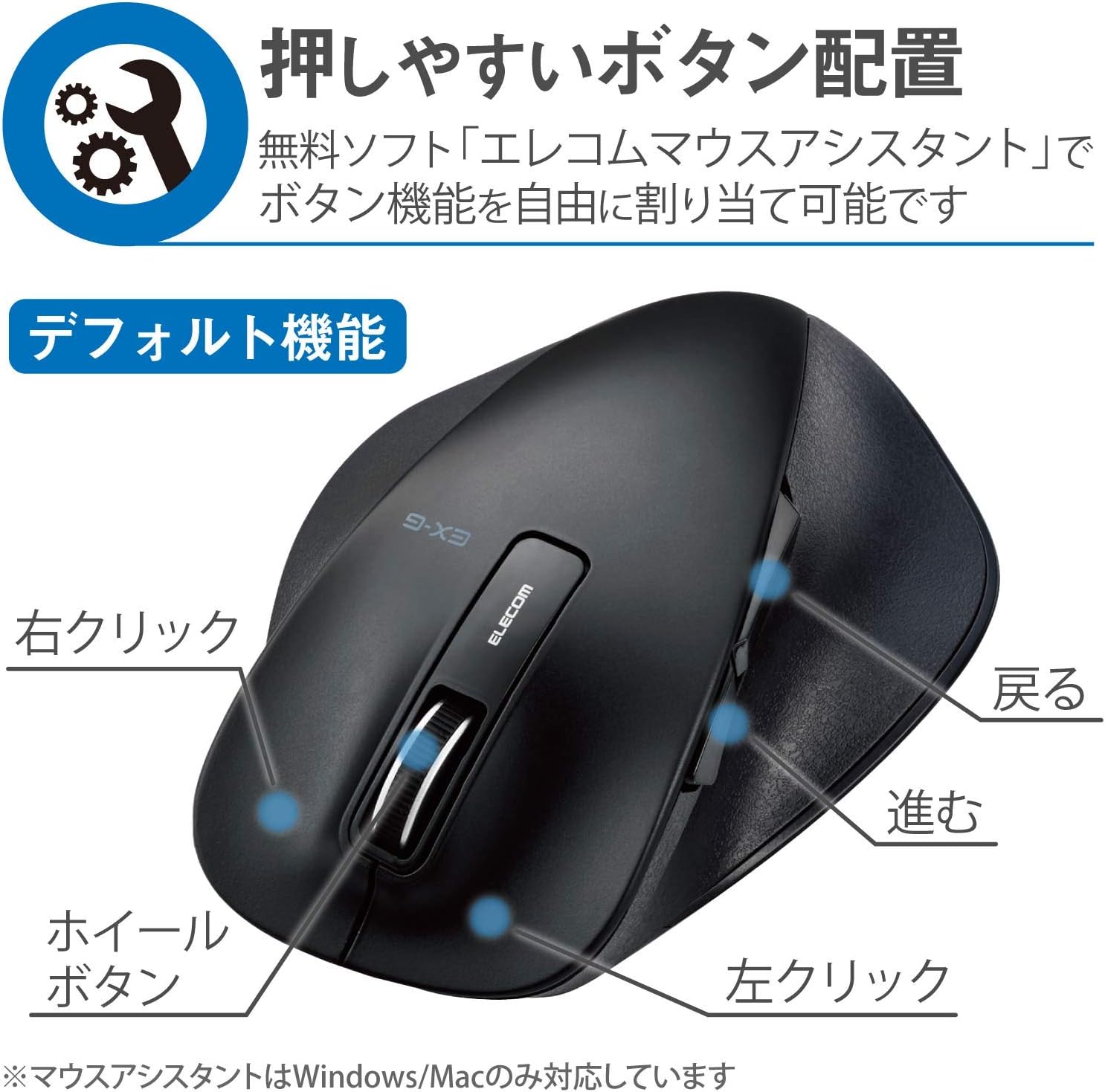
شکل 2.2: اړخ view of the mouse, showing the back and forward buttons.
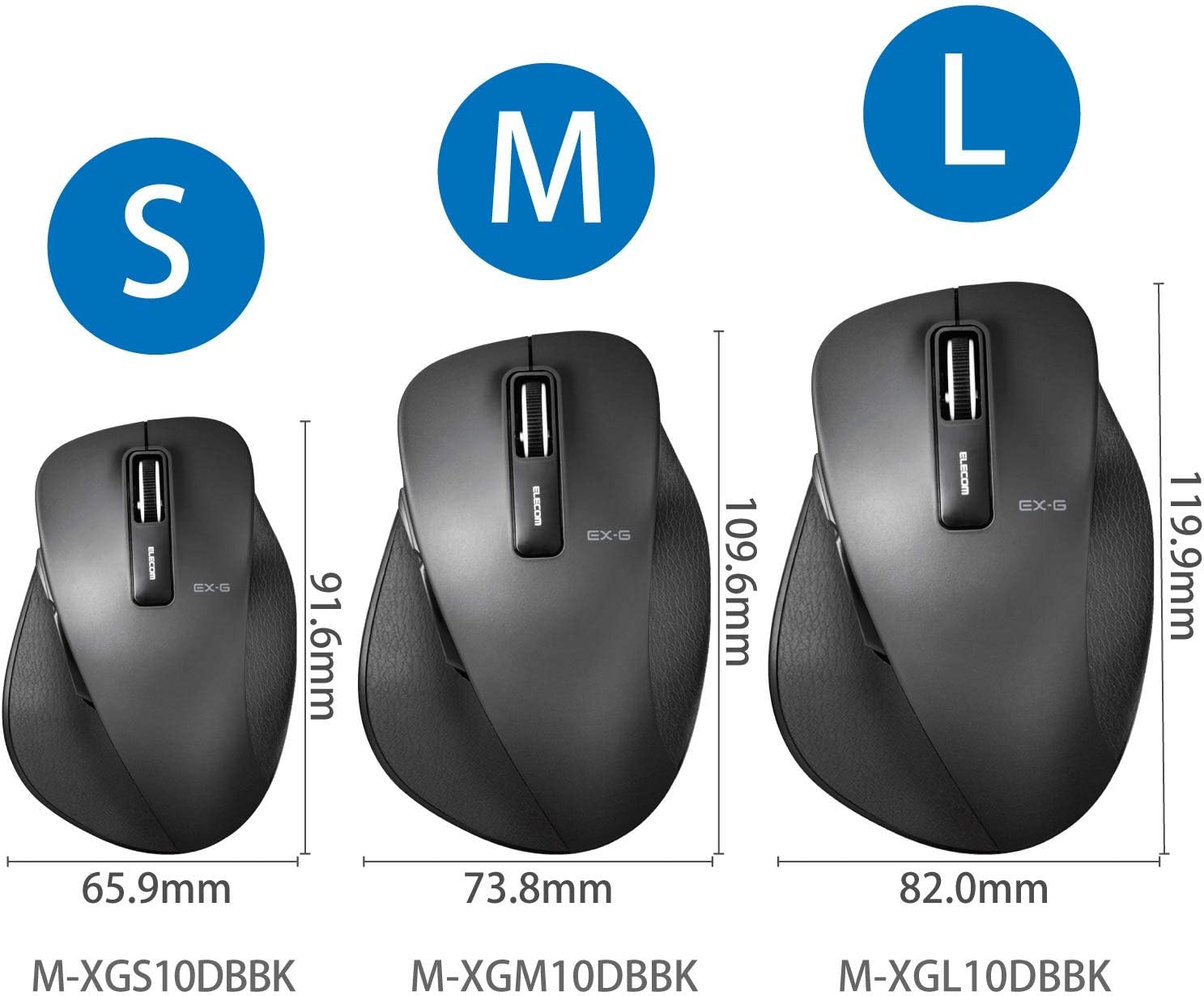
Figure 2.3: Size comparison of EX-G mice (S, M, L). The M-XGM10DBBK is the M size.

شکل 2.4: لاندې view of the mouse, indicating the optical sensor, power switch, and receiver storage compartment.

Figure 2.5: Illustration of the durable Omron switches used for the left and right click buttons.
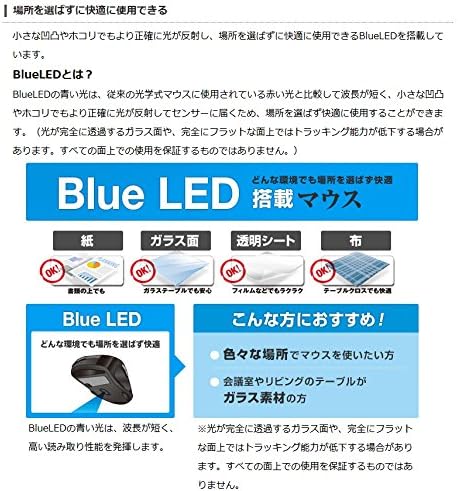
Figure 2.6: Explanation of BlueLED technology, demonstrating its versatility on different surfaces. Note: Tracking performance may decrease on completely transparent or perfectly flat surfaces.

Figure 2.7: Details on 2.4GHz wireless, battery indicator, and 2000 DPI resolution for smooth operation.

Figure 2.8: The ELECOM M-XGM10DBBK mouse is certified to work with Chromebooks.
3. ترتیب کول
3.1 د بیټرۍ نصب کول
- Locate the battery cover on the bottom of the mouse.
- پوښ خلاص کړئ.
- Insert one AA alkaline, manganese, or nickel-metal hydride battery, ensuring correct polarity (+/-).
- د بیټرۍ پوښ په خوندي ډول وتړئ.
3.2 د ترلاسه کونکي پیوستون
- د USB ریسیور د موږک په ښکته برخه کې د هغې د ذخیره کولو برخې څخه لرې کړئ.
- د USB ریسیور په خپل کمپیوټر کې موجود USB-A پورټ کې ولګوئ.
- ستاسو کمپیوټر باید په اتوماتيک ډول اړین چلوونکي ومومي او نصب کړي. دا ممکن یو څو شیبې وخت ونیسي.
3.3 فعالول
- Slide the power switch on the bottom of the mouse to the "ON" position.
- موږک اوس د کارونې لپاره چمتو دی.
4. عملیاتي لارښوونې
4.1 اساسي دندې
- کیڼ کلیک: لومړني انتخاب او فعالول.
- ښي کلیک: د شرایطو مینو پرانیزي.
- سکرول ویل: اسناد سکرول کوي او web pages vertically. Can also be clicked for middle-click functionality.
4.2 Back/Forward Buttons
The dedicated back and forward buttons located on the side of the mouse allow for quick navigation in web براوزرونه او file سپړونکي
- فشار ورکړئ شاته button to go to the previous page or folder.
- فشار ورکړئ مخکی button to go to the next page or folder.
4.3 Customizing Buttons (ELECOM Mouse Assistant)
For advanced customization, download the free "ELECOM Mouse Assistant" software from the official ELECOM website. This software allows you to re-assign functions to the mouse buttons according to your preferences. Please note that this software is compatible with Windows and macOS only.
5. ساتنه
5.1 پاکول
د غوره فعالیت او حفظ الصحې ساتلو لپاره، په منظم ډول خپل موږک پاک کړئ:
- Turn off the mouse using the power switch.
- د موږک سطحه د پاکولو لپاره نرم، وچ ټوکر وکاروئ.
- د سختې خاورې لپاره، لږ څهampټوکر د اوبو یا نرم پاکولو محلول سره ومینځئ، بیا سمدلاسه وچ کړئ.
- د سختو کیمیاوي موادو، کثافاتو یا محلولونو کارولو څخه ډډه وکړئ.
- Gently clean the optical sensor area on the bottom of the mouse with a cotton swab if tracking issues occur.
5.2 د بیټرۍ بدلول
کله چې د بیټرۍ شاخص lamp flashes or the mouse performance degrades, replace the battery:
- موږک بند کړئ.
- د بیټرۍ پوښ خلاص کړئ.
- زوړ بیټرۍ لرې کړئ او د ځایی مقرراتو سره سم یې له مینځه یوسي.
- یو نوی AA بیټرۍ دننه کړئ، د سم قطبیت ډاډ ترلاسه کړئ.
- Close the battery cover and turn the mouse back on.
6. ستونزه حل کول
که تاسو د خپل موږک سره ستونزې سره مخ شئ، لاندې عامې ستونزې او حل لارې وګورئ:
| ستونزه | احتمالي لامل | د حل لاره |
|---|---|---|
| موږک ځواب نه ورکوي | Low battery; Power switch off; Receiver not connected; Receiver interference. | Replace battery; Turn power switch ON; Ensure receiver is firmly plugged in; Try a different USB port; Move closer to the receiver. |
| د کرسر ناڅاپي حرکت | ناپاک نظري سینسر؛ نامناسب سطحه؛ مداخله. | Clean optical sensor; Use on a suitable mouse pad or surface; Reduce interference from other wireless devices. |
| بټن کار نه کوي | د سافټویر شخړه؛ د موټر چلوونکي ستونزه. | Restart computer; Reinstall mouse drivers; Check for conflicting software. |
| د بې سیم اتصال مسلې | Distance too far; Obstructions; Interference. | Ensure mouse is within range (10m); Remove obstructions between mouse and receiver; Avoid using near other 2.4GHz devices. |
7. مشخصات
| فیچر | تفصیل |
|---|---|
| د ماډل شمیره | M-XGM10DBBK |
| د پیوستون طریقه | ۲.۴GHz بېسیم (USB-A رسیور) |
| د سینسر ډول | BlueLED Optical |
| تڼۍ | 5 buttons (Left, Right, Scroll Wheel, Back, Forward) |
| قرارداد | 2000 DPI |
| ابعاد (W x D x H) | 73.8 x 109.6 x 40.8 mm (M Size) |
| وزن | نږدې 151.95 g (د بیټرۍ په ګډون) |
| د بریښنا سرچینه | 1 x AA battery (Alkaline, Manganese, or Ni-MH) |
| د بیټرۍ ژوند اټکل شوی | Approx. 722 days (based on typical usage) |
| مطابقت لرونکی OS | Windows 11, 10, RT8.1, 8.1, 7, Vista; macOS High Sierra 10.13, OS X 10.10; Chrome OS |
| رنګ | تور |
8. تضمین او ملاتړ
8.1 د تضمین معلومات
دا محصول د الف سره راځي د 6 میاشتو تضمین from the date of purchase. Please retain your proof of purchase for warranty claims. The warranty covers manufacturing defects under normal use. It does not cover damage caused by misuse, accidents, unauthorized modifications, or normal wear and tear.
8.2 د پیرودونکي ملاتړ
For technical assistance, troubleshooting, or warranty inquiries, please visit the official ELECOM website or contact ELECOM customer support. Contact details can typically be found on the ELECOM webد 'ملاتړ' یا 'موږ سره اړیکه ونیسئ' برخې لاندې سایټ ته مراجعه وکړئ.