1. پیژندنه
This manual provides essential information for the safe and efficient operation of your NEC X555UNS 55-inch 1080p LED TV. Please read these instructions thoroughly before installation and use, and retain them for future reference.
The NEC X555UNS is designed for professional signage applications, particularly for building video walls, offering superior off-angle viewing and minimal color shift due to its S-IPS panel technology. It supports 24/7 operation with advanced heat management and localized dimming for improved brightness uniformity.

Image: The NEC X555UNS 55-inch LED TV displaying vibrant, colorful content, showcasing its high-quality visual output.
2. د خوندیتوب معلومات
تل د محصول د زیان مخنیوي او د کارونکي خوندیتوب ډاډمن کولو لپاره لاندې خوندیتوب احتیاطي تدابیر په پام کې ونیسئ:
- Ensure the product is installed by qualified personnel.
- د هوا د خلاصیدو مخنیوی مه کوئ.
- باران یا رطوبت ته د واحد د افشا کولو څخه ډډه وکړئ.
- Use only the power cord supplied with the unit or a suitable replacement.
- د پاکولو یا خدمت کولو دمخه د بریښنا اړیکه.
- د واحد د ترمیم هڅه مه کوئ. ټول خدمات وړ خدماتو پرسونل ته راجع کړئ.
3. د بسته محتويات
ډاډ ترلاسه کړئ چې ټول توکي په کڅوړه کې شتون لري:
- NEC X555UNS 55-inch LED TV Unit
- ولاړ
- د بریښنا تار
- ریموټ کنټرول
- د لارښود لارښود (دا سند)

انځور: مخکینۍ برخه view of the NEC X555UNS 55-inch LED TV, showing its sleek, dark display panel when powered off.
4. ترتیب او نصب کول
4.1 فزیکي نصب کول
The NEC X555UNS is designed for video wall applications. Ensure proper mounting hardware is used for secure installation. The unit weighs approximately 81 pounds (36.7 kg).
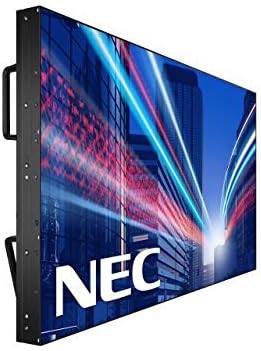
انځور: اړخ view of the NEC X555UNS 55-inch LED TV, highlighting its robust construction and integrated handles for easier installation in video wall configurations.
4.2 نښلول
Connect your video sources and network cables to the appropriate ports on the display. The X555UNS offers various connectivity options:
- HDMI: د لوړ تعریف ویډیو او آډیو ان پټ لپاره.
- DVI-D: For digital video input.
- لین: For network control and content distribution.
- ډیسپلی پورټ: Supports UHD pass-through for daisy-chaining multiple displays in a video wall setup.
- OPS Slot: Allows for integration of single board computers.
For video wall configurations, utilize the DisplayPort for UHD daisy-chaining to achieve a high-resolution display across the entire wall.
4.3 ابتدايي پاور آن
- Connect the power cord to the display and a suitable power outlet.
- په ښودنه یا ریموټ کنټرول کې د بریښنا تڼۍ فشار ورکړئ.
- The display will power on and show the NEC logo.
- Use the on-screen menu to configure initial settings such as language, input source, and display mode.
د Auto ID feature can simplify installation time, especially in multi-display setups, by reducing configuration steps to a single button press.
5. عملیاتي لارښوونې
5.1 بنسټیز عملیات
Use the remote control or the buttons on the display to navigate the on-screen menu (OSD). Adjust settings such as brightness, contrast, color temperature, and input source.
5.2 ځانګړتیاوې ښکاره کول
- S-IPS Panel Technology: Provides excellent off-angle viewing and minimizes color shift, making it ideal for public viewing and video walls.
- Direct LED Backlighting with Localized Dimming: Enhances brightness uniformity and achieves a higher dynamic contrast ratio.
- 24/7 عملیات: Designed for continuous use with advanced thermal protection, internal temperature sensors, and fan-based cooling.
- 700 cd/m² Brightness: Ensures clear visibility even in brightly lit environments.
6. ساتنه
6.1 د نندارې پاکول
د سکرین پاکولو لپاره، په نرمۍ سره یې د نرم، لینټ نه پاک ټوکر سره پاک کړئ. د سختو نښو لپاره، dampټوکر په اوبو یا یو نرم، غیر خارښونکي سکرین کلینر سره لږ څه ومینځئ. په مستقیم ډول په سکرین باندې مایع مه سپری کوئ.
6.2 عمومي پاملرنه
- نندارتون په ښه هوا کې وساتئ ترڅو د ډیر تودوخې مخنیوی وشي.
- په ښودنه کې د درنو شیانو له ایښودلو څخه ډډه وکړئ.
- په منظم ډول د کیبل اتصالونه وګورئ ترڅو ډاډ ترلاسه کړئ چې دوی خوندي دي.
7. ستونزه حل کول
If you encounter issues with your NEC X555UNS, refer to the following common problems and solutions:
| ستونزه | احتمالي لامل | د حل لاره |
|---|---|---|
| هیڅ ځواک نشته | د برېښنا تار پرې شوی؛ د برېښنا سوری خراب شوی دی. | Check power cord connection; Test power outlet with another device. |
| هیڅ انځور نشته | Incorrect input source selected; Video cable loose or faulty. | Select correct input source; Check video cable connections. |
| د عکس ضعیف کیفیت | Resolution mismatch; Display settings incorrect. | Adjust resolution on source device; Calibrate display settings (brightness, contrast). |
If the problem persists, contact NEC customer support.
8. مشخصات
| فیچر | تفصیل |
|---|---|
| د ماډل نوم | X555UNS |
| د سکرین اندازه | ۷۸۷ انچه |
| ټیکنالوژي ښکاره کول | LED, S-IPS Panel |
| قرارداد | ۱۰۸۰p (بشپړ HD) |
| د اړخ نسبت | 16:9 |
| د تازه کولو نرخ | 60 Hz |
| روښانتیا | 700 cd/m² (nits) |
| ارتباط | HDMI, DVI-D, LAN, DisplayPort |
| ځانګړي ځانګړتیاوې | Flat, S-IPS Panel, Auto ID, UHD Daisy Chain, OPS Slot, 24/7 Operation, Advanced Thermal Protection |
| د محصول ابعاد | 54 x 12 x 34 انچه (نږدې) |
| د توکي وزن | 81 پونډه (تقریبا) |
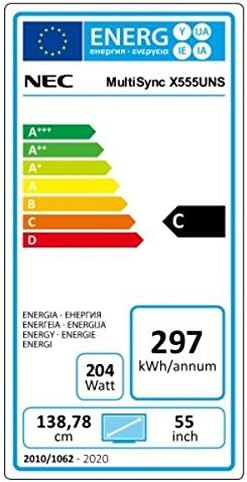
Image: Energy efficiency label for the NEC MultiSync X555UNS, showing energy consumption details and efficiency class.
9. تضمین او ملاتړ
For warranty information and technical support, please refer to the official NEC website or contact your local NEC representative. Keep your purchase receipt as proof of purchase.
آنلاین سرچینې: لیدنه www.necdisplay.com for product documentation, drivers, and support contact information.
د پیرودونکي ملاتړ: For direct assistance, please contact NEC customer service.


