1. پیژندنه
This manual provides detailed instructions for the installation, operation, and maintenance of your JOOAN 770 HD 720P Wireless IP Camera. Please read this manual thoroughly before using the product to ensure proper functionality and to avoid damage. Keep this manual for future reference.
2. محصول ختم شوview
2.1 د بسته محتويات
ډاډ ترلاسه کړئ چې لاندې ټول توکي ستاسو په کڅوړه کې شامل دي. که کوم توکي ورک یا زیانمن شوي وي، مهرباني وکړئ د پیرودونکو ملاتړ سره اړیکه ونیسئ.
- JOOAN 770 HD 720P Wireless IP Camera (Note: Some variants may be 1080P or have internal model JA-C9E-U)
- د بریښنا اډاپټر
- د USB ډیټا کیبل
- د خولو لگول
- Screw Pack (for mounting)
- د شبکې کیبل (ایترنیټ)
- د کارونکي لارښود (دا لاسوند)

Image: Contents of the JOOAN 770 HD 720P Wireless IP Camera package, including the camera, power adapter, cables, and mounting hardware.
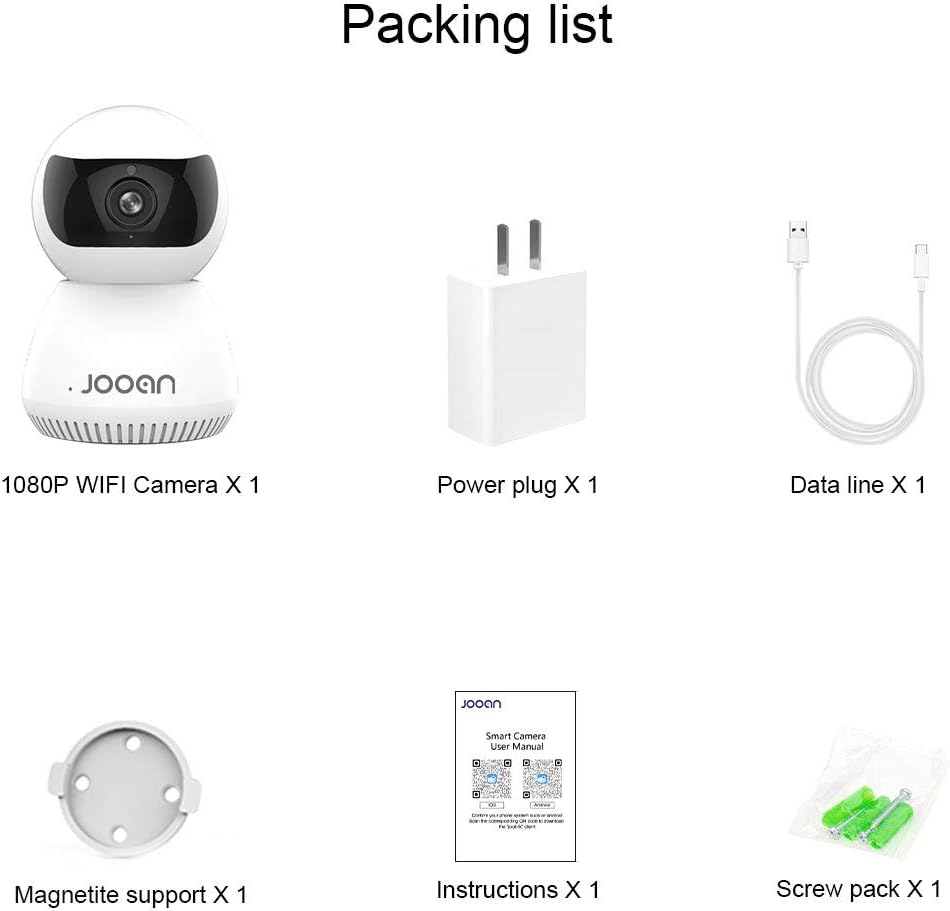
انځور: یو مفصل view of the packing list for a JOOAN WiFi Camera, showing a 1080P camera, power plug, data line, magnetite support, instructions, and screw pack.
2.2 کلیدي ځانګړتیاوې
- د HD ویډیو کیفیت: Captures clear 720P high-definition video. (Note: Some models may support 1080P resolution).
- د بیسیم اتصال: Supports Wi-Fi for flexible placement and easy setup.
- د پین/ټيلټ فعالیت: پراخه وړاندې کوي viewing angle with 355° horizontal rotation and 100° vertical tilt, controllable via the companion application.
- دوه طرفه آډیو: جوړ شوی مایکروفون او سپیکر د ریښتیني وخت اړیکو ته اجازه ورکوي.
- د شپې لید: Equipped with infrared LEDs for clear monitoring in low-light conditions, up to 35 feet.
- د حرکت کشف: Alerts users to detected movement within the camera's field of view.
- ځایی ذخیره: Supports Micro SD cards up to 128GB for continuous or event-triggered recording.
- P2P Cloud Monitoring: Remote access and monitoring via smartphone (Android & iOS) and computer applications.
- ایترنیټ پورټ: Provides an option for wired network connection when Wi-Fi signal is unstable.

انځور: مخکینۍ برخه view of the JOOAN 770 HD 720P Wireless IP Camera, showcasing its dome design and lens.

Image: A JOOAN camera with speech bubbles indicating two-way audio functionality, allowing communication between the camera's location and a remote user via a smartphone.

Image: A JOOAN camera in a nursery setting, illustrating its infrared night vision capability with red LEDs visible, providing clear monitoring in darkness.
۴. د تنظیم لارښوونې
۳.۱ د بسته بندۍ خلاصول او لومړني ځای پرځای کول
- په احتیاط سره د بسته بندۍ څخه ټولې برخې لرې کړئ.
- Choose a suitable location for your camera. Ensure it is within range of your Wi-Fi network or close to an Ethernet port.
- For optimal performance, place the camera on a stable, flat surface or mount it using the provided bracket and screws.
3.2 فعالول
- Connect the USB data cable to the camera's power input port.
- د بریښنا اډاپټر په معیاري بریښنایی پلورنځي کې ولګوئ.
- The camera will power on, and an indicator light will illuminate, typically blinking to indicate readiness for setup.
3.3 Network Connection (Wi-Fi or Ethernet)
Your camera supports both wireless (Wi-Fi) and wired (Ethernet) connections.
د وای فای اتصال:
- Ensure your smartphone is connected to the 2.4GHz Wi-Fi network you intend to use for the camera. (5GHz networks are generally not supported).
- Proceed to section 3.4 for app installation and pairing, which will guide you through the Wi-Fi setup process.
ایترنیټ پیوستون:
- Connect one end of the provided network cable to the camera's Ethernet port.
- Connect the other end of the network cable to an available LAN port on your router or network switch.
- کیمره به په اتوماتيک ډول د تار لرونکي شبکې اتصال رامینځته کولو هڅه وکړي.

انځور: شاته view of the JOOAN camera, highlighting the Ethernet port for wired network connectivity.
۵.۴ د اپلیکیشن نصب او د وسیلو جوړه کول
- Download the official companion application for JOOAN cameras from your smartphone's app store (e.g., Apple App Store for iOS, Google Play Store for Android). Refer to the quick start guide included in your package for the specific app name or QR code.
- اپلیکیشن پرانیزئ او یو نوی کارن حساب جوړ کړئ، یا که تاسو دمخه یو حساب لرئ نو ننوتل وکړئ.
- Follow the in-app instructions to add a new device. This typically involves scanning a QR code on the camera, or selecting your camera model and following prompts for Wi-Fi configuration (entering your Wi-Fi password).
- Once successfully paired, the camera's indicator light will usually turn solid, and you will see the live video feed in the app.
4. عملیاتي لارښوونې
4.1 ژوندی View
After successful pairing, open the companion app and select your camera from the device list to view the live video feed. You can switch between standard and high-definition viewing modes if available.
۳.۱ د پین او ټیلټ کنټرول
په ژوندۍ به view screen within the app, use the directional controls (often a joystick-like interface or swipe gestures) to remotely adjust the camera's horizontal (pan) and vertical (tilt) angles. The camera supports 355° pan and 100° tilt.
۴.۴ دوه اړخیزه آډیو
To use the two-way audio feature, tap the microphone icon in the app's live view interface. Hold the button to speak, and release to listen. Ensure your phone's microphone permissions are granted to the app.
۵.۳ د حرکت کشف او خبرتیاوې
- Navigate to the camera settings within the app.
- Locate the "Motion Detection" or "Alarm Settings" option.
- Enable motion detection and configure sensitivity levels as desired.
- Set up alert notifications (e.g., push notifications to your phone, email alerts) to be informed when motion is detected.
4.5 ثبتول او ذخیره کول
د مایکرو ایس ډی کارت ثبت کول:
- Insert a Micro SD card (up to 128GB, Class 10 or higher recommended) into the camera's SD card slot. Power off the camera before inserting or removing the card.
- In the app settings, format the SD card if prompted.
- Configure recording settings: continuous recording, motion-triggered recording, or scheduled recording.
- ثبت شوی footage کیدی شي viewed and downloaded directly from the app.
د کلاوډ ذخیره (اختیاري):
The camera may offer optional cloud storage services. Refer to the app for details on subscription plans and activation.
5. ساتنه
- پاکول: د کیمرې لینز او بدن پاکولو لپاره نرم، وچ ټوکر وکاروئ. د مایع پاکوونکو یا کثافاتو موادو کارولو څخه ډډه وکړئ.
- د سافټویر تازه معلومات: Regularly check the companion app for firmware updates. Keeping the camera's firmware updated ensures optimal performance and security.
- ځای په ځای کول: Ensure the camera is not exposed to extreme temperatures, direct sunlight for prolonged periods, or excessive moisture.
- د بریښنا دوره: که کیمره ستونزه ولري، هڅه وکړئ چې د 10 ثانیو لپاره یې د بریښنا سرچینې څخه خلاص کړئ او بیا یې بیرته ولګوئ.
6. ستونزه حل کول
دا برخه هغه عامې ستونزې په ګوته کوي چې تاسو ورسره مخ کیدی شئ. د ډیرو پیچلو ستونزو لپاره، مهرباني وکړئ د پیرودونکو ملاتړ سره اړیکه ونیسئ.
| ستونزه | احتمالي لامل | د حل لاره |
|---|---|---|
| کیمره د وای فای سره وصل کیدو کې پاتې راغلې. | Incorrect Wi-Fi password; camera too far from router; 5GHz Wi-Fi network used; router firewall settings. | Verify Wi-Fi password. Move camera closer to router. Ensure you are using a 2.4GHz Wi-Fi network. Check router settings for any restrictions. |
| ژوندۍ ویډیو نشته. | Camera offline; poor network connection; app issue. | Check camera's power and network connection. Restart camera and router. Close and reopen the app. Ensure stable internet connection. |
| دوه اړخیزه آډیو کار نه کوي. | Microphone/speaker muted in app; app permissions not granted; network latency. | Check audio settings in the app. Ensure the app has microphone permissions on your phone. Verify network stability. |
| د حرکت کشف خبرتیاوې ترلاسه نه شوې. | Motion detection disabled; notification settings incorrect; app running in background. | Enable motion detection in app settings. Check app notification permissions on your phone. Ensure the app is allowed to run in the background. |
| SD کارت نه ثبتېږي یا نه پیژندل کېږي. | SD card not inserted correctly; card corrupted; unsupported card type/size; card not formatted. | Reinsert SD card. Try a different, compatible SD card (Max 128GB, Class 10). Format the SD card via the app. |
7. مشخصات
The following are the technical specifications for the JOOAN 770 HD 720P Wireless IP Camera:
| فیچر | تفصیل |
|---|---|
| ماډل | 770 (Internal Model: JA-C9E-U) |
| د ویډیو حل | 720P HD (Some variants may support 1080P) |
| ارتباط | Wi-Fi (2.4GHz), Ethernet |
| د پین / خښتو سلسله | افقی: 355°، عمودی: 100° |
| د بریښنا سرچینه | د بریښنا تار، ۵ ولټه |
| ذخیره کول | د مایکرو ایس ډی کارت (زیات 128 جی بی) |
| ځانګړي ځانګړتیاوې | Motion Sensor, Two-Way Audio, Infrared Night Vision |
| مطابقت لرونکې وسیلې | Smartphone (Android & iOS), Tablet, Computer |
| مواد | فلزي |
| ابعاد | نږدې 20 x 15.2 x 13.8 سانتي متره |
| وزن | تقریبا 679.99 ګرامه |

Image: The bottom of a JOOAN Smart Camera, displaying the model number JA-C9E-U and power specifications.
8. تضمین او ملاتړ
JOOAN products are designed for reliability and performance. For warranty information, please refer to the warranty card included with your product or visit the official JOOAN website. If you encounter any issues or require technical assistance, please contact JOOAN customer support.
د اړیکو معلومات:
- سکایپ: live:market_491
- بریښنالیک: wendy@qacctv.com


