پیژندنه
This manual provides detailed instructions for the safe and effective use of the BSIDE ADM02 Auto Ranging Digital Multimeter. This handheld, battery-operated DMM offers multiple functions for various electrical measurements.
Designed to meet IEC61010-1 & CAT II 600V overvoltage category and double insulation standards, the ADM02 features a robust holster for enhanced drop resistance. It is an ideal general measurement tool for schools, laboratories, factories, and other professional or educational environments.

شکل 1: مخکی view of the BSIDE ADM02 Digital Multimeter with its display and function dial.
د خوندیتوب معلومات
WARNING: To avoid electrical shock or personal injury, please read and understand all safety information before using this multimeter.
د عمومي خوندیتوب مقررات
- Always ensure the test leads are properly connected and the function switch is set to the correct range before making any measurements.
- د ټاکل شوي حجم څخه ډیر مه پلي کوئtage، لکه څنګه چې په میټر کې نښه شوې، د ترمینل یا د هر ترمینل او ځمکې ځمکې ترمنځ.
- د حجم سره کار کولو پرمهال خورا احتیاط وکاروئtagد 30V AC RMS، 42V چوکۍ، یا 60V DC څخه پورته. دا حجمونهtagد شاک خطر رامنځته کوي.
- Disconnect the circuit power and discharge all high-voltage capacitors مخکې له دې چې مقاومت، دوام، یا ډایډونه معاینه کړي.
- Always remove the test leads from the circuit before changing the function switch position.
- که چیرې میټر خراب ښکاري یا د ازموینې لیډونو موصلیت خراب شوی وي نو مه یې کاروئ.
- کله چې د بیټرۍ ټیټ شاخص څرګند شي نو بیټرۍ بدله کړئ ترڅو دقیق لوستل ډاډمن شي.
- د اور د مخنیوي لپاره، فیوز نصب کړئ amp/volt ratings shown on the back of the device.
د خوندیتوب ټولګي
This device complies with IEC 61010-1, CAT II 600V safety standards.
د محصول ځانګړتیاوې
- 2000 counts Auto Ranging Digital Multimeter (DMM).
- 3 1/2 digit LCD display with backlight for clear readings.
- Full overload protection and dual insulation protection for enhanced safety.
- Capable of measuring DC/AC voltage, DC/AC current, resistance, temperature, and performing diode & continuity checks.
- Data Hold function to freeze the displayed reading.
- Max value hold function to capture the maximum measured value.
- د بیټرۍ د ټیټوالي نښه د بیټرۍ پر وخت بدلولو لپاره.
- د بیټرۍ ژوند خوندي کولو لپاره د اتوماتیک بریښنا بندولو ځانګړتیا.
- Compact dimensions: 140 x 67 x 30mm.
- Operating Temperature: 0 ~ 40 ℃ (32 ~ 104 ℉) & <80% RH.
- Storage Temperature: -10 ~ 50 ℃ (14 ~ 122 ℉) & <70% RH.
د بسته محتويات
مهرباني وکړئ د لاندې توکو لپاره په بسته کې وګورئ:
- 1 x ADM02 Multimeter
- 1 x Test leads (one red, one black)
- 1 x K-type temperature probe
- ۱ x د کارونکي لارښود

Figure 2: The BSIDE ADM02 Multimeter shown with its test leads, temperature probe, and user manual.
چمتو کول
د بیټرۍ نصب کول
The ADM02 Multimeter requires one 9V battery (6F22 or 1604A Type).
- ډاډ ترلاسه کړئ چې ملټي میټر بند دی.
- د بیټرۍ د برخې پوښ د واحد په شا کې ومومئ.
- د بیټرۍ پوښ خوندي کولو لپاره د سکرو ډرایور څخه کار واخلئ.
- Gently lift the cover.
- Connect the 9V battery to the battery clip, observing correct polarity (+ and -).
- بیټرۍ په کڅوړه کې ځای په ځای کړئ.
- د بیټرۍ پوښ بدل کړئ او د سکرو سره یې خوندي کړئ.

شکل 3: شاته view of the multimeter showing the battery compartment and stand.
د ټیسټ لیډونو سره وصل کول
Insert the red test lead into the "VΩTemp mA" input jack and the black test lead into the "COM" (common) input jack for most voltage, resistance, temperature, and current measurements (up to 200mA).
For high current measurements (up to 10A), insert the red test lead into the "10A" input jack and the black test lead into the "COM" jack.

Figure 4: The multimeter with test leads properly connected to the input jacks.
عملیاتي لارښوونې
عمومي عملیات
- Turn the rotary switch to the desired function (e.g., V~ for AC Voltage، V- د DC Vol لپارهtage, Ω for Resistance, A~ for AC Current, A- for DC Current, Temp for Temperature, Diode/Continuity).
- د ازموینې لیډونه د ازموینې لاندې سرکټ یا برخې سره وصل کړئ.
- د اندازه کولو ارزښت په LCD ډسپلې کې ولولئ.
د DC/AC حجم اندازه کولtage
- د روټري سویچ مطلوب DC حجم ته تنظیم کړئtage (V-) or AC Voltage (V~) range. The ADM02 is auto-ranging, so it will select the appropriate range automatically.
- Connect the red test lead to the positive side of the circuit and the black test lead to the negative side (for DC) or across the circuit (for AC).
- ټوک ولولئtage ارزښت.
د DC/AC اوسني اندازه کول
- Set the rotary switch to the desired DC Current (A-) or AC Current (A~) range.
- For currents up to 200mA, ensure the red lead is in the "VΩTemp mA" jack. For currents up to 10A, move the red lead to the "10A" jack.
- ملټي میټر په لړۍ کې د سرکټ سره وصل کړئ.
- اوسنی ارزښت ولولئ.
د مقاومت اندازه کول
- Set the rotary switch to the "Ω" range.
- ډاډ ترلاسه کړئ چې سرکټ غیر فعال شوی او ټول کیپسیټرونه خارج شوي دي.
- د ازموینې لیډونه د هغه برخې په اوږدو کې وصل کړئ چې اندازه کیږي.
- د مقاومت ارزښت ولولئ.
د حرارت درجه اندازه کول
- Set the rotary switch to the "Temp" range.
- Connect the K-type temperature probe to the "VΩTemp mA" and "COM" jacks, observing polarity.
- د تودوخې د معاینې څوکه په هغه شی یا هغه ته نږدې کېږدئ چې تودوخه یې اندازه کیږي.
- Read the temperature value in Celsius or Fahrenheit.
Diode and Continuity Check
- Set the rotary switch to the "Diode/Continuity" range.
- For diode test: Connect the red lead to the anode and the black lead to the cathode of the diode. A forward voltage drop will be displayed. Reverse the leads; an open circuit (OL) should be displayed.
- For continuity test: Connect the test leads across the circuit or component. If continuity exists (resistance below approx. 50Ω), the buzzer will sound.
د ډاټا نیول فنکشن
Press the "HOLD" button to freeze the current reading on the display. Press it again to release.
Max Value Hold Function
Press the "MAX" button to display and hold the maximum value measured since the function was activated. Press it again to exit.
د بیک لائټ فنکشن
Press the backlight button (light bulb icon) to turn the display backlight ON or OFF.
د اتومات بریښنا بند
The multimeter will automatically power off after approximately 15 minutes of inactivity to conserve battery life. To reactivate, turn the rotary switch to OFF and then back to the desired function, or press any button.
ساتنه
پاکول
په وخت سره قضیه د اعلان سره پاک کړئamp ټوکر او نرم صابون. د کثافاتو او محلولونو څخه کار مه اخلئ.
د بیټرۍ بدلول
When the low battery indicator appears on the display, replace the 9V battery as described in the "Battery Installation" section.
د فیوز بدلول
If the current measurement function does not work, the fuse may need replacement.
WARNING: To avoid electrical shock, remove test leads before opening the battery cover.
The fuses are located inside the meter. Refer to the specifications for the correct fuse ratings (e.g., F 250mA/250V and F 10A/250V). Fuse replacement should only be performed by qualified personnel.
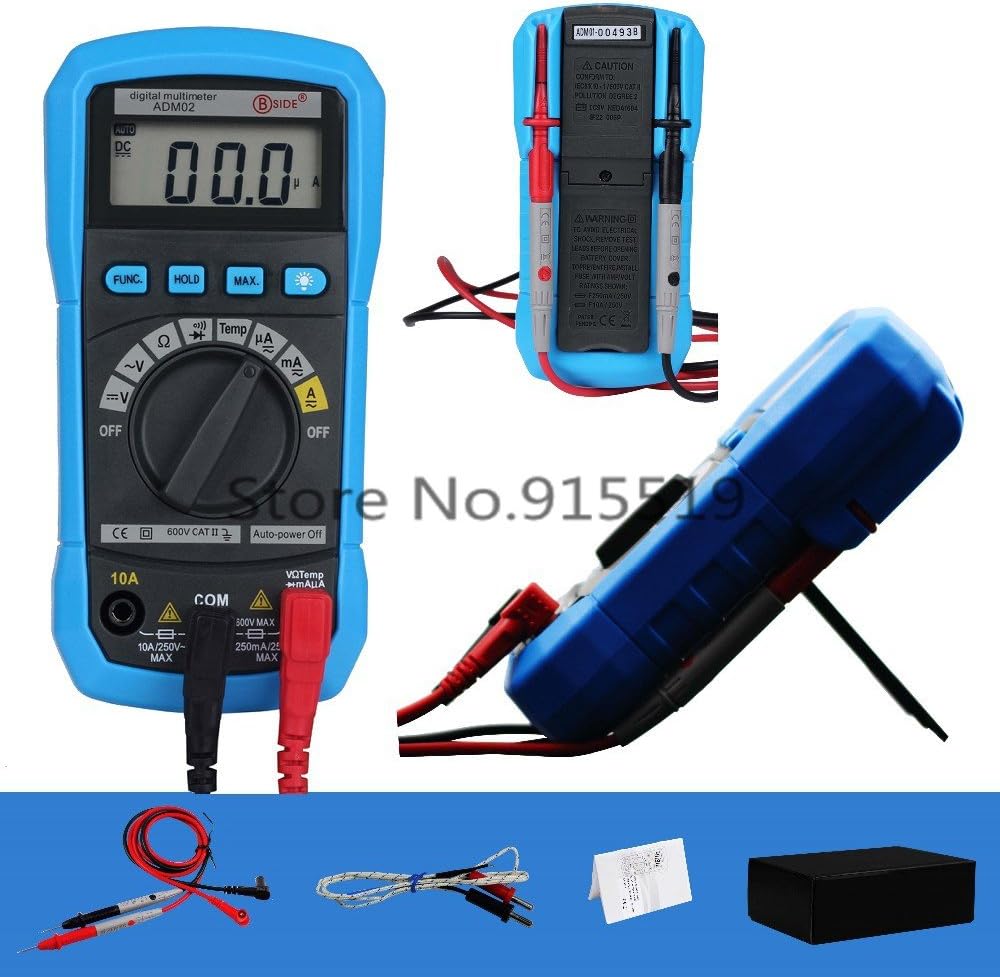
شکل 5: شاته view of the multimeter showing safety warnings and specifications.
د ستونزو حل کول
| ستونزه | احتمالي لامل | د حل لاره |
|---|---|---|
| میټر نه چالانېږي. | مړ یا په ناسم ډول نصب شوی بیټرۍ. | د بیټرۍ نصب کول وګورئ؛ که اړتیا وي نو بیټرۍ بدله کړئ. |
| "OL" (اوورلوډ) ښودل شوی. | د ننوتلو ارزښت د ټاکل شوي حد څخه ډیر دی؛ خلاص سرکټ (د مقاومت / دوام لپاره). | Select a higher range (if applicable); check circuit connection. |
| ناسم لوستل. | Low battery; incorrect function/range selected; poor test lead connection. | Replace battery; verify function/range; ensure secure connections. |
| د اوسني اندازه کولو نشته. | Blown fuse; incorrect test lead connection for current. | Check fuse (replace if necessary by qualified personnel); ensure red lead is in correct current jack (mA or 10A). |
که چیرې د دې حل لارو هڅه کولو وروسته هم ستونزه دوام ومومي، مهرباني وکړئ د پیرودونکو ملاتړ سره اړیکه ونیسئ.
مشخصات
| پیرامیټر | رینج | دقت |
|---|---|---|
| DC Voltage | 200mV/2V/20V/200V | ±(0.5%+2) |
| DC Voltage | 600V | ±(0.8%+2) |
| AC Voltage | 2V/20V/200V/600V | ±(1.0%+3) |
| DC اوسنی | ۲۰۰µA/۲mA/۲۰mA/۲۰۰mA | ±(1.0%+3) |
| DC اوسنی | 10A | ±(3.0%+3) |
| AC اوسنی | ۲۰۰µA/۲mA/۲۰mA/۲۰۰mA | ±(1.2%+3) |
| AC اوسنی | 10A | ±(3.0%+5) |
| مقاومت | 200Ω/2kΩ/20kΩ/200kΩ/2MΩ | ±(0.8%+2) |
| مقاومت | 20MΩ | ±(1.0%+2) |
| دحرارت درجه (℃) | -20 ℃ ~ 1000 ℃ | ±(3.0%+3) |
| دحرارت درجه (℉) | -0 ℉ ~ 1800 | ±(3.0%+3) |
عمومي مشخصات
- Display: 2000 counts, 3 1/2 digit LCD with backlight
- Power Supply: 9V Battery (6F22 or 1604A Type) x 1pc (not included)
- Operating Temperature & Humidity: 0 ~ 40℃ (32 ~ 104℉) & <80% RH
- Storage Temperature & Humidity: -10 ~ 50℃ (14 ~ 122℉) & <70% RH
- Safety Class: IEC 61010-1, CAT II 600V
- ابعاد (L x W x H): 140 x 67 x 30mm
- Weight: Approx. 140g (excluding battery)
تضمین او ملاتړ
For warranty information and technical support, please refer to the contact details provided with your purchase or visit the official BSIDE webسایټ. د پیرود ثبوت په توګه د پیرود رسید وساتئ.
Manufacturer: Bside
Date First Available: Dec 3 2016


