پیژندنه
This manual provides detailed instructions for the safe and efficient operation of your Telefunken RC1007BM Bluetooth Boombox. Please read this manual thoroughly before using the device and retain it for future reference.

انځور: مخکینۍ برخه view of the Telefunken RC1007BM Bluetooth Boombox, showcasing its speakers, central control panel, and antenna.
د خوندیتوب لارښوونې
- د اور یا بریښنا شاک څخه د مخنیوي لپاره وسیله باران یا رطوبت ته مه ښکاره کوئ.
- د هوا د بهېدو لارې مه بندوئ. د جوړونکي د لارښوونو سره سم نصب کړئ.
- د تودوخې کومې سرچینې ته نږدې مه نصب کړئ لکه ریډیټرونه، د تودوخې راجسترونه، بخارۍ، یا نور وسایل (په شمول ampلایفیر) چې تودوخه تولیدوي.
- د بریښنا تار د چلولو یا پنچ کیدو څخه خوندي کړئ، په ځانګړې توګه په پلګونو، د اسانتیاو استخراج، او هغه ځای چې دوی د وسایلو څخه وځي.
- یوازې د جوړونکي لخوا مشخص شوي ضمیمې / لوازم وکاروئ.
- دا آله د بریښنا د طوفانونو په جریان کې یا کله چې د اوږدې مودې لپاره نه کارول کیږي خلاص کړئ.
- ټول خدمتونه وړ خدماتي پرسونل ته راجع کړئ. خدمت کول اړین دي کله چې وسیله په هر ډول زیانمنه شوې وي.
د بسته محتويات
مهرباني وکړئ وګورئ چې ټول توکي شتون لري:
- Telefunken RC1007BM Bluetooth Boombox
- د بریښنا اډاپټر
- اوږه پټه
- ریموټ کنټرول
- د کارونکي لارښود (دا لاسوند)
محصول پای ته ورسیدview
د فرنټ پینل کنټرولونه او اړیکې
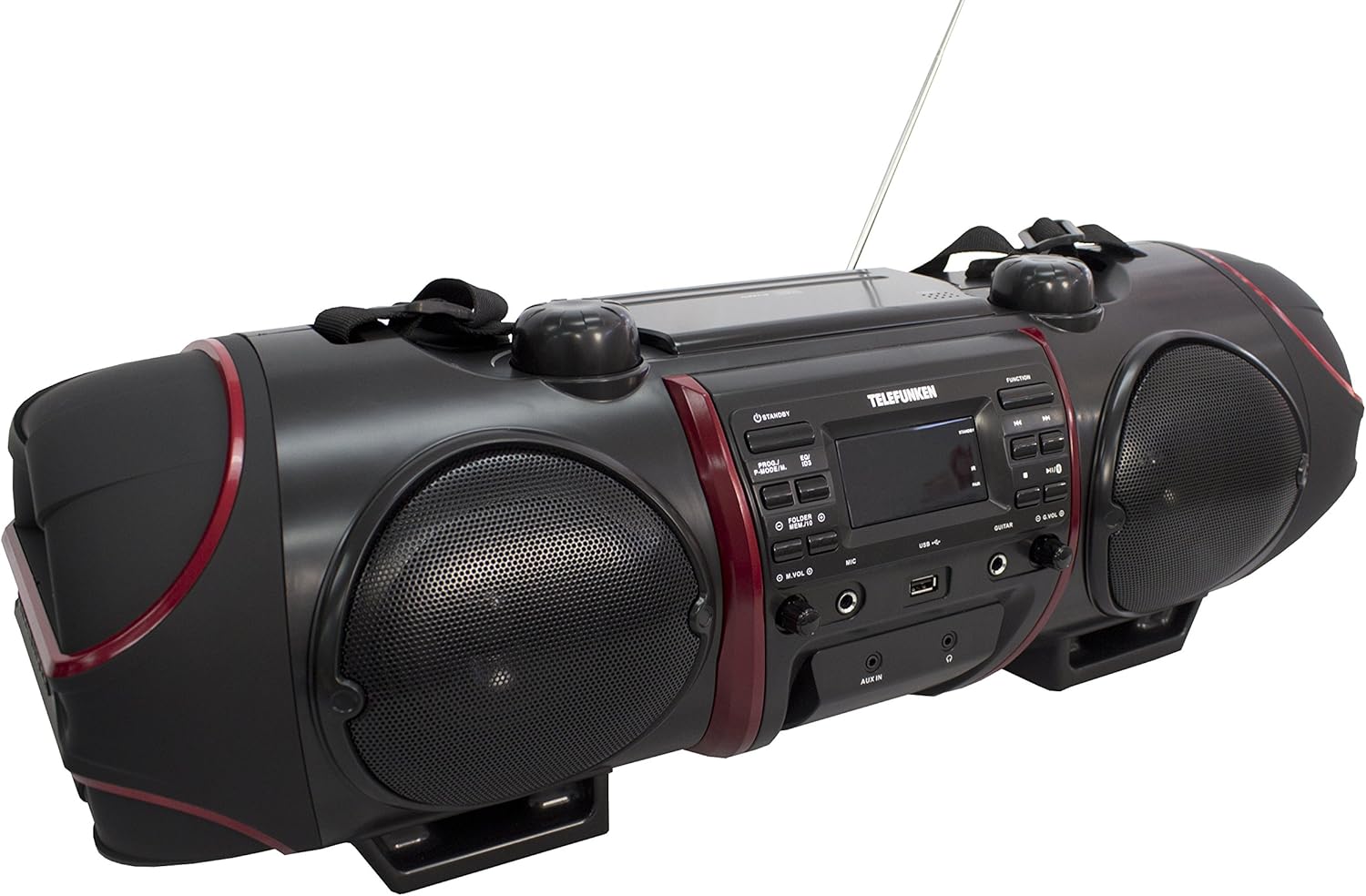
Image: Close-up of the central control panel, showing buttons, LCD display, USB port, and input jacks.
- د سټنډرډ تڼۍ: واحد فعال یا بندوي.
- PROG./P-MODE/M. Button: Program CD tracks, select playback mode, or store/recall radio presets.
- EQ/ID3 Button: Select equalizer presets or display ID3 tag information for MP3s.
- FOLDER/MENU/TS Button: Navigate folders on USB/CD or access menu options.
- M.VOL (Microphone Volume) Knob: د مایکروفون ان پټ حجم تنظیموي.
- MIC (Microphone) Input: 3.5mm jack for microphone connection.
- USB پورټ: د USB ذخیره کولو وسیلو سره د نښلولو لپاره.
- د ګیتار داخلول: 3.5mm jack for guitar connection.
- G.VOL (Guitar Volume) Knob: Adjusts guitar input volume.
- د فعالیت تڼۍ: Selects input source (CD, FM, Bluetooth, AUX).
- د پلی/پاز بټن: پلے بیک شروع کوي یا وقفه کوي.
- د بندولو تڼۍ: د پلې بیک مخه نیسي.
- SKIP/TUNE Buttons (Previous/Next): ټریکونه پریږدي یا د راډیو فریکونسۍ تنظیموي.
- د جوړه تڼۍ: د بلوتوث جوړه پیل کوي.
- د حجم (حجم) نوب: د ماسټر حجم تنظیموي.
- AUX په جیک کې: د بهرني آډیو وسیلو لپاره 3.5 ملي میتر ان پټ.
- د سر تلیفون جیک: د هیډفونونو لپاره 3.5 ملي میتر محصول.
- د LCD نندارې: Shows current status, track information, and radio frequency.
Top Panel (CD Compartment)

انځور: پورته view of the boombox, highlighting the CD compartment with 'PUSH TO OPEN' label.
The CD compartment is located on the top of the unit. Press the 'PUSH TO OPEN' area to open the lid and insert a CD.
Rear Panel (Power and Battery Compartment)

انځور: شاته view of the boombox, displaying the AC power input and the battery compartment cover.
The AC power input and battery compartment are located on the rear of the unit. Ensure the correct power source is connected or batteries are inserted correctly.
ریموټ کنټرول

Image: The remote control for the Telefunken RC1007BM, showing various function buttons.
The remote control provides convenient access to most functions of the boombox. Refer to the button labels on the remote for specific operations.
چمتو کول
د بریښنا پیوستون
- د AC بریښنا: Connect the supplied power adapter to the AC input jack on the rear of the unit and then to a standard wall outlet.
- د بیټرۍ ځواک: For portable use, open the battery compartment on the rear of the unit and insert the required batteries (not included), ensuring correct polarity.
د انتن تعدیل
Extend the telescopic antenna fully for optimal FM radio reception. Adjust its position for the best signal.
د اوږو پټه ضمیمه
Attach the provided shoulder strap to the designated loops on the sides of the boombox for easy portability.
عملیاتي لارښوونې
بریښنا کول / بند کول
فشار ورکړئ تيارسئ د واحد د فعالولو یا بندولو لپاره په مخکینۍ پینل یا ریموټ کنټرول کې تڼۍ.
CD/MP3-CD پلې بیک
- فشار ورکړئ فعالیت د CD حالت غوره کولو لپاره ت buttonۍ.
- Open the CD compartment lid by pressing 'PUSH TO OPEN' on the top.
- Place a CD or MP3-CD with the label side facing up. Close the lid.
- Playback will start automatically. If not, press the پلی/پاز تڼۍ
- د کارولو پریږدئ/ټون وکړئ د ټریکونو پریښودو لپاره تڼۍ.
- فشار ورکړئ ودروئ د بيا غږولو د بندولو لپاره ت buttonۍ.
- د پروګرام پلې بیک: While in stop mode, press PROG./P-MODE/M. to program tracks.
- تکرار / تصادفي پلے بیک: مطبوعاتي PROG./P-MODE/M. during playback to cycle through repeat modes (e.g., repeat one, repeat all) or random play.
د ایف ایم راډیو عملیات
- فشار ورکړئ فعالیت د FM راډیو حالت غوره کولو لپاره تڼۍ.
- اتومات سکین او ذخیره کول: فشار ورکړئ او ونیسئ PROG./P-MODE/M. د شته ایف ایم سټیشنونو د اتوماتیک سکین کولو او ذخیره کولو لپاره تڼۍ.
- لاسي لارښود: د کارولو پریږدئ/ټون وکړئ د مطلوب فریکونسیو سره په لاسي ډول د ټون کولو لپاره تڼۍ.
- پریزیټ یاد کړئ: مطبوعاتي PROG./P-MODE/M. repeatedly to cycle through stored preset stations.
د بلوتوث جوړې کول
- فشار ورکړئ فعالیت د بلوتوث حالت غوره کولو لپاره تڼۍ. ښودنه به "BT" او فلش وښيي، چې دا په ګوته کوي چې دا د جوړه کولو حالت کې دی.
- Activate Bluetooth on your smartphone or tablet and search for available devices.
- Select "RC1007BM" from the list of devices.
- Once paired, the display will stop flashing, and you can play music from your device.
- The effective transmission range is up to 10 meters.
د وکس آخذه
- یو بهرنۍ آډیو وسیله (د مثال په توګه، MP3 پلیر) سره وصل کړئ اکس ان جیک د 3.5 ملي میتر آډیو کیبل په کارولو سره (شامل نه دی).
- فشار ورکړئ فعالیت د AUX حالت غوره کولو لپاره تڼۍ.
- د خپل وصل شوي وسیلې څخه آډیو غږ کړئ.
د مایکروفون او ګیتار ان پټ
- یو مایکروفون سره وصل کړئ MIC input jack and/or a guitar to the ګیټار داخل جیک
- په کارولو سره د مایکروفون حجم تنظیم کړئ M.VOL knob and the guitar volume using the G.VOL غوټۍ
د غږ برابرونکی
فشار ورکړئ EQ/ID3 button repeatedly to cycle through the 6 preset equalizer levels: Flat, Classic, Pop, Jazz, Rock, and 3D. Select the one that best suits your audio preference.
ساتنه
- پاکول: د واحد بهرنۍ برخه پاکولو لپاره نرم، وچ ټوکر وکاروئ. د کثافاتو پاکوونکي یا محلولونه مه کاروئ.
- د سي ډي پاملرنه: سي ډي ګانې د هغوی له څنډو سره ونیسئ. ناپاکې سي ډي ګانې د نرم، لینټ نه پاک ټوکر سره پاکې کړئ، او له مرکز څخه بهر ته یې پاک کړئ.
- د بیټرۍ پاملرنه: که چیرې دا واحد د اوږدې مودې لپاره ونه کارول شي، نو د لیکیدو او زیان مخنیوي لپاره بیټرۍ لرې کړئ.
د ستونزو حل کول
| ستونزه | احتمالي لامل | د حل لاره |
|---|---|---|
| هیڅ ځواک نشته | د برېښنا تار نه دی تړل شوی؛ بیټرۍ خالي شوې یا په غلط ډول داخل شوې دي. | Ensure AC adapter is securely connected. Replace batteries or check polarity. |
| غږ نشته | غږ ډېر ټیټ دی؛ ناسمه سرچینه غوره شوې ده؛ هیډفونونه وصل دي. | Increase volume. Press FUNCTION to select correct source. Disconnect headphones. |
| سي ډي نه غږېږي | CD inserted incorrectly; CD dirty or scratched; Disc format not supported. | Insert CD with label side up. Clean or replace CD. Ensure it's a CD-R/RW or MP3-CD. |
| بلوتوټ نه جوړیږي | وسیله ډیره لرې ده؛ په بهرني وسیله کې بلوتوټ فعال نه دی؛ واحد د جوړې کولو حالت کې نه دی. | Move device closer. Enable Bluetooth on your device. Press FUNCTION to select BT mode and PAIR button. |
| د راډیو ضعیف استقبال | انتن په سمه توګه نه غځول شوی یا موقعیت نه لري؛ کمزوری سیګنال. | د ټیلسکوپیک انتن په بشپړه توګه پراخ او تنظیم کړئ. هڅه وکړئ چې واحد بل ځای ته ولیږدوئ. |
مشخصات
- ماډل: RC1007BM
- نښه: ټیلیفونکن
- د بریښنا سرچینه: AC 100-240V ~ 50/60Hz or Batteries (not included)
- د تولید ټوله بریښنا (RMS): 52 W (2 x 8 W speakers, 2 x 18 W subwoofer)
- د بلوتوت نسخه: 3.0
- بلوتوث حدود: تر 10 مترو پورې
- تونر: Digital PLL FM/FM-Stereo
- د ایف ایم پرسیټونه: 30
- سي ډي غږول: CD, CD-R/-RW, MP3-CD
- ملاتړ شوي آډیو فارمیټونه: MP3، WMA، AAC، WAV
- معلومات: 3.5mm AUX-in, 3.5mm Microphone, 3.5mm Guitar, USB
- پایلې: 3.5 ملي هیډفون
- د ښودلو ډول: LCD
- Equalizer Presets: 6 (Flat, Classic, Pop, Jazz, Rock, 3D)
- د محصول ابعاد (L x W x H): 68 x 23 x 22 سانتي متره
- د توکي وزن: 6 کیلو ګرامه
تضمین او ملاتړ
For warranty information and technical support, please refer to the documentation provided at the time of purchase or contact your local Telefunken dealer or service center. Keep your proof of purchase for any warranty claims.


