پیژندنه
This manual provides comprehensive instructions for the Paulmann URail Remote, Model 952.96. This remote control is specifically designed for operating the Paulmann URail wireless adapter, enabling convenient switching and dimming of your URail lighting system. With its multi-channel capabilities, you can achieve individual or group control over various lighting scenarios. Please read this manual carefully before use to ensure proper installation and operation.
چمتو کول
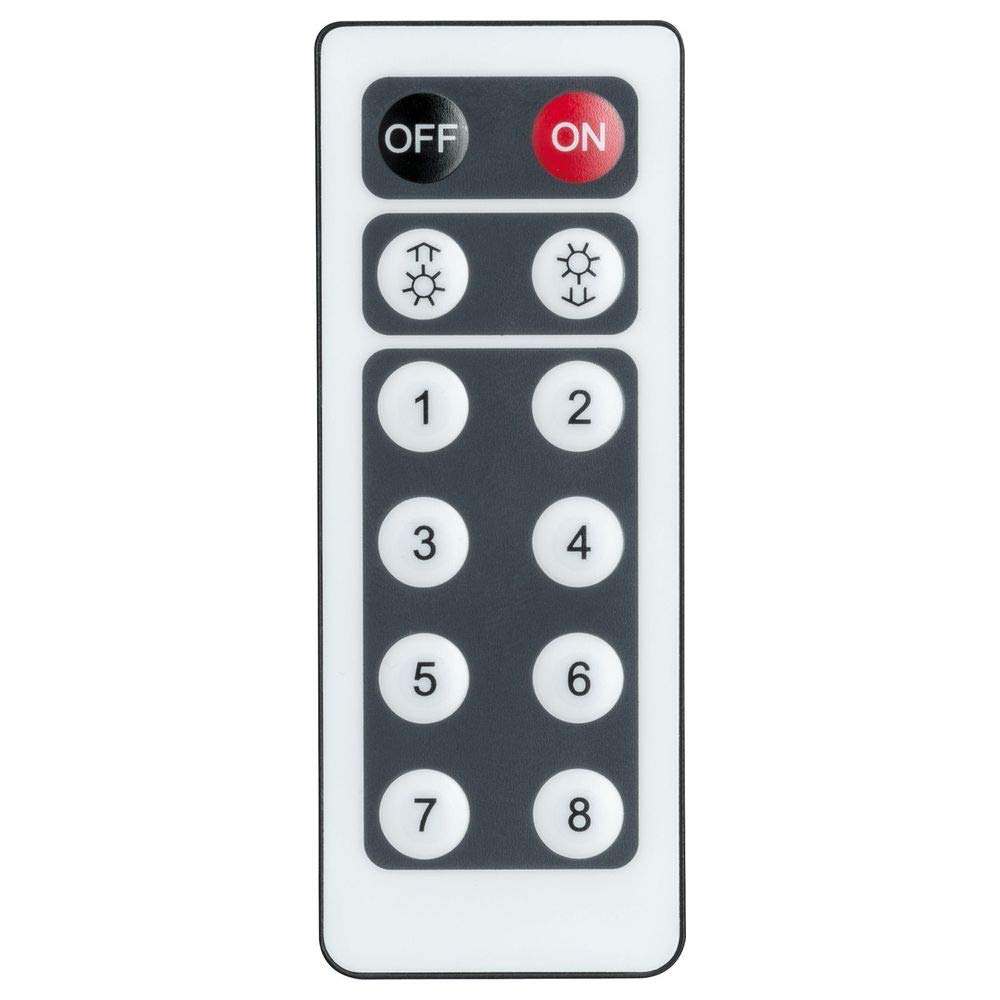
Image: The Paulmann URail Remote Control (Model 952.96) with its various buttons for power, dimming, and channel selection.
1. د بیټرۍ نصب کول
The URail Remote requires a Lithium-ion battery. Please check the battery compartment for the exact type and ensure it is correctly installed.
- د ریموټ کنټرول شاته د بیټرۍ کمپارټ پوښ ومومئ.
- پوښ د سلایډ کولو یا خلاصولو سره خلاص کړئ.
- Insert the battery, ensuring correct polarity (+ and - terminals).
- د بیټرۍ کمپارټ پوښ په خوندي ډول بدل کړئ.
2. Pairing with URail Wireless Adapter
To control your URail lighting, the remote must be paired with the URail wireless adapter (sold separately). The pairing process is designed to be straightforward.
- Ensure the URail wireless adapter is correctly installed in your URail system and powered on.
- Refer to the instruction manual of your URail wireless adapter for specific pairing mode activation steps. This typically involves a button press on the adapter itself.
- While the adapter is in pairing mode, press and hold the designated pairing button on your URail Remote (often a specific button combination or a small button inside the battery compartment).
- A visual confirmation (e.g., flashing light on the adapter or remote) will indicate successful pairing.
- Test the remote's functionality by attempting to switch the connected lights on/off or dim them.
The remote supports multiple channels (A, B, C, D), allowing you to pair it with several adapters for individual or group control. Repeat the pairing process for each adapter or group you wish to control.
عملیاتي لارښوونې
The Paulmann URail Remote provides intuitive control over your URail lighting system.
بنسټیز کارونه
- آن/بند: Press the large round 'ON' button to turn the lights on, and the large round 'OFF' button to turn them off.
- دیمینګ: Use the rocker switch labeled 'DIM'. Press the top part (+) to increase light intensity and the bottom part (-) to decrease it. Hold the button for continuous dimming.
Channel and Group Control
If you have paired your remote with multiple URail wireless adapters on different channels, you can control them individually or as groups using the 'A', 'B', 'C', 'D' buttons.
- انفرادي کنټرول: Select the desired channel (A, B, C, or D) by pressing its corresponding button before pressing On/Off or Dim.
- د ګروپ کنټرول: To control multiple adapters simultaneously, ensure they are paired to the same channel. Alternatively, some systems may allow a master control or specific group channels to operate multiple adapters.

انځور: یو پخوانیample of a Paulmann URail lighting system installed in a modern dining room, featuring both spotlights and pendant lights. This system can be controlled by the URail Remote.
ساتنه
To ensure the longevity and optimal performance of your Paulmann URail Remote, follow these simple maintenance guidelines:
- پاکول: Wipe the remote control with a soft, dry cloth. Do not use abrasive cleaners, solvents, or harsh chemicals, as these can damage the surface.
- د بیټرۍ بدلول: Replace the battery when the remote's range decreases or it becomes unresponsive. Dispose of old batteries according to local regulations.
- ذخیره کول: ریموټ په وچ ځای کې وساتئ، د مستقیم لمر وړانګو او سختې تودوخې څخه لرې.
- د اوبو ښکاره کول: Avoid exposing the remote to water or high humidity, as it is not waterproof.
د ستونزو حل کول
If you encounter issues with your Paulmann URail Remote, try the following troubleshooting steps:
- ریموټ ځواب نه ورکوي:
- Check the battery: Ensure the battery is correctly inserted and has sufficient charge. Replace if necessary.
- Check line of sight: Ensure there are no obstructions between the remote and the URail wireless adapter.
- Verify range: The maximum range is 10 meters. Ensure you are within this distance.
- Lights Not Dimming/Switching:
- Re-pair the remote: Follow the pairing instructions in the "Setup" section to re-establish the connection with the URail wireless adapter.
- Check adapter power: Ensure the URail wireless adapter is powered on and functioning correctly.
- Verify channel selection: If using multiple channels, ensure the correct channel (A, B, C, or D) is selected on the remote for the desired adapter.
- لاسوهنه:
- Other infrared devices: Ensure other infrared remote controls are not interfering with the URail system.

Image: A Paulmann URail track system illuminating a modern living and dining area, demonstrating the versatility of the system controlled by the remote.
مشخصات
| برانډ | پاولمن |
| د ماډل شمیره | 952.96 |
| د ماډل نوم | URail Remote |
| رنګ | میټ کروم |
| مواد | پلاستیک |
| ځانګړي ځانګړتیاوې | بدلول او کمول |
| د پیوستون ټیکنالوژي | انفراریډ |
| د کنټرولر ډول | د تڼۍ کنټرول |
| اعظمي حد | 10 متره |
| د بیټرۍ ډول | لیتیم آیون |
| مطابقت لرونکې وسیلې | Light Control Systems (specifically Paulmann URail Wireless Adapters) |

Image: An illustration of a Paulmann URail track system featuring both large pendant lights and smaller spotlights, highlighting its adaptability in various interior designs.
تضمین او ملاتړ
For information regarding warranty coverage, please refer to the documentation provided with your purchase or visit the official Paulmann webسایټ
If you require further assistance or have questions not covered in this manual, please contact Paulmann customer support. Contact details can typically be found on the Paulmann webپه سایټ یا ستاسو د محصول په بسته بندۍ کې.


