1. پیژندنه
The Tekpower TP12003D is a professional DC regulated linear power supply designed for various applications requiring a stable and adjustable power source. This unit provides continuously adjustable output voltage from 0 to 120V DC and current from 0 to 3A. It features large LCD displays for accurate voltage and current readings and includes built-in overload protection.
This manual provides essential information for the safe and efficient operation, setup, maintenance, and troubleshooting of your TP12003D power supply. Please read it thoroughly before using the device.
2. د خوندیتوب معلومات
خبرداری: Failure to follow these safety instructions may result in electric shock, fire, or personal injury.
- د ننوتلو حجم ډاډمن کړئtage matches the specified rating (110V AC) before connecting the power supply.
- د برېښنا رسولو کار په لوند یا وچ حالت کې مه کوئamp شرایط
- سي مه خلاصوهasinد بریښنا رسولو g. دننه د کارونکي لپاره د خدمت وړ برخې نشته. ټولې خدمتونه وړ پرسونل ته راجع کړئ.
- Always disconnect the power cord from the AC outlet before performing any maintenance or if the unit will be unused for an extended period.
- د یونټ شاوخوا مناسب هوا ورکول ډاډمن کړئ ترڅو د ډیر تودوخې مخه ونیول شي. د هوا د توییدو لارې مه بندوئ.
- یوازې چمتو شوي بریښنا تار او لوازم وکاروئ.
- د محصول ټرمینالونو د لنډ سرک کولو څخه ډډه وکړئ.
3. د بسته محتويات
ډاډ ترلاسه کړئ چې لاندې ټول لیست شوي توکي ستاسو په کڅوړه کې شتون لري:
- Tekpower TP12003D DC Regulated Power Supply Unit
- Alligator Clip Probe
- د کارونکي لارښود (دا لاسوند)
- د بریښنا تار

Figure 3.1: Tekpower TP12003D unit with power cord and alligator clip probes.
4. محصول ختم شوview
4.1 مخکښ پینل

شکل 4.1: د مخ پینل ترتیب
- والیtage ښودنه (V): Digital LCD display showing the output voltage.
- اوسنی ښودنه (A): Digital LCD display showing the output current.
- والیtagد تنظیم کولو نوب: Used to adjust the output voltage.
- د اوسني سمون غوټۍ: Used to adjust the current limit.
- Output Terminals (+/-): Main output terminals for connecting loads. Red for positive, Black for negative.
- Sampling Terminals: Additional terminals for remote sensing or specific applications.
- د بریښنا سویچ: ON/OFF switch for the unit.
- Output ON/OFF Button: Controls the output power to the terminals independently of the main power switch.
4.2 شاته پینل
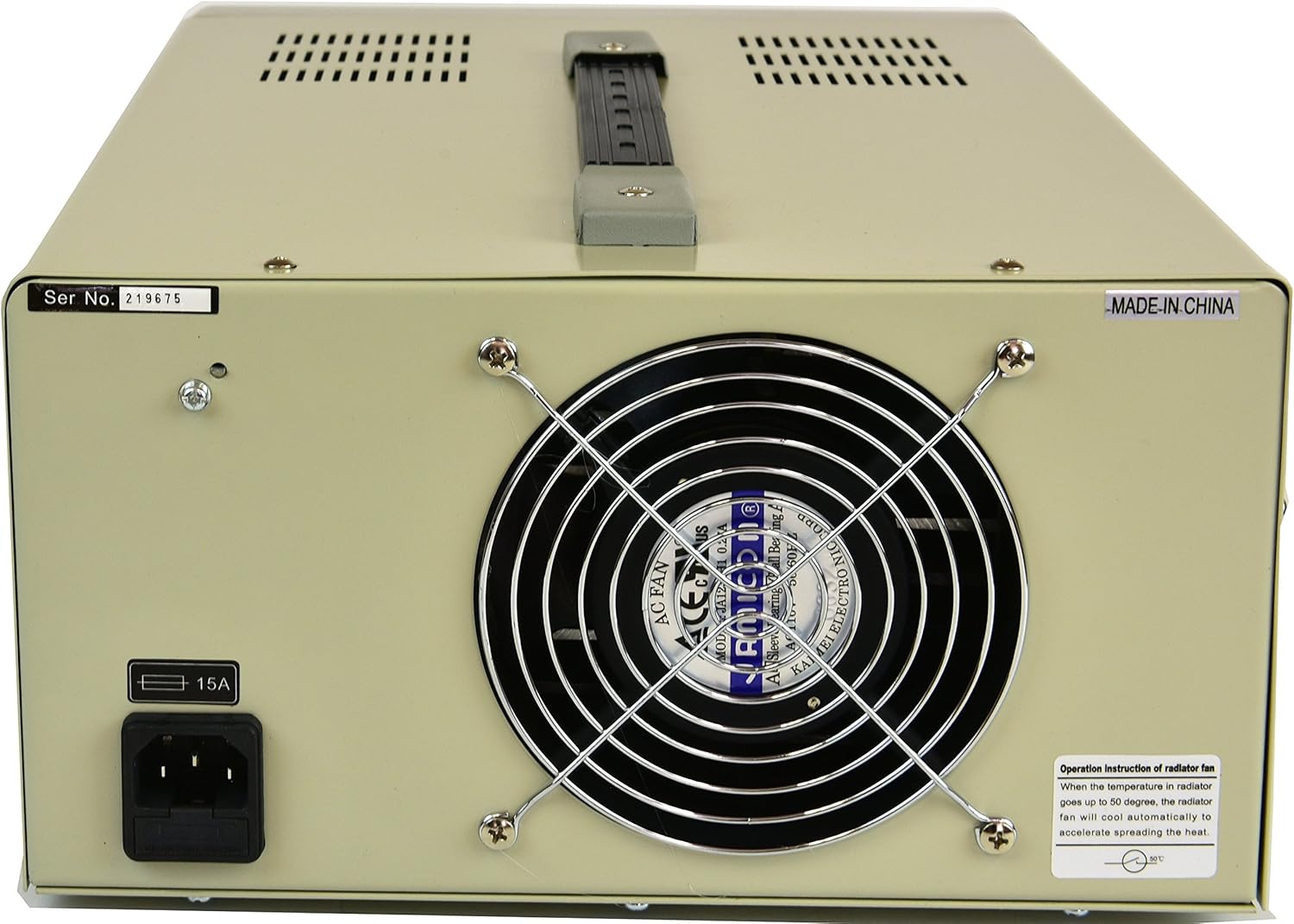
شکل 4.2: د شا پینل ترتیب
- د AC بریښنا داخلول: Connector for the main power cord.
- د فیوز هولډر: Contains the main protective fuse (8A).
- د یخولو فین: Automatically activates to dissipate heat during operation.
5. ترتیب کول
- بسته بندي کول: Carefully remove the power supply from its packaging. Retain the packaging for future transport or storage.
- ځای په ځای کول: Place the unit on a stable, level surface with adequate ventilation. Ensure there is at least 10 cm (4 inches) of clear space around all sides, especially the rear cooling fan. Avoid placing it near heat sources or in direct sunlight.
- د بریښنا پیوستون:
- ډاډ ترلاسه کړئ چې د مخکینۍ پینل بریښنا سویچ په بند حالت کې دی.
- Connect the provided power cord to the AC Power Input on the rear panel.
- Plug the other end of the power cord into a grounded 110V AC outlet.
- لومړنۍ کتنه: Before connecting any load, turn the power switch ON. The displays should illuminate. Verify that the voltage and current displays show readings (initially 0V and 0A or a small residual value).
6. عملیاتي لارښوونې
6.1 د ترتیب حجمtage او اوسني محدودیتونه
- Ensure the power supply is ON but the output is OFF (Output ON/OFF button).
- وګرځوئ والیtagد تنظیم کولو نوب clockwise to increase the voltage or counter-clockwise to decrease it. Observe the Voltage ښودنه.
- وګرځوئ د اوسني تنظیم کولو نوب clockwise to increase the current limit or counter-clockwise to decrease it. This sets the maximum current the supply will deliver.
- For precise settings, adjust the coarse knob first, then fine-tune with the fine adjustment knob (if available, or use small turns for precision).
۵.۴ د بار سره نښلول
- Ensure the power supply output is OFF.
- د خپل بار مثبت (+) ټرمینل د بریښنا رسولو سور ټرمینل سره وصل کړئ.
- د خپل بار منفي (-) ټرمینل د بریښنا رسولو تور تولید ټرمینل سره وصل کړئ.
- Double-check all connections for polarity and security.
6.3 Applying Power to the Load
- د مطلوب حجم تنظیم کولو وروستهtage and current limits and connecting the load, press the Output ON/OFF button to enable the output.
- Observe the Voltage and Current Displays. The voltage should stabilize at the set value, and the current display will show the actual current drawn by the load (up to the set current limit).
- If the load draws more current than the set limit, the power supply will enter constant current (CC) mode, and the current display will show the set limit. The voltage will drop to maintain this current.
- To turn off the output, press the Output ON/OFF button بیا
7. ساتنه
- پاکول: د پاکولو دمخه د AC ساکټ څخه د بریښنا رسولو قطع کړئ. د بهرنۍ برخې د پاکولو لپاره نرم، وچ ټوکر وکاروئ. د کثافاتو پاکوونکي یا محلولونه مه کاروئ.
- وینټیلیشن: Regularly check that the ventilation openings and cooling fan are free from dust and obstructions. Use compressed air to gently clear dust if necessary.
- د فیوز بدلول: If the power supply does not turn on, check the fuse located on the rear panel.
- د بریښنا تار قطع کړئ.
- Unscrew the fuse holder cap.
- Replace the fuse with one of the same type and rating (8A).
- کیپ بیرته په خوندي توګه وخورئ.
- ذخیره کول: کله چې د اوږدې مودې لپاره په کار نه وي، د بریښنا رسولو په وچ، دوړو څخه پاک چاپیریال کې وساتئ.
8. ستونزه حل کول
| ستونزه | احتمالي لامل | د حل لاره |
|---|---|---|
| No power, displays off. | Power cord not connected, AC outlet faulty, main power switch off, blown fuse. | Check power cord connection. Test AC outlet. Ensure power switch is ON. Check and replace fuse if necessary (refer to Maintenance section). |
| د محصول voltage is 0V or lower than set, current display shows set limit (CC mode). | Load resistance is too low, drawing more current than the set limit. | Increase the current limit using the Current Adjustment Knob, or reduce the load. Ensure the load is appropriate for the power supply's rating. |
| د محصول voltage is unstable or fluctuating. | Loose connections, faulty load, internal issue. | Check all output connections. Test with a different load. If the problem persists, contact customer support. |
| واحد ډیر ګرمیږي. | Blocked ventilation, excessive load, prolonged operation at high power. | Ensure ventilation openings are clear. Reduce load or operating time. Allow the unit to cool down. |
9. مشخصات
| ماډل | TP12003D |
| ننوتۍ جلدtage | 110V AC |
| د محصول Voltage | ۰-۳۰ ولټه ډي سي (د تعدیل وړ) |
| د محصول اوسنی | 0-3A (Adjustable) |
| ښودل | Large LCD (3 1/2 Digits) for Voltage او اوسنی |
| ټیکنالوژي | SMD Technology, Linear Transformer Type |
| ساتنه | Overload Protection Circuit, 8A Fuse Protection |
| ابعاد (L x W x H) | 11 x 6 x 14 انچه (نږدې) |
| وزن | 25.7 پونډه (تقریبا) |
| د یخولو طریقه | Air (Internal Fan) |
10. تضمین
The Tekpower TP12003D DC Adjustable Linear Power Supply comes with a د امریکا یو کلن تضمین from the date of purchase. This warranty covers defects in materials and workmanship under normal use. It does not cover damage caused by misuse, accident, unauthorized modification, or improper operation. Please retain your proof of purchase for warranty claims.
11. د پیرودونکي ملاتړ
For technical assistance, troubleshooting beyond this manual, or warranty inquiries, please contact Tekpower customer support. Refer to the contact information provided with your purchase or visit the official Tekpower webد ملاتړ د خورا تازه جزیاتو لپاره سایټ.
جوړونکی: ټیک پاور