پیژندنه
This manual provides detailed instructions for the Neoteck DAC04 4K HDMI Audio Extractor Converter. This device allows you to extract audio from an HDMI signal and output it to SPDIF (optical) and analog RCA (L/R) while passing the video signal through to an HDMI display. It supports resolutions up to 4K@30Hz and various audio formats, making it ideal for integrating modern HDMI sources with older audio systems.
د محصول ځانګړتیاوې
- 4K HDMI Audio Extraction: Converts HDMI input to HDMI output with additional SPDIF and R/L analog audio outputs. Supports HDCP 1.4 and 3D.
- د لوړ ریزولوشن ملاتړ: Input resolution up to Ultra HD 4K@30Hz. Compatible with 1080p@60/50Hz, 1080i, 720p, 576i, 480p, and 480i. Note: Does not support 4K@60Hz.
- Versatile Audio Modes: Offers PASS, 2.0CH, and 5.1CH audio output options. Analog RCA output supports 2-channel PCM stereo audio. SPDIF output supports 2-channel PCM, Dolby Digital, and DTS (Dolby Digital Plus is not supported). HDMI output supports up to 7.1CH audio.
- د LED شاخصونه: A red LED illuminates for power status, and a green LED illuminates for HDMI connection status.
- دوامدار ساختمان: د المونیم الیاژ ځانګړتیاوې لري casinد ښه پایښت او تودوخې ضایع کیدو لپاره.
- پراخه مطابقت: Suitable for various HDMI source devices including Blu-ray/DVD players, game consoles (PS3, PS4, Xbox), streaming devices (Roku, Chromecast, Amazon Fire TV, Apple TV), PCs, laptops, HD cameras, and HD DVRs.
د بسته محتويات
مهرباني وکړئ د بکس خلاصولو پر مهال د کڅوړې محتويات وګورئ:
- 1 x Neoteck DAC04 HDMI Audio Extractor Converter
- د 1 x USB بریښنا کیبل
- 1 x د کارونکي لارښود
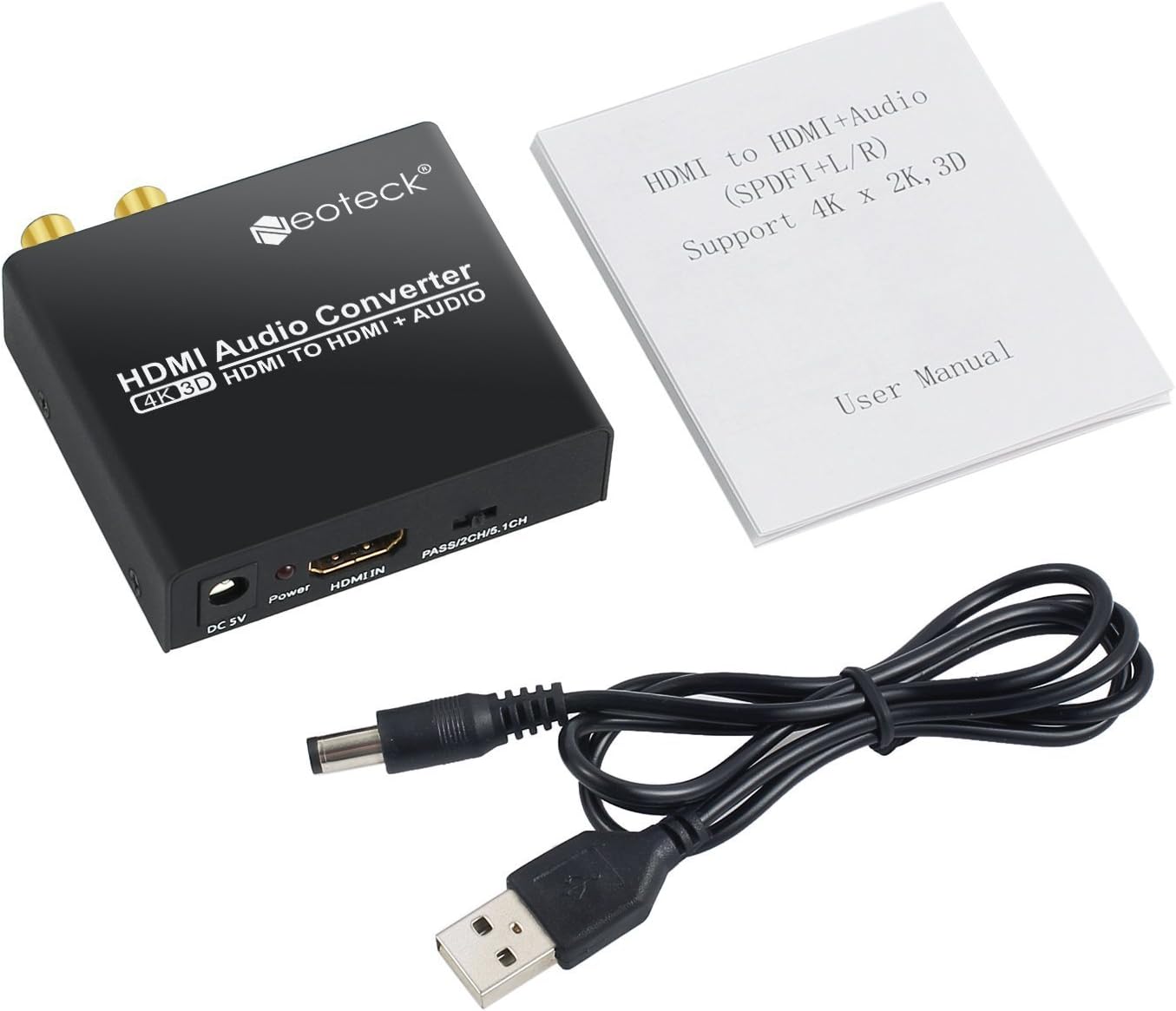
Image: Neoteck DAC04 HDMI Audio Extractor, USB power cable, and user manual included in the package.
د محصول ډیاګرام
مخکینۍ او شاته تختې
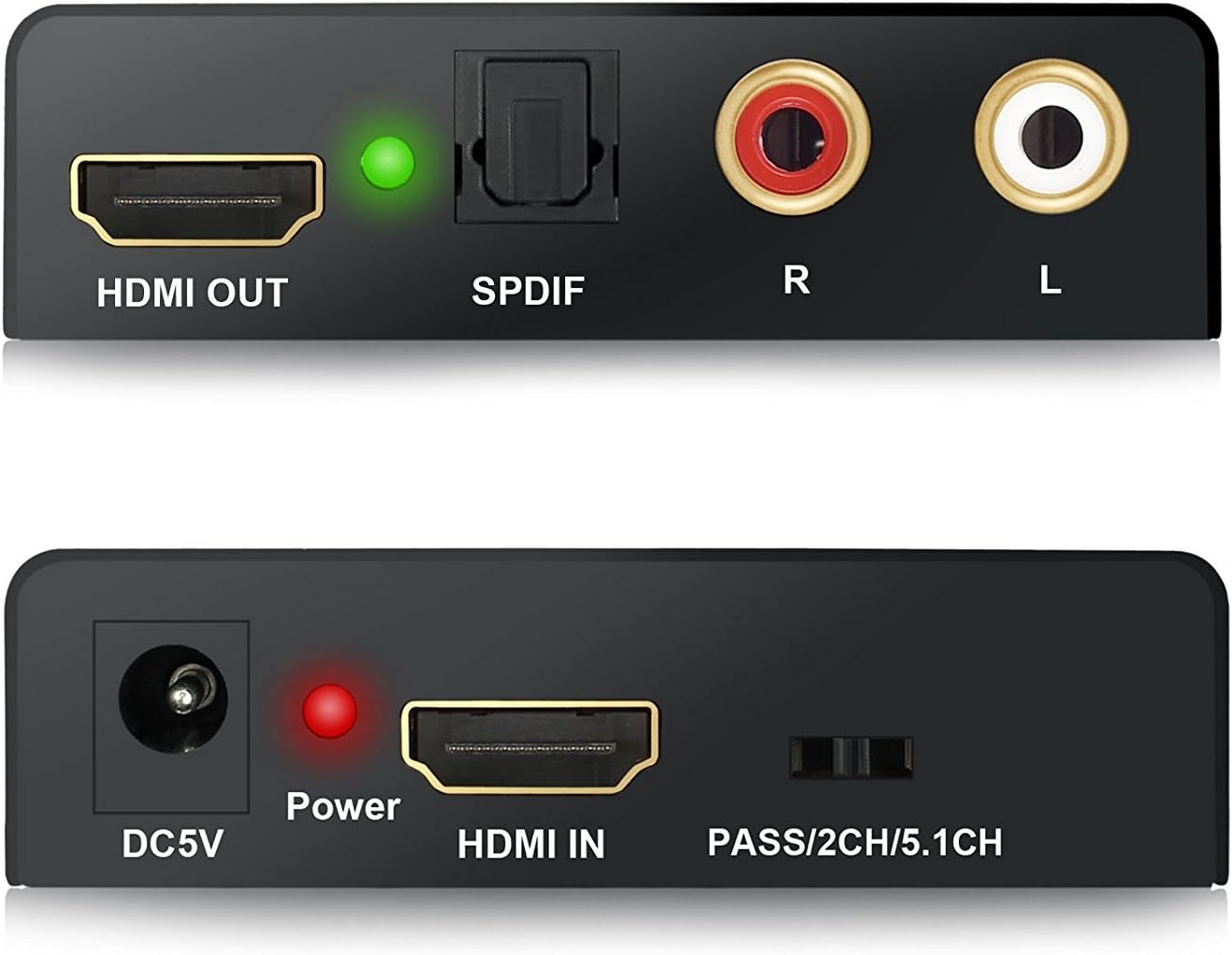
انځور: نږدې انځور view of the Neoteck DAC04 converter's front panel (DC5V, Power LED, HDMI IN, Audio Mode Switch) and rear panel (HDMI OUT, SPDIF, R/L RCA, HDMI LED).
- DC5V: د بریښنا وتلي درشل.
- د بریښنا LED: Red indicator for power status.
- په HDMI کې: HDMI input port for source devices.
- PASS/2CH/5.1CH Switch: Audio mode selection switch.
- HDMI وت: HDMI output port for display devices.
- SPDIF: د آپټیکل آډیو تولید بندر.
- R/L: Analog RCA stereo audio output ports (Red for Right, White for Left).
- د HDMI LED: Green indicator for HDMI connection status.
د عادي پیوستون ډایگرام

Image: Diagram illustrating how to connect a Blu-ray DVD player (HDMI In) to the Neoteck converter, then HDMI Out to an HDTV and Optical Out/RCA Out to an ampلايف
د تنظیم کولو لارښوونې
- Connect your HDMI source device (e.g., Blu-ray player, PS4) to the "HDMI IN" port of the Neoteck converter using an HDMI cable.
- Connect your HDMI display (e.g., TV, projector) to the "HDMI OUT" port of the Neoteck converter using an HDMI cable.
- For audio output:
- To use optical audio, connect an optical cable from the "SPDIF" port of the converter to your audio receiver or soundbar.
- To use analog stereo audio, connect RCA cables from the "R/L" ports of the converter to your stereo ampژوندی یا سپیکرې.
- ورکړل شوی USB بریښنا کیبل له سره وصل کړئ "DC5V" port on the converter and then to a USB power source (e.g., a USB port on your TV, a USB wall adapter). The red Power LED will illuminate.
- Ensure all connected devices (source, display, audio system) are powered on. The green HDMI LED will illuminate when a stable HDMI connection is established.
عملیاتي لارښوونې
The Neoteck DAC04 features a switch on the front panel to select the desired audio output mode: PASS, 2.0CH, or 5.1CH.

Image: The audio mode switch on the Neoteck DAC04 with labels for PASS, 2CH, and 5.1CH, and corresponding explanations.
- د پاس حالت: In this mode, the SPDIF audio output format depends on the EDID (Extended Display Identification Data) of the connected TV or display. The audio signal is passed through without modification.
- 2.0CH حالت: کله چې ټاکل کیږي "2.0CH", the SPDIF output audio format will be LPCM 2-channel stereo. This is suitable for stereo audio systems.
- 5.1CH حالت: کله چې ټاکل کیږي "5.1CH", the SPDIF output audio format will be 5.1-channel. For this mode to function correctly, the source audio must also be 5.1CH. This mode supports Dolby Digital and DTS 5.1-channel audio.
د ستونزو حل کول
- د ویډیو محصول نشته:
- ډاډ ترلاسه کړئ چې ټول HDMI کیبلونه په خوندي ډول وصل دي.
- Verify that the HDMI source device and display are powered on and functioning correctly.
- Check if the converter's red Power LED is illuminated. If not, ensure the USB power cable is connected to a working power source.
- Confirm that your display supports the input resolution (up to 4K@30Hz). This converter does not support 4K@60Hz.
- د آډیو محصول نشته:
- Check all audio cables (SPDIF, RCA) for secure connections.
- Ensure your audio receiver/amplifier is powered on and set to the correct input.
- Verify the audio mode switch on the converter is set appropriately (PASS, 2.0CH, or 5.1CH) for your audio system and source content.
- If using 5.1CH mode, confirm that the source audio is indeed 5.1CH.
- Note that Dolby Digital Plus is not supported by the SPDIF output.
- If using PASS mode, the SPDIF output format depends on the TV's EDID. Try 2.0CH or 5.1CH mode if you experience issues.
- ضعیف آډیو کیفیت:
- Ensure all cables are high quality and not damaged.
- د نورو بریښنایی وسیلو څخه د مداخلې لپاره چیک کړئ.
- Adjust audio settings on your source device and audio receiver.
مشخصات
| برانډ | نوټیک |
| د ماډل شمیره | DAC04 |
| د ننوتلو پورټ | 1 x HDMI |
| د تولید بندرونه | 1 x HDMI, 1 x SPDIF (Optical), 1 x RCA L/R |
| د HDMI ریزولوشن | Up to 4K@30Hz, 1080p@60/50Hz, 1080i, 720p, 576i, 480p, 480i |
| د HDCP نسخه | HDCP 1.4 |
| د 3D ملاتړ | هو |
| د آډیو آوټ پټ حالتونه | پاس، ۲CH، ۵.۱CH |
| د SPDIF آډیو فارمیټونه | PCM 2CH, Dolby Digital, DTS (Dolby Digital Plus not supported) |
| RCA L/R Audio Formats | PCM 2CH Stereo |
| د HDMI آډیو بmatsه | تر 7.1CH پورې |
| د بریښنا رسول | ډي سي ۵ وولټ (د USB له لارې) |
| Casinمواد | د المونیم مصر |
| جوړونکی | نوټیک |
ساتنه
- وسیله په وچه او ښه هوا لرونکې سیمه کې وساتئ.
- د وسیلې د خورا تودوخې ، رطوبت یا مستقیم لمر وړانګو ته د افشا کولو څخه ډډه وکړئ.
- وسیله د نرم او وچ ټوکر سره پاکه کړئ. د مایع پاکوونکو یا ایروسولونو څخه کار مه اخلئ.
- د ډیر تودوخې مخنیوي لپاره د وسیلې شاوخوا مناسب هوا ورکول ډاډمن کړئ.
تضمین او ملاتړ
For warranty information or technical support, please refer to the contact details provided with your purchase or visit the official Neoteck webسایټ د تضمین ادعاګانو لپاره خپل د پیرود رسید وساتئ.


