پیژندنه
د پیرودلو لپاره مننهasing the Havit HV-MS991GT Wireless Mouse. This manual provides essential information for setting up, operating, maintaining, and troubleshooting your device. Please read it carefully before use to ensure optimal performance and longevity of your mouse.
د تنظیم کولو لارښوونې
- موږک خلاص کړئ: Carefully remove the mouse and the USB receiver from the packaging.
- بیټرۍ نصب کړئ:
Locate the battery compartment on the underside of the mouse. Open the cover and insert one AA battery (not included), ensuring correct polarity (+/-). Close the battery compartment cover.
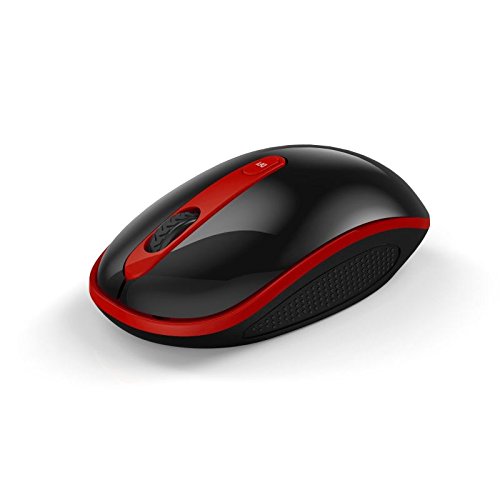
Image: The Havit HV-MS991GT Wireless Mouse, featuring a black body with red accents and a scroll wheel. This image illustrates the overall design of the mouse.
- د USB رسیدونکي سره وصل کړئ: Plug the mini USB receiver into an available USB port on your computer. The system will automatically detect and install the necessary drivers.
- موږک چالان کړئ: Locate the power switch on the underside of the mouse and slide it to the "ON" position. The mouse is now ready for use.
عملیاتي لارښوونې
The Havit HV-MS991GT Wireless Mouse is designed for intuitive use with standard mouse functions.
- اساسي دندې:
- کیڼ کلیک: لومړني انتخاب او فعالول.
- ښي کلیک: د شرایطو مینو ته لاسرسی لري.
- سکرول ویل: اسناد سکرول کوي او web pages vertically. The scroll wheel also functions as a middle click button.
- د DPI تعدیل: This mouse features adjustable DPI settings (1000-1600 DPI) for varying cursor speeds and precision. A dedicated DPI button, usually located near the scroll wheel, allows you to cycle through these settings. Press the button to switch between DPI levels.
- د بې سیم لړۍ: The advanced 2.4GHz wireless technology provides an effective working distance of up to 15 meters (approximately 49 feet) from the USB receiver.
- د سیسټم مطابقت: This mouse is compatible with Windows 2000, Windows XP, Windows Vista, Windows 7, and Windows 8 operating systems.
ساتنه
- پاکول: To clean the mouse, gently wipe its surface with a soft, dry cloth. For stubborn dirt, slightly dampen the cloth with water. Avoid using harsh chemicals or abrasive cleaners, as these can damage the mouse's finish.
- د بیټرۍ بدلول: When the mouse performance degrades or it stops responding, it is likely time to replace the battery. Follow the battery installation steps in the "Setup Instructions" section.
- د اتومات خوب فعالیت: The mouse features a built-in auto sleep function to conserve battery life. If the mouse is inactive for a period, it will enter a low-power sleep mode. To wake it up, simply move the mouse or click any button.
- د ترلاسه کونکي ذخیره: The mini USB receiver can be stored inside the mouse's battery compartment when not in use, making it convenient for travel and preventing loss.
د ستونزو حل کول
| ستونزه | د حل لاره |
|---|---|
| موږک ځواب نه ورکوي. |
|
| د کرسر حرکت بې نظمه یا ورو دی. |
|
| بېسیم اړیکه بې ثباته ده. |
|
مشخصات
| فیچر | تفصیل |
|---|---|
| برانډ | هیت |
| د ماډل شمیره | HV-MS991GT |
| د ارتباط ټیکنالوژي | 2.4GHz بې سیم |
| د DPI تنظیمات | 1000-1600 DPI |
| د تڼیو شمیر | 4 |
| کلیدي ژوند | 1,000,000 ځله |
| د بیسیم رینج | تر 15 مترو پورې |
| د عملیاتي سیسټم ملاتړ | وینډوز 2000/XP/Vista/7/8 |
| د اوسط بیټرۍ ژوند | ۶ میاشتې |
| بیټرۍ پکې شاملې دي | No (Requires 1x AA battery) |
| د توکي وزن | 120 ګرامه |
| د کڅوړې ابعاد | 16.2 x 10.8 x 6 سانتي متره |
تضمین او ملاتړ
Specific warranty information for the Havit HV-MS991GT Wireless Mouse is not provided in this manual. Please refer to the product packaging or the manufacturer's official website for details regarding warranty coverage and customer support contact information.


