پیژندنه
This manual provides essential instructions for the setup, operation, maintenance, and troubleshooting of your NEC NP-M403H projector. Please read this manual thoroughly before using the projector to ensure proper and safe operation.
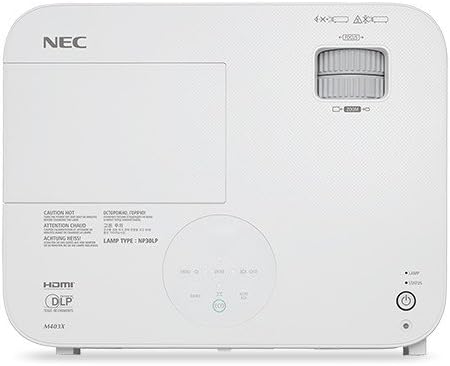
انځور: پورته view of the NEC NP-M403H projector, showing the lens, control panel, and ventilation. This image illustrates the overall design and key external features from a top-down perspective.
چمتو کول
Follow these steps for initial setup of your NEC NP-M403H projector.
- بسته بندي کول: Carefully remove the projector and all accessories from the packaging. Ensure all components are present.
- ځای په ځای کول: Position the projector on a stable, flat surface or mount it to the ceiling. Ensure adequate ventilation around the unit. The compact and lightweight design allows for flexible placement.
- د بریښنا پیوستون: Connect the power cord to the projector and then to a suitable electrical outlet.
- د منابعو نښلول:
The projector supports various connectivity options. Use appropriate cables to connect your source devices (e.g., computer, media player) to the projector's input ports.
- HDMI: د لوړ تعریف ډیجیټل ویډیو او آډیو لپاره.
- VGA (کمپیوټر دننه): د انالوګ کمپیوټر سیګنالونو لپاره.
- USB: For certain data or control functions.
- آډیو په: د انلاګ آډیو ان پټ لپاره.

انځور: شاته view of the NEC NP-M403H projector, displaying the array of input and output ports including HDMI, VGA, USB, and audio connections. This image helps users identify where to connect their source devices.
- ابتدايي بریښنا فعاله: Press the power button on the projector or remote control. The projector will initiate its startup sequence.
عملیاتي لارښوونې
This section details the basic operation of your projector.
پاور آن/بند
- پاور آن: Press the power button. The projector features a quick startup function.
- بندول: Press the power button again. The projector supports direct power off, allowing for quick shutdown.
د انځور سمون
- تمرکز: د روښانه انځور ترلاسه کولو لپاره د تمرکز حلقه په لینز باندې وګرځوئ.
- زوم: د عکس اندازه بدلولو لپاره په لینز کې د زوم حلقه تنظیم کړئ.
- د کیسټون سمون: که چیرې پروجیکټر په بشپړ ډول د سکرین سره عمودي نه وي، د ټراپیزایډل تحریف سمولو لپاره د پروجیکټر مینو یا وقف شوي تڼیو څخه کار واخلئ.

انځور: مخکینۍ خوا view of the NEC NP-M403H projector, highlighting the lens assembly and front ventilation. This image assists users in locating the lens for focus and zoom adjustments.
د سرچینې انتخاب داخل کړئ
The projector can automatically detect input signals (Autosense™). You can also manually select the input source using the "Input" button on the projector or remote control.
د ECO حالت
د غځولو لپارهamp life and reduce power consumption, activate ECO Mode. This feature contributes to energy savings and environmental protection. The projector offers a lamp life of up to 8,000 hours in ECO Mode.
ساتنه
منظم ساتنه د غوره فعالیت ډاډ ورکوي او ستاسو د پروجیکټر عمر اوږدوي.
- Lamp بدلول: پروجکټور lamp has a life of up to 8,000 hours in ECO Mode. When the lamp reaches the end of its life, a warning indicator will appear. Refer to the full service manual for detailed lamp د بدیل لارښوونې.
- د فلټر پاکول/بدلول: The projector is equipped with an air filter to prevent dust accumulation. Regularly clean the filter to maintain proper airflow and cooling. Replace the filter as needed; the projector features an extended filter life.
- د عینکو پاکول: Gently clean the projector lens with a soft, lint-free cloth specifically designed for optical surfaces. Do not use abrasive cleaners.
- بهرنۍ پاکوالی: Wipe the projector's exterior with a soft, dry cloth. Avoid using harsh chemicals.
د ستونزو حل کول
This section addresses common issues you might encounter with your NEC NP-M403H projector.
| ستونزه | احتمالي لامل | د حل لاره |
|---|---|---|
| هیڅ عکس ندی ښودل شوی |
|
|
| انځور غلی دی |
|
|
| انځور trapezoidal دی |
|
|
| پروجیکټر ډیر ګرمیږي یا بندیږي |
|
|
مشخصات
Key technical specifications for the NEC NP-M403H projector:
- ماډل: NP-M403H
- نښه: NEC
- د ښودلو ټیکنالوژي: DLP
- روښانتیا: 4000 lumens
- اصلي پریکړه: 1920 x 1080 (1080p)
- د ښودلو اعظمي ریزولوشن: 1920 x 1080
- تناسب نسبت: تر 10,000:1 پورې
- Lamp ژوند: تر ۱۲۰۰۰ ساعتونو پورې (ایکو موډ)
- ارتباط: HDMI، USB، VGA
- ابعاد (W x H x D): 14.5 x 4.3 x 11.5 انچه
- وزن: ۲.۴۵ پونډه
- ځانګړي ځانګړتیاوې: Lightweight, Portable, ECO Mode, Autosense™
تضمین او ملاتړ
For detailed warranty information, please refer to the warranty card included with your product or visit the official NEC website. Technical support contact details are typically provided in the product packaging or on the manufacturer's support pages.


