1. پیژندنه
This manual provides essential information for the safe and efficient operation of your NEC NP-PA653U LCD Projector. Please read this manual thoroughly before using the projector and retain it for future reference. The NEC NP-PA653U is an advanced professional installation projector designed for higher education and corporate environments, offering high brightness and flexible installation options.
2. د خوندیتوب معلومات
د خوندیتوب مهمې لارښوونې:
- Always connect the projector to a grounded power outlet.
- د هوا د جریان لپاره د پروجیکټر شاوخوا کافي ځای ډاډمن کړئ.
- کله چې l وي، مستقیم د پروجیکټر لینز ته مه ګورئamp is on, as this can cause eye damage.
- Avoid placing the projector in direct sunlight, near heat sources, or in environments with excessive dust or humidity.
- ټول خدمات وړ خدماتو پرسونل ته راجع کړئ. د پروجیکټر د خلاصولو یا ترمیم کولو هڅه مه کوئ.
- یوازې د جوړونکي لخوا مشخص شوي ضمیمې / لوازم وکاروئ.
3. د بسته محتويات
ډاډ ترلاسه کړئ چې لاندې ټول توکي ستاسو په بسته کې شامل دي:
- NEC NP-PA653U LCD Projector
- د لینس سوراخ پوښ
- بې سیم ریموټ کنټرول
- Lens lock screw
- د بریښنا تار
- د کارونکي لارښود (دا لاسوند)
4. محصول ختم شوview
The NEC NP-PA653U is a high-performance LCD projector designed for professional installations. It features 6500 lumens brightness, WUXGA (1920x1200) resolution, and advanced connectivity options including HDBaseT.
4.1 مخ View

شکل 4.1: مخکی view of the NEC NP-PA653U LCD Projector. This image shows the main lens assembly and the overall white casing of the projector.
4.2 شاته View (Input/Output Panel)
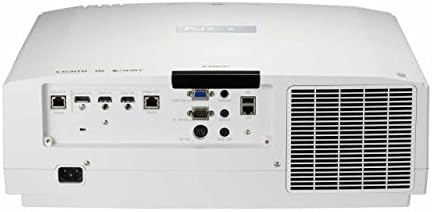
شکل 4.2: شاته view of the NEC NP-PA653U LCD Projector. This panel includes various connectivity options such as HDMI, HDBaseT, VGA, audio inputs/outputs, and network ports.
4.3 اړخ View (د تضمین اداره)
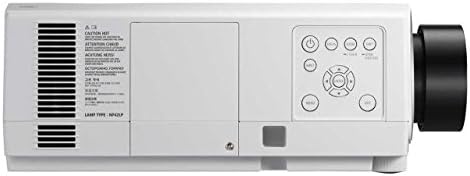
شکل 4.3: اړخ view of the NEC NP-PA653U LCD Projector. This image highlights the integrated control panel with buttons for power, menu navigation, and input selection.
5. ترتیب کول
۴.۱ فزیکي ځای پر ځای کول
The NP-PA653U offers flexible installation options, including tilt-free and portrait installation capabilities. Ensure the projector is placed on a stable, level surface or securely mounted. Maintain adequate ventilation space around the unit.
- د لینز نصبول: This projector uses optional powered lenses. Align the lens with the lens mount and secure it according to the lens-specific instructions. Use the provided lens lock screw.
- د پروجیکشن واټن: Adjust the distance from the screen to achieve the desired image size. The optional powered lenses allow for lens shift, focus, and zoom adjustments.
5.2 د نښلولو وسایل
Connect your source devices (e.g., computer, Blu-ray player) to the appropriate input ports on the projector's rear panel (refer to Figure 4.2).
- HDBaseT: For uncompressed Full HD digital video, audio, Ethernet, power, and control signals over a single cable. The HDBaseT input and separate HDBaseT loop out provide versatile connectivity.
- HDMI: Connect devices using HDMI cables for high-definition digital video and audio.
- VGA: Connect computers using a VGA cable for analog video signals.
- شبکه (ایترنیټ): Connect to a network for control and monitoring.
۸ پاور آن/بند
- Connect the power cord to the projector and a grounded electrical outlet.
- فشار ورکړئ ځواک button on the projector's control panel or the remote control to turn on the projector. The power indicator light will change.
- د بندولو لپاره ځواک button again. Confirm shutdown if prompted. Allow the projector to cool down before unplugging.
6. عملیاتي لارښوونې
6.1 بنسټیز عملیات
- د ننوتلو انتخاب: Use the "Input" button on the remote or control panel to cycle through available input sources (HDMI, HDBaseT, VGA, etc.).
- مینو نیویگیشن: Press the "Menu" button to access the on-screen display (OSD) menu. Use the arrow keys to navigate and "Enter" to select options.
- تمرکز او زوم: Adjust the focus and zoom using the controls on the optional powered lens or via the remote control/OSD menu.
- د لینز شفټ: Utilize the lens shift function (horizontal and vertical) to adjust the image position without moving the projector.
6.2 پرمختللی ځانګړتیاوې
- 4K Ready (HDR10, BT.2020): The projector supports HDR10 and BT.2020 signal formats, making it compatible with Ultra HD Blu-ray and 4K TV broadcasting content. Ensure your source device is configured for these formats.
- TileMatrix: This feature enables the creation of a large 4K x 2K resolution image by utilizing up to four projectors. Connect multiple projectors via the HDBaseT loop out and configure TileMatrix settings in the OSD menu.
- د څنډې ترکیب: For seamless multi-projector installations, use the built-in edge blending feature to smoothly combine images from adjacent projectors, eliminating visible seams.
- دلۍ کول: The projector supports stacking, allowing two or more projectors to be aligned to increase brightness or provide redundancy.
- High Performance Video Processing/Scaling: The projector incorporates advanced video processing to create life-like images from various input resolutions.
7. ساتنه
7.1 پاکول
- پروجیکټر سيasing: ج پاک کړئasinد نرم، وچ ټوکر سره. د سختې خاورې لپاره، لږ څه d وکاروئamp ټوکر د یو نرم، غیر خارښونکي پاکونکي سره ومینځئ.
- لینز: Gently clean the lens with a lens cleaning cloth or lens paper. Avoid using abrasive materials or harsh chemicals.
- د هوا فلټرونه: Regularly check and clean the air filters to prevent dust buildup, which can affect performance and lamp life. Refer to the OSD menu for filter usage time.
۴ لamp بدلول
پروجکټور lamp محدود عمر لري. کله چې lamp life approaches its end, a warning message will appear. Replace the lamp with an authentic NEC replacement lamp (Lamp Type: NP42LP) to ensure optimal performance and safety.
- Turn off the projector and unplug the power cord. Allow it to cool completely (at least 60 minutes).
- l پیدا کړئamp cover (refer to Figure 4.3 for general location on the side panel).
- l خلاص کړئamp cover and carefully remove the old lamp ماډل
- نوی l داخل کړئamp ماډل، ډاډ ترلاسه کول چې دا په سمه توګه ځای پر ځای شوی.
- l بدل کړئamp cover and secure it with screws.
- ایل بیا تنظیم کړئamp د پروجیکټر په OSD مینو کې ټایمر.
8. ستونزه حل کول
This section addresses common issues you might encounter. For more complex problems, contact NEC customer support.
| ستونزه | احتمالي لامل | د حل لاره |
|---|---|---|
| هیڅ عکس ندی ښودل شوی |
|
|
| انځور غلی دی |
|
|
| پروجیکټر ډیر ګرمیږي او بندیږي |
|
|
9. مشخصات
| فیچر | تفصیل |
|---|---|
| د ماډل شمیره | NP-PA653U |
| برانډ | NEC |
| روښانتیا | 6500 Lumens |
| د ښودلو ریزولوشن | 1920 x 1080 (supports 4K signals) |
| د ارتباط ټیکنالوژي | Ethernet, HDBaseT, HDMI, VGA |
| د محصول ابعاد | 19.8 x 16.2 x 6.6 انچه |
| د توکي وزن | ۲.۴۵ پونډه |
| وړاندیز شوي استعمالونه | سوداګري، زده کړه |
| ځانګړی ځانګړنه | د پورټ وړ |
| جوړونکی | NEC Solutions (America), Inc. |
| نیټه لومړی شتون لري | د ۲۰۲۴ کال د جنورۍ ۲۸ مه |
10. تضمین او ملاتړ
For warranty information, technical support, or service inquiries, please refer to the official NEC website or contact your authorized NEC dealer. Keep your purchase receipt as proof of purchase for warranty claims.
آنلاین سرچینې: Visit the official NEC website for the latest drivers, firmware updates, and additional support documentation.


