1. پیژندنه
This manual provides comprehensive instructions for the installation, operation, and maintenance of your UHPPOTE 4 Channel Color Quad System Video Splitter, Model UT-XYL-440. This device is designed to process and display video feeds from up to four CCTV cameras simultaneously on a single monitor, offering various display modes and control options for effective surveillance monitoring.
2. د خوندیتوب معلومات
- ډاډ ترلاسه کړئ چې وسیله په یوه مستحکم، فلیټ سطحه کې کیښودل شوې ده ترڅو د ناڅاپي غورځیدو مخه ونیول شي.
- وسیله په ټاکل شوي حجم کې چل کړئtage range (DC 12V) using the provided power adapter.
- Avoid exposing the unit to moisture, rain, or extreme temperatures. This device is intended for indoor use only.
- سي مه خلاصوهasing or attempt to repair the unit yourself. Refer all servicing to qualified personnel.
- Maintain adequate ventilation around the unit to prevent overheating.
3. د بسته محتويات
مهرباني وکړئ تصدیق کړئ چې ټول توکي ستاسو په کڅوړه کې شتون لري:
- UHPPOTE 4 Channel Color Quad System Video Splitter (UT-XYL-440)
- د انفراډ ریموٹ کنټرول
- BNC Adapters (7 pieces)
- د بریښنا اډاپټر (DC 12V)

Image 3.1: UHPPOTE 4 Channel Color Quad System Video Splitter, remote control, and BNC adapters.
4. محصول ختم شوview
Familiarize yourself with the components and controls of your video splitter.
4.1. د مخ پینل
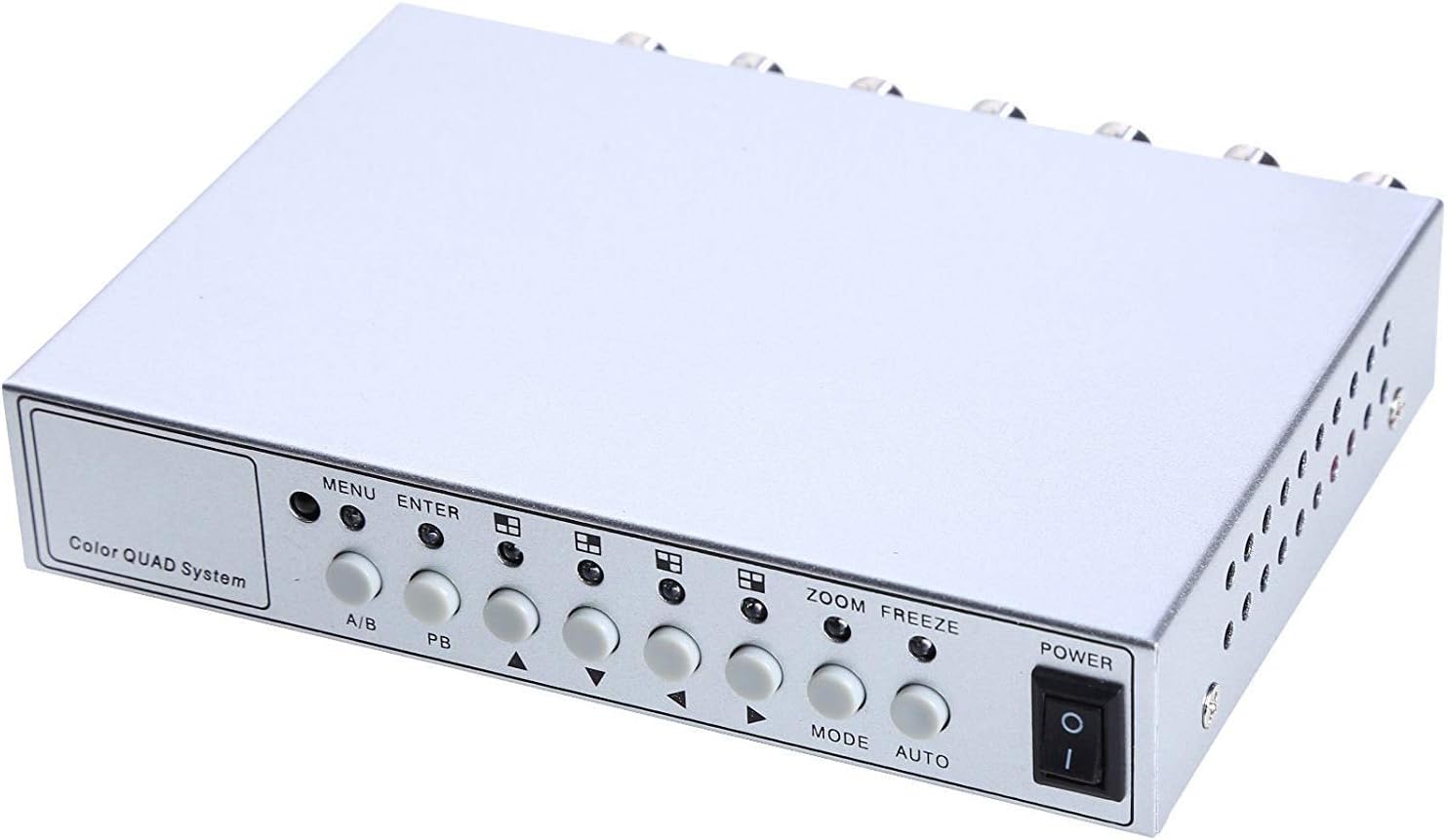
Image 4.1: Front panel controls and indicators.
- مینو: Accesses the on-screen display (OSD) menu for settings adjustment.
- ننوتل: د OSD مینو دننه انتخابونه تاییدوي.
- A/B: Switches between different display modes or channels.
- PB: Playback control (if connected to a VCR).
- لارښوونه کوونکي تیرونه (پورته/ښکته/کیڼ/ښي): د مینو انتخابونو له لارې حرکت وکړئ او ارزښتونه تنظیم کړئ.
- زوم: Activates the digital zoom function.
- وړیا: Freezes the current video frame.
- لارښوونه: Cycles through various display modes (Quad, Full Screen, PIP, Dual Split).
- اتو: Activates the auto-sequence display mode.
- ځواک: د واحد لپاره د چالانولو/بندولو سویچ.
4.2. د شا پینل

Image 4.2: Rear panel video input/output ports and power input.
- VIDEO 1-4: BNC inputs for connecting up to four CCTV cameras.
- VCR IN: BNC input for connecting a VCR or other recording device.
- VCR OUT: BNC output for connecting to a VCR or other recording device.
- څارنه: BNC output for connecting to a display monitor.
- DC 12V: د DC 12V بریښنا اډاپټر لپاره د بریښنا ان پټ جیک.
4.3. ریموټ کنټرول

Image 4.3: Infrared remote control for convenient operation.
The remote control provides convenient access to all functions, mirroring the front panel controls and offering direct channel selection.
5. ترتیب کول
Follow these steps to set up your UHPPOTE Video Splitter:
- کیمرې وصل کړئ: Connect your CCTV cameras to the ویډیو 1, ویډیو 2, ویډیو 3، او ویډیو 4 BNC input ports on the rear panel. Ensure secure connections.
- مانیټر وصل کړئ: خپل د ښودنې مانیټر سره وصل کړئ څارونکی BNC output port on the rear panel.
- Connect VCR (Optional): If you wish to record video, connect the VCR IN او VCR OUT BNC ports to your VCR or recording device.
- بریښنا وصل کړئ: د DC 12V بریښنا اډاپټر دننه کړئ DC 12V input jack on the rear panel, then plug the adapter into a standard electrical outlet.
- پاور آن: فشار ورکړئ پاور د واحد د فعالولو لپاره په مخکینۍ پینل یا ریموټ کنټرول کې تڼۍ.
6. عملیاتي لارښوونې
6.1. بریښنا فعال/بند
فشار ورکړئ پاور button on the front panel or the remote control to switch the unit on or off.
6.2. د ښودلو طریقې
The unit supports various display configurations. Use the موډ button on the front panel or remote to cycle through them:
- QUAD Split Mode: Displays all four camera feeds simultaneously in a four-way split screen.
- د بشپړ سکرین حالت: Displays a single camera feed in full screen. Use the directional arrows or number buttons (1-4) on the remote to select the desired camera.
- PIP (Picture-in-Picture) Mode: Displays one main camera feed with a smaller window of another camera feed. The position of the PIP window can often be adjusted via the menu.
- Dual Split Mode: Displays two camera feeds simultaneously (e.g., side-by-side or top-bottom).
- Auto Sequence Mode: Automatically cycles through full-screen views of each connected camera. Activate using the آټو button on the front panel or remote.
۵.۵. د مینو نیویګیشن او ترتیبات
To access and adjust system settings:
- فشار ورکړئ مینو button on the front panel or remote control. The On-Screen Display (OSD) menu will appear.
- د کارولو پورته/ ښکته directional arrows to navigate between menu options.
- مطبوعاتي ننوتل to select an option or enter a sub-menu.
- د کارولو کیڼ/ښي directional arrows to adjust values (e.g., brightness, contrast) or change settings.
- مطبوعاتي مینو بیا له مینو څخه وتل.
کلیدي ترتیبات:
- د ویډیو سمون: Adjust Brightness, Contrast, Saturation, Hue, and Sharpness for optimal image quality.
- د سیسټم بڼه: Select between NTSC (for North America, Japan, etc.) or PAL (for Europe, Asia, etc.) based on your region's video standard. Incorrect selection can lead to distorted or black and white images.
- Overlay Information: Configure display of Camera Title, Real Time and Date, and Alarm/Loss/Motion messages.
- Event Report: Review event logs and configure buzzer/relay output settings.
۲. د زوم فعالیت
In full-screen mode, press the زوم button on the front panel or remote to activate digital zoom. Use the directional arrows to select the area to zoom in on.
6.5. Freeze Function
فشار ورکړئ منجمد (FRZ) button on the front panel or remote to pause the current video frame. Press it again to resume live video.
7. ساتنه
- پاکول: د واحد بهرنۍ برخه پاکولو لپاره نرم، وچ ټوکر وکاروئ. مایع یا ایروسول پاکوونکي مه کاروئ.
- وینټیلیشن: Ensure the ventilation holes are not obstructed to prevent overheating.
- ذخیره کول: که چیرې یونټ د اوږدې مودې لپاره ذخیره کوئ، نو له بریښنا څخه یې جلا کړئ او په یخ او وچ ځای کې یې وساتئ.
8. ستونزه حل کول
| ستونزه | احتمالي لامل | د حل لاره |
|---|---|---|
| په مانیټر کې د ویډیو سیګنال نشته |
|
|
| Distorted, black & white, or rolling image |
|
|
| ریموټ کنټرول کار نه کوي |
|
|
| Constant buzzing sound |
|
|
9. مشخصات
| فیچر | تفصیل |
|---|---|
| د ماډل شمیره | UT-XYL-440 |
| د ویډیو داخلونه | 4 BNC (for cameras), 1 BNC (VCR In) |
| د ویډیو محصولات | 1 BNC (Monitor), 1 BNC (VCR Out) |
| د ویډیو حل | 720x480 (NTSC 60Hz), 720x576 (PAL 50Hz) |
| د ښودلو طریقې | Quad Split, Full Screen, PIP, Dual Split, Auto Sequence |
| د انځور سمون | روښانتیا ، برعکس ، سنتریت ، رنګ ، تیزوالی |
| ځانګړې دندې | Freeze Function, Zoom Function, Video Loss Detection, Motion Detection |
| د بریښنا رسول | DC 12V |
| د توکي وزن | ۷.۳۷ اونس (تقریبا ۲۰۹ ګرامه) |
| د کڅوړې ابعاد | ۲.۶۴ x ۲.۳۲ x ۲.۷۶ انچه (تقریبا ۶.۷ x ۵.۹ x ۷ سانتي متره) |
| لرې بیټرۍ | 1 x CR2 battery (required) |
10. تضمین او ملاتړ
UHPPOTE products are designed for reliability and performance. For warranty information, technical support, or service inquiries, please refer to the contact information provided with your purchase or visit the official UHPPOTE website. Please have your model number (UT-XYL-440) available when contacting support.


