1. پیژندنه
This manual provides essential information for the safe and efficient operation of your DNP DS820A Professional Dye-Sublimation Printer. The DS820A is designed for high-quality photo printing, offering a resolution of 300 x 600 dpi and supporting various print sizes up to 8x32 inches. It features a high-speed print mode, producing 8x10 inch glossy photos in approximately 29.3 seconds, and supports multiple surface options including Glossy, Luster, Matte, and Fine Matte.
Please read this manual thoroughly before using the printer to ensure proper setup, operation, and maintenance.

شکل ۱: مخکینۍ زاویه view of the DNP DS820A printer.
2. د خوندیتوب معلومات
د چاپګر د ټپي کیدو او زیان څخه د مخنیوي لپاره لاندې خوندیتوب احتیاطي تدابیر په پام کې ونیسئ:
- تل پرنټر د ځمکې لاندې بریښنا سایټ سره وصل کړئ.
- Do not block ventilation openings on the printer. Ensure adequate space around the unit for proper airflow.
- پرنټر د اوبو یا ډیر رطوبت څخه لرې وساتئ.
- د پرنټر د جلا کولو یا ترمیم کولو هڅه مه کوئ. د وړ خدماتو پرسونل ته مراجعه وکړئ.
- Use only DNP-approved media and ribbons.
3. د بسته محتويات
ډاډ ترلاسه کړئ چې ټول توکي په کڅوړه کې شتون لري:
- DNP DS820A Printer Unit
- د بریښنا کیبل
- USB کیبل
- د رسنیو ټری
- د چټک پیل لارښود او اسناد
Media (paper and ribbon) is typically sold separately.
4. ترتیب کول
4.1 پاکول او ځای پرځای کول
- پرنټر په احتیاط سره له بسته بندۍ څخه لرې کړئ.
- Place the printer on a stable, level surface with sufficient space for ventilation and media loading/unloading.
- ټول محافظتي ټیپونه او د بسته بندۍ توکي لرې کړئ.
4.2 د پرنټر سره نښلول
- Connect the power cable to the printer's power input and then to a grounded electrical outlet.
- Connect the USB cable to the printer's USB port and to your computer.
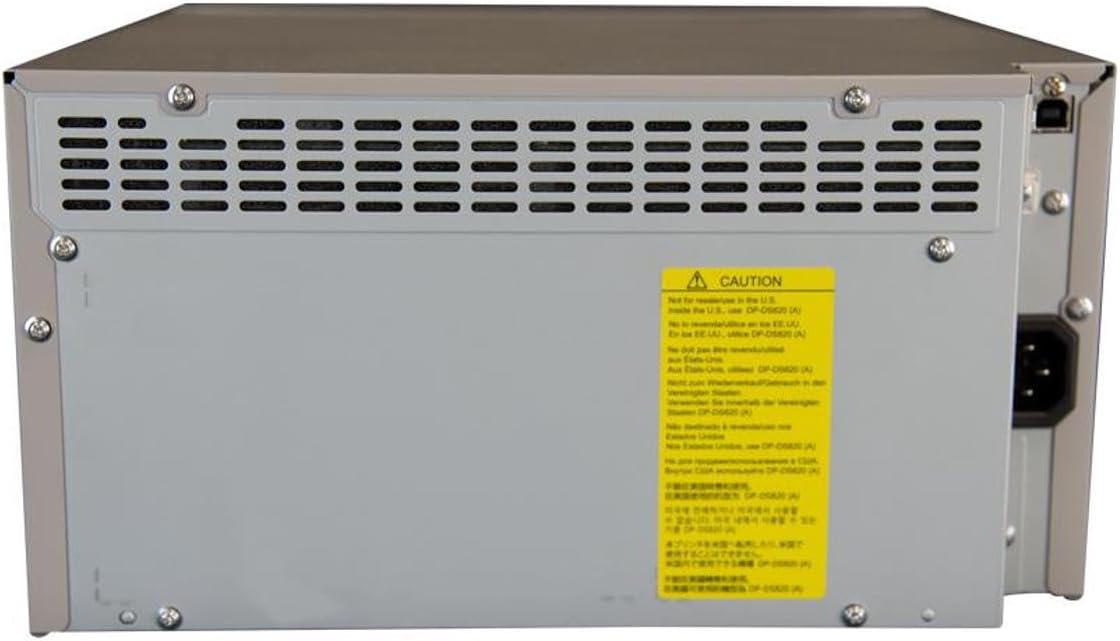
شکل 2: شاته view of the DNP DS820A, highlighting connectivity ports.
4.3 د ډرایور نصب کول
Install the latest printer drivers from the DNP website. The printer is compatible with Windows and Mac OS X/macOS operating systems.
4.4 Loading Media (Paper and Ribbon)
The DS820A uses a roll-fed media system. Refer to the specific instructions provided with your DNP media for detailed loading procedures. Generally, this involves opening the front panel, inserting the ribbon cassette, and then loading the paper roll into its designated slot.
5. عملیاتي لارښوونې
5.1 بریښنا کول / بندول
Locate the power switch on the front or side of the printer. Flip the switch to the 'On' position to power on the printer. To power off, flip the switch to the 'Off' position.
5.2 د شاخص څراغونه
The printer features several indicator lights on the front panel to communicate its status:
- ځواک: دا په ګوته کوي چې پرنټر فعال دی.
- روان/ ولاړ: Indicates operational status or standby mode.
- RIBBON: Illuminates when the ribbon needs replacement or is incorrectly installed.
- پاه: Illuminates when paper needs replacement or is incorrectly loaded.
- تېروتنه: Indicates a general error. Refer to the troubleshooting section or driver software for details.

Figure 3: Front control panel with status indicator lights.
۵.۲ د چاپ پروسه
- ډاډ ترلاسه کړئ چې پرنټر فعال دی او ستاسو کمپیوټر سره وصل دی.
- Open the image or document you wish to print on your computer.
- Select the DNP DS820A from your printer options.
- Adjust print settings such as print size, resolution (300x600 dpi recommended for color), and surface type (Glossy, Luster, Matte, Fine Matte) in the printer driver settings.
- Initiate the print job. The printer will process and output the photo.
6. ساتنه
6.1 د پرنټر پاکول
منظم پاکول د چاپ کیفیت ساتلو کې مرسته کوي او د چاپګر ژوند اوږدوي.
- بهر: بهرنۍ برخه د نرم، وچ، لینټ نه پاک ټوکر سره پاک کړئ. د کثافاتو پاکونکو یا محلولونو څخه کار مه اخلئ.
- داخلي: Periodically open the front panel and gently remove any dust or debris from the media path using a soft brush or compressed air.
۳.۳ د رسنیو ځای پر ځای کول
When the RIBBON or PAPER indicator lights illuminate, it's time to replace the respective media. Open the front access panel to replace the ribbon cassette and paper roll according to the instructions provided with the DNP media.
7. ستونزه حل کول
دا برخه هغه عامې ستونزې په ګوته کوي چې تاسو ورسره مخ کیدی شئ.
| ستونزه | احتمالي لامل | د حل لاره |
|---|---|---|
| پرنټر نه چالانېږي | Power cable disconnected; Power switch off | د برېښنا کیبل اتصال وګورئ؛ ډاډ ترلاسه کړئ چې د برېښنا سویچ فعال دی. |
| RIBBON light on | Ribbon empty or incorrectly installed | Replace ribbon; Reinstall ribbon correctly. |
| PAPER light on | د کاغذ رول خالي یا په غلط ډول بار شوی | Replace paper roll; Re-load paper correctly. |
| ERROR رڼا | د چاپګر عمومي تېروتنه | Turn printer off and on; Check computer for specific error messages; Consult DNP support. |
| د چاپ کیفیت خراب دی | Dirty print head; Incorrect driver settings; Low quality image source | Clean printer interior; Verify print settings (DPI, media type); Use high-resolution images. |
If you encounter issues not covered here, or if solutions do not resolve the problem, contact DNP customer support.
8. مشخصات
| فیچر | مشخصات |
|---|---|
| د ماډل نوم | DS820A |
| د چاپ ټیکنالوژي | رنګ Sublimation |
| د رنګ چاپ اعظمي ریزولوشن | 300 x 600 dpi |
| د تور او سپین چاپ اعظمي ریزولوشن | 300 x 300 dpi or 300 x 600 dpi |
| د ملاتړ شوي میډیا اندازه | 5 x 7 inches, 8 x 10 inches, 8 x 12 inches, up to 8 x 32 inches (panoramic) |
| د چاپي رسنیو ډولونه | Glossy photo paper, Luster, Matte, Fine Matte |
| Print Speed (8x10 Glossy) | نږدې 29.3 ثانیې |
| د اعظمي داخل شیټ ظرفیت | 250 sheets (depending on media type) |
| د محصول پاڼې ظرفیت | 250 پاڼې |
| د ټریونو شمیر | 2 |
| د ارتباط ټیکنالوژي | USB 2.0 |
| هډوتري برسیر | USB |
| د کنټرول طریقه | اپلیکیشن |
| د چاپګر محصول | Color; Monochrome |
| د توکي وزن | ۶ پونډه (۳ کیلو ګرامه) |
| د محصول ابعاد (L x W x H) | 19.25 x 17.25 x 12 انچه (48.9 x 43.8 x 30.5 سانتي متره) |
| جوړونکی | DNP |
| UPC | 650415905867 |
9. تضمین او ملاتړ
The DNP DS820A printer comes with a full warranty. For specific warranty terms and conditions, please refer to the documentation included with your product or visit the official DNP webسایټ
For technical assistance, troubleshooting beyond this manual, or to inquire about service, please contact DNP customer support directly. Contact information can typically be found on the DNP webپه سایټ کې یا ستاسو د محصول په بسته بندۍ کې.


