پیژندنه
This manual provides comprehensive instructions for the safe and effective use of your Winplus AC55925-80 3-in-1 Emergency Socket Power Bank. This device combines a compact power bank, a USB car charger, and an emergency glass-breaking tool. Please read this manual thoroughly before operation and retain it for future reference.
محصول پای ته ورسیدview
The Winplus 3-in-1 Emergency Socket Power Bank is designed for convenience and safety, offering multiple functionalities in a compact form factor.

Figure 1: Winplus 3-in-1 Emergency Socket Power Bank with key features highlighted.
اجزا:
- Compact Power Bank: Provides portable power for charging devices.
- د USB موټر چارجر: Plugs into a 12V car socket to charge devices and the power bank.
- Emergency Glass-Breaking Tool: Integrated for emergency situations.
- د USB محصول پورټ: For connecting charging cables to devices.
- د مایکرو USB ان پټ پورټ: For charging the internal power bank.
- د LED شاخص: د چارج کولو حالت ښیې.

شکل 2: مفصل view of the device's ports.
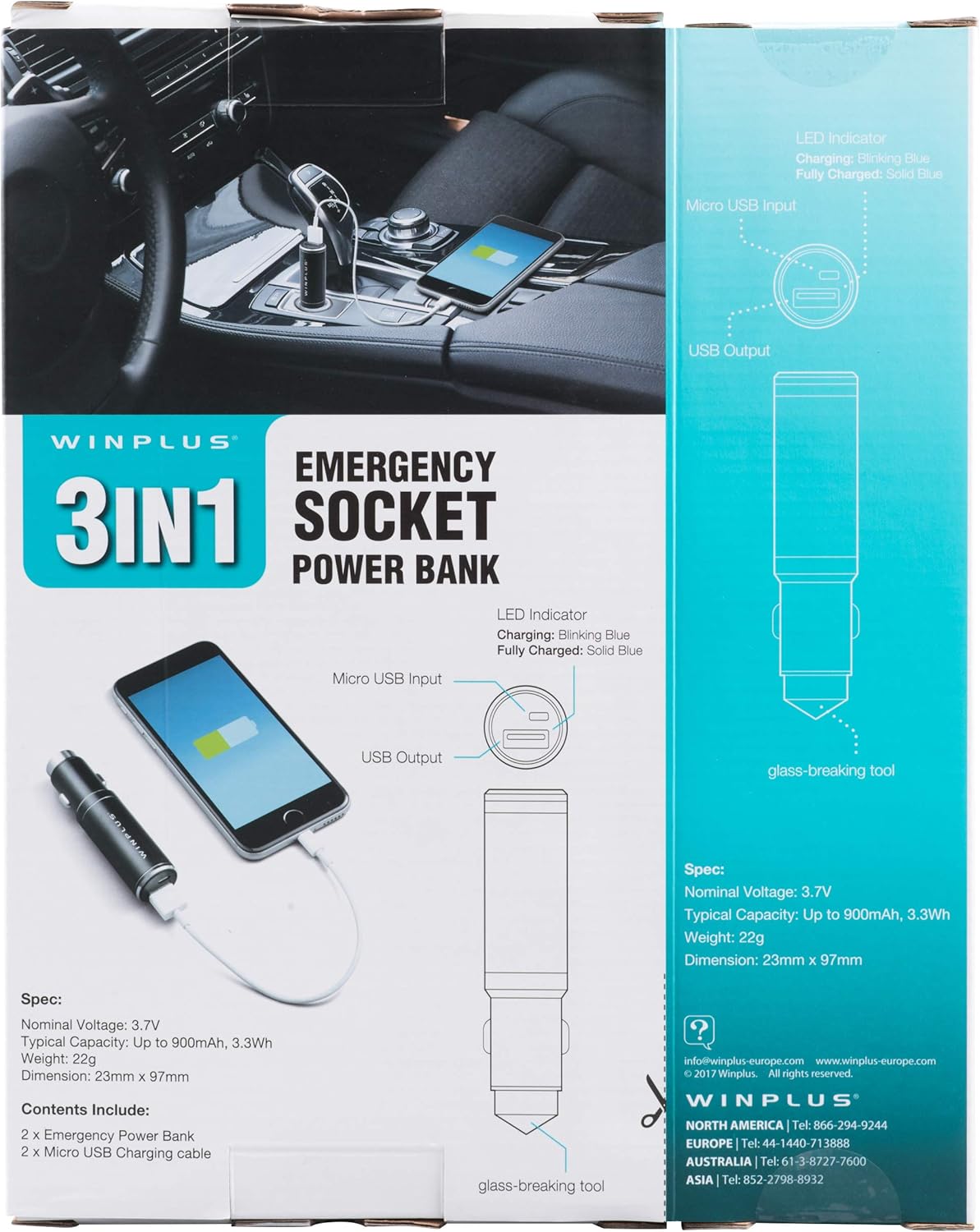
Figure 3: LED indicator status and glass-breaking tool location.
چمتو کول
د پاور بانک لومړنی چارج کول:
- Locate the Micro USB Input port on the device.
- Connect the provided Micro USB charging cable to the Micro USB Input port.
- Connect the other end of the USB cable to a standard USB power source (e.g., a computer USB port, a wall adapter, or the car's 12V socket when used as a car charger).
- د LED شاخص به د چارج کولو پرمهال نیلي رنګ روښانه کړي.
- Once fully charged, the LED indicator will turn solid blue.
یادونه: سپارښتنه کیږي چې د لومړي ځل کارولو دمخه د پاور بانک په بشپړه توګه چارج کړئ.
عملیاتي لارښوونې
د پورټ ایبل پاور بانک په توګه کارول:
- Ensure the power bank is charged (solid blue LED indicator).
- Connect your device's charging cable to the USB Output port on the power bank.
- Connect the other end of the cable to your mobile device (smartphone, tablet, etc.).
- د پاور بانک به په اتوماتيک ډول ستاسو وسیله چارج کول پیل کړي.
Using as a USB Car Charger:
- Insert the Winplus 3-in-1 device into your vehicle's 12V accessory socket (cigarette lighter socket).
- Connect your device's charging cable to the USB Output port on the Winplus device.
- د کیبل بل پای خپل ګرځنده وسیلې سره وصل کړئ.
- Your device will begin charging. The internal power bank will also charge simultaneously if it is not full.
Using the Emergency Glass-Breaking Tool:
The emergency glass-breaking tool is located at the tip of the device, opposite the USB ports. This tool is intended for emergency use only to break vehicle side windows in situations where occupants are trapped.
- In an emergency, firmly press the tip of the tool against a corner of a side window.
- Apply steady pressure until the spring-loaded mechanism activates and shatters the glass.
- Once the glass is broken, carefully clear any remaining shards before exiting the vehicle.
خبرداری: Use this tool only in genuine emergencies. Misuse can cause serious injury. Keep out of reach of children.
ساتنه
- وسیله وچه وساتئ. رطوبت کولی شي داخلي سرکټونه زیانمن کړي.
- د ډیر تودوخې (ګرم یا سړه) سره مخ مه کوئ.
- وسیله د نرم او وچ ټوکر سره پاکه کړئ. سخت کیمیاوي مواد یا د کثافاتو پاکوونکي مه کاروئ.
- په یخ او وچ ځای کې ذخیره کړئ کله چې نه کارول کیږي.
- د قوي تاثیراتو سره د وسیله له مینځه وړلو یا تابع کولو څخه ډډه وکړئ.
د ستونزو حل کول
| ستونزه | احتمالي لامل | د حل لاره |
|---|---|---|
| وسیله چارج نه کوي. | Power bank is depleted. کیبل خراب دی. USB port is dirty or damaged. | د بریښنا بانک بیا چارج کړئ. د چارج کولو بل کیبل هڅه وکړئ. Clean the USB ports carefully or try another port. |
| د LED شاخص نه روښانه کېږي. | Device is not connected to a power source. Device is fully charged (if solid blue). وسیله غلطه ده. | Ensure proper connection to a power source. Check if it's already solid blue. د پیرودونکي ملاتړ سره اړیکه ونیسئ که ستونزې دوام ولري. |
| ورو چارج کول. | Cable is not suitable. Power source is low current. Device being charged has high power requirements. | Use a high-quality charging cable. Connect to a higher current USB adapter. This device provides 2.1A output, which is standard for fast charging most phones. |
مشخصات
- ماډل: AC55925-80
- نومی ټوکtage: 3.6V
- عادي ظرفیت: Up to 2500 mAh, 9 Wh
- د بیټرۍ حجرو جوړښت: لیتیم پولیمر
- د USB محصول: 5V / 2.1A
- د مائکرو USB انټرنیټ: 5V / 0.5A
- ابعاد: ۱۲۴.۸۶ ملي متره x ۷۷.۷۴ ملي متره (تقریبا)
- د توکي وزن: 510 g (for the 2-pack)
- د نښلونکي ډول: Micro USB (Input), USB Type-A (Output)
د خوندیتوب معلومات
- د بیټرۍ کڅوړه مه جلا کوئ، خلاصوئ یا ټوټه ټوټه مه کوئ.
- د بیټرۍ کڅوړه تودوخه یا اور ته مه ښکاره کوئ. په مستقیم لمر کې د ذخیره کولو څخه مخنیوی وکړئ.
- د بیټرۍ کڅوړه لنډ سرکټ مه کوئ. د بیټرۍ کڅوړې په ناڅاپي ډول په بکس یا دراز کې مه ساتئ چیرې چې دوی ممکن یو بل ته لنډ سرکټ وکړي یا د نورو فلزي شیانو لخوا لنډ سرکټ شي.
- د بیټرۍ کڅوړې د میخانیکي شاک تابع مه کوئ.
- د بیټرۍ د لیکیدو په صورت کې، مایع ته اجازه مه ورکوئ چې د پوستکي یا سترګو سره تماس ونیسي. که چیرې تماس شوی وي، اغیزمنه شوې سیمه په ډیرو اوبو سره ومینځئ او طبي مشوره وغواړئ.
- په ځانګړي ډول د تجهیزاتو سره د کارولو لپاره چمتو شوي پرته بل کوم چارجر مه کاروئ.
- د بیټرۍ کڅوړې د ماشومانو له لاسرسي لرې وساتئ.
- که د بیټرۍ کڅوړه تیر شوي وي سمدلاسه طبي مشوره وغواړئ.
- د تجهیزاتو لپاره تل د بیټرۍ سمه کڅوړه واخلئ.
- د بیټرۍ کڅوړې پاکې او وچې وساتئ.
- بیټرۍ د اوږدې مودې چارج کولو پرمهال مه پریږدئ کله چې کار نه وي.
- Dispose of battery packs properly according to local regulations.
تضمین او ملاتړ
For warranty information or technical support, please contact Winplus North America Inc. directly.
- جوړونکی: Winplus North America Inc
- د اړیکو معلومات: Refer to product packaging or the official Winplus webد ملاتړ د تازه جزیاتو لپاره سایټ.
You can also visit the Winplus webد FAQs او اضافي محصول معلوماتو لپاره سایټ: www.winplus-europe.com


