1. محصول ختم شوview
The Yaskawa V1000 is a compact, high-performance AC microdrive designed for a wide range of industrial applications. It offers precise motor control, energy efficiency, and ease of use. This manual provides essential information for the safe and effective operation of your V1000 AC Drive.
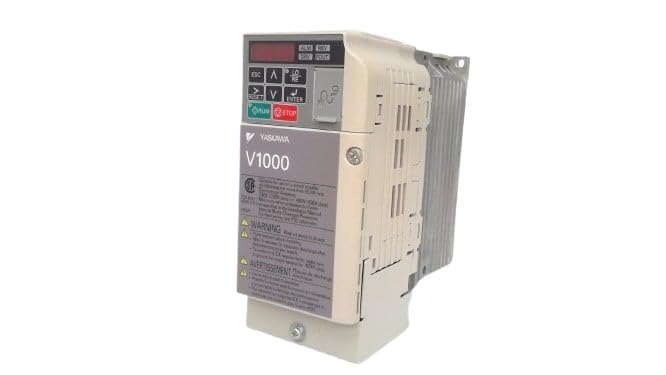
شکل 1: مخکی view of the Yaskawa V1000 AC Drive (Model CIMR-VU2A0006FAA). This image shows the drive's compact design, control panel with display and buttons, and ventilation fins on the side.
2. د خوندیتوب معلومات
WARNING: Risk of electric shock. Ensure power is disconnected before installation or maintenance.
Read this manual thoroughly before installing, operating, or performing maintenance on the V1000 AC Drive. Failure to follow these instructions may result in serious injury or equipment damage.
2.1 عمومي خوندیتوب احتیاطونه
- یوازې وړ پرسونل باید دا تجهیزات نصب، چلوي او ساتي.
- Do not operate the drive with damaged cables or if the enclosure is open.
- Ensure proper grounding according to local electrical codes.
- د ننوتلو حجم تایید کړئtage matches the drive's specifications.
- د بریښنا بندیدو وروسته سمدلاسه داخلي برخو ته لاس مه ورکوئ، ځکه چې پاتې حجمtage may be present. Wait for the charge lamp to extinguish.
2.2 د چاپیریال په اړه نظرونه
- Install the drive in a clean, dry, and well-ventilated area.
- د لمر مستقیم وړانګو، ډیرې دوړې، زنګ وهونکي ګازونو او وایبریشنونو څخه ډډه وکړئ.
- د عملیاتي تودوخې حد: له ۵ درجو څخه تر ۴۵ درجو پورې (۴۱ درجو فارنهایټ څخه تر ۱۱۳ درجو فارنهایټ).
3. ترتیب کول
Proper installation and wiring are crucial for the safe and reliable operation of the V1000 AC Drive.
3.1 پورته کول
Mount the drive vertically on a flat, stable surface. Ensure adequate clearance for ventilation around the drive (minimum 50mm above and below, 25mm on sides).
3.2 تارونه
Refer to the wiring diagram provided in the full product manual for detailed connections. Key connections include:
- د بریښنا داخلول (R/L1، S/L2، T/L3): Connect the 3-phase 200-240V AC power supply.
- د موټرو محصول (U، V، W): د موټرو ترمینلونو سره وصل شئ.
- ځمکه (PE): Connect to a reliable earth ground.
- د کنټرول ټرمینلونه: For external control signals (e.g., run/stop, speed reference, fault output).
Always use appropriate wire gauges and circuit protection devices as specified in local electrical codes and the drive's technical specifications.
4. Operating the V1000 AC Drive
The V1000 drive can be operated via its integrated control panel or external control signals.
4.1 د کنټرول پینلview
د کنټرول پینل یو ډیجیټل نندارتون او څو تڼۍ لري:
- ESC: Escape/Back button.
- پورته/ښکته تیرونه: Navigate menus, adjust parameters.
- چپ/ښي غشي: Shift cursor, change digits.
- ننوتل: Confirm selection, enter parameter edit mode.
- چلول: Start motor operation.
- ودرول: Stop motor operation.
۵.۳ د عملیاتو اساسي مرحلې
- پاور آن: ډرایو ته بریښنا ورکړئ. سکرین به روښانه شي.
- د پیرامیټر ترتیب: Configure essential parameters such as motor data (voltage, current, frequency), acceleration/deceleration times, and control mode (V/f, vector control). Refer to the parameter list in the detailed manual.
- Start Command: فشار ورکړئ چلول button on the control panel or activate the external run command.
- د سرعت سمون: Adjust the motor speed using the UP/DOWN arrows (if in local control mode) or via external speed reference.
- Stop Command: فشار ورکړئ ودروئ button or deactivate the external stop command.
5. ساتنه
Regular maintenance ensures the longevity and optimal performance of your V1000 AC Drive.
۵.۱ معمول معاینات
- ورځنی: Check for unusual noises, vibrations, or odors. Verify display for error codes.
- میاشتنی: Inspect cooling fans for proper operation and cleanliness. Clean dust from ventilation openings.
- په کلني ډول: Check terminal connections for tightness. Inspect wiring for signs of wear or damage. Measure input/output voltages او جریانونه.
5.2 پاکول
Use a soft, dry cloth to clean the exterior of the drive. For internal cleaning (only by qualified personnel with power disconnected), use compressed air to remove dust from heat sinks and circuit boards.
Always disconnect power and wait for the charge lamp to extinguish before performing any maintenance.
6. ستونزه حل کول
This section provides common issues and their potential solutions. For complex problems, consult a qualified technician or Yaskawa support.
| ستونزه | احتمالي لامل | د حل لاره |
|---|---|---|
| Drive does not power on. | No input power; Blown fuse. | Check power supply; Replace fuse (after identifying cause). |
| موټروان نه چلیږي. | No run command; Incorrect wiring; Motor fault. | Verify run command; Check motor and drive wiring; Inspect motor. |
| Overcurrent fault (OC). | Motor overload; Short circuit; Rapid acceleration. | Reduce load; Check motor/cables for shorts; Increase acceleration time. |
| اوورولtage fault (OV). | لوړ انټرنیټ ولtage; Rapid deceleration. | د ننوتلو حجم چیک کړئtage; Increase deceleration time; Install braking resistor if needed. |
7. مشخصات
Key technical specifications for the Yaskawa V1000 AC Drive (CIMR-VU2A0006FAA):
- ماډل: CIMR-VU2A0006FAA
- لړۍ: V1000 AC Drive
- ننوتۍ جلدtage: 200-240V AC, 3-Phase
- د محصول Voltage: 240V AC
- د محصول اوسنی درجه بندي: 6.0A (Heavy Duty) / 5.0A (Normal Duty)
- د موټرو ځواک درجه بندي: 1 HP (0.75 kW)
- جوړونکی: YASKAWA ELECTRIC
- د لومړي شتون نیټه: د فبروري ۴، ۲۰۲۳
8. تضمین او ملاتړ
For detailed warranty information, please refer to the official Yaskawa warranty statement or contact your authorized Yaskawa distributor.
For technical support, service, or to obtain a full copy of the V1000 technical manual, please visit the official Yaskawa webسایټ یا د دوی د پیرودونکي خدماتو څانګې سره اړیکه ونیسئ.
Yaskawa Electric Corporation
Webسایټ: www.yaskawa.com


