1. پیژندنه
This manual provides essential instructions for the safe and efficient operation of your Intermec CN75E Mobile Computer. Please read this manual thoroughly before using the device to ensure proper functionality and to prevent damage. Keep this manual for future reference.
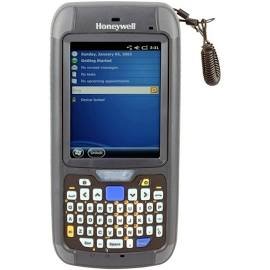
یو مخ view of the Intermec CN75E mobile computer, featuring a full QWERTY keyboard, a color display showing a user interface, and a wrist strap attached to the top right. This image illustrates the device's physical appearance.
2. ترتیب کول
2.1 د بسته محتويات
ډاډ ترلاسه کړئ چې ټول توکي په کڅوړه کې شتون لري:
- Intermec CN75E Mobile Computer
- Rechargeable Battery (may be pre-installed)
- د AC ځواک اډیپټر
- د USB مخابراتو کیبل
- د چټک پیل لارښود او د خوندیتوب معلومات
2.2 د بیټرۍ نصب کول
If the battery is not pre-installed, locate the battery compartment cover on the rear of the device. Remove the cover, insert the battery with the contacts aligned, and then replace the cover securely. Refer to the Quick Start Guide for detailed diagrams.
2.3 د وسیلې چارج کول
Connect the AC power adapter to the charging port on the device. Plug the adapter into a standard electrical outlet. The charging indicator light will illuminate. Allow the device to charge fully before initial use. A full charge typically takes several hours.
2.4 بریښنا کول / بندول
To power on the device, press and hold the Power button until the display illuminates. To power off, press and hold the Power button, then follow the on-screen prompts to shut down the device.
3. د آلې چلول
3.1 Keyboard and Display
The CN75E features a full QWERTY keyboard for efficient data entry. The color display operates on Windows Embedded Handheld 6.5, providing a familiar interface for navigation and application use. Use the stylus or your finger for touch screen interaction.
3.2 د معلوماتو نیول
The device is equipped with an EA30 stand-range imager for barcode scanning and a camera for image capture. To activate the imager, press the designated scan button. For camera operation, access the camera application from the device's main menu.
3.3 نښلول
The CN75E supports various connectivity options:
- Wi-Fi (802.11abgn): Connect to wireless networks for data communication. Access Wi-Fi settings through the device's control panel.
- بلوتوث (BT): Pair with compatible Bluetooth devices such as headsets or printers. Bluetooth settings are available in the device's control panel.
- GPS: Utilize the integrated GPS for location-based services and navigation. Ensure GPS is enabled in the system settings for applications requiring location data.
- Flex Radio: The device includes a Flex Radio for specific communication needs. Refer to your network administrator or specific application documentation for configuration and usage.
4. ساتنه
4.1 پاکول
To clean the device, use a soft, lint-free cloth lightly dampened with water or a mild, non-abrasive cleaning solution. Do not use harsh chemicals, solvents, or abrasive materials. Avoid spraying liquids directly onto the device. Ensure all ports are closed before cleaning.
4.2 ذخیره کول
Store the device in a cool, dry environment away from direct sunlight and extreme temperatures. If storing for an extended period, ensure the battery is partially charged (around 50%) to prolong its lifespan. Remove the battery if the device will not be used for several months.
5. ستونزه حل کول
5.1 عام مسایل او حلونه
- وسیله نه چلیږي: Ensure the battery is properly installed and charged. Connect the device to the AC adapter and attempt to power on.
- بیټرۍ چارج نه کوي: Verify that the AC adapter is securely connected to both the device and a working power outlet. Check for any damage to the cable or adapter.
- د اتصال ستونزې (وای فای/بلوتوث): Confirm that Wi-Fi or Bluetooth is enabled in the device settings. Check network availability and credentials. Restart the device and the access point/paired device if necessary.
- سکینر بارکوډونه نه لولي: Ensure the barcode is clean and undamaged. Check the scanner's settings to confirm it is enabled and configured for the barcode type being scanned. Ensure adequate lighting.
If problems persist, perform a soft reset (refer to the Quick Start Guide for instructions) or contact technical support.
6. مشخصات
- ماډل: CN75EQ6KCF2W6100
- کیبورډ: QWERTY
- انځورګر: EA30 Stand Range
- کمره: هو
- د بیسیم اتصال: 802.11abgn, Bluetooth (BT)
- راډیو: فلیکس راډیو
- نیویگیشن: GPS
- عملیاتي سیسټم: Windows Embedded Handheld 6.5
- ژبه: Worldwide English (Ww English)
- د مقرراتو اطاعت: FCC
- د بسته ابعاد: 15 x 14 x 14 انچه
- د بسته وزن: 1.1 پونډه
- جوړونکی: انټرمیک
- د لومړي شتون نیټه: د می 19، 2017
7. تضمین او ملاتړ
For detailed warranty information, terms, and conditions, please refer to the warranty card or documentation included with your Intermec CN75E Mobile Computer. For technical assistance, product support, or service inquiries, please visit the official Intermec (now Honeywell) website or contact your authorized reseller. Support resources typically include FAQs, driver downloads, and contact information for customer service.


