1. ترتیب کول
1.1 د بیټرۍ نصب کول
The Insignia NS-RC03A-13 remote control requires two AAA batteries for operation. Follow these steps to install them:
- د ریموټ کنټرول شاته د بیټرۍ کمپارټ پوښ ومومئ.
- پوښ ښکته خوا ته وغورځوئ یا د خلاصولو لپاره یې قلف فشار ورکړئ.
- دوه AAA بیټرۍ دننه کړئ، ډاډ ترلاسه کړئ چې مثبت (+) او منفي (-) ټرمینلونه د خونې دننه د نښانونو سره په سمه توګه سمون لري.
- د بیټرۍ پوښ بیرته خپل ځای ته وغورځوئ تر هغه چې په خوندي ډول کلیک وکړي.
انځور: شاته view of the Insignia NS-RC03A-13 remote control, showing the battery compartment open with two AAA batteries inserted. The remote is black with gray buttons.
2. عملیاتي لارښوونې
This section details the primary functions and usage of your Insignia NS-RC03A-13 remote control.
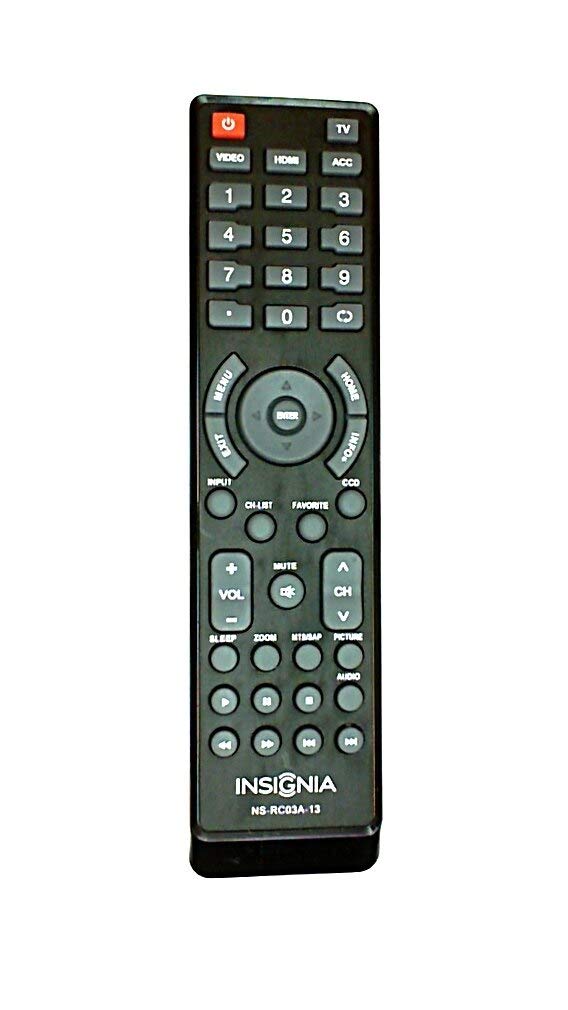
انځور: مخکینۍ برخه view of the Insignia NS-RC03A-13 remote control, displaying all buttons and their labels. The remote is black with gray buttons and white text.
۸ پاور آن/بند
فشار ورکړئ پاور button (usually located at the top left) to turn your television on or off.
2.2 د ننوتلو انتخاب
To switch between different video sources (e.g., HDMI 1, HDMI 2, Video), press the INPUT button. Continue pressing to cycle through available inputs until your desired source is selected.
۳.۳ د چینل او حجم کنټرول
- حجم: د کارولو VOL+ او والیوم - buttons to increase or decrease the audio volume.
- خاموش: فشار ورکړئ خاموش button to instantly silence the television audio. Press it again to restore sound.
- چینلونه: د کارولو CH + او سي ایچ - buttons to navigate through television channels.
- شمیره پیډ: Directly enter channel numbers using the numeric keypad (0-9).
2.4 د مینو نیویګیشن
Use the directional arrow buttons (Up, Down, Left, Right) around the ننوتل button to navigate through on-screen menus. Press ننوتل to confirm a selection. The مینو button typically opens the main menu, and وتون بندوي.
3. ساتنه
Proper care ensures the longevity and optimal performance of your remote control.
- پاکول: Wipe the remote control with a soft, dry cloth. Avoid using liquid cleaners, abrasive materials, or chemical solvents, as these can damage the surface or internal components.
- د بیټرۍ بدلول: کله چې د ریموټ غبرګون کم شي نو بیټرۍ بدلې کړئ. تل دواړه بیټرۍ په ورته وخت کې د ورته ډول (AAA) نوي بیټرۍ سره بدل کړئ.
- ذخیره کول: ریموټ په وچ ځای کې وساتئ، د مستقیم لمر وړانګو، سختې تودوخې او لوړې رطوبت څخه لرې.
- له څاڅکو ډډه وکړئ: ریموټ د فزیکي اغیزو څخه خوندي کړئ، ځکه چې څاڅکي کولی شي داخلي سرکټري ته زیان ورسوي.
4. ستونزه حل کول
که تاسو د خپل ریموټ کنټرول سره ستونزې سره مخ شئ، لاندې حلونه هڅه وکړئ:
- ریموټ ځواب نه ورکوي:
- وګورئ چې آیا بیټرۍ د مناسب قطب سره سم داخل شوي.
- زړې بیټرۍ د نوي AAA بیټرۍ سره بدل کړئ.
- ډاډ ترلاسه کړئ چې د ریموټ کنټرول او د تلویزیون انفراریډ (IR) ریسیور ترمنځ هیڅ خنډ شتون نلري.
- ریموټ مستقیم د تلویزیون د IR ریسیور ته وښایاست.
- ځانګړي تڼۍ کار نه کوي:
- Clean around the unresponsive buttons with a soft, slightly damp cloth to remove any debris or stickiness.
- If cleaning does not resolve the issue, the button mechanism may be faulty, and the remote might require replacement.
- TV not responding to input changes:
- Ensure the remote is correctly paired or compatible with your Insignia TV model.
- د فشار کولو هڅه وکړئ INPUT button multiple times to cycle through all available sources.
5. مشخصات
| د ماډل شمیره | NS-RC03A-13 |
| برانډ | اندیښنه |
| مطابقت لرونکې وسیلې | ټلویزیون |
| د ملاتړ شوي وسایلو اعظمي شمیر | 1 |
| بیټرۍ ته اړتیا ده | 2 AAA بیټرۍ |
| رنګ | تور |
| ځانګړی ځانګړنه | ارګونومیک |
| د توکي وزن | 2.39 اونس |
| د کڅوړې ابعاد | 7 x 2 x 1 انچه |
6. تضمین او ملاتړ
For detailed warranty information, product registration, or technical support, please visit the official Insignia webسایټ ته مراجعه وکړئ یا د دوی د پیرودونکو خدماتو څانګې سره اړیکه ونیسئ. د هر ډول تضمین ادعا لپاره د پیرود ثبوت په توګه د پیرود رسید وساتئ.
آنلاین ملاتړ: www.insigniaproducts.com
یادونه: د تضمین ځانګړي شرایط ممکن د سیمې او پرچون پلورونکي له مخې توپیر ولري.


