1. پیژندنه
This manual provides detailed instructions for the assembly, operation, and maintenance of your VIVO STAND-V102F Dual Monitor Free-Standing Desk Mount. This mount is designed to hold two flat or curved display screens ranging from 13 to 30 inches, with a maximum weight capacity of 17.6 lbs per screen. It supports VESA mounting patterns of 75x75mm or 100x100mm.
د خوندیتوب خبرداری:
- ډاډ ترلاسه کړئ چې ټولې برخې د کارونې دمخه په خوندي ډول تړل شوي.
- د هر سکرین د وزن اعظمي ظرفیت له ۲۲ پونډو څخه زیات مه کوئ.
- Avoid pulling monitors too far forward or backward unless the stand is bolted down, as this may compromise stability.
- Always check that the base size fits your available desk space to prevent tipping.
2. د بسته محتويات
Please verify that all components listed below are present in your package. If any parts are missing or damaged, contact VIVO customer support.
- Heavy-Duty Base (11" x 15.4")
- Center Pole (16.4" height)
- Dual Monitor Arms with VESA Plates
- د کیبل مدیریت کلیپونه
- All necessary hardware (screws, washers, Allen keys)
3. د مجلس لارښوونې
Follow these steps to assemble your VIVO Dual Monitor Free-Standing Desk Mount.
- Attach the Center Pole to the Base: Securely fasten the center pole to the heavy-duty base using the provided screws and Allen key. Ensure it is stable.
- Install Monitor Arms: Slide the dual monitor arms onto the center pole. Adjust their height to your preference and tighten the locking mechanism.
- د VESA پلیټونه په مانیټرونو پورې وصل کړئ: Remove the VESA plates from the monitor arms. Attach these plates to the back of your monitors using the appropriate screws for your monitor's VESA pattern (75x75mm or 100x100mm).
- د مانیټرونو نصبول: Carefully slide the monitors (with attached VESA plates) onto the monitor arms. Ensure they click securely into place.
- د کیبل مدیریت: Utilize the included cable management clips to route and organize your monitor cables along the arms and down the center pole for a tidy setup.

Figure 1: Assembled VIVO Dual Monitor Free-Standing Desk Mount with monitors.

Figure 2: Detail of VESA plate for monitor attachment.
4. عملیاتي لارښوونې
The VIVO STAND-V102F offers full articulation for optimal viewزاویې
- د لوړوالی سمون: cl خلاص کړئamp on the center pole to slide the monitor arms up or down. Re-tighten the clamp firmly once the desired height is achieved.
- د خښتو سمون: Monitors can be tilted +45° to -45°. Adjust the tilt knob on the VESA plate to achieve your preferred vertical viewزاویه.
- سویول تعدیل: The monitor arms allow for 180° swivel, enabling you to adjust the horizontal angle of each monitor independently.
- گردش: Monitors can be rotated 360° for portrait or landscape orientation. Simply turn the monitor to the desired orientation.
- Arm Articulation: The double center arm joints provide additional articulation, allowing for flexible monitor placement and positioning.

Figure 3: Full articulation features including tilt, swivel, and rotation.
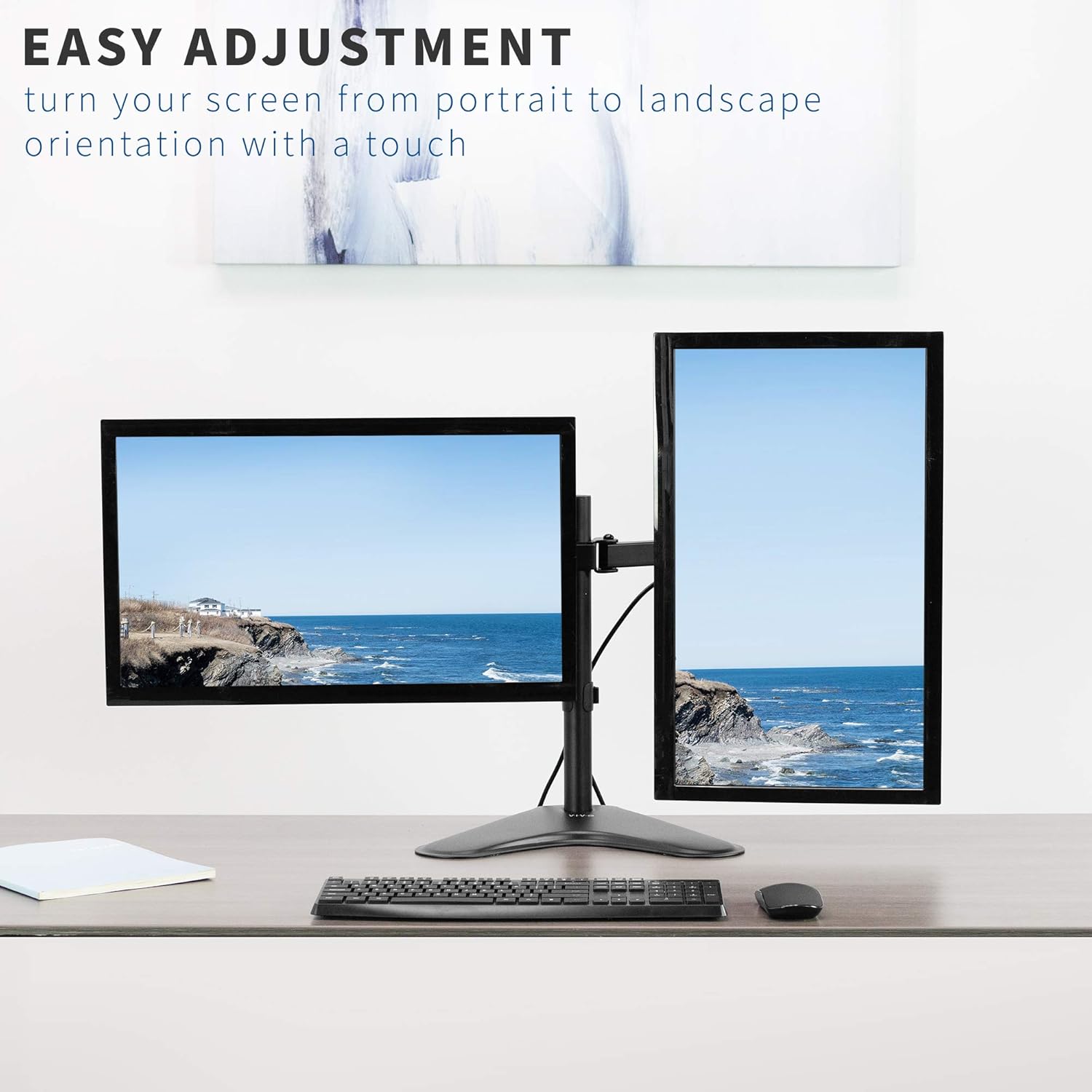
شکل 4: مثالample of monitors in both portrait and landscape orientations.
5. ځانګړتیاوې
- نړیوال مطابقت: Fits two screens from 13" to 30" and up to 17.6 lbs each. Supports VESA 75x75mm or 100x100mm mounting patterns.
- بشپړه جمله: Offers +45° to -45° tilt, 180° swivel, and 360° rotation for flexible viewing.
- د لوړوالی سمون: Monitors can be adjusted along the 16.4" center pole.
- Heavy-Duty Base: A solid steel 11" x 15.4" base ensures stability for your monitor setup.
- د کیبل مدغم مدیریت: Clips are included to keep cables organized and out of sight.

Figure 5: Key dimensions and compatibility information.

Figure 6: The heavy-duty base providing stability.

شکل ۶.۴.۱: د کیبل مدغم مدیریت سیسټم.
6. مشخصات
| صفت | تفصیل |
|---|---|
| د ماډل شمیره | سټینډ- V102F |
| د سکرین اندازه مطابقت | 13" to 30" (Dual) |
| د وزن ظرفیت | په هر سکرین کې ۲۲ پونډه |
| د VESA مطابقت | 75x75mm، 100x100mm |
| د خښتو زاویه | له 45° څخه تر -45° پورې |
| سویول زاویه | 180° |
| گردش | ۳۶۰° (پورټریټ/منظره) |
| قطب لوړوالی | 16.4 انچه |
| د بنسټ ابعاد | ۶.۹" x ۳.۴" |
| مواد | د الماس فولاد |
| رنګ | تور |
7. ساتنه
د خپل VIVO مانیټر ماونټ د اوږد عمر او غوره فعالیت ډاډمن کولو لپاره، د ساتنې دا لارښوونې تعقیب کړئ:
- منظم پاکول: غره د نرم، d سره پاک کړئamp cloth to remove dust and debris. Avoid abrasive cleaners or solvents.
- د تشنابونو چک کول: Periodically inspect all screws and bolts to ensure they remain tight. Re-tighten as necessary to maintain stability.
- غوړول: If any joints become stiff, a small amount of silicone-based lubricant can be applied to the moving parts.
8. ستونزه حل کول
If you encounter any issues with your monitor mount, refer to the following common problems and solutions:
- Mount is Unstable/Tipping:
- Ensure the heavy-duty base is fully on a flat, stable surface.
- Verify that the combined weight of your monitors does not exceed the maximum capacity.
- Avoid extending monitors too far forward or backward from the center pole without securing the base to the desk (if applicable).
- Monitors Sagging/Not Holding Position:
- Tighten the tilt adjustment knob on the VESA plate.
- Ensure all arm joints are securely tightened with the provided Allen key.
- Difficulty Adjusting Tilt:
- Some tilt bolts may require a specific Allen key or tool for proper tightening/loosening. Refer to the assembly diagram for exact locations.
- Ensure the monitor is not exceeding the weight limit, which can make adjustments difficult.
۸. د محصول رسمي ویډیوګانې
Full Motion Dual Monitor Free-Standing Desk Stand
This video demonstrates the full motion capabilities of the VIVO Dual Monitor Free-Standing Desk Stand, including articulation and double center arm joints for flexible monitor positioning.
Dual Monitor Free-Standing Desk Stand (STAND-V102F) Overview
دا ویډیو یو اوور وړاندې کويview of the VIVO STAND-V102F Dual Monitor Free-Standing Desk Stand, showcasinد هغې ډیزاین او ځانګړتیاوې.
10. تضمین او ملاتړ
VIVO products are backed by a manufacturer's warranty. For specific warranty details, product registration, or technical support, please visit the official VIVO webسایټ ته مراجعه وکړئ یا د دوی د پیرودونکو خدماتو څانګې سره اړیکه ونیسئ. د تضمین ادعاوو لپاره خپل د پیرود رسید وساتئ.
VIVO is a US-based company committed to providing quality ergonomic solutions. Their sales and technical support teams are available to assist with any product-related inquiries.
Figure 8: VIVO's commitment to customer support.


